
Install the app
How to install the app on iOS
Follow along with the video below to see how to install our site as a web app on your home screen.
Note: This feature may not be available in some browsers.
-
 You've discovered RedGuides, an EverQuest multi-boxing and scripting community 🧙♀️⚙️. We want you to play several EQ characters at once, come join us and say hello! 👋
You are using an out of date browser. It may not display this or other websites correctly.
You should upgrade or use an alternative browser.
You should upgrade or use an alternative browser.
Resource icon
Release lootnscoot (for emu) 05/16/2026
No permission to download
- Thread starter aquietone
- Start date

aquietone updated lootnscoot (for emu) with a new update entry:
12/03/2025
Read the rest of this update entry...
12/03/2025
Read the rest of this update entry...

drawthow
Well-known member
I was deleting the the default items in Buy Items table the food item./lns debug onwill turn on debug spew to mq console. there is also a toggle at the top left of the main window.


drawthow
Well-known member
Here is the error/lns debug onwill turn on debug spew to mq console. there is also a toggle at the top left of the main window.

aquietone updated lootnscoot (for emu) with a new update entry:
12/03/2025
Read the rest of this update entry...
12/03/2025

Read the rest of this update entry...
drawthow
Well-known member
Not sure if this update addressed the errors I just uploaded. After downloading the update it ran for much longer before erroring out.aquietone updated lootnscoot (for emu) with a new update entry:
12/03/2025
Read the rest of this update entry...

rgmercs starts lootnscoot for you from its own location outside of rgmercs with commandDid I read somewhere that RGMercs calls a version of LootnScoot from it's own directory?
/lua run lootnscoot directed rgmercsWhen you toggle DoLoot to on, it first stops lootnscoot if its already running, then starts it with the above command.
from the screenshots you're pasting they aren't really telling anything useful except that in most cases lootnscoot is exiting normally (status 0).
are you trying to run lootnscoot yourself at all or just leaving it to rgmercs to manage it?
drawthow
Well-known member
Letting rgmercs manage itrgmercs starts lootnscoot for you from its own location outside of rgmercs with command/lua run lootnscoot directed rgmercs
When you toggle DoLoot to on, it first stops lootnscoot if its already running, then starts it with the above command.
from the screenshots you're pasting they aren't really telling anything useful except that in most cases lootnscoot is exiting normally (status 0).
are you trying to run lootnscoot yourself at all or just leaving it to rgmercs to manage it?
drawthow
Well-known member
It's defiantly running much better before the last patch the program would crash within looting 10 mobs now I can pull and entire zone and only crash once or twice when looting.rgmercs starts lootnscoot for you from its own location outside of rgmercs with command/lua run lootnscoot directed rgmercs
When you toggle DoLoot to on, it first stops lootnscoot if its already running, then starts it with the above command.
from the screenshots you're pasting they aren't really telling anything useful except that in most cases lootnscoot is exiting normally (status 0).
are you trying to run lootnscoot yourself at all or just leaving it to rgmercs to manage it?

MQ is crashing every time any character tries to loot a particular corpse with LNS running.
I have never seen this issue before I updated this evening, and it does not occur without LNS running.
If I pause LNS, the crash does not occur. If I do not, it is occuring 100%.
---------------------------
EverQuest Crash Detected
---------------------------
MacroQuest caught a crash:
Process ID: 36524
Version: 3.1.1.3435
Location: SetOverlayEnabled+0 (C:\Games\MQ\VV-Emu\MQ2Main.dll+001D0D30)
CrashID: b7abcfef-61e9-4772-bceb-85e7a61b7193
You can either:
* [RETRY] Continue execution and hope for the best.
* [CANCEL] Write a crash dump and terminate EverQuest.
Copy the contents of this dialog to your clipboard by pressing Ctrl+C
---------------------------
Retry Cancel
---------------------------
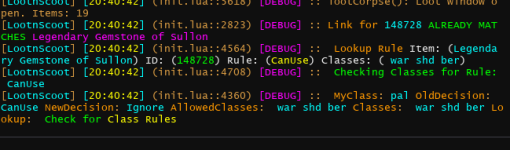
Edit:
I had that item already in my inventory, and it is Lore/NT.
I deleted the item from my inventory, and looted the new copy with LNS paused, unpaused, and it worked well after that.
However, *only* my driver had that item, and he was the only person eligible to loot it (it is set to Can Use)... yet, any character doing the looting was crashing (I did it like 7 times, 100% repeatable). I don't see anything odd about the item, but giving as much info as I can in case it helps.
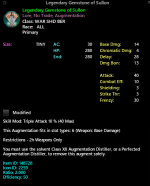
I have never seen this issue before I updated this evening, and it does not occur without LNS running.
If I pause LNS, the crash does not occur. If I do not, it is occuring 100%.
---------------------------
EverQuest Crash Detected
---------------------------
MacroQuest caught a crash:
Process ID: 36524
Version: 3.1.1.3435
Location: SetOverlayEnabled+0 (C:\Games\MQ\VV-Emu\MQ2Main.dll+001D0D30)
CrashID: b7abcfef-61e9-4772-bceb-85e7a61b7193
You can either:
* [RETRY] Continue execution and hope for the best.
* [CANCEL] Write a crash dump and terminate EverQuest.
Copy the contents of this dialog to your clipboard by pressing Ctrl+C
---------------------------
Retry Cancel
---------------------------
Edit:
I had that item already in my inventory, and it is Lore/NT.
I deleted the item from my inventory, and looted the new copy with LNS paused, unpaused, and it worked well after that.
However, *only* my driver had that item, and he was the only person eligible to loot it (it is set to Can Use)... yet, any character doing the looting was crashing (I did it like 7 times, 100% repeatable). I don't see anything odd about the item, but giving as much info as I can in case it helps.
Only with LNS running and not paused, right after LNS added a new feature in imGUI?

I can't be sure its from this update, it was some weeks ago when I first had that item and set the rule. If I come across it again (I'm farming that boss), I'll revert versions and check.
I can't be sure its from this update, it was some weeks ago when I first had that item and set the rule. If I come across it again (I'm farming that boss), I'll revert versions and check.
drawthow
Well-known member
Having some problems with LootNScoot
1. LootNScoot crashes after pulling 3 or 4 mobs even on characters that do not have looting enabled.
2. I have an item configured for quest|1 , but when my first toon looed he got all 4. Did I misunderstand the |1 after quest?
View attachment 73001
I think this is the output you are looking for the item marked a quest|1 but got looted 4 timeshave any output from it crashing? for quest there should be output in the LNS console about the decisions its making.
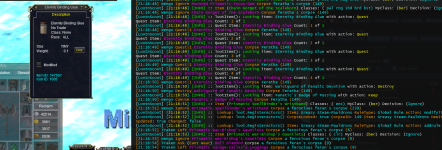
Looks like that's happening because multiple of the same item on 1 corpse. It evaluates the rule and makes decision to keep because 0 < 1 initially. Then it keeps looting multiple of the item from the corpse based on that initial decision. It does check the updated count you have on each item looted, but appears to only be for logging purposes at that point.I think this is the output you are looking for the item marked a quest|1 but got looted 4 times
View attachment 73140
Just happened again, this time with a different boss, different item. Same symptoms, 100% reproduce rate.
I reverted #61 (the last update) locally and was able to loot the corpse without issue.
Edit: It occurs to me the first item today when I was crashing was also a weapon augment with a skill mod.
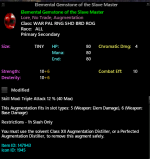
I reverted #61 (the last update) locally and was able to loot the corpse without issue.
Edit: It occurs to me the first item today when I was crashing was also a weapon augment with a skill mod.
Last edited:
I just came back to Project Lazarus after a year and getting reacclimated to RGMercs + new LootNScoot. I'm experiencing an odd condition where LootNScoot will... just stop/exit at seemingly random times on all of my characters. I only notice it's not running because one of the loot macros on a character will produce a command error. Otherwise I don't get any other MQ messages or obvious indicators about the Lua crashing or stopping. Once I restart it on the characters (using the directed rgmercs command) it will resume normally for another period of time before stopping. Any ideas on what might be happening?
See above posts from @drawthow which are all about that, he made some workaround here https://www.redguides.com/community/posts/656614/ but if you have some kind of info on how to reproduce this i'd try to look into it, like what is happening when it happens to exit?I just came back to Project Lazarus after a year and getting reacclimated to RGMercs + new LootNScoot. I'm experiencing an odd condition where LootNScoot will... just stop/exit at seemingly random times on all of my characters. I only notice it's not running because one of the loot macros on a character will produce a command error. Otherwise I don't get any other MQ messages or obvious indicators about the lua crashing or stopping. Once I restart it on the characters (using the directed rgmercs command) it will resume normally for another period of time before stopping. Any ideas on what might be happening?
Thanks I missed this other thread. I can't really say how or why it happens, but as drawthow points out it seems to exit cleanly. For now I've also added the restart command to the lootnscoot.Lua file in rgmercs\modules. If there was a way to monitor the MQ chat window with MQ2Events, I could probably run the Lua restart based on the "LNS not running!" log message but I don't think that's possible.See above posts from @drawthow which are all about that, he made some workaround here https://www.redguides.com/community/posts/656614/ but if you have some kind of info on how to reproduce this i'd try to look into it, like what is happening when it happens to exit?
aquietone updated lootnscoot (for emu) with a new update entry:
12/10/2025
Read the rest of this update entry...
12/10/2025
Read the rest of this update entry...
drawthow
Well-known member
Are there any
After this update I have been able to run for just a little over an hr. without crashing. Before this update characters would only run for between 3 and 20 loots before crashing.aquietone updated lootnscoot (for emu) with a new update entry:
12/10/2025
Read the rest of this update entry...
the only change here was to add a line when the script exits to say why it's exiting. do you see that print?Are there any
After this update I have been able to run for just a little over an hr. without crashing. Before this update characters would only run for between 3 and 20 loots before crashing.
drawthow
Well-known member
The only time I see that message is when I'm shutting down RGMercs.the only change here was to add a line when the script exits to say why it's exiting. do you see that print?

aquietone updated lootnscoot (for emu) with a new update entry:
12/11/2025
Read the rest of this update entry...
12/11/2025
Commits
PR # [63](https://github.com/aquietone/lootnscoot/pull/63): split up init.lua into ui, db, actor, settings
- Maybe fixed CTD errors. Ran under debug build and fixed a bunch of random imgui errors popping up.
- Maybe fixed script randomly exiting. Seemed to occur mostly when both a modify and add rule actor message are sent when setting a rule from new item table.
- Fixed removing entries in restock list.
- Refactored a bunch so probably broke everything...
Read the rest of this update entry...
On next update
This one should be fixed.I just did get a crash rom deleting the Iron ration and the water flask from the buy table. Happened on multiple people.
View attachment 73509
May or may not be improved not really sure.Are there any
After this update I have been able to run for just a little over an hr. without crashing. Before this update characters would only run for between 3 and 20 loots before crashing.
Worked around the crash for now, issue here https://github.com/macroquest/macroquest/issues/953Just happened again, this time with a different boss, different item. Same symptoms, 100% reproduce rate.
I reverted #61 (the last update) locally and was able to loot the corpse without issue.
Edit: It occurs to me the first item today when I was crashing was also a weapon augment with a skill mod.
View attachment 73229

The update mentioned above hasn't released yet. That message you keep showing is also printed by rgmercs, not LNS, and offers no useful info about what might be up with LNS.Just crashed while looting got this error.
drawthow
Well-known member
Sorry I posted it because that was the first time I had seen an error number. Thought it may be helpful.The update mentioned above hasn't released yet. That message you keep showing is also printed by rgmercs, not LNS, and offers no useful info about what might be up with LNS.
aquietone updated lootnscoot (for emu) with a new update entry:
12/11/2025
Read the rest of this update entry...
12/11/2025
(6c7fa73) ~aquietoneAvoid item.DMGBonusType crash for now and loot non-lore items before lore items
Read the rest of this update entry...
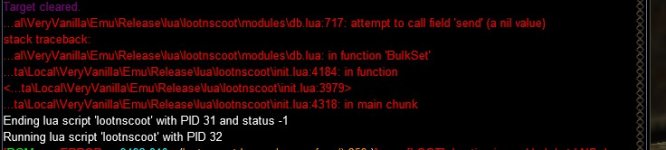
lootnscoot/modules/db.Lua line 717 change actors.send to actors.Send
will be another hour before it updates here.
aquietone updated lootnscoot (for emu) with a new update entry:
12/11/2025
Read the rest of this update entry...
12/11/2025

Read the rest of this update entry...
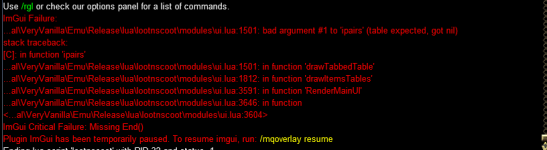
aquietone updated lootnscoot (for emu) with a new update entry:
12/19/2025
Read the rest of this update entry...
12/19/2025
Read the rest of this update entry...
After the last update, I've noticed when I goto group Sell stuff it fails. In the MQ window I see it states cannot parse. And I see the error is a missing A. It has /dgg /multi-line /tar.... etc etc. So I made a quick key /dgga /tar etc etc.... and that works fine. Just thought I'd let someone know.
dgg is the same as dgga. are you sure it wasn't some other part of the command failing to parse? a screenshot of the command / error would helpAfter the last update, I've noticed when I goto group Sell stuff it fails. In the MQ window I see it states cannot parse. And I see the error is a missing A. It has /dgg /multi-line /tar.... etc etc. So I made a quick key /dgga /tar etc etc.... and that works fine. Just thought I'd let someone know.
Users who are viewing this thread
Total: 1 (members: 0, guests: 1)
Share: