aquietone updated lootnscoot (for emu) with a new update entry:
06/14/2025
Read the rest of this update entry...
06/14/2025
Read the rest of this update entry...


Features
- Help WINDOW, fix: restock fixes (#31)
Remove duplicate actor messages (#30)
Added help window with lists of commands and settings. `/lns help` or there is a toggle on the main UI
`/lns bank` was a duplicate command
now to bank with targeted banker use `/lns bankstuff`
`/lns bank` is still reserved for setting items on cursor...
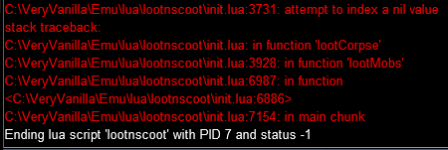
[LootnScoot] [20:28:43] (init.lua::3897) [DEBUG] :: lootMobs(): Attempting to loot 1 corpses.[LootnScoot] [20:28:43] (init.lua::3933) [DEBUG] :: lootMobs(): Navigating to corpse ID 484.[LootnScoot] [20:28:44] (init.lua::3728) [DEBUG] :: Enter lootCorpse[LootnScoot] [20:28:44] (init.lua::3761) [DEBUG] :: lootCorpse(): Loot window open. Items: 0[LootnScoot] [20:28:44] (init.lua::3763) [DEBUG] :: lootCorpse(): No items to loot on corpse a goblin stalag trooper`s corpse (484)[LootnScoot] [20:28:44] (init.lua::3968) [DEBUG] :: lootMobs(): Reached loot limit of 1 corpses.Did you grab either of the updates from this afternoon? I was seeing that same thing this morning and added a line to close loot window when thatI am regularly seeing a loot window left open, and these are the last few debug lines when it happens:
[LootnScoot] [20:28:43] (init.lua::3897) [DEBUG] :: lootMobs(): Attempting to loot 1 corpses.
[LootnScoot] [20:28:43] (init.lua::3933) [DEBUG] :: lootMobs(): Navigating to corpse ID 484.
[LootnScoot] [20:28:44] (init.lua::3728) [DEBUG] :: Enter lootCorpse
[LootnScoot] [20:28:44] (init.lua::3761) [DEBUG] :: lootCorpse(): Loot window open. Items: 0
[LootnScoot] [20:28:44] (init.lua::3763) [DEBUG] :: lootCorpse(): No items to loot on corpse a goblin stalag trooper`s corpse (484)
[LootnScoot] [20:28:44] (init.lua::3968) [DEBUG] :: lootMobs(): Reached loot limit of 1 corpses.
Edit: My MaxCorpsesPerCycle setting seems to be at the default of 5 if that has anything to dowith this
lootCorpse(): No items to loot on corpse a goblin stalag trooper`s corpse (484) happensI will update and recheck, I did update today but I don't remember the time. It's been a long one. Cheers!Did you grab either of the updates from this afternoon? I was seeing that same thing this morning and added a line to close loot window when thatlootCorpse(): No items to loot on corpse a goblin stalag trooper`s corpse (484)happens
was running standalone + rgmercs, and that was wrong so this might not be an issue
Styling
- Clone settings gets its own window (#33)
Cloning settings should now be more intuitive
clicking on the clone settings button will open a new window.
Select the source and destination users from the list on the left. Right click to bring up the selection context menu.
Once both are selected you can compare their settings side by side . Clicking the "Clone Now" button will send the new...
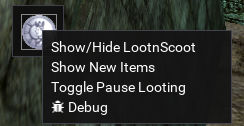
it should change the coin to a gold coin if there are new items for your to confirm rules on.
But also fixed and on the way soon =)

@grimmier i think the only DoClose that needed to be added is the one when items on corpse is 0 where it was returning early, the rest that you added the other day probably can be removed. but otherwise i'm not sure why that commit would impact looting manually as all those extra closes were inside lootMobs which wouldn't have been called?This commit broke manual looting. If you try to do that, the window will close if LNS is running. I reverted to the commit before it and the issue went away.
https://github.com/aquietone/lootnscoot/commit/22edd9e4d84fe39e1b9aa353677ba040d7700ca5
I'm not sure, maybe I should've provided more detail, I was attempting to loot a notrade item that lns is not set to loot@grimmier i think the only DoClose that needed to be added is the one when items on corpse is 0 where it was returning early, the rest that you added the other day probably can be removed. but otherwise i'm not sure why that commit would impact looting manually as all those extra closes were inside lootMobs which wouldn't have been called?
should be fixed let me know at least on LNS sideThis commit broke manual looting. If you try to do that, the window will close if LNS is running. I reverted to the commit before it and the issue went away.
https://github.com/aquietone/lootnscoot/commit/22edd9e4d84fe39e1b9aa353677ba040d7700ca5
will do cheersok fix on the way and also the coin will change to a gold coin if there are new items to evaluate \ confirm r
should be fixed let me know at least on LNS side
if its not there try removing any close loot window checks in the loot module of mercs if running from there.
It may be a case of LNS returns control and merc's tries to close errant windows.
Bug Fixes
- Buy items saving qty as strings (#35)
...* fix: buy items saving qty as strings
* fix: crash trying to open new item table when empty
fixed a crash if you tried to open the new items window without new items from the mini button context.
also hide the context menu item if no new items
* fix: Manual Looting windows closing out issue
will abort lootMobs() routine if already looting
Features
- Import Old Database Rules (#36)
* Added command `/lns importold` incase you already had a `LootRules_Server_name.db` file in your MQ/Config folder and wanted to import those.
* this will open a window for you to enter the db name (including .db at the end) and import everything with a button click.
* any items in the db we couldn't find or that had more than one item matching that name...
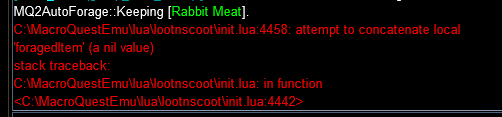
ahh thanks found it =) it was on the print output, added a nil checkHi, I am still loving this great resource. What a time saver!
Lately I've been "driving" on a foraging toon, running MQ@Autoforage. I've been getting the error below. This does not affect gameplay in any way, and does not crash LNS, which I run as standalone. I just thought you would want to know.
View attachment 70346

Commits
Master Loot Option (#37)
* You can enable `MasterLooting` in the settings or through `/lns set` command
* Changing the setting on one char will tell the others to match
* When MasterLooting is on we will report back any items not marked as ignore or destroy.
* the items will appear in a new window showing some basic information about the item,
* clicking on the item name will open its link in...
classic EQI am liking the way that that lns has really evolved lately.
As I am very paranoid, I was wondering if you can manually add an item to the "keep" list if you don't have the item to drop onto the appropriate tab.
I don't want to take a chance I miss it on a hiden corpse, looted.
Of course I tried to use the old /lootutils keep "Ghoulbane" (substituting the name of the cursor name) and it returned a nil value.
Thank you in advance - M
(As I was typing this the Lord dropped the Ghoulbane. I wish I had asked hours ago)
haven't been able to replicate the first issue.Master looting: Hitting the trash can icon from the driver, but (i think) with a rule to loot the item normally seemed to lead to a spam condition where 2 of my dudes just looted and left the corpse over and over, did not investigate further because a mob came along and killed us.
Edit: I zoned back in and these two dudes are trying to beeline for the corpse that is 1000 units away
Cheers dudehaven't been able to replicate the first issue.
I have a fix the 2nd one though, forgot to clear the table if we zoned. which was why they beelined it for the corpse after coming back into the zone. going to keep trying to get the first thing to replicate before tossing up the fix.
Bug Fixes
- ML stuck loops (#39)
* clear the items to loot and ML tables on zoning so we don't beeline to a corpse a cross the zone when coming back after wiping.
* fixed the stuck loop when a corpse or item is missing and we get stuck trying to loot and remove it over and over. had the index value wrong.
* Added combat checks when directing a character to loot. combatlooting setting will be checked...