
schmoodawg33
Member
I had the launcher pointed in the wrong direction. Thanks for helping me sort this out.


So I got mine working. In the end I deleted the lootnscoot folder and did a re-install. Once it was in place, i double checked the file attributes. Windows like to make folders read only over and over. So I turned that off, and immediately ran the Lua script in game. it installed and works.Same issue here, sqllite install fails and lua crashes.
error
Code:Failed to load package lsqlite3 :: success
Automated update: b4198fa2f686d9eee1956b4b2a2127b3010ea18d

 github.com
I'll give that a shot. Thanks for the reply.I run in standalone also, and I've seen this, where the corpse is opened and closed very quickly. Items are left. Lately I've been using a hotkey to pause lootnscoot (/lua pause lootnscoot), kill mobs in a defined area, then stop pulling and use the same key to unpause.
No worries, just thought I was missing it somewhere. Thanks again for all the work.the hide corpse command is just using the ingame ones, and sadly that doesn't stick =(
Commits
Adv looting rewrite (#20)
# Loot N Scoot (Rewrite) ~ Now with more adv looting features.~
Because of the rewrite to fix some issues and add more advanced looting mechanics. There is a link to the old version on the Github Releases page.

Release classic lns · aquietone/lootnscoot
this is the classic version of lootnscoot before the rewrite. Creating this so users can go back if they wish.
All configs, tables, etc are kept separate between the new...
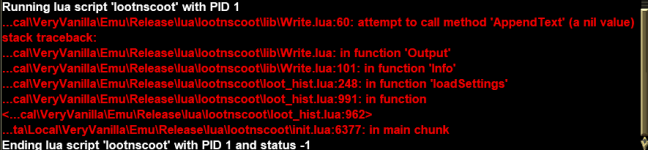
found it and should be fixed on next push.The new update is crashing for me. Not sure what the issue is. Error message is:
View attachment 69321
Working without error / crashing.aquietone updated lootnscoot (for emu) with a new update entry:
04/15/2025
Read the rest of this update entry...

MQfolder\Resources\Lootnscoot\servername\
...Directed adjustments (#25)
for handling calling LNS from its install folder and not being bundled
You can call it in directed mode either way by bundling it into your lib/lootnscoot folder or just pass lootnscoot as the 3rd parameter to call it from its own standalone install folder (this should make it easier than having to maintain LNS inside other scripts)
New settings, fixes, tooltips and more (#27)
* Added New setting `IgnoreMyNearCorpses` for those servers where you keep your gear on death.
* Added `SafeZones` see Settings panel We will NOT try to loot if in a `SafeZone`.
* Added Tooltips to the settings
* Added a button to the GUI to toggle Debug spam
* Another pass on directed mode.
* Another pass on loot rule checks (hopefully this fixes...
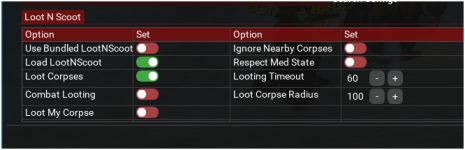
Combat Looting, Loot MyCorpse, Ignore Nearby Corpses, and Loot Corpse Radius are passed between RGMercs lus as the Director and LNS, you can adjust on either gui and the other is in sync.Bundled = mqLuaDir/rgmercs/lib/lootnscoot and standard is just mqLuaDir/lootnscootSafeZones and Tooltips
...New setting and some fixes \ tweaks (#28)
* New Setting `MaxCorpsesPerCycle` sets the number of corpses we will try to loot each cycle,
* fixed some history reporting outputs, they would record correctly but display wrong on the session.
* Made the debug button a toggle for easier visibility


