
-
 Hail, we're RedGuides. We want you to play six (yes, 6!) EverQuest characters at once. We have scripts and a friendly community to help, please join our playstyle and say hello! 👋
You are using an out of date browser. It may not display this or other websites correctly.
You should upgrade or use an alternative browser.
You should upgrade or use an alternative browser.
Resource icon
Release Lootly 2024-01-24.1
- Thread starter SpecialEd
- Start date

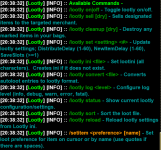
I think it shows up when you do lootly status.
But it’s in the overview:
Raid Looting -
Raid looting can be enabled by running /lootly raidloot on on any characters in the raid/running Lootly. Note: Lootly will automatically disable raid looting any time you join or leave a raid. As annoying as it might be to opt in each time, it's less annoying than your cleric looting that warrior only item.
But it’s in the overview:
Raid Looting -
Raid looting can be enabled by running /lootly raidloot on on any characters in the raid/running Lootly. Note: Lootly will automatically disable raid looting any time you join or leave a raid. As annoying as it might be to opt in each time, it's less annoying than your cleric looting that warrior only item.

Jelly Belly
Member
Question: will Lootly send my rogue only, no trade items to my rogue instead of giving them to my ML?

You need to manually add the items to your lootly loot iniIt seems like lootly is having hard time writing to file on any item with quotation marks. I tried editing the ini file directly but it ends up getting override next time there's a change in game. Any workaround?
I edited the ini file when everything was off. It got overwritten when I started up the game with MQ. Not sure if MQ keeps temp data allocated in memory when the game is off but it seems like it.You need to manually add the items to your lootly loot ini

Lootly handles all ini updates through the /ini command, so it only writes the file when you use /setitemI edited the ini file when everything was off. It got overwritten when I started up the game with MQ. Not sure if MQ keeps temp data allocated in memory when the game is off but it seems like it.
How does lootly check for lore items? I was farming for augs and when my guys were full up I put the augs into shared bank slot and went back to farm some more. Now lootly won't pick up the augs and I have to do it myself. I restarted lootly just to reset any flag there may be but that didn't seems to work.
lootly is going to check for if you have the item - i don't think mq differentiates specifically ignoring shared bank - you could put it in your dragon horde i believe thoHow does lootly check for lore items? I was farming for augs and when my guys were full up I put the augs into shared bank slot and went back to farm some more. Now lootly won't pick up the augs and I have to do it myself. I restarted lootly just to reset any flag there may be but that didn't seems to work.
Lol thanks. I didn't know what dragon hoard is until now since I came back. Does that mean dragon hoard is its own container and we can now have 3 lore items per char?
Edit: Humm I have to purchase this feature? Said you'd get it if you have CoV but since I bought ToL does that mean I need to buy the feature still?
Edit: Humm I have to purchase this feature? Said you'd get it if you have CoV but since I bought ToL does that mean I need to buy the feature still?
Last edited:

Shadow
Ultimate seasoned veteran member
It was only available for free when you purchased the specific expansion when it was current. It is no longer current and not available as it is rolled into ToL when you purchase ToL. You cannot purchase the xpac separately. However, you can purchase the feature through the DBG marketplace.Lol thanks. I didn't know what dragon hoard is until now since I came back. Does that mean dragon hoard is its own container and we can now have 3 lore items per char?
Edit: Humm I have to purchase this feature? Said you'd get it if you have CoV but since I bought ToL does that mean I need to buy the feature still?
Some items, even though set as Keep, are being left on corpses:

I have tried stopping, starting, reloading, etc, no luck. Still leaves these pages. And no, they do not have them!
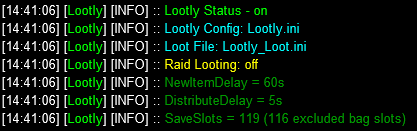
Lootly_Loot.ini T section
Any ideas? Thanks!
I have tried stopping, starting, reloading, etc, no luck. Still leaves these pages. And no, they do not have them!
Lootly_Loot.ini T section
Code:
[T]
Tainted Caladium=Keep
Tainted Delphinium=Keep
Tainted Feather=Keep
Tainted Laburnum=Keep
Tainted Larkspur=Keep
Tainted Muscimol=Keep
Tainted Oleander=Keep
Tainted Privet=Keep
Tantalum Ore=Keep
Tattered=Sell
Tattered Cloth Sandal=Sell
Tattered Journal Page 2=Keep
Tattered Pillow=Keep
Terrifying Jaws=Sell
Terrifying Tentacle=Sell
Terror Infused Linked Vambraces=Ignore
The Interrogator's Favorite 'Toy'=Keep
The Root of All Evil=Keep
Titanium Ore=Keep
Tome Insert Page 4=Keep
Torn Old Book - Page 1=Keep
Torn Old Book - Page 2=Keep
Torn Old Book - Page 3=Keep
Torn Old Book - Page 4=Keep
Torn Old Book - Page 5=Keep
Torn Old Book - Page 6=Keep
Torn Old Book - Page 7=Keep
Treant Flower=Sell
Tuft of Gnoll Fur=Destroy
Twisted Gorilla Hand=Sell
Twisted Vine=Sell
Any ideas? Thanks!
Does all your guys have that page? Are you keeping a spare in the shared bank?
Nm just read the last part. No idea on that one.
I had issues where if I made changes across multiple clients, they end up overriding each other with previously loaded ini template.
Nm just read the last part. No idea on that one.
I had issues where if I made changes across multiple clients, they end up overriding each other with previously loaded ini template.
Last edited:
Yea, no idea. Sometimes it gives other stuff to someone else and not master looter too. Like the Key Shaft (ND of course) for the Korucust mission to the 4th person in the group.Does all your guys have that page? Are you keeping a spare in the shared bank?
Nm just read the last part. No idea on that one.
I had issues where if I made changes across multiple clients, they end up overriding each other with previously loaded ini template.


Some items, even though set as Keep, are being left on corpses:
View attachment 39188
I have tried stopping, starting, reloading, etc, no luck. Still leaves these pages. And no, they do not have them!
View attachment 39189
Lootly_Loot.ini T section
Code:[T] Tainted Caladium=Keep Tainted Delphinium=Keep Tainted Feather=Keep Tainted Laburnum=Keep Tainted Larkspur=Keep Tainted Muscimol=Keep Tainted Oleander=Keep Tainted Privet=Keep Tantalum Ore=Keep Tattered=Sell Tattered Cloth Sandal=Sell Tattered Journal Page 2=Keep Tattered Pillow=Keep Terrifying Jaws=Sell Terrifying Tentacle=Sell Terror Infused Linked Vambraces=Ignore The Interrogator's Favorite 'Toy'=Keep The Root of All Evil=Keep Titanium Ore=Keep Tome Insert Page 4=Keep Torn Old Book - Page 1=Keep Torn Old Book - Page 2=Keep Torn Old Book - Page 3=Keep Torn Old Book - Page 4=Keep Torn Old Book - Page 5=Keep Torn Old Book - Page 6=Keep Torn Old Book - Page 7=Keep Treant Flower=Sell Tuft of Gnoll Fur=Destroy Twisted Gorilla Hand=Sell Twisted Vine=Sell
Any ideas? Thanks!
Check your AdvLoot filters for those items. I have seen this happen and it almost always because my AdvLoot filter actually has the item set to Never or something where I don't want to loot it. It seems that can interfere with Lootly if not set correctly. Not sure if this will help but it has fixed some the issues I've came across.
I've been running lootly since it came out without problems.
Now if I unload lootly, back up my lootly.ini and lootly_loot.ini files, destroy the ini files, download and reinstall lootly then lastly run lootly again, it will create the ini files but not update them as it loots. Furthermore, it won't check the ini file to see what it should do with an item, it just loots it. If I start with a clean INI file and loot items using lootly, the items are never put into the INI file.
Any suggestions?
Now if I unload lootly, back up my lootly.ini and lootly_loot.ini files, destroy the ini files, download and reinstall lootly then lastly run lootly again, it will create the ini files but not update them as it loots. Furthermore, it won't check the ini file to see what it should do with an item, it just loots it. If I start with a clean INI file and loot items using lootly, the items are never put into the INI file.
Any suggestions?

Gekko
Seasoned veteran member
Hi all,
Been trying to read through all the threads but not sure if I saw this question(s) answered. I apologize if I missed something in the previous messages.
1) Will Lootly distributed items based upon which class can use them?
2) If Lootly is giving items to a Master Looter will it, or can it be set to, give items to a second or third toon after the original toon has reached carrying limit?
Thanks for the feedback.
Be well.
Been trying to read through all the threads but not sure if I saw this question(s) answered. I apologize if I missed something in the previous messages.
1) Will Lootly distributed items based upon which class can use them?
2) If Lootly is giving items to a Master Looter will it, or can it be set to, give items to a second or third toon after the original toon has reached carrying limit?
Thanks for the feedback.
Be well.
Silverspaceman
Seasoned veteran member
1 - yes, the overview page has list of instructions for the program1) Will Lootly distributed items based upon which class can use them?
2) If Lootly is giving items to a Master Looter will it, or can it be set to, give items to a second or third toon after the original toon has reached carrying limit?
2 - yesClass|#|WAR,BRD,CLR - Keep # of an item if the looter is on the class list
Also would recommend using Lootier in addition to Lootly as the GUI is just /chefskiss.
Last edited:
I've run lootly since it came out and not had much of a challenge. Recently I cleaned out my bags and made a ton of space. I was excited to get back out there and loot some stuff. Unfortunately I've got an issue that I can't figure out. My main who is my ML lootls like crazy but when his bags are full, he keeps looting. Items are getting stuck on his cursor. In the past when he was full items kicked over to the other toons. That's not happening any more. I didn't change anything in the lootly file so I can't figure out why it would break suddenly. Any suggestions? Thanks

Start with /echo ${Me.FreeInventory} when your bags are full -- what is that returning?I've run lootly since it came out and not had much of a challenge. Recently I cleaned out my bags and made a ton of space. I was excited to get back out there and loot some stuff. Unfortunately I've got an issue that I can't figure out. My main who is my ML lootls like crazy but when his bags are full, he keeps looting. Items are getting stuck on his cursor. In the past when he was full items kicked over to the other toons. That's not happening any more. I didn't change anything in the lootly file so I can't figure out why it would break suddenly. Any suggestions? Thanks

simcoe
Well-known member
Greetings; I'm not sure if this is the right place to post this, so forgive me if it needs to go elsewhere. I really have enjoyed using lootly the past week or so, but I believe I have entered a wrong command (or jacked it up somehow) and now when zoning I get the following message:
DoCommand - Couldn't parse 'item sell'
Everything seems to work correctly, but seeing the message every time I zone makes wonder if it needs correcting, and I have no idea where to begin.
I'm currently running VV, a handful of CWTN plugins, and lootly/lootier.
Any help would be appreciated, thanks.
DoCommand - Couldn't parse 'item sell'
Everything seems to work correctly, but seeing the message every time I zone makes wonder if it needs correcting, and I have no idea where to begin.
I'm currently running VV, a handful of CWTN plugins, and lootly/lootier.
Any help would be appreciated, thanks.

Class|#|WAR,BRD,CLR - Keep # of an item if the looter is on the class list
Is there a way to have ALL of something go to a particular class? For example, Luclinite Laced Taipan Venom=Class|ROG does not work. It still loots the item on the driver. Would the correct syntax be Class|999999999|ROG in that case?
I have logged in for the first time in a month so my apologies for the late reply. When I put this command in I get a return of 22 (this is how many slots are available in my Extraplanar Trade Satchel). This was never a problem before.Start with /echo ${Me.FreeInventory} when your bags are full -- what is that returning?
*Edit - my Lootly.ini file. Originally I didn't have anything under Excluded Bags and I never had any issues. I added my ETSs and now items are no longer getting stuck on my cursor when my loot bags are full. The problem now is that its not kicking the items over to anyone else in my group. All toons are running Lootly.
[Excluded Bags]
1=Extraplanar Trade Satchel
2=Extraplanar Trade Satchel
3=Extraplanar Trade Satchel
4=Extraplanar Trade Satchel
[Lootly]
DanNetDelay=150
DistributeDelay=1
Lootini=Lootly_Loot.ini
NewItemDelay=10
SaveSlots=3
**Edit 2
When I loot something with the ML and his normal bags are full I get the message [Shared] No one was able to loot/wanted blah blah. Leaving. This is happening with all items. It doesn't matter what I have them tagged as in my lootly.ini All the other characters have plenty of space. Also, now I am finding that tradeskill items are not going into my ETS bags like they used to. I assume this is because I told it to ignore them. Any further assistance in getting this figured out will be greatly appreciated. Thanks
Last edited:
Is there a way to have ALL of something go to a particular class? For example, Luclinite Laced Taipan Venom=Class|ROG does not work. It still loots the item on the driver. Would the correct syntax be Class|999999999|ROG in that case?
Also, Lootly gets hung up on a new item that is marked as Never on the master looter. It will not proceed, try to pass it out elsewhere, or drop it.
Thanks for the response. It tells me the looted item would put them over the configured save slots value. It says 1 toon has 44 open slots and another has 131 yet it won't let them loot.Turn on debug and see what those messages are saying./lootly log debug
*Edit
If I give a toon an item, lootly will then give them any more that are found until I sell them. Then the process starts all over.
Last edited:
Is there a way to have ALL of something go to a particular class? For example, Luclinite Laced Taipan Venom=Class|ROG does not work. It still loots the item on the driver. Would the correct syntax be Class|999999999|ROG in that case?
So it seems that =Class|0|ROG is the correct syntax to loot unlimited items.
Is there a way to say "If I have a rogue, give this to them, but if I don't have a rogue, loot it anyway on the main driver" at all?
For example: =Class|0|ROG,ANY (or something like this?)
So pretty much all classes if I am out farming tradeskill items, but in a group setting prefer certain items to funnel to a specific class.Add the class of the ML to the class list
Different situations require different configurations - easy enough to /setitem and toggle between your scenariosSo pretty much all classes if I am out farming tradeskill items, but in a group setting prefer certain items to funnel to a specific class.
For no drop items that I clearly don't want to loot because they are quest items or whatever, is there a "hover" command, or ability to link it in /setitem?

Lootly greatly wigs out when an item is marked as Never in advloot, and it doesn't know how to process beyond it.
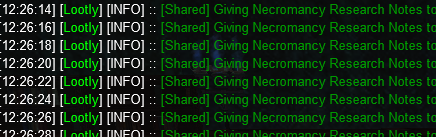

Lootly greatly wigs out when an item is marked as Never in advloot, and it doesn't know how to process beyond it.
Turn off advl / apply filters (for everyone) when using lootlyFor no drop items that I clearly don't want to loot because they are quest items or whatever, is there a "hover" command, or ability to link it in /setitem?
View attachment 42694
Lootly greatly wigs out when an item is marked as Never in advloot, and it doesn't know how to process beyond it.
View attachment 42695
View attachment 42696

I know that lootly is not "supported" by EMU yet according to server type. but since the introduction of macroquest emu. I have been running a test deployment of this download with RG macros|plugins|Lua added to it. I was running lootly fine and was just running it last night. This morning I try to start it up and got the following error. I am not sure what the error means, if this is outside of support it is all good.
D:\RedGuides\newmacroquest\Lua\lootly.Lua:325: attempt to index field 'AdvLoot' (a nil value)
stack traceback:
D:\RedGuides\newmacroquest\Lua\lootly.Lua: in function 'handle_personal_loot'
D:\RedGuides\newmacroquest\Lua\lootly.Lua:997: in function 'main'
D:\RedGuides\newmacroquest\Lua\lootly.Lua:1007: in main chunk
D:\RedGuides\newmacroquest\Lua\lootly.Lua:325: attempt to index field 'AdvLoot' (a nil value)
stack traceback:
D:\RedGuides\newmacroquest\Lua\lootly.Lua: in function 'handle_personal_loot'
D:\RedGuides\newmacroquest\Lua\lootly.Lua:997: in function 'main'
D:\RedGuides\newmacroquest\Lua\lootly.Lua:1007: in main chunk
Users who are viewing this thread
Total: 1 (members: 0, guests: 1)
Share: