• You've discovered RedGuides, an EverQuest multi-boxing and scripting community 🧙‍♀️⚙️. We want you to play several EQ characters at once, come join us and say hello! 👋

  • A TLP without truebox has thawed (Very Vanilla ready)
    Frostreaver

Question - Looting Help

Abbath

New member
Joined
Sep 22, 2014
RedCents
19¢
Hi guys, doing a slight amount of AFK exp on a couple of toons. I currently have most of my AG AN loot preferences in place, however there is heaps of stuff dropping i do not want but i want destroyed etc. Plus there are rares that drop which i have not seen while at the Pc so i do not have those configured to loot, and am likely losing out on.

Question is, how can i configure it to easily loot items (including no drop items) and destroy certain items i do not want, keeping others i do?

And is there a way i can "greed" certain items between toons (for lore items)
 
NinjaAdvloot is certainly the way to go. What you've not been told though is after you get it set up, you will need to remove all the loot filters you have set up in the advanced looting window in game. If you don't remove these rules, they will take precedence over NinjaAdvLoot and you will get strange results. I had items that were marked to be destroyed constantly in my inventory until I cleared out my advanced looting filters. After I cleared them it works like a champ. Well worth your time.
 
Turn off filters causes problems with the =quest functions, affecting nodrop items. Just be aware the in-game filters can interfere with how ninjadvloot works.

So what's the way to go on this then? Turn off advloot? Or delete all filter settings? Or other?
 
My recommendation is to delete all the filter settings. I had flaky results with turning the filter off and since I deleted all the items in my filter list, I've not had any other problems.
 
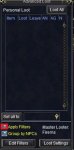
Pull up the advloot window (/advloot), click the Edit Filters button, then either delete all the items or search for the specific items and remove them from the list. I believe there is also a file you can delete prior to starting EQ. My solution was to import a filter list from a toon I knew had never looted, so EQ just overwrote all the items I had in my filter list with the empty list and I didn't have to manually click off 1000 items. I did this by hitting the Merge / Replace Filters button on the Edit Loot Filters window.
 
In your everquest directory should be files with the character name that have prefixes like "LF_AGxxx" or something like that.

I *think* if you search by LF* it will give you all your toons loot filters and can delete them all so NinjaAdvLoot is the only thing being used.
 
So what's the way to go on this then? Turn off advloot? Or delete all filter settings? Or other?

Other...
turning off advloot will completely disable the new ninjadvloot features.
delete all filter settings?? This one is tricky for me. What if you decide to use the in-game filters again?

I am still tweaking how advloot filters affect ninjadvloot but it is very slow confusing process. EQMule's new window mouseover TLO is proving invaluable.

Best thought... Copy your LF files to a separate directory and save them until you are certain you won't want them again.
 
Ninjadvloot is amazing these days! I love the =quest|# flag. Have been collecting augs and gear drops for all my characters without having to pay attention to every drop and distribute the gear myself.
 
im gonna have to sit down and take the time to set up ninjaloot....sounds like i'm missing out on some pretty nice features using just advloot window
 
Question - Looting Help

Users who are viewing this thread

Back
Top
Cart