
-
 Hail, we're RedGuides. We want you to play six (yes, 6!) EverQuest characters at once. We have scripts and a friendly community to help, please join our playstyle and say hello! 👋
You are using an out of date browser. It may not display this or other websites correctly.
You should upgrade or use an alternative browser.
You should upgrade or use an alternative browser.

Release Lootier 1.0.6
- Thread starter Coldblooded
- Start date


- Commits
- 192
Did a bit of testing, it's the underlying LIP.Lua library. It does not return those values. 

Throg123mq2
New member
I had the exact error message. Narrowed it down to the moment I added an item that began with a number rather than a letter. Looking at the Lua file itself, I ended up adjusting the "local.function convertToRemoteFormat(localTbl)" by adding entries for each number starting at line 170:Any ideas what I can do fix this?
['0'] = {},
['1'] = {},
['2'] = {},
['3'] = {},
['4'] = {},
['5'] = {},
['6'] = {},
['7'] = {},
['8'] = {},
['9'] = {}
I saved the Lua file, reloaded and it worked. I was able to open, save and adjust the entries as normal.
Hope this helps.

Mattheux
Member
In the Lootly discussion, I found that to have a certain class loot a certain item with unlimited amounts, like my ROG loot all poison tradeskill items, I have to enter this:
Distilled Grade AA Choresine Sample=Class|0|ROG
When I right click on Class in the UI and click on ROG and enter 0 for the value, I get this message:
Action Found - Class without number of items or classes selected on item "Distilled Grade AA Choresine Sample". Saving as Keep. Make sure to use the context menu on the item to set amounts and classes.
Am I doing something wrong?
Distilled Grade AA Choresine Sample=Class|0|ROG
When I right click on Class in the UI and click on ROG and enter 0 for the value, I get this message:
Action Found - Class without number of items or classes selected on item "Distilled Grade AA Choresine Sample". Saving as Keep. Make sure to use the context menu on the item to set amounts and classes.
Am I doing something wrong?

- Commits
- 2
Try moving it to where you want it and then /Lua stop lootier and then /Lua run lootierHow to keep Lootier UI @ where and how it was on the screen?
Everytime I login it goes to NW corner(default?) and shrinked as an icon, I have to move and expand it again.
By all accounts it should stay there.

Try moving it to where you want it and then /lua stop lootier and then /lua run lootier
By all accounts it should stay there.
this won't do anything.
do you have multiple clients active and viewports turned on? try disabling viewports in settings.
- Commits
- 2
No? It worked for all my gui windows, unless he has another issue going on with viewports. But I don't have veiwports enabled either.this won't do anything.
do you have multiple clients active and viewports turned on? try disabling viewports in settings.
No? It worked for all my gui windows, unless he has another issue going on with viewports. But I don't have veiwports enabled either.
I can't think of any reason why stopping and starting a Lua script would have any impact on how it saves the window coordinates. imgui has no idea you started or stopped a Lua script. That state is held within the overlay and reloaded when the overlay is reloaded, or if you unload/reload the mq. multiple clients can also cause issues sometimes if the coordinates get saved in one client but reloaded in another, viewports exacerbates this issue.

Furthermore, if you want your Rogue to be the default looter of rogue poison mats, but once in a while don't have your rogue in the group but still want to loot the poison mats on something else, how is this performed?In the Lootly discussion, I found that to have a certain class loot a certain item with unlimited amounts, like my ROG loot all poison tradeskill items, I have to enter this:
Distilled Grade AA Choresine Sample=Class|0|ROG
When I right click on Class in the UI and click on ROG and enter 0 for the value, I get this message:
Action Found - Class without number of items or classes selected on item "Distilled Grade AA Choresine Sample". Saving as Keep. Make sure to use the context menu on the item to set amounts and classes.
Am I doing something wrong?
Dropping items you want makes zero sense, just because the main looter for those items is not present.
Maybe this is more of a Lootly problem than it is Lootier.

Qnome
Active member
1. Viewports is not on.this won't do anything.
do you have multiple clients active and viewports turned on? try disabling viewports in settings.
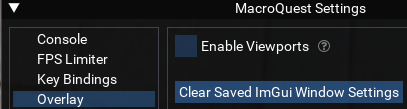
2.
/lua stop /lua run works, it's now where I want on all accounts.
Mattheux
Member
Found an issue with the item names that have special characters. As has been noted for Lootly, those items have to be manually added to the file, which is no problem.
But if you use Lootier to edit while playing in game, it does not recognize those items from the ini file, so does not load them. Once you have made your edits in Lootier and save and reload, the items with special characters have been deleted from the ini file.
An example I tested is Vyzh'dra's Log #374
But if you use Lootier to edit while playing in game, it does not recognize those items from the ini file, so does not load them. Once you have made your edits in Lootier and save and reload, the items with special characters have been deleted from the ini file.
An example I tested is Vyzh'dra's Log #374

Berkz
Well-known member
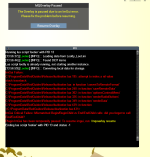
So I turned off viewports in all my clients, but every time I run lootier and want to change anything, I get this error when I click save. For example I wanted to set up a Top Section of an Engraved Signet as a Class so I clicked the radio button for class, set quantity to 1, and clicked the cleric checkbox.


Tiny_Ape
Member
This is a similar problem I am experiencing. After manually adding the item and status, I still am trying to loot items I've set to ignore.I've noticed that when I encounter a new item with Lootly, it can be really tough to get Lootly to find the new item in the Manage Loot window. Pressing Reload doesn't seem to load the new item in. Not sure if I'm doing anything wrong, is this common?
What am I doing wrong?
It comes back to tell me that it can't loot a Diamond, nobody wants it. Have to manually loot it. I have it in my Manage Loot window and have it assigned to be looted by class for 999. Saved and reloaded. Still won't loot the next one. So exasperating. Diamonds are the only item to do this. But also the same symptoms as Tiny Ape and Kambic above. Won't automatically insert a new item into the file until after I log.
Vrak
Vrak

SomeRandomDude
Well-known member
Hi. I've just switched over from MQLootManager to Lootly + Lootier. So far I like it. I do miss the ability to control who *exactly* wants what items, however, this is very much made up for by the features such as loot counts (great for splitting up quest items), and having a single global loot ini file, which is amazing when running a huge team.
I have one multi-part question and one suggestion:
Question: I'm running a team of lowish-level guys and am running Lootly+Lootlier only on my MA (not running on the others due to fear of the performance issues outlined above). When I find my first copy of a no-drop item and want some subset of my characters to get that item, and the MA doesn't want it, what is my procedure for registering the others to get it? I can't put it on my MA's cursor (since he's not looting it) it seems like I need to type the name into Lootier and then apply the count and class filters to the item, then save? Note: I've turned up NewItemDelay so that I have some time to do all of this. I'm seeing that adding the item in this way doesn't trigger Lootly to loot it. When I wait for the NewItemDelay to expire my MA ends up looting it anyway. Do I need to restart lootly to get it to actually loot correctly? Again, I'm looking for the most sensible procedure to accomplish my goal. Thanks.
Unrelated Suggestion: I see that newly encountered items get added as Keep. I think it would be really cool it new items were added with some new tag, say "auto". This "auto" would behave exactly like "keep". The point is that after running for a bit you can search for items that have this "auto" tag and consider what to do with them. It just makes it easier to perform incremental maintenance on your setup. The suggestion, unfortunately, would necessitate both a Lootly and Lootier change to support but I think it would be really cool.
Thanks for the help.
I have one multi-part question and one suggestion:
Question: I'm running a team of lowish-level guys and am running Lootly+Lootlier only on my MA (not running on the others due to fear of the performance issues outlined above). When I find my first copy of a no-drop item and want some subset of my characters to get that item, and the MA doesn't want it, what is my procedure for registering the others to get it? I can't put it on my MA's cursor (since he's not looting it) it seems like I need to type the name into Lootier and then apply the count and class filters to the item, then save? Note: I've turned up NewItemDelay so that I have some time to do all of this. I'm seeing that adding the item in this way doesn't trigger Lootly to loot it. When I wait for the NewItemDelay to expire my MA ends up looting it anyway. Do I need to restart lootly to get it to actually loot correctly? Again, I'm looking for the most sensible procedure to accomplish my goal. Thanks.
Unrelated Suggestion: I see that newly encountered items get added as Keep. I think it would be really cool it new items were added with some new tag, say "auto". This "auto" would behave exactly like "keep". The point is that after running for a bit you can search for items that have this "auto" tag and consider what to do with them. It just makes it easier to perform incremental maintenance on your setup. The suggestion, unfortunately, would necessitate both a Lootly and Lootier change to support but I think it would be really cool.
Thanks for the help.

Boring
Well-known member
Running Lootier with Lootly. Just installed it today. While I would prefer to have everyone round robin a quest item, I read that is not possible. I tried to have Lootier set up the item by class (Fiery Ore) and have everyone just loot 30. Lootier throws an error "Errors in converting to remote format. Aborting save operation."
So I tried just telling Lootier to give everyone 30 of the item (instead of selecting specific classes). Same error.
So I tried just telling Lootier to give everyone 30 of the item (instead of selecting specific classes). Same error.
tomahawkeer
Well-known member
This might be a bug, but I am assuming its working as intended. If you are using the /setitem command or button or what not, and you happen to hit the save button in Lootier after making several changes, your changes will not save. It appears, after you make your changes, you need to "reload" lootier and then save your changes. I didn't see mention of this anywhere else in the thread and thought I would mention it incase someone makes a bunch of changes and hits save before hitting reload. It could save you a lot of time. Of course if you manually edit the file and save it, those changes will stay, but if you hit save after making changes, and before hitting reload, they will not save.


Shadow
Ultimate seasoned veteran member
From my understanding, you don't need to log in to see you were banned. They sent out emails already.Shadow
Thanks for taking the time to answer. Good suggestion, and I take a look at it and see what I see lol. But I am thinking that this has become a moot point considering the ban wave. Scared to login today just to see all my accounts banned.
Vrak
Shadow
Just wanted to post this for future reference. That worked, my Lootly_Loot.ini file had a goofy looking "5" at the very bottom (of course) with the number "5" underneath it. I deleted both and relogged my toon and voila the error is gone.
Thanks for the helpful suggestion, appreciate you man.
Vrak
Just wanted to post this for future reference. That worked, my Lootly_Loot.ini file had a goofy looking "5" at the very bottom (of course) with the number "5" underneath it. I deleted both and relogged my toon and voila the error is gone.
Thanks for the helpful suggestion, appreciate you man.
Vrak


drawthow
Well-known member
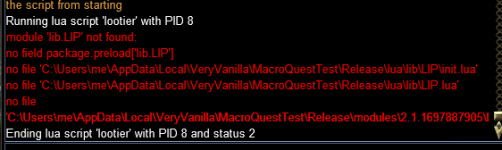
Thanks for the reply. Now getting another error module lib.Write not found. Is there some generic Lua setup that I missed?make a folder called "lib" in your lua folder.
put this file LIP.lua inside that folder.
lootier is still setup with the older layout. let me get all of the lib stuff together.Thanks for the reply. Now getting another error module lib.Write not found. Is there some generic Lua setup that I missed?
the zip below should have all the lib files
Attachments
drawthow
Well-known member
Thank you! That got me running.lootier is still setup with the older layout. let me get all of the lib stuff together.
the zip below should have all the lib files
Happy to help.Thank you! That got me running.
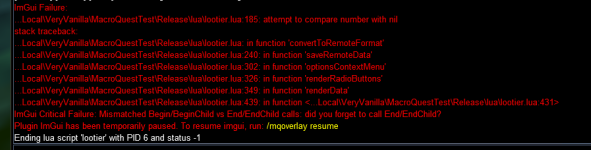

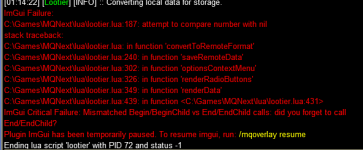
Getting an error when trying to save the Keep quantity using Lootier. I can edit the file manually and set it, but Lootier is crashing and not saving the quantity . I tried a couple different scenarios: changing the qty from 2 to 3 for Gallant Earrring Clasp to see if it was an issue because the original entry did not have the Keep|2 at the end, bit it did not make a difference, it crashed Lootier either way, either adding a qty or modifying an existing qty. I can make the entry changes in the file manually, then load lootly and lootier, and both can see the entry.
Nightmare
I don't know if this will help or not, but it sounds a lot like a problem I had with Lootly a while back. It sounds like you have a corrupted file. I had to go back through my lootly_loot.ini file and sure enough I had some goofy stuff in 2 lines. One was a bad character and the other was several === at the end of a line. Fixed those 2 items and it worked again. I have no idea how those characters got inserted in that file but that was the fix for it.
Hope this at least gives you a direction to look in.
Vrak
I don't know if this will help or not, but it sounds a lot like a problem I had with Lootly a while back. It sounds like you have a corrupted file. I had to go back through my lootly_loot.ini file and sure enough I had some goofy stuff in 2 lines. One was a bad character and the other was several === at the end of a line. Fixed those 2 items and it worked again. I have no idea how those characters got inserted in that file but that was the fix for it.
Hope this at least gives you a direction to look in.
Vrak
I finally had time to debug the issue. There was one entry that had an =Keep|Ignore entry, which shouldn't ever happen, but had happened somehow. Once I fixed that entry, it resolved the issue.
Users who are viewing this thread
Total: 1 (members: 0, guests: 1)
Share: