
yup >> CLICK HERE <<Is there a way to get notified when RG gets MQ2 updated?

-
 Hail, we're RedGuides. We want you to play six (yes, 6!) EverQuest characters at once. We have scripts and a friendly community to help, please join our playstyle and say hello! 👋
You are using an out of date browser. It may not display this or other websites correctly.
You should upgrade or use an alternative browser.
You should upgrade or use an alternative browser.
Resource icon
Legacy MacroQuest2 (Live Servers) 2022-01-19
- Thread starter Redbot
- Start date
- Status
- Not open for further replies.

Redbot updated Very Vanilla MQ2 (Live Servers) with a new update entry:
20200521
Read the rest of this update entry...
20200521
May 21 2020
- Updated for LIVE
Read the rest of this update entry...

Hi,
Just did the update with the Launcher and it shows me up to date. However, I get an error message "MQ2 expected eqgame Date and Time to be: Apr 13 2020 16:06:55 But eqgame's Date and Time is: May 21 2020 09:48:09 Do you need to patch one of them? Loading of MQ2 can not be completed." I tried to reload twice just to be sure it was as up to date as I can make it on my end. Any idea as to why? Thanks, AnotherJohn
Edit: additional info, Launcher shows Last Installed: 5/21/2020 4:41:52 PM
Just did the update with the Launcher and it shows me up to date. However, I get an error message "MQ2 expected eqgame Date and Time to be: Apr 13 2020 16:06:55 But eqgame's Date and Time is: May 21 2020 09:48:09 Do you need to patch one of them? Loading of MQ2 can not be completed." I tried to reload twice just to be sure it was as up to date as I can make it on my end. Any idea as to why? Thanks, AnotherJohn
Edit: additional info, Launcher shows Last Installed: 5/21/2020 4:41:52 PM
Last edited:
doesn't look like your launcher updated since it says april 13th and today is may.Hi,
Just did the update with the Launcher and it shows me up to date. However, I get an error message "MQ2 expected eqgame Date and Time to be: Apr 13 2020 16:06:55 But eqgame's Date and Time is: May 21 2020 09:48:09 Do you need to patch one of them? Loading of MQ2 can not be completed." I tried to reload twice just to be sure it was as up to date as I can make it on my end. Any idea as to why? Thanks, AnotherJohn
also moving this thread since it is not kissassist
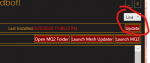
Yes, just edited to show my Launcher shows Last Installed: 5/21/2020 4:41:52 PM. So not sure why the April date is showing up....
Yes, just edited to show my Launcher shows Last Installed: 5/21/2020 4:41:52 PM
Have you updated EverQuest?
Yes, that shows May 21 2020 09:48:09
"MQ2 expected eqgame Date and Time to be: Apr 13 2020 16:06:55 But eqgame's Date and Time is: May 21 2020 09:48:09 Do you need to patch one of them? Loading of MQ2 can not be completed."
Wow, wonder how that happened. Thanks will check it out.
This is the update button you pressed, right?
View attachment 21688
Also, make sure you updated EverQuest, not just VV
Thanks! As a recent return user to MQ2(last used like 10 years ago) this thread just helped answer my problem with MQ2 after the patch, getting mq2 updated and I had no idea about the launcher which I now have installed and mq2 updated! My drood is back to foraging those goodies, many thanks for the work you guys do

Redbot updated Very Vanilla MQ2 (Live Servers) with a new update entry:
20200527
Read the rest of this update entry...
20200527
Code:May 27 2020 by RedGuides - MQ2AutoLogin (eqmule) Added Rizlona support - MQ2Rez (Knightly) Fix issue with Rez not being consistent - MQ2Status (Sic) Code cleanup - MQ2AdvPath (Knightly) Remove "failed to create directory" message when dir exists - New paid plugin! MQ2Eskay (ChatWithThisName, Sic) For when you need a good tank. - New paid plugin! MQ2Bst (ChatWithThisName, Sic) It's a Beastlord. - CWTN Plugins: fixed issues with MQ2Headshots, MQ2Cleric updated low-level healing, MQ2Bst &...
Read the rest of this update entry...
Redbot updated Very Vanilla MQ2 (Live Servers) with a new update entry:
20200529
Read the rest of this update entry...
20200529
May 29 2020 by RedGuides
- CWTN Plugins (ChatWithThisName, Sic) Heal routine while melee is fixed. Updated MercFerocity/SharedMercFero, autobuffing fixes.
Read the rest of this update entry...
Thought that Group.Member[#].Invis[] would work same as Me.Invis[], it does not it mirrors your own invis status. this does not happen if using .Invis
e.g if you are SoS then Group.Member[3].Invis[SOS] also return TRUE
Apr 30 2020
e.g if you are SoS then Group.Member[3].Invis[SOS] also return TRUE
Apr 30 2020
- Me.Invis now takes an optional index or a name to return invis vs undead and animals
Example 1: /echo ${Me.Invis} just return the normal one like before, are u invis of any kind.
Example 2: /echo ${Me.Invis[ANY]} or just ${Me.Invis[0]} returns true if you are invis of any kind, same as just doing ${Me.Invis}
Example 3: /echo ${Me.Invis[NORMAL]} or just ${Me.Invis[1]} returns true if you are normal invis.
Example 4: /echo ${Me.Invis[UNDEAD]} or just ${Me.Invis[2]} returns true if you are invis vs undead
Example 5: /echo ${Me.Invis[ANIMAL]} or just ${Me.Invis[3]} returns true if you are invis vs animal
Example 6: /echo ${Me.Invis[SOS]} or just ${Me.Invis[4]} returns true IF you are a ROG AND in fact hidden AND have a skill of at least 100 in HIDE AND have the AA for SoS
Last edited:
Redbot updated Very Vanilla MQ2 (Live Servers) with a new update entry:
20200603
Read the rest of this update entry...
20200603
Code:Jun 03 2020 by RedGuides - MQ2Cast (eqmule) fixed fizzled and interrupted identifications on Live Jun 03 2020 - Added ${Me.AbilityTimer[x]} where x is a bility ad or the name, it returns a pTimeStampType of the timer left on a Ability Example: /echo ${Me.AbilityTimer[Hide].TimeHMS} returns 0:06 (or whatever it's at)
Read the rest of this update entry...

Have an issue with Redguides Launcher installed on my new computer:
When click the Launcher icon (both on the desktop or in the folder) ... the launcher widow with briefly showed up on the Window 10 desktop... then it disappeared...
- I tried uninstall and reinstall Redguides Launcher and still the same
- I am able to launch MQ2 with the MQ2 button from the same folder
- The Redguides launcher is installed at the default location c:\ProgramData\RedGuides\DesktopUtility
- I am able to start the Redguides Launcher on other computers
So now I don't know how I can use the Launcher to update for the next eq patch....
Help please and thanks
When click the Launcher icon (both on the desktop or in the folder) ... the launcher widow with briefly showed up on the Window 10 desktop... then it disappeared...
- I tried uninstall and reinstall Redguides Launcher and still the same
- I am able to launch MQ2 with the MQ2 button from the same folder
- The Redguides launcher is installed at the default location c:\ProgramData\RedGuides\DesktopUtility
- I am able to start the Redguides Launcher on other computers
So now I don't know how I can use the Launcher to update for the next eq patch....
Help please and thanks
Redbot updated Very Vanilla MQ2 (Live Servers) with a new update entry:
20200605
Read the rest of this update entry...
20200605
Jun 05 2020 by RedGuides
- MQ2TSTrophy (Sic, Knightly) Fixed an issue when updating trophies that caused bad info to remain
- MQ2AutoLoog (Knightly) partial code cleanup
- CWTN Plugins (ChatWithThisName, Sic) updated, including MQ2BerZerker, MQ2Bst, MQ2Cleric, MQ2Eskay. Changelog in the CWTN forum.
Read the rest of this update entry...
Redbot updated Very Vanilla MQ2 (Live Servers) with a new update entry:
20200606
Read the rest of this update entry...
20200606
Jun 06 2020
- Fixed a crash in CUnSerializeBuffer::GetString (the one where the address ends in 22) -Brainiac
Read the rest of this update entry...
Redbot updated Very Vanilla MQ2 (Live Servers) with a new update entry:
20200614
Read the rest of this update entry...
20200614
Jun 14 2020 by RedGuides
- MQ2Nav (brainiac) updated to 1.3.3
The navmesh compatibility version has changed in this release. MQ2Nav is backwards compatible, so meshes do not need to be re-made. Conversion is optional, but recommended to improve performance and memory usage. New MQ2Nav can load old meshes. Old MQ2Nav cannot load new meshes generated with this version.
Highlights
Previous versions of MQ2Nav had an issue when loading navmesh files that caused it to...
Read the rest of this update entry...
After updating to 20200614 I've been having characters kicked back to server select with the message 'The server terminated your connection', and saying 'probably you were inactive too long'. My characters are moving around, casting, not inactive. Is anybody else seeing this happen too?
Edit: Nm, it seems it might have just been a sign that my SSD was about to completely die and take all the data on it. Also, apparently everything I've coded in the last month wasn't getting backed up.
Edit: Nm, it seems it might have just been a sign that my SSD was about to completely die and take all the data on it. Also, apparently everything I've coded in the last month wasn't getting backed up.
Last edited:
SpartacustheMan
New member
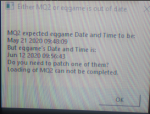
I am trying to login on to MQ2 but I keep getting the following message:
MQ2 expected eqgame Date and Time to be:
May 21 2020 09:48:09
But eqgame's Date and Time is
June 12 2020 09:56:43
Do you need to patch one of them?
Loading of MQ2 can not be completed.
I am not too sure what I need to do in order to fix this. Any assistance would be greatly appreciated. Thank you.
MQ2 expected eqgame Date and Time to be:
May 21 2020 09:48:09
But eqgame's Date and Time is
June 12 2020 09:56:43
Do you need to patch one of them?
Loading of MQ2 can not be completed.
I am not too sure what I need to do in order to fix this. Any assistance would be greatly appreciated. Thank you.
SpartacustheMan
New member
Ah ok hehe thank you.Hey, I was notified in the discord that this is normal after patch day and to just sit tight.

When EverQuest patches MQ2 has to patch. Generally special donors are allowed to test it for a bit before it's released to general public so any issues can be found. Generally on patch days if too much wasn't changed you can expect an MQ2 release around 8-8:30pm EST. With major changes such as new expansions that time can be extended to be much longer but generally that's when you can expect a working MQ2 after Everquest patches.
SpartacustheMan
New member
Right on so I suppose I will play tonight. Thank you!When EverQuest patches MQ2 has to patch. Generally special donors are allowed to test it for a bit before it's released to general public so any issues can be found. Generally on patch days if too much wasn't changed you can expect an MQ2 release around 8-8:30pm EST. With major changes such as new expansions that time can be extended to be much longer but generally that's when you can expect a working MQ2 after Everquest patches.

RoaringLion
Member
I believe if you donate to the developers you get early access to test out the new patch updates before they go live to the rest of the redguides community. Link posted below for thread describing how to donate.
https://www.redguides.com/community/threads/donate-to-mq2-dev-eqmule.71208/
https://www.redguides.com/community/threads/donate-to-mq2-dev-eqmule.71208/
Basically i am new to using this. it's 6/17/2020 and that what shows up on EQGames But MQ2 is showing up at 5/21/2020. i can assume its because of the new Patch. is there a place i can update MQ2. Do i have to wait until MQ2 comes out with there own patch to update there logins? i just dont know what to do. if someone has any clue on whats going on please write back...
Last edited by a moderator:
RoaringLion
Member
I posted this in another thread but its relevant here also:
MQ2 not working immediately is normal on a patch day. Give it a few hours.
I believe if you donate to the developers you get early access to test out the new patch updates before they go live to the rest of the redguides community. Link posted below for thread describing how to donate.
https://www.redguides.com/community/threads/donate-to-mq2-dev-eqmule.71208/
MQ2 not working immediately is normal on a patch day. Give it a few hours.
I believe if you donate to the developers you get early access to test out the new patch updates before they go live to the rest of the redguides community. Link posted below for thread describing how to donate.
https://www.redguides.com/community/threads/donate-to-mq2-dev-eqmule.71208/


Yea I am really having a great time with everquest now. I been using this. Before this I was on the fence about if I was gonna keep playing. But since I started this I got 5 all access accounts all 5 went from 1 to 93 in like 3 weeks once I get them to 100 gonna upgrade them to mq2war and such
Redbot updated Very Vanilla MQ2 (Live Servers) with a new update entry:
20200617
Read the rest of this update entry...
20200617
Jun 17 2020 by RedGuides
- MQ2React (drwhomphd) Replaced the .ini file with a .yaml - please update your reacts. Added logic to avoid crashing on parse errors, improved save & loading functions, improved enable/disable commands, and made executing actions more aggressive to avoid other issues.
- MQ2Status (Sic) New "/status" commands: login (returns login name) zone (returns current zone) krono (returns # of krono) stat weight (returns weight, limit and difference) currency blah (returns...
Read the rest of this update entry...
I ran the red guides updater and the patch notes say that it is updated for Jun 17, 2020, but when I click to launch MQ it launches the Jun 12th version (I find this by hovering over the MQ icon in system tray). Is this on my end or something with the patcher?
\
NM, rebooting fixed it.
\
NM, rebooting fixed it.
The date when hovering over the MQ2 icon reflects the date of eqgame.exe, not our software.I ran the red guides updater and the patch notes say that it is updated for Jun 17, 2020, but when I click to launch MQ it launches the Jun 12th version (I find this by hovering over the MQ icon in system tray). Is this on my end or something with the patcher?
\
NM, rebooting fixed it.
Last edited:
Redbot updated Very Vanilla MQ2 (Live Servers) with a new update entry:
20200620
Read the rest of this update entry...
20200620
Jun 20 2020 by RedGuides
- MQ2SQLite (Knightly) Major update - Added advanced functionality
Can now choose to keep a database open rather than open and close on each query
Deprecated the .clear TLO in favor of the clear command line argument (in Live this will only notify you 5 times per plugin load/unload)
Added the query verb to specify that this is a standard query
Added the open/close verbs to open and close databases
Added the AdvQuery verb to specify that...
Read the rest of this update entry...
DoubleShotW
Member
This update is not working on my installation. When I try to run a Tradesman mac in game it crashes with the following popup:
Plugin Load Failed
Please recompile
<install path>mq2shellcmd.dll -- it is out of date with respect to mq2main (1592731056> 1592426987)
Everything was working fine for me last night prior to this update.
Plugin Load Failed
Please recompile
<install path>mq2shellcmd.dll -- it is out of date with respect to mq2main (1592731056> 1592426987)
Everything was working fine for me last night prior to this update.
MQ2ShellCMD was removed. I'll recompile, I didn't know jande's work depended on it.This update is not working on my installation. When I try to run a Tradesman mac in game it crashes with the following popup:
Plugin Load Failed
Please recompile
<install path>mq2shellcmd.dll -- it is out of date with respect to mq2main (1592731056> 1592426987)
Everything was working fine for me last night prior to this update.
- Status
- Not open for further replies.
Users who are viewing this thread
Total: 1 (members: 0, guests: 1)
Share: