• You've discovered RedGuides, an EverQuest multi-boxing and scripting community 🧙‍♀️⚙️. We want you to play several EQ characters at once, come join us and say hello! 👋

  • A TLP without truebox has thawed (Very Vanilla ready)
    Frostreaver
LDON.mac - LDON Adventures

Release LDON.mac - LDON Adventures v6.0

No permission to download
In that situation I /mqp on tank, grab the mobs I need and /mqp again. Group finishes off mobs then leader goes through exit routine and gets new mission.
Correct, if you get aggro this will break the med cycle.

Additionally, it allows us to use clickies, but I've not found a way to specify a particular clicky I want it to always keep on. In my particular case, my SK tank is an ogre, I don't have a shrink capable toon in my group, but I do have a guise of the deceiver that I would like to always keep enabled, so my ogre's fat behind can be shrunk down to a DE instead, lessening the hangups, but with only a 30 min effect, and it doesn't seem to autoclick it currently, I don't know how I can keep that automatically on my toon. After a death I'd lose that, as well as the cobalt bracer shrink effect on my ogre war.
You would need to edit the clicky section to check for height and then cast the shrink clicky.
INI:
|Clicky Buff
    /if (${Me.ItemReady[Guise of the Deceiver]} && ${Me.Height}>1.91) {
            /useitem Guise of the Deceiver
            /delay 1s
            /echo \agActivating \ay[\apGuise of the Deceiver\ay]
            /delay 1s !${Me.ItemReady[Guise of the Deceiver]}
        }

 
Thanks, I was looking for a command, but editing the mac works too. FYI for others interested, I changed the bottom of the Sub Clickies in the macro to this to accomodate the clickies I referenced, so it doesn't try to do skeleton illusion from AoN as well as the guise of the deceiver, and uses the Cobalt Bracer on my Ogre to shrink him down if he has neither, by doing a final check on character Height, which I may need to tweak a bit, though it's working so far for me:
INI:
    |Clicky Illusion
    /if (${Me.ItemReady[Amulet of Necropotence]} && !${Me.Buff[Illusion: Skeleton].ID}) {
            /useitem Amulet of Necropotence
            /delay 1s
            /echo \agActivating \ay[\apAmulet of Necropotence\ay]
            /delay 1s !${Me.ItemReady[Amulet of Necropotence]}
        }
    |Clicky Guise of the Deceiver
    /if (${Me.ItemReady[Guise of the Deceiver]} && !${Me.Buff[Illusion: Dark Elf].ID} && !${Me.Buff[Illusion: Skeleton].ID}) {
            /useitem Guise of the Deceiver
            /delay 7s
            /echo \agActivating \ay[\apGuise of the Deceiver\ay]
            /delay 1s !${Me.ItemReady[Guise of the Deceiver]}
        }
    }
    |Clicky Boots
    /if (${Me.ItemReady[Fabled Journeyman's Boots]} && !${Me.Buff[Bootstrutter's Blessing].ID} && !${Me.Buff[Flight of Falcons].ID} && !${Me.Buff[Spirit of Wolf].ID} && !${Me.Buff[Spirit of Bih'Li].ID} && !${Me.Buff[Spirit of Tala'Tak].ID} && !${Me.Buff[Flight of Eagles].ID}) {
            /useitem Fabled Journeyman's Boots
            /delay 1s
            /echo \agActivating \ay[\apFabled Journeyman's Boots\ay]
            /delay 1s !${Me.ItemReady[Fabled Journeyman's Boots]}
        }
    |Clicky Cobalt Bracer
    /if (${Me.Height} > 4.00 && ${Me.ItemReady[Cobalt Bracer]}) {
        /target ${Me.CleanName}
        /useitem Cobalt Bracer
        /delay 8s
        /echo \agActivating \ay[\apCobalt Bracer\ay]
        /delay 1s !${Me.ItemReady[Cobalt Bracer]}
    }
/return

Edit: modified to target self for the cobalt bracer
 
Last edited:
Sooooo....

In the Guk adventures, I seem to randomly get a "You are too far away from the door" message and my toon just sits there. If I'm in the room, no biggie; I just Gate back to South Ro and restart the LDON Mac when I get there. If I'm not here, he just sits there until I finally come back.

My question is: Is there a line to tweak that would get him to move closer without me being there?

Thanks again for all of the hard work you put into this, Cannonballdex! Awesome work!
So I'm now running the Hunter tasks for each of the LDONs and I keep having issues in Guk and Miragul's; I'm often off in a far distant corner of the zone, still needing more Mobs to complete the task, but my character can't find a target within the 200 scope. Can this be adjusted somewhere so he will look farther; for 300 or 400, for example? I've tried skimming through the code, but I'm at a loss.

Thank you again for ***ALL*** the hard work and responses!
 
So I'm now running the Hunter tasks for each of the LDONs and I keep having issues in Guk and Miragul's; I'm often off in a far distant corner of the zone, still needing more Mobs to complete the task, but my character can't find a target within the 200 scope. Can this be adjusted somewhere so he will look farther; for 300 or 400, for example? I've tried skimming through the code, but I'm at a loss.

Thank you again for ***ALL*** the hard work and responses!
This could be from a bad navmesh file not being able to reach mobs.
/ldon zradius
/ldon help
the default is set to 250
if using cwtn i think you might look at this section
/if (${UseCWTNHunterTankMode}) {
/docommand /${Me.Class.ShortName} mode 0
/delay 30
/docommand /${Me.Class.ShortName} Radius 100
/delay 30
/docommand /${Me.Class.ShortName} zRadius 25
/delay 5s
}
 
This could be from a bad navmesh file not being able to reach mobs.
/ldon zradius
Mine shows my zradius as 1000

I'm running the missions in Mistmoore right now (I'm literally only missing the Trueborn Soul Render from each of those missions, ha ha) and there are now issues here. I'll go back and check later.

Thanks again, CannonBallDex!
 
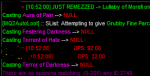
I see this a lot with my SHD when a mob dies part way through a casting cycle:
1629572165909.png
It might speed things up a bit if there was a NULL check for target in the casting routine? check xtar for next target or nav to next if no name's found in target window upon cast?
 
It might speed things up a bit if there was a NULL check for target in the casting routine? check xtar for next target or nav to next if no name's found in target window upon cast?
How fast are the mobs dying? If they are dying faster than you cast spells, I would just /ldon usecastspells off
 
I actually disabled the casting because I was burning through my mana too fast and spending too much time medding on the SHD. my caster group is gimp dps, I cut it to the wire time-wise to finish quite a few ldon's with this particular group.
 
First off - amazing work, thankyou!

Secondly - my issue. So, basically everything runs smoothly, the occasional stuck cleric aside. My main problem is that if I complete a dungeon but have more mobs on agro list then the tank switches off and heads for the zone out whilst the agro'd mob splats the rest of my party.
Is there any way to stop this happening?
I'm running CWTN on my warr in HT mode and the rest of the group KA assisting.
Zone in - auto changes into HT mode and goes about it's business. Final kill, regardless of excess mobs, switches to manual, stops attacking and runs back to attempt to zone out.

Cheers,

THN
 
Not sure why the cwtn plugin would not engage aggro, unless you were already waiting at the zoneline, but even then I would think the other mode would engage aggro. Also, When you are running cwtn hunter tank mode on the tank, there is no communication with the group running kissassist. The macro is not set up to run mix and match plugins and macros.

This was a post earlier about modifications using cwnt and kissassist, but I haven't tested it. https://www.redguides.com/community/threads/ldon-mac-ldon-adventures.78209/post-479727
 
Secondly - my issue. So, basically everything runs smoothly, the occasional stuck cleric aside. My main problem is that if I complete a dungeon but have more mobs on agro list then the tank switches off and heads for the zone out whilst the agro'd mob splats the rest of my party.
Is there any way to stop this happening?
I'm running CWTN on my warr in HT mode and the rest of the group KA assisting.
Zone in - auto changes into HT mode and goes about it's business. Final kill, regardless of excess mobs, switches to manual, stops attacking and runs back to attempt to zone out.

I haven’t seen that to be the case for when I’m running CWTN HT mode. He usually keeps killing after the mission and only turns to manual after running to the zone out. Are you running a modified copy by chance?
If I remember I’ll post my modifications when I get home for running MA /CWTN.
 
Thanks, I was looking for a command, but editing the mac works too. FYI for others interested, I changed the bottom of the Sub Clickies in the macro to this to accomodate the clickies I referenced, so it doesn't try to do skeleton illusion from AoN as well as the guise of the deceiver, and uses the Cobalt Bracer on my Ogre to shrink him down if he has neither, by doing a final check on character Height, which I may need to tweak a bit, though it's working so far for me:
INI:
    |Clicky Illusion
    /if (${Me.ItemReady[Amulet of Necropotence]} && !${Me.Buff[Illusion: Skeleton].ID}) {
            /useitem Amulet of Necropotence
            /delay 1s
            /echo \agActivating \ay[\apAmulet of Necropotence\ay]
            /delay 1s !${Me.ItemReady[Amulet of Necropotence]}
        }
    |Clicky Guise of the Deceiver
    /if (${Me.ItemReady[Guise of the Deceiver]} && !${Me.Buff[Illusion: Dark Elf].ID} && !${Me.Buff[Illusion: Skeleton].ID}) {
            /useitem Guise of the Deceiver
            /delay 7s
            /echo \agActivating \ay[\apGuise of the Deceiver\ay]
            /delay 1s !${Me.ItemReady[Guise of the Deceiver]}
        }
    }
    |Clicky Boots
    /if (${Me.ItemReady[Fabled Journeyman's Boots]} && !${Me.Buff[Bootstrutter's Blessing].ID} && !${Me.Buff[Flight of Falcons].ID} && !${Me.Buff[Spirit of Wolf].ID} && !${Me.Buff[Spirit of Bih'Li].ID} && !${Me.Buff[Spirit of Tala'Tak].ID} && !${Me.Buff[Flight of Eagles].ID}) {
            /useitem Fabled Journeyman's Boots
            /delay 1s
            /echo \agActivating \ay[\apFabled Journeyman's Boots\ay]
            /delay 1s !${Me.ItemReady[Fabled Journeyman's Boots]}
        }
    |Clicky Cobalt Bracer
    /if (${Me.Height} > 4.00 && ${Me.ItemReady[Cobalt Bracer]}) {
        /useitem Cobalt Bracer
        /delay 8s
        /echo \agActivating \ay[\apCobalt Bracer\ay]
        /delay 1s !${Me.ItemReady[Cobalt Bracer]}
    }
/return


I did the cobalt bracer portion but my ogre didnt do it. Any suggestions? I turned on /ldon useclickybuff
 
-On the cobalt bracer, I'm still trying to suss that one myself actually. My toons will click other inventory clickies, but for some reason won't click the cobalt bracer, so I'm still playing with this one to try and find out how a condition as simple as ${Me.Height} won't trigger the usage of the bracer. I was confused earlier because I was using Autosize, and thought the bracer had done that.
 
Good point, if the bastards will let us back in I can verify and edit my posting as needed
 
Then you will probably get in to the whole if Group.Member checking height or just /target each group member and shrink if they need it or not when you shrink...
 
INI:
|Clicky Cobalt Bracer
    /if (${Me.Height} > 4.00 && ${Me.ItemReady[Cobalt Bracer]}) {
        /target ${Me.Name}
        /useitem Cobalt Bracer
        /delay 8s
        /echo \agActivating \ay[\apCobalt Bracer\ay]
        /delay 1s !${Me.ItemReady[Cobalt Bracer]}
    }
 
Is there any way to turn off the "attack mobs that aggro me/my group" when I'm outside of a LDoN? The invis helps, but the North Ro nav path takes you straight through a bunch of undead that I'm always killing, I'd rather just ignore them and train a bunch of lvl 10 mobs to the zone.
 
Is there any way to turn off the "attack mobs that aggro me/my group" when I'm outside of a LDoN? The invis helps, but the North Ro nav path takes you straight through a bunch of undead that I'm always killing, I'd rather just ignore them and train a bunch of lvl 10 mobs to the zone.
Haven't tested but you can try to replace
INI:
Sub GroupWait
:WaitForGroup
/if (${Me.XTarget[1].ID}) {

With

Sub GroupWait
:WaitForGroup
/if (${Me.XTarget[1].ID} && ${Zone.ShortName.NotEqual[northro]}) {
 
tried this but doesnt work. My driver toon is still attacking the undead in nro when aggroed.

Sometimes he targets a random npc in the adventure camp when he has undead on the aggrolist and macro hangs up.

Guess this has something to do with trying to target nearest mob when the group has aggro?

Going to bed for now but will try to find a sollution tomorow how to avoid these level 10 mob battles :-)
 
Line around 304
from
INI:
/if (!${UseCWTNHunterTankMode}) {

        /call Farmstuff

        }
to
INI:
/if (!${UseCWTNHunterTankMode} && ${Zone.ShortName.NotEqual[northro]}) {
        /call Farmstuff
        }
 
Curious as to why all the locations except mistmoore have
[CODE lang="ini" highlight="2"]/squelch /bcg //doortarget *DOORNAME*
/squelch /bcg //nav door *DOORNAME*
/delay 2s
/squelch /bcg //click left door[/CODE]
vs Mistmoore:
INI:
/squelch /bcg //doortarget *DOORNAME*)
/delay 2s
/squelch /bcg //click left door

I'm randomly in some of the zones having my toons not click to exit. I was fixing to add that in to the macro manually but I'm sure you had some reason not to include that?
I suspect what is happening is with the mac or the plugins still running in chase mode, they are not getting close enough to the door after the NAV command. The tank see's them 'close' and exits the instance but the trailing char's may be just to far from the click to exit.
 
I think mistmoore is the zone where the door is in the wall and doesn't nav to. Also, I think those zones have 3 different doors depending on what zone you are in, never got around to finishing them.
 
I think mistmoore is the zone where the door is in the wall and doesn't nav to. Also, I think those zones have 3 different doors depending on what zone you are in, never got around to finishing them.
Yeah, some are in the wall and some are on the ceiling. The one that was in the wall I was able to issue the nav command and it would run at the wall 'trying' to get to the door but couldn't. However, doing so made sure they were close enough to the exit to click it ;).
I'll do some testing and give you some feedback.
 
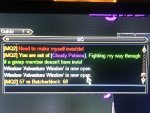
Hello, I am having a Problem while running 2 separate groups. One group works Perfectly, the 2nd group, When I get the LDON in BB, the 2nd group leader will run to The Greater Faydark and just stands there. In the MQ2 window, It just spams the same message over and over, Which is in the Picture Below. Also, All of the toons in the 2nd group chat window it spams: "You Don't Have that Ability"
mq2 photo.jpg
 
Last edited:
Hello, I am having a Problem while running 2 separate groups. One group works Perfectly, the 2nd group, When I get the LDON in BB, the 2nd group leader will run to The Greater Faydark and just stands there. In the MQ2 window, It just spams the same message over and over, Which is in the Picture Below. Also, All of the toons in the 2nd group chat window it spams: "You Don't Have that Ability"
What message is it spamming over and over? The second part, They Don't have that ability is just the group saying they do not have the abilities requested by the leader for invisibility.
 
The mq2 window is spamming the message I attached to the prior post. The picture thumbnail. All 6 lines. 57 vs butcherblock 68
 
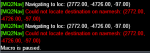
Having an issue with this after I enter everfrost cave
1630357526271.png

Once inside, I can end the mac and start it up again and the message goes away. Just none of the support toons are set how they should be.
 
Last edited:
The mq2 window is spamming the message I attached to the prior post. The picture thumbnail. All 6 lines. 57 vs butcherblock 68
Are you using any plugins? I assume this is on your way back to Butcherblock to get another task? Do you have the navmesh file for Lesser Faydark?
 
I'm just wondering what the trick is here? My toons constantly get stuck on the geometry in the zones (some worse than other, like Guk). I'm lucky if I can do 2 in a row without having to intervene to get unstuck.

I am using the mesh files attached, and do have Nav set to get unstuck, etc. What am I missing?
 
I'm just wondering what the trick is here? My toons constantly get stuck on the geometry in the zones (some worse than other, like Guk). I'm lucky if I can do 2 in a row without having to intervene to get unstuck.

I am using the mesh files attached, and do have Nav set to get unstuck, etc. What am I missing?
I have the same thing, I just monitor them while watching youtube / netflix.
 
Release LDON.mac - LDON Adventures

Users who are viewing this thread

Back
Top
Cart