• Hail, we're RedGuides. We want you to play six (yes, 6!) EverQuest characters at once. We have scripts and a friendly community to help, please join our playstyle and say hello! 👋
  • We've added LLM sections to our Terms & Rules and Resource Rules, for everyone's sanity & in-game safety.
    Read more
    a. Do not replace your voice with an LLM. This goes for your posts and your scripts. Drafting and editing with a tool is fine, but don't take you out of what you share.
    b. Do not replace your EQ character's voice with an LLM. We don't want scripts that speak over /ooc, /shout or other public channels. This has been an unwritten rule that's kept casino scripts off the site for decades, but we're now compelled to make it clear: keep automated communication private.

    Why Does RG Review Scripts?
    Nearly every LLM-written Lua script we see is making your character do impossible things, and rarely in a way that's beneficial to you. We've seen heavy server hammering, /target over impossible distances when /nav spawn would passively accomplish the same thing, a spawn search that fires 20+ times per second, and other pointless actions that are likely annoying GMs.

    You are welcome to use LLMs as a tool to structure, draft, and edit your work, but please read critically before hitting /lua run

Problem - Issues loading after recent patch

Status
Not open for further replies.
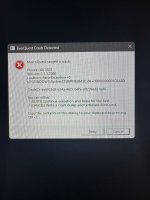
I updated yesterday EQ and RG then upon launch of autorun i got this error message, doesn't matter if loading 1 or all 6 but it fails before it even gets to login screen. Any solution to the fix? i have tried reinstalling with no luck. @Sic , sorry for the tag man but you are usually the one with most of the answers..
 

Attachments

  • IMG_2581.JPG
    IMG_2581.JPG
    752 KB · Views: 0
I updated yesterday EQ and RG then upon launch of autorun i got this error message, doesn't matter if loading 1 or all 6 but it fails before it even gets to login screen. Any solution to the fix? i have tried reinstalling with no luck. @Sic , sorry for the tag man but you are usually the one with most of the answers..
please follow the instructions on the window.

a picture of the screen that says to copy and paste the error code isn't helpful for anyone.

i mean look at the picture
 
What The Ok GIF by Lillee Jean
 
please follow the instructions on the window.

a picture of the screen that says to copy and paste the error code isn't helpful for anyone.

i mean look at the picture
It literally just copies the exact text from the window to paste in a notebook, i don't see where that makes much difference beyond posting the screenshot.

---------------------------
EverQuest Crash Detected
---------------------------
MacroQuest caught a crash:

Process ID: 27928
Version: 3.1.1.2986
Location: RaiseException+0 (C:\WINDOWS\System32\KERNELBASE.dll+00000000000CBA80)

CrashID: b5a25897-e1d6-4319-bd27-de0f2a2f53f6

You can either:
* [RETRY] Continue execution and hope for the best.
* [CANCEL] Write a crash dump and terminate EverQuest.

Copy the contents of this dialog to your clipboard by pressing Ctrl+C

---------------------------
Retry Cancel
---------------------------
 
It just literally just copies the exact text from the window to paste in a notebook, i don't see where that makes much difference beyond posting the screenshot.
"CrashID: b5a25897-e1d6-4319-bd27-de0f2a2f53f6" having this in text means it can be looked up exactly - instead of transcribed from something that looks like it was put through a wood chipper.
 
"CrashID: b5a25897-e1d6-4319-bd27-de0f2a2f53f6" having this in text means it can be looked up exactly - instead of transcribed from something that looks like it was put through a wood chipper.
Makes sense I suppose, posted things like that in the past and usually get asked for a pic of what its doing so I defaulted I guess...
 
Reinstalled RG launcher and I can now login via autorun... but now when I start RG launcher, and I choose log in it fails to load page... so new issue I guess
RG launcher wouldnt really have anything to do with that.

Re your new issue, make sure to look at the discussion on the mq2autologin thread
 
RG launcher wouldnt really have anything to do with that.

Re your new issue, make sure to look at the discussion on the mq2autologin thread
well, every time I tried to load it would crash and it is now fixed after redownloading and installing launcher so... it is what it is but then fixes one issue and starts another lol my luck....
 
Problem - Issues loading after recent patch
Status
Not open for further replies.

Users who are viewing this thread

Back
Top
Cart