I updated yesterday EQ and RG then upon launch of autorun i got this error message, doesn't matter if loading 1 or all 6 but it fails before it even gets to login screen. Any solution to the fix? i have tried reinstalling with no luck. @Sic , sorry for the tag man but you are usually the one with most of the answers..

Install the app
How to install the app on iOS
Follow along with the video below to see how to install our site as a web app on your home screen.
Note: This feature may not be available in some browsers.
-
 You've discovered RedGuides, an EverQuest multi-boxing and scripting community 🧙♀️⚙️. We want you to play several EQ characters at once, come join us and say hello! 👋
You are using an out of date browser. It may not display this or other websites correctly.
You should upgrade or use an alternative browser.
You should upgrade or use an alternative browser.
Problem - Issues loading after recent patch
- Thread starter Sinfool
- Start date
- Status
- Not open for further replies.
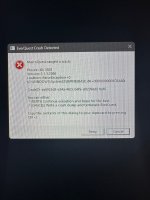

please follow the instructions on the window.I updated yesterday EQ and RG then upon launch of autorun i got this error message, doesn't matter if loading 1 or all 6 but it fails before it even gets to login screen. Any solution to the fix? i have tried reinstalling with no luck. @Sic , sorry for the tag man but you are usually the one with most of the answers..
a picture of the screen that says to copy and paste the error code isn't helpful for anyone.
i mean look at the picture


It literally just copies the exact text from the window to paste in a notebook, i don't see where that makes much difference beyond posting the screenshot.please follow the instructions on the window.
a picture of the screen that says to copy and paste the error code isn't helpful for anyone.
i mean look at the picture
---------------------------
EverQuest Crash Detected
---------------------------
MacroQuest caught a crash:
Process ID: 27928
Version: 3.1.1.2986
Location: RaiseException+0 (C:\WINDOWS\System32\KERNELBASE.dll+00000000000CBA80)
CrashID: b5a25897-e1d6-4319-bd27-de0f2a2f53f6
You can either:
* [RETRY] Continue execution and hope for the best.
* [CANCEL] Write a crash dump and terminate EverQuest.
Copy the contents of this dialog to your clipboard by pressing Ctrl+C
---------------------------
Retry Cancel
---------------------------
"CrashID: b5a25897-e1d6-4319-bd27-de0f2a2f53f6" having this in text means it can be looked up exactly - instead of transcribed from something that looks like it was put through a wood chipper.It just literally just copies the exact text from the window to paste in a notebook, i don't see where that makes much difference beyond posting the screenshot.
Makes sense I suppose, posted things like that in the past and usually get asked for a pic of what its doing so I defaulted I guess..."CrashID: b5a25897-e1d6-4319-bd27-de0f2a2f53f6" having this in text means it can be looked up exactly - instead of transcribed from something that looks like it was put through a wood chipper.

Lord Sivion
Ultimate seasoned veteran member
- Joined
- Oct 24, 2020
- RedCents
- 14,843¢
Why not do both? Post the screen and a copy+paste? 
More information is better when troubleshooting a problem.....
More information is better when troubleshooting a problem.....
Moving forward... won't be an issue... Used to not having many issues that I've not been able to troubleshoot myself so I'm fairly new to asking for assistance in most cases.Why not do both? Post the screen and a copy+paste?
More information is better when troubleshooting a problem.....
RG launcher wouldnt really have anything to do with that.Reinstalled RG launcher and I can now login via autorun... but now when I start RG launcher, and I choose log in it fails to load page... so new issue I guess
Re your new issue, make sure to look at the discussion on the mq2autologin thread
well, every time I tried to load it would crash and it is now fixed after redownloading and installing launcher so... it is what it is but then fixes one issue and starts another lol my luck....RG launcher wouldnt really have anything to do with that.
Re your new issue, make sure to look at the discussion on the mq2autologin thread
- Status
- Not open for further replies.
Users who are viewing this thread
Total: 1 (members: 0, guests: 1)
Share: