• You've discovered RedGuides, an EverQuest multi-boxing and scripting community 🧙‍♀️⚙️. We want you to play several EQ characters at once, come join us and say hello! 👋

  • A TLP without truebox has thawed (Very Vanilla ready)
    Frostreaver

Issue launching MQ with elevated permissions

Sic

Administrator
Moderator
Joined
May 5, 2016
RedCents
49,476¢
Pronouns
He/Him
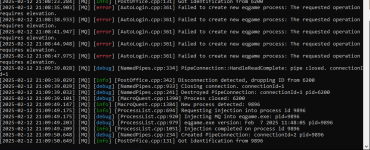
if you're having issues with autologin/mq "connecting/injecting" to everquest, you can toggle on the debug console

1739497662652.png

if after you turn that on and try and launch eq - and you get either of these, it means something is having an issue with running as administrator

1739497694983.png
or
1739497761262.png

you don't want eq run as administrator.

if you're just launching EQ / MQ through MQ loader then you need to check your eqgame.exe isn't set to "Run as Administrator"
if you launch eq/mq through something else, like isboxer you want to disable that in the settings for that program.


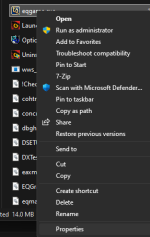
how to check if eqgame.exe is set to being launched as admin:
- open your everquest directory
- find eqgame.exe

1739452306747.png

Right click and click "Properties" - if you don't see properties click "Show more options" and then click "Properties"
1739452349307.png

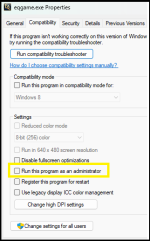
You do not want the "Run this program as an administrator" checked.
You also do NOT want compatibility mode
1739452435365.png


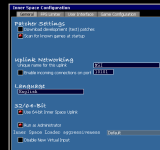
If you are using ISBoxer
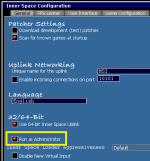
you want to open your Inner Space Configuration, and under the General Tab you want to have deselected "Run as Administrator"
in this screenshot it is selected, you don't want the red dot on that option.

Make sure to hit save after making this change
1739452502500.png

If you are being PROMPTED asking for elevated permission - like using Joeboxer - you also don't want to give it, because that is also doing the elevated administrator permission.
 
Last edited:
Since the update my teams are failing launch from MQ2 anyone having this issue? Yes I've updated from launcher, tried launching single toons as well with no luck. Anyone have an idea as to what is the problem? Thanks in advance.
 
Since the update my teams are failing launch from MQ2 anyone having this issue? Yes I've updated from launcher, tried launching single toons as well with no luck. Anyone have an idea as to what is the problem? Thanks in advance.
this should be in the mq2autologin thread.

also - you're not using MQ2, MQ2 has been dead and gone for a while

did you update everquest as well as mq?

i was able to launch like normal, didn't see anything different.

you're not using isboxer as admin or something like that are you?
 
this should be in the mq2autologin thread.

also - you're not using MQ2, MQ2 has been dead and gone for a while

did you update everquest as well as mq?

i was able to launch like normal, didn't see anything different.

you're not using isboxer as admin or something like that are you?
My bad, pleased forgive me I'm not a pro poster.... no I'm not using isboxer and I did update eq before I updated the RG Launcher
 
My bad, pleased forgive me I'm not a pro poster.... no I'm not using isboxer and I did update eq before I updated the RG Launcher
So what happens exactly

You see MQ icon, you click it to launch a toon.

You click on your toonname - then what happens?

MQ has an option to turn on debugging too, which might indicate what's happening
 
So what happens exactly

You see MQ icon, you click it to launch a toon.

You click on your toonname - then what happens?

MQ has an option to turn on debugging too, which might indicate what's happening
So what happens exactly

You see MQ icon, you click it to launch a toon.

You click on your toonname - then what happens?

MQ has an option to turn on debugging too, which might indicate what's happening
Also gave that that a try, Says Failed to create new eqgame process: The requested operation requires elevation

Like I said have had no prob with any of my teams, just since the patch today i've had a problem. I can go play directly via everquest to log on a toon but not through mq
 
Also gave that that a try, Says Failed to create new eqgame process: The requested operation requires elevation

Like I said have had no prob with any of my teams, just since the patch today i've had a problem. I can go play directly via everquest to log on a toon but not through mq
It does nothing, click and nothing at all, just thought maybe the path for toons might have been incorrect but the path is fine, made a new team profile and still nothing...
 
Also gave that that a try, Says Failed to create new eqgame process: The requested operation requires elevation

Like I said have had no prob with any of my teams, just since the patch today i've had a problem. I can go play directly via everquest to log on a toon but not through mq
So this is what I mentioned before about launching something as admin.

Is boxer is one of the culprits for this.
 
I'm not using IS Boxer
Yes you said that I hear you friend.

I don't think you are using isboxer because you said you weren't.

You are having an issue with elevation of privileges, for which I gave one of the most common reasons.
 
I'm experiencing the same issue, and so is my roommate. We can log in through the character select screen, and all the toons launch like normal, but when we get to the individual login screen, the passwords aren't being filled in for either of us. I’ve checked the profiles and everything else, and it shows that the passwords are correct and saved, but they’re just not being entered automatically when trying to log in.
 
Yes you said that I hear you friend.

I don't think you are using isboxer because you said you weren't.

You are having an issue with elevation of privileges, for which I gave one of the most common reasons.
I've tried everything I can think of with no luck at all, the thread seems buried now that it has been moved, guess I wait for the next patch I've tried reinstalling and no luck....
 
Same issue as most recent posters. Running the debug console for macroquest gives me:
[MQ] [error] [AutoLogin.cpp:361] Failed to create new eqgame process: The requested operation requires elevation.
 
So I am having this same issue. However, I have two seperate EQ folders one for my main driver, and the rest under the other folder. I am able to launch my main without any issue. So I went and inspected the login config to make sure that the correct folders are being used and they are. I turned on debugging and I am not getting any output when attempting to load my other toons. I am going to read through the autologin wiki and see if I can't find anything there on my own. I just wanted to chime in with what I have been able to come up with so far.
 
Looking further it appears my issue may have more to do with isboxer. I brought up the debug console and when I launch from isboxer it doesn't inject. It literally does nothing.
 
Fixed mine. I had run as administrator set under compatibility for Macroquest and the run as administrator box checked in isboxer. I didn't see any permission errors until after I had turned it off for Macroquest. After unsetting both of these I'm able to launch and login as normal from isboxer.
 
ditto, i tried it and it didnt work either, but i am convinced it is an IS boxer issue not a MQ issue. Well in so far as Inner Space is not communicating with MQ now
 
For those that

ARE

Running isb, you have to change it in this screen

1000007189.png
 
Fixed mine. I had run as administrator set under compatibility for Macroquest and the run as administrator box checked in isboxer. I didn't see any permission errors until after I had turned it off for Macroquest. After unsetting both of these I'm able to launch and login as normal from isboxer.

Yep definitely dont want to run MQ as admin make sure you don't have your right click properties for MQ set to run as admin.

I think this patch MQ will no longer be happy if you try.

You don't want mq or eq trying to be run as admin, so check both
 
Ok just wanted to confirm that unchecking "run as admin" via the config screen as Sic posted, this DID work for me. Thank you Sic
 
This happens with my laptop but not my desktop. Both should be identical but *clearly* were not.

I do not use ISBoxer.
I verified the following:
- macroquest.exe is NOT set to run as admin
- obfuscated mq process/exe is NOT set to admin
- redguides launcher script/icon is NOT set to admin

Still was throwing elevated issues.
- eqgame.exe WAS set to run as administrator

This was the culprit. I have no idea why the eqgame client wass flagged run as admin. But please go check your exe files in your EQ folder, they may (probably are) the weak link.
 
Yep definitely dont want to run MQ as admin make sure you don't have your right click properties for MQ set to run as admin.

I think this patch MQ will no longer be happy if you try. You don't want mq or eq trying to be run as admin, so check both

Any tips for those of us NOT using isb? 😆
The post above yours. You don't want MQ or EQ set as admin.

Still was throwing elevated issues.
- eqgame.exe WAS set to run as administrator

This was the culprit. I have no idea why the eqgame client wass flagged run as admin. But please go check your exe files in your EQ folder, they may (probably are) the weak link.
Woot. Yep check what tempus did
 
This happens with my laptop but not my desktop. Both should be identical but *clearly* were not.

I do not use ISBoxer.
I verified the following:
- macroquest.exe is NOT set to run as admin
- obfuscated mq process/exe is NOT set to admin
- redguides launcher script/icon is NOT set to admin

Still was throwing elevated issues.
- eqgame.exe WAS set to run as administrator

This was the culprit. I have no idea why the eqgame client wass flagged run as admin. But please go check your exe files in your EQ folder, they may (probably are) the weak link.
This was the issue for me, eq exe was wet as run as admin, Thank you!
 
@Zak1011 @Aandien
 
just getting to log on after yesterdays patch, updated eq, updated the patcher, load it up, but my autologin doesn't work, and if i load 1 single account, mq isn't working in the game neither? something change on directory?
 
Wrong forum
Updated everquest launcher, update redguides launcher and all plugins, macros, and everything, go to use autologin in, nothing, go to load a single account up without using autologin and don't have a single mq window/plugin in the game.
 
@Zerox8900 please read the earlier posts here
Updated everquest launcher, update redguides launcher and all plugins, macros, and everything, go to use autologin in, nothing, go to load a single account up without using autologin and don't have a single mq window/plugin in the game.
Zerox,
Sorry you're having problems bro.

I tagged you in this thread already, please read the last few posts back.
 
It is always great when a community comes together and helps each other to fix hick ups. I want to say thank you to all who helped here at red guides, even though my issue was with Inner space.
 
i have read all the posted threads and none of the eqgame.exe files are running as admins, redguides isn't runnning as admin, still not getting anywhere for the autologin to work or any mq windows/plugins loaded in game
 
Issue launching MQ with elevated permissions

Users who are viewing this thread

Back
Top
Cart