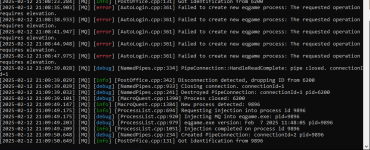
if you're having issues with autologin/mq "connecting/injecting" to everquest, you can toggle on the debug console

if after you turn that on and try and launch eq - and you get either of these, it means something is having an issue with running as administrator

or

you don't want eq run as administrator.
if you're just launching EQ / MQ through MQ loader then you need to check your eqgame.exe isn't set to "Run as Administrator"
if you launch eq/mq through something else, like isboxer you want to disable that in the settings for that program.
how to check if eqgame.exe is set to being launched as admin:
- open your everquest directory
- find eqgame.exe

Right click and click "Properties" - if you don't see properties click "Show more options" and then click "Properties"
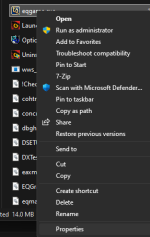
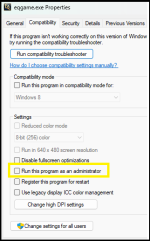
You do not want the "Run this program as an administrator" checked.
You also do NOT want compatibility mode
If you are using ISBoxer
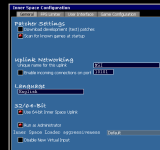
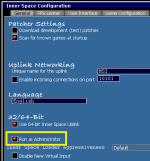
you want to open your Inner Space Configuration, and under the General Tab you want to have deselected "Run as Administrator"
in this screenshot it is selected, you don't want the red dot on that option.
Make sure to hit save after making this change
If you are being PROMPTED asking for elevated permission - like using Joeboxer - you also don't want to give it, because that is also doing the elevated administrator permission.
if after you turn that on and try and launch eq - and you get either of these, it means something is having an issue with running as administrator
or
you don't want eq run as administrator.
if you're just launching EQ / MQ through MQ loader then you need to check your eqgame.exe isn't set to "Run as Administrator"
if you launch eq/mq through something else, like isboxer you want to disable that in the settings for that program.
how to check if eqgame.exe is set to being launched as admin:
- open your everquest directory
- find eqgame.exe
Right click and click "Properties" - if you don't see properties click "Show more options" and then click "Properties"
You do not want the "Run this program as an administrator" checked.
You also do NOT want compatibility mode
If you are using ISBoxer
you want to open your Inner Space Configuration, and under the General Tab you want to have deselected "Run as Administrator"
in this screenshot it is selected, you don't want the red dot on that option.
Make sure to hit save after making this change
If you are being PROMPTED asking for elevated permission - like using Joeboxer - you also don't want to give it, because that is also doing the elevated administrator permission.
Last edited: