
• You've discovered RedGuides, an EverQuest multi-boxing and scripting community 🧙‍♀️⚙️. We want you to play several EQ characters at once, come join us and say hello! 👋

  • A TLP without truebox has thawed (Very Vanilla ready)
    Frostreaver

Problem - ISBOXER and MQ Frame Limiter

Schuckenstein

Well-known member
Joined
Feb 11, 2018
RedCents
1,300¢
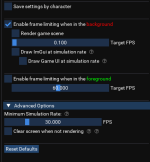
I decided to re-up my isboxer subscription the other day and I'm having a hard time getting the MQ frame limiter to play nice with isboxer. If "Enable frame limiting when in the background" is checked and "Draw ImGui at simulation rate" and "Draw Game UI at simulation rate" are both unchecked ISBOXER refuses to switch windows. The problem is CPU usage is absolute garbage with both of these checked inorder to get ISBOXER to work and it sometimes will peak out at 10%+ on a i7-8700K overclocked to 4.7GHz. I'm using the round-robin CPU profile in ISBOXER and have tried 1 core and 2 cores for each client with no change. Now if I don't use ISBOXER I can uncheck "Draw ImGui at simulation rate" and "Draw Game UI at simulation rate" and everything will run at a smooth 0.8% - 1.5% CPU when in the background. I've tried disabling MQ Frame Limiter and just letting ISBOXER handle the frame limiting but that doesn't even compare and still runs @ high CPU.

Anyways, I'm about ready to ask for a refund and go back to rocking 20+ EQ windows old school because ISBOXER melting my CPU down for window swapping just isn't a good tradeoff in my opinion. If anyone has any suggestions I'd appreciate it. Thanks!
 
I decided to re-up my isboxer subscription the other day and I'm having a hard time getting the MQ frame limiter to play nice with isboxer. If "Enable frame limiting when in the background" is checked and "Draw ImGui at simulation rate" and "Draw Game UI at simulation rate" are both unchecked ISBOXER refuses to switch windows. The problem is CPU usage is absolute garbage with both of these checked inorder to get ISBOXER to work and it sometimes will peak out at 10%+ on a i7-8700K overclocked to 4.7GHz. I'm using the round-robin CPU profile in ISBOXER and have tried 1 core and 2 cores for each client with no change. Now if I don't use ISBOXER I can uncheck "Draw ImGui at simulation rate" and "Draw Game UI at simulation rate" and everything will run at a smooth 0.8% - 1.5% CPU when in the background. I've tried disabling MQ Frame Limiter and just letting ISBOXER handle the frame limiting but that doesn't even compare and still runs @ high CPU.

Anyways, I'm about ready to ask for a refund and go back to rocking 20+ EQ windows old school because ISBOXER melting my CPU down for window swapping just isn't a good tradeoff in my opinion. If anyone has any suggestions I'd appreciate it. Thanks!
i've used isboxer for much longer than i've used MQ.

if you're using framelimiter you really DONT want isboxer handling any cpu core management nor any frame limiting. you want to let windows handle your core management and let framelimiter (and non-outside limiting) do anything

this is what i use
1720794926549.png

overlay setting also has a work-around for isboxer resetting window positions
1720794994606.png
 
Hey @Sic , thanks for replying. How do you get the Ignore Window Clamping option as I'm not seeing that in mqconsole settings?
 
Hey @Sic , thanks for replying. How do you get the Ignore Window Clamping option as I'm not seeing that in mqconsole settings?
mq settings -> overlay tab -> ignore window clamping just as shown in the image

if you're on emu, make sure you're running a current up to date version
 
Okay, updating it added the Ignore Window Clamping option but even with that checked isboxer window swapping won't work if "Draw ImGui at simulation rate" and "Draw Game UI at simulation rate" aren't checked . It works when I'm at character select screen but I don't think framelimiter is running at that point as CPU usage is high. I'm assuming you play on live or test so this may just be a MQ/Emu issue?
 
Last edited:
Okay, updating it added the Ignore Window Clamping option but even with that checked isboxer window swapping won't work if "Draw ImGui at simulation rate" and "Draw Game UI at simulation rate" aren't checked . It works when I'm at character select screen but I don't think framelimiter is running at that point as CPU usage is high. I'm assuming you play on live or test so this may just be a MQ/Emu issue?
So I was having the same problem you did. What you have to do is set the background fps on frame limiter to a number above 5 and it will switch correctly. I have mine set about 6 and never have issues switching anymore, you will not be able to keep background super low using innerspace / isboxer
 
Use frame limiter on one, or the other. If you use ISBoxer, just use it's built in frame limiter. Works fine. I have been using it for a long time and don't have any issues. But everyone has their own favorite sauce when playing. It's really up to you.
 
Use frame limiter on one, or the other. If you use ISBoxer, just use it's built in frame limiter. Works fine. I have been using it for a long time and don't have any issues. But everyone has their own favorite sauce when playing. It's really up to you.

Hard disagree, the ISBoxer framelimiter is objectively worse.
 
Hard disagree, the ISBoxer framelimiter is objectively worse.

Current MQ frame limiter is awesome and should be used as primary!

Set ISB to use all cores (and make sure ClientCore0=-1 thru ClientCore23=-1 in all your virtualized EQClient.INI files! You need lines for every concurrent EQ installation you run at the same time! The -1 value tells EQ to let the Windows OS handle CPU core affinity and thread scheduling. You also want to make sure ISB also defers to Windows! ISB's CPU wizard was great 20 years ago but it's way way past it's prime!)

Also set ISB to have some reasonably high frame limits for those times that MQ isn't loaded. ( I use 45 background, 65 foreground myself.)

Set in-game frame limiters for max on all sliders so the game just goes for maximum frames. (You can also reverse this recommendation by disabling frame limiting in ISB and setting the game to have some reasonable limits, or none at all if you're running MQ all the time!)
 
Hard disagree, the ISBoxer framelimiter is objectively worse.
Yeah, I have to agree, I tried the ISBoxer framelimiter and even with it I was running almost 10% on one character. Gonna try and set it to 5% like @TVCChiver recommends and go from there.
 
So I was having the same problem you did. What you have to do is set the background fps on frame limiter to a number above 5 and it will switch correctly. I have mine set about 6 and never have issues switching anymore, you will not be able to keep background super low using innerspace / isboxer
Okay, so this worked. Set background above 5 and isboxer switching will work. I'll go ahead and post something about this in the emulator section so hopefully it's easier for people to find.
 
Problem - ISBOXER and MQ Frame Limiter

Users who are viewing this thread

Back
Top
Cart
