• You've discovered RedGuides, an EverQuest multi-boxing and scripting community 🧙‍♀️⚙️. We want you to play several EQ characters at once, come join us and say hello! 👋

  • A TLP without truebox has thawed (Very Vanilla ready)
    Frostreaver
IonBC Legacy READ OVERVIEW

💾Software IonBC Legacy READ OVERVIEW 0.29.5

No permission to download
Ionis updated IonBC (TrueBox) with a new update entry:

0.28.8.3: Button Logic rework & isShowing bugfix.

**Note: This is a FULL update, you'll need to replace both client AND host-side versions.

Changes:
-Reworked all forms of button click handling, IBT, comma pass, all pass, clients pass, /click and standard pass as well as repeaters and cooldown buttons, if you run in to any issues with button logic please contact me.

Bug Fixes:
-Fixed a bug that caused the isShowing bool to be...

Read the rest of this update entry...
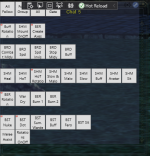
 
Development on 0.29 has started, this is a pretty big one so it's probably going to be a bit before development and QA are done but I'll keep everyone posted. I'm still taking bug reports and suggestions but any suggestions received at this point, if accepted, will be pushed back to a later patch.

Here's a peek at the finalized 0.29 patch notes:
[CODE title="0.29"]New Stuff:
-Auto-updater
-You can now minimize (hide) hotbars so they're no longer visible but still active!
-There is now a menu for navigating over all buttons that exist on a hotbar for easy manipulation of stacked buttons.
-You can now use the /enableevent & /disableevent command to toggle whether or not an event is enabled quickly (syntax: /enableevent "Event Name Here" ex. /disableevent "OMM Gaze").
-When client receives a command it can now switch to a designated EQ window before processing that command if a checkbox is flipped!
-You can now set buttons default data via the options tab of the server window!
-Buttons now have a height & width slider in the Create/Edit button window!
-New debug tab with a breakdown of related debug information!
-You can now blacklist certain phrases from firing events.
-You can now whitelist certain phrases so events will only fire if the trigger phrase contains X phrase.
-You can now selectively check for guildmates before firing a responsive event. (I.E. make a trigger off of a tell only fire if a guildmate sent it to you.)

Changes:
-All textboxes for all windows now activate linearly when tabbing from top to bottom.
-Changed the range of values possible when using a delimiter on /pause and interval to be much less patternized.
-The Add Trigger window now has an options tab that hosts the misc. options like wait, interrupt, etc. while also hosting our new black/whitelist textboxes and guild option.

Bug Fixes:[/CODE]

Let me know if you have any questions!
 
Is there a way to disable clickthrough? For example when you click on a UI button you've created, it will also click something within the EQ window.
 
Is there a way to disable clickthrough? For example when you click on a UI button you've created, it will also click something within the EQ window.
Excuse the canned response, but I answer this quite a bit!

In short, yes it is possible, in long:

We don't inject in to the client so we can't create a TLO directly in-game, which really sucks.

So, essentially, what we do is we overlay a hotbar directly over every application that holds all of our logic. This is the big reason why EQ needs to be in Windowed Mode on the host-side, or else we can't overlay.

So, you'll notice, clickthrough actually doesn't happen on normal applications like a web browser, notepad, games that don't use DirectX, etc. This is, once again, because of the DirectInput wrapper.

DirectInput wraps over your native input and checks whether or not you've sent input and then sends that input directly to the client. It doesn't matter if you're clicking in another window or not, if EQ is your foreground window it will send the input to EQ regardless.

I'm not going to go over all the reasons why we can't inject or modify memory data to explain why I can't modify this in any way to avoid redundancy, but you can imagine why this is an issue.

This makes blocking calls very, very tricky. Unfortunately, there isn't much we can do in the ways of preventing this without injection or memory manipulation.

But there is a solution!

Open up a new chatbar in EQ and size it to a little bigger than your window, turn the opacity almost all the way down and lock the chat window. You'll want to make sure that the windows X button and bar you'd type into aren't under any buttons.

At the end it should look something like this (My hotbar as an example):
unknown.png

This will block any clickthrough functionality you may run in to as the TLO under the hotbar will block anything passing.
 
Just throwing this up here so folks can see it, posted in our Discord about how I'll be handling development moving forward:
Hey just a quick update here on how I'm handling development moving forward, if you don't care feel free to ignore!

First off, I was on vacation this week so if I seemed a bit slower to respond I'm sorry about that! Everything will return to normalcy come Monday! Next, I'd like to talk about how I'm going to handle updates moving forward. So I decided that I really want to focus on the quality of the update as opposed to the quantity of the content released per update. Instead of pumping out as many features as I can per update, I'm going to focus on specific subsets of features and release them building up to a final version. To give an example of what that would look like, I'm going to breakdown the individual patch notes for 0.29!

So, instead of releasing them all at once, they'd look more like this:

0.28.8.5: New Stuff:
-You can now blacklist certain phrases from firing events.
-You can now whitelist certain phrases so events will only fire if the trigger phrase contains X phrase.
-You can now selectively check for guildmates before firing a responsive event. (I.E. make a trigger off of a tell only fire if a guildmate sent it to you.)
-The Add Trigger window now has an advanced tab that hosts the misc. options like wait, interrupt, etc. while also hosting our new black/whitelist textboxes.

0.28.8.6: New Stuff:
-You can now use the /enableevent & /disableevent command to toggle whether or not an event is enabled quickly (syntax: /enableevent "Event Name Here" ex. /disableevent "OMM Gaze").
-When client receives a command it can now switch to a designated EQ window before processing that command if a checkbox is flipped!
-You can now set buttons default data via the options tab of the server window!

0.29: New Stuff:
-Auto-updater
-You can now minimize (hide) hotbars so they're no longer visible but still active!
-There is now a menu for navigating over all buttons that exist on a hotbar for easy manipulation of stacked buttons.

These notes aren't set in stone, but they're just to give a visualization of what updates would look like moving forward. Essentially development will be more centralized around a set of features, as opposed to a wide array of them, and QA will be more focused on those specific features rather than a wide array of testing to help increase the quality of patches pushed and allow me to spend more time fine tuning each individual mechanic rather than trying to push out as much at once as possible.

One last note, as most of you know I'm not really around on the weekends, just keep this in mind for when I seem like I've disappeared. If you have any questions, feel free to ask anytime!
If anyone has any questions, feel free to PM me anytime! :)
 
Quick update, 0.28.8.5 is going well, if testing comes back green expect a push sometime next week, here's a peek at the patch notes:

[CODE title="0.28.8.5"]New Stuff:
-You can now blacklist certain phrases from firing events.
-You can now whitelist certain phrases so events will only fire if the trigger phrase contains X phrase.
-You can now selectively check for guildmates before firing a responsive event. (I.E. make a trigger off of a tell only fire if a guildmate sent it to you.)

Changes:
-The Add Trigger window now has an advanced tab that hosts the misc. options like wait, interrupt, etc. while also hosting our new black/whitelist textboxes.
-Reworked the cancel command to take only two iterations, /cancel and /cancel abnormal. /cancel will cancel all commands running on targets and /cancel abnormal will cancel ALL running abnormal command types (/ibt, /click etc.).

Bug Fixes:
-Fixed a bug where the first iteration of a repeater command wasn't being processed properly.
-Fixed a bug where repeaters were still processing commands on tick while tabbed out with Toggle GUI on Window Change enabled.
-Fixed a bug where the host wasn't properly processing the /cancel command.[/CODE]

If you have any questions, just let me know!
 
0.28.8.5 has entered experimental, assuming everything goes well expect a push sometime this week! I also had to change repos over so we're getting the pipeline reset up for a new repo, this may delay things a bit but I'll keep everyone posted.

Current finalized patch notes for 0.28.8.5 are:
[CODE title="0.28.8.5"]
New Stuff:
(In Testing)-You can now blacklist certain phrases from firing events.
(In Testing)-You can now whitelist certain phrases so events will only fire if the trigger phrase contains X phrase.
(In Testing)-You can now selectively check for guildmates before firing a responsive event. (I.E. make a trigger off of a tell only fire if a guildmate sent it to you.)

Changes:
(Done)-The Add Trigger window now has an advanced tab that hosts the misc. options like wait, interrupt, etc. while also hosting our new black/whitelist textboxes and guild trigger logic.
(Done)-Reworked the cancel command to take only two iterations, /cancel and /cancel abnormal. /cancel will cancel all commands running on targets and /cancel abnormal will cancel ALL running abnormal command types (/ibt, /click etc.).

Bug Fixes:
(Done)-Fixed a bug where the first iteration of a repeater command wasn't being processed properly.
(Done)-Fixed a bug where repeaters were still processing commands on tick while tabbed out with Toggle GUI on Window Change enabled.
(Done)-Fixed a bug where the host wasn't properly processing the /cancel command.
(Done)-Fixed a bug where, when starting a repeater, a deprecated method was being called that used outdated logic.
(Done)-Fixed a bug where the first iteration of a repeater would have a slight delay in sending the command.
(Done)-Fixed a bug where the wait and interval variables weren't being properly re-assgined when refreshing the Server/Client trigger windows.
[/CODE]

Let me know if you have any questions!
 
Feature Request:
Can you add the ability to define button sizes Info tab of the Create Button panel? Both width and height. This would allow us to create uniform pretty GUIs.

I've got a basic GUI set up and running fairly well. 3 boxing and able to CC multiple targets on a bard, keep fighting with the tank and control the healer all at once. I have run into some issues though. I've seen the GUI duplicate and haven't been able to figure out why. Process controller doesn't save settings and I need to recreate hotkeys for tabbing between processes every time I launch. Similar issue with toggle GUI on window change. When I can get you repro steps for that GUI duplication bug I'll post them up. This project has massive potential and is already quite awesome.
 
Feature Request:
Can you add the ability to define button sizes Info tab of the Create Button panel? Both width and height. This would allow us to create uniform pretty GUIs.
Yeah! This is actually planned for an upcoming update here where you can set the default dimensions (and other information) for buttons as well as define their sizes dynamically within the Create Button window!

I've seen the GUI duplicate and haven't been able to figure out why.
First I've heard of this, but if you can figure out how to reproduce it just let me know!

Process controller doesn't save settings and I need to recreate hotkeys for tabbing between processes every time I launch. Similar issue with toggle GUI on window change.
I'll take a look at this but the process controller really needs to be revamped overall, I feel like it could be done a lot better than it is and a lot of the controls are pretty confusing. Have you tried adding a Add Win Kb and then using that to set the windows on reset for tabbing to as opposed to going in and resetting all the processes every time? Just make sure they're the foreground window when hitting the Add Win Kb to set the process. That would probably alleviate some of the issues you're having. As far as Toggle GUI on Window Change, it should automatically detect EQ assuming the proper EQ client was selected through the processes window and it should automatically reselect EverQuest when it's closed and re-opened but if this isn't happening let me know. I plan to revamp the process controller coming up here, since it desperately needs some code maintenance.

This project has massive potential and is already quite awesome.

Thanks man, I do appreciate it! :)
 
Last edited:
Sorry about the delay on the most recent patch, was some QA issues that are back in testing! :) It will be out soon, just making sure everything is as clean as it can be before it's pushed!
 
Ionis updated IonBC (TrueBox) with a new update entry:

0.28.8.5: Trigger Black/Whitelisting, Guild Specific Triggers, /cancel reworks, bug fixes & more!

New Stuff:
-There's a new blacklist and whitelist associated with each individual trigger that can be used to blacklist or whitelist specific phrases, word, etc. for that specific trigger.
-Both black AND whitelists can take multiple strings by using a semi-colon as a delimiter!​
-There's a new globals tab in the Server/Client trigger window, this hosts a global blacklist and whitelist which can be used to blacklist or whitelist words, phrases etc...

Read the rest of this update entry...
 
With 0.28.8.5 being out, I'm going to do my usual and give it a week or so to focus out any bugs that may rear-up. But here's a peek at what's planned for 0.28.8.6!

[CODE title="0.28.8.6"]
New Stuff:
-You can now minimize (hide) hotbars so they're no longer visible but still active!
-There is now a menu for navigating over all buttons that exist on a hotbar for easy manipulation of stacked buttons.
-You can now use the /enableevent & /disableevent command to toggle whether or not an event is enabled quickly (syntax: /enableevent "Event Name Here" ex. /disableevent "OMM Gaze").
-When client receives a command it can now switch to a designated EQ window before processing that command if a checkbox is flipped!

Changes:
-All elements for all windows now activate linearly when tabbing from top to bottom.
-Changed the range of values possible when using a delimiter on /pause and interval to be much less patternized.

Bug Fixes:
[/CODE]

If you have any issues, feel free to let me know! I'll keep y'all posted as development continues. :)
 
In the TLP version here. Is there a way to trigger another button from a button?
AKA button1 = buff me --- button2 = Load Buffs (cd 18seconds)
is there a command to put on button 1 to trigger button2 then continue button1
 
In the TLP version here. Is there a way to trigger another button from a button?
AKA button1 = buff me --- button2 = Load Buffs (cd 18seconds)
is there a command to put on button 1 to trigger button2 then continue button1
There is! You can use the /click command over the buttons ID which can be found right under the button preview in the Create/Edit button window!

Something like what you'd want would look like this:
Buff Button:
/cast 1 ; /pause 50 ; /cast 2 ; /pause 60 ; /cast 3 ; /pause 35 ; /cast 4 ; /pause 120 ; /click 123456 ; /pause 180 ; /cast 1 ; /pause 70 ; /cast 2

Load Spellset Button (ID: 123456):
/memspellset Other Cool Buffs

This would effectively cast spellgems, 1, 2, 3 & 4, click our load spellset button then continue by casting 1 and 2!

If you have any more questions, just let me know!
 
There is! You can use the /click command over the buttons ID which can be found right under the button preview in the Create/Edit button window!

Something like what you'd want would look like this:
Buff Button:
/cast 1 ; /pause 50 ; /cast 2 ; /pause 60 ; /cast 3 ; /pause 35 ; /cast 4 ; /pause 120 ; /click 123456 ; /pause 180 ; /cast 1 ; /pause 70 ; /cast 2

Load Spellset Button (ID: 123456):
/memspellset Other Cool Buffs

This would effectively cast spellgems, 1, 2, 3 & 4, click our load spellset button then continue by casting 1 and 2!

If you have any more questions, just let me know!

Great, a nobby question: how to find out what the Spellset Button ID are?
 
Great, a nobby question: how to find out what the Spellset Button ID are?
I'm not sure if you're referring to the in-game command /memspellset or if you're referring to the button ID of an IonBC button, so let's go over both! :)

/memspellset:
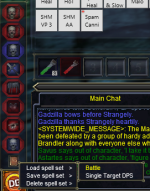
First, make spell set and name it anything, let's take my spellset Battle for example:
1659975515960.png

After you've done that, you can just type /memspellset SpellSetNameHere and it will automatically load up that spellset! So, for my spellset Battle, I would type /memspellset Battle!

For IonBC Button ID:
1. Create a button!
2. Right click that button to open the edit button window!
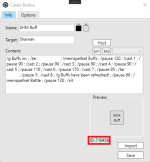
After you've done that, you can find the button ID below the Button Preview, as indicated here by the red square:
1659975699536.png

From there, all you have to do is make a button for /click ButtonIDHere! You can also use button name within quotations, so the syntax for my SHM Buff button would be:
/click 710458
OR
/click "SHM Buff"

As an added side-note, DayBreak recently added a new command called /memspellslot which allows you to designate a specific spell to be memmed in a specific slot! This is really useful for loading one time spells like gate or invis.
Syntax is:
/memspellslot # spellname

So, if you wanted to load gate, you could do something like:
/memspellslot 7 Gate

And it will load Gate dynamically in to spellslot 7!

Let me know if you have any questions! :)
 
Just got this program, already seeing top tier support and top tier functionality. Wow. You are a game changer!
 
Just got this program, already seeing top tier support and top tier functionality. Wow. You are a game changer!
Thanks man! I appreciate the kind words, they mean a lot to me. :) If you ever have any questions or concerns, just let me know!
 
I'm not sure if you're referring to the in-game command /memspellset or if you're referring to the button ID of an IonBC button, so let's go over both! :)

/memspellset:
First, make spell set and name it anything, let's take my spellset Battle for example:
View attachment 41285

After you've done that, you can just type /memspellset SpellSetNameHere and it will automatically load up that spellset! So, for my spellset Battle, I would type /memspellset Battle!

For IonBC Button ID:
1. Create a button!
2. Right click that button to open the edit button window!
After you've done that, you can find the button ID below the Button Preview, as indicated here by the red square:
View attachment 41286

From there, all you have to do is make a button for /click ButtonIDHere! You can also use button name within quotations, so the syntax for my SHM Buff button would be:
/click 710458
OR
/click "SHM Buff"

As an added side-note, DayBreak recently added a new command called /memspellslot which allows you to designate a specific spell to be memmed in a specific slot! This is really useful for loading one time spells like gate or invis.
Syntax is:
/memspellslot # spellname

So, if you wanted to load gate, you could do something like:
/memspellslot 7 Gate

And it will load Gate dynamically in to spellslot 7!

Let me know if you have any questions! :)
Fantastic, just the info. I need. Thanks again
 
I like this idea and if I was running multiple comps this would fit perfectly. Unfortunately for me I have all toons on one comp now and I'm back to boxing old school style. I might fire up two other comps to test it out some. Could put my healer on one and one other melee DPS or Bard and rest stay on main comp. Ill download it and see where it goes. Thanks for the effort you are putting into this!
 
I like this idea and if I was running multiple comps this would fit perfectly. Unfortunately for me I have all toons on one comp now and I'm back to boxing old school style. I might fire up two other comps to test it out some. Could put my healer on one and one other melee DPS or Bard and rest stay on main comp. Ill download it and see where it goes. Thanks for the effort you are putting into this!
Hey!

I do plan to make a Live version at some point but I'm not sure exactly when work will begin on that. I have heard of some folks using this in-tandem with ISBoxer over two PCs. Having the pilot be on one PC by itself and then all the boxes on another PC with ISBoxer, then using the /keypress command to switch between the different clients before sending the command.

I haven't done this person ally though! :) If you ever have any questions or anything just let me know!
 
Feature request, Synchronous macros eg.
/click 634638; /ibt cleric /cast1, /pause50, /cast 2, /pause 80, /cast 3, /pause 35, /sit; /ibt Druid /cast 1, /pause 30, /cast 2, /pause 60, /sit;
This would allow you to click a single button and have the cleric cast a series of commands and the druid to cast a series of commands
For me to know if this was even possible would require a much larger understanding of exactly how Ion operates but from what I have seen so far seems like this should be possible.
 
Feature request, Synchronous macros eg.
/click 634638; /ibt cleric /cast1, /pause50, /cast 2, /pause 80, /cast 3, /pause 35, /sit; /ibt Druid /cast 1, /pause 30, /cast 2, /pause 60, /sit;
This would allow you to click a single button and have the cleric cast a series of commands and the druid to cast a series of commands
For me to know if this was even possible would require a much larger understanding of exactly how Ion operates but from what I have seen so far seems like this should be possible.
This is definitely possible, but depending on the scenario may require a few things, but first and foremost I see that you're using comma as a delimiter for a lot of the commands! The commands only take a semi-colon as a delimiter, so change this:

/click 634638; /ibt cleric /cast1, /pause50, /cast 2, /pause 80, /cast 3, /pause 35, /sit; /ibt Druid /cast 1, /pause 30, /cast 2, /pause 60, /sit;

To this:

/click 634638 ; /ibt cleric /cast 1 ; /pause 50 ; /cast 2 ; /pause 80 ; /cast 3 ; /pause 35 ; /sit ; /ibt Druid /cast 1 ; /pause 30 ; /cast 2 ; /pause 60 ; /sit

As far as throwing a click and then continuing, this really depends on how long the 634638 command takes to process and what it's targets are.

For instance, if the targets of 634638 are not cleric, Druid or included in the target field of this button, then it wouldn't matter if you throw the click over 634638 as the command wouldn't be rejected and/or stacking with those designated clients.

If 634638 DOES share a target field with cleric, Druid or the targets of the button calling the /click command, then you'd want to throw a pause for the time it takes 634638 to complete it's processing for most cases unless you have command stacking enabled.

With command stacking enabled, it will just stack the commands sent to the cleric, Druid or target field clients behind the /click 634638 command as it's sent post-click. But if command stacking is NOT enabled, then you'll want to throw a pause in there for the determinant time it takes for the 634638 command to finish processing.

For example, say 634638 takes 30 seconds to process, the button would then look like this:
/click 634638 ; /pause 300 ; /ibt cleric /cast1 ; /pause 50 ; /cast 2 ; /pause 80 ; /cast 3 ; /pause 35 ; /sit ; /ibt Druid /cast 1 ; /pause 30 ; /cast 2 ; /pause 60 ; /sit

If you plan on using command stacking, you can find it in the options tab of the Server Window!

Let me know if you have any questions! :)
 
Last edited:
This is definitely possible, but depending on the scenario may require a few things, but first and foremost I see that you're using comma as a delimiter for a lot of the commands! The commands only take a semi-colon as a delimiter, so change this:

/click 634638; /ibt cleric /cast1, /pause50, /cast 2, /pause 80, /cast 3, /pause 35, /sit; /ibt Druid /cast 1, /pause 30, /cast 2, /pause 60, /sit;

To this:

/click 634638 ; /ibt cleric /cast 1 ; /pause 50 ; /cast 2 ; /pause 80 ; /cast 3 ; /pause 35 ; /sit ; /ibt Druid /cast 1 ; /pause 30 ; /cast 2 ; /pause 60 ; /sit

As far as throwing a click and then continuing, this really depends on how long the 634638 command takes to process and what it's targets are.

For instance, if the targets of 634638 are not cleric, Druid or included in the target field of this button, then it wouldn't matter if you throw the click over 634638 as the command wouldn't be rejected and/or stacking with those designated clients.

If 634638 DOES share a target field with cleric, Druid or the targets of the button calling the /click command, then you'd want to throw a pause for the time it takes 634638 to complete it's processing for most cases unless you have command stacking enabled.

With command stacking enabled, it will just stack the commands sent to the cleric, Druid or target field clients behind the /click 634638 command as it's sent post-click. But if command stacking is NOT enabled, then you'll want to throw a pause in there for the determinant time it takes for the 634638 command to finish processing.

For example, say 634638 takes 30 seconds to process, the button would then look like this:
/click 634638 ; /pause 300 ; /ibt cleric /cast1 ; /pause 50 ; /cast 2 ; /pause 80 ; /cast 3 ; /pause 35 ; /sit ; /ibt Druid /cast 1 ; /pause 30 ; /cast 2 ; /pause 60 ; /sit

If you plan on using command stacking, you can find it in the options tab of the Server Window!

Let me know if you have any questions! :)
Yea was just using the above line as a possible example of easy way to parse and write it for the peoples and cake way of doing the deserialization of object's on feature
But thanks for going into command stacking a bit might rethink some things.
 
Quick little update!

Everything has gone exceptionally well with the most recent patch and I've received 0 total bug reports! As such, development on the next patch (0.28.8.6) will begin on Monday, here's a little reminder of the patch notes:
[CODE title="0.28.8.6"]New Stuff:
-You can now minimize (hide) hotbars so they're no longer visible but still active!
-There is now a menu for navigating over all buttons that exist on a hotbar for easy manipulation of stacked buttons.
-You can now use the /enableevent & /disableevent command to toggle whether or not an event is enabled quickly (syntax: /enableevent "Event Name Here" ex. /disableevent "OMM Gaze").
-When client receives a command it can now switch to a designated EQ window before processing that command if a checkbox is flipped!

Changes:
-All elements for all windows now activate linearly when tabbing from top to bottom.
-Repeaters and cooldowns values have been changed so they can take a range as opposed to being static. (I.E. instead of 5 you can do 5-10).
-Changed the range of values possible when using a delimiter on /pause, cooldown, repeater and interval to be much less patternized.

Bug Fixes:
[/CODE]

Sometime over the weekend I plan to push a little mini-update to our obfuscation methods! It is currently in testing with QA but once everything comes back all green it will be pushed! Will keep everyone posted, if you have any issues don't hesitate to contact me!
 
Shout out to @Ionis once again. This program is beyond amazing. I appreciate your hard work and continued support on the project!
 
Ionis updated IonBC (TrueBox) with a new update entry:

0.28.8.5.5: Ver. # and Trigger bugfix

**Note: This is a FULL update, you'll have to replace both client AND host side. Make sure you also replace the bin folder! As our obfuscation update requires it.

Bug Fixes:
-Fixed a bug that was causing the content of the triggers file to duplicate infinitely so long as there were no triggers currently created and the window was reopened after closing.
-Fixed a bug where the...

Read the rest of this update entry...
 
Ionis updated IonBC (TrueBox) with a new update entry:

0.28.8.5.8: Trigger Symbols Bugfix

**Note: This is a FULL update, you'll have to replace both client AND host side. Make sure you also replace the bin folder! As our obfuscation requires it.

Bug Fixes:
-Fixed a bug where, when a trigger with an expression would have a symbol included in it's target text, the symbol would be excluded in the result returned.

Let me know if you run in to any issues!

Read the rest of this update entry...
 
Ionis updated IonBC (TrueBox) with a new update entry:

0.28.8.5.9: /hotbutton bugfix

**Note: This is a FULL update, you'll have to replace both client AND host side. Make sure you also replace the bin folder! As our obfuscation requires it.

Bug Fixes:
-Fixed a bug where, when creating a in-game macro using the /hotbutton command that used /pause, the command would be misidentified as throwing a /pause within the application.

Thanks to...

Read the rest of this update entry...
 
Need some help here....
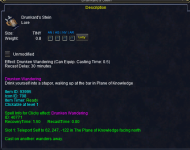
I want to create a button to have all my toons to use the teleport item Drunkard's Stein.

Target all
/useitem xx

How do you find out what number is the Drunkard's Stein ?

Thanks
 
Need some help here....
I want to create a button to have all my toons to use the teleport item Drunkard's Stein.

Target all
/useitem xx

How do you find out what number is the Drunkard's Stein ?

Thanks
Durango's solution should work, but you can also use the name!

[CODE title="Usage"]/useitem Drunkard's Stein[/CODE]

Should work for what you're looking to do, I use /useitem with item name in a few of my button's commands. :)

Let me know if you run in to any issues!
 
Last edited:
Durango's solution should work, but you can also use the name!

[CODE title="Usage"]/useitem Drunkard's Stein[/CODE]

Should work for what you're looking to do, I use /useitem with item name in a few of my buttons commands. :)

Let me know if you run in to any issues!
Thanks .... works like a charm!
 
💾Software IonBC Legacy READ OVERVIEW

Users who are viewing this thread

Back
Top
Cart