• You've discovered RedGuides, an EverQuest multi-boxing and scripting community 🧙‍♀️⚙️. We want you to play several EQ characters at once, come join us and say hello! 👋

  • A TLP without truebox has thawed (Very Vanilla ready)
    Frostreaver

Question - instant close upon loading mecroquest2

jrm55

New member
Joined
May 19, 2018
RedCents
60¢
My eq live client instantly closes when i load macroquest. Anyone have any ideas how to troubleshoot? If I load macroquest while windowed, i can see the script load but as soon as i focus the window (click anywhere) it will close. It doesn't happen on my laptop. I appreciate your help.

- - - Updated - - -

Maybe since I logged on my laptop before desktop? is there a limit to 1 computer?
 
Last edited:
Have you tried to start MQ and the ecbc server BEFORE you launch the EQ client?
I have tried loading mq before the eq client and when i do that it instantly crashes at the character select screen. I havent tried using ecbc but when i tested the game on my laptop it seemed to work without ecbc so i figured i didnt need it.
 
Make sure nonagwindiws=0 in macroquest.ini it's a fucked up plugin that needs to die and get removed from rg. Redbot please remove it.
 
I would rerun the updater, if that fails then remove every plugin except MQ2Ic.dll and then retry. If that succeeds add 1 plugin at a time back in till you find which one is causing the crash and let us know.
 
I took the following actions:
Launching MQ and EQBCS, then running client... insta-close.
Turning nonagwindiws=0 in the config file ... insta-close.
Moving all .dll files except mq2Ic.dll .. macroquest wouldn't start.
Moved the .dll files back to the right location but changed all plugins to =0 in the config file .. insta-close.
Any other ideas?


- - - Updated - - -

also updater says everything is up to date
 
Not sure if you want your toon name plastered all over RG for the world to see either...
 
nope not trying to use on coirnav or agnarr. i didn't care too much about toon name but since you care i will care more. I figure there are people browsing here because they use it so it wouldn't be a big deal.
 
My suggestion would be

1. Try running mq2 as admin
2. Try disabling all of your MQ2 plugins if it works with everything disabled then enable half and process of elimination will tell you whats bad.
3. to delete everquest and install or copy the everquest directory from the working computer it might be specifically a UI element
4. re download mq2
5. try disabling your antivirus or windows defender

BTW have you been getting the option to have a crash dump, that can have some info in it.
 
turning off windows defender changed it from automatically closing instantly to staying visible but frozen

- - - Updated - - -

i should add that i ran the update again, did a fresh eq install and redownloaded mq2
 
Was it ever running on your desktop?

Or has it never run, and you happened to try running it on your laptop also?

If it did initially run, what did you do in game with mq2?

What happens when you run MQ2 , then load up a new instance of EQ ? Does it get to server select ... then to / past char select ?
 
turning off windows defender changed it from automatically closing instantly to staying visible but frozen

- - - Updated - - -

i should add that i ran the update again, did a fresh eq install and redownloaded mq2

You shouldn't need to turn off windows defender, feel free to turn that back on. Microsoft has us on the whitelist.

This sounds like it could be a video card issue, or a problem with another program on your desktop. I've seen it on member's computers before, there is a background program that hates MQ2. Usually an outdated video card settings app, or an overclocking app.

Open your task manager (CTRL+ALT+DELETE) and close any programs that aren't widely used, or don't seem to be a part of Windows. Any app that has to do with your video card or cpu performance especially.

You can also contact me on our Discord chat: https://discord.gg/GUeSzr9
and we can arrange a time for a teamviewer session.
 
Last edited:
Was it ever running on your desktop?

Or has it never run, and you happened to try running it on your laptop also?

If it did initially run, what did you do in game with mq2?

What happens when you run MQ2 , then load up a new instance of EQ ? Does it get to server select ... then to / past char select ?

It never ran on my desktop. I first loaded it up on my laptop to test and because i didn't have access to my desktop. then when I got home i tried on my desktop and encountered issues.
If I run mq2 then open up a new instance of eq I can get through server select just fine, then at character select it crashes.

- - - Updated - - -

hmm, might have found the problem...
 
If you found the problem please share :)

If you crash/freeze after trying to load to char select even, it sounds more likely as Redbot suggests as a background app. Probably associated with video card.

Since up until char select nothing graphics wise is loaded, and very little UI wise is loaded for char select to cause UI issues

Also, less likely a plugin problem, since most plugins won't cause an issue until loading into world since they wait for that to occur to even enter any sort of functional state
 
If its a direct copy from your laptop makes sure to go into the everquest folder and Run OptionsEditor.exe and sellect A (your desktops video card ) (b) all the options recommended for that system.
 
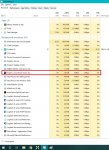
the culprit.jpg
I closed a lot of processess yesterday afternoon and got it to work. This morning I went back and closed each one individually and tested, then when it started working i rebooted and closed just the app shown in the picture.
Now it works like a charm!
 
Question - instant close upon loading mecroquest2

Users who are viewing this thread

Back
Top
Cart