• You've discovered RedGuides, an EverQuest multi-boxing and scripting community 🧙‍♀️⚙️. We want you to play several EQ characters at once, come join us and say hello! 👋

  • A TLP without truebox has thawed (Very Vanilla ready)
    Frostreaver

Question - Improving navigation holes?

Jalerian

Well-known member
Joined
Jul 14, 2016
RedCents
687¢
So the room I am experiencing at a lot has an archway behind my camp location. Navigation works great in the entire area, except through the arch way. The mobs I am fighting have a knock back that can rarely knock my tank through the archway. If this happens, he can't find his way back to the camp and if I don't notice it quickly, usually my group wipes. If I call up the /nav ui, it shows blue stuff all around, except at the bottom of the archway. Is there a way to fix just that area? I have never used the /nav ui for anything other than looking for holes like that and avoiding them...but I can't avoid this one.

Thanks!
 
So the room I am experiencing at a lot has an archway behind my camp location. Navigation works great in the entire area, except through the arch way. The mobs I am fighting have a knock back that can rarely knock my tank through the archway. If this happens, he can't find his way back to the camp and if I don't notice it quickly, usually my group wipes. If I call up the /nav ui, it shows blue stuff all around, except at the bottom of the archway. Is there a way to fix just that area? I have never used the /nav ui for anything other than looking for holes like that and avoiding them...but I can't avoid this one.

Thanks!
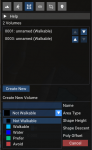
I liked to utilize the Create New Volumes section of the Mark Areas tool in the mesh gen

With this i can create an area/block to do any of those functions - Not Walkable, Walkable, Water, Prefer, Avoid

With problem doorways/tunnels/etc I will either do an "Avoid" or "not walkable" on the sides - or even easier to just do a "Prefer" strip down the middle

1588627579581.png
 
Is this done while in game? Ie, I need to travel to the spot, and do this there? Or is it done offline somehow?
 
This sounds more like an issue that needs a connection made, than a volume for not walkable/avoid etc

You can make one and two way connections, ie you can make a connection off of a cliff one way... And in your door way you would make a two way connection


I didn't watch the video, but in mesh generator there is a connections tab on the right hand side and you will select that and choose bidirectional/one way and then click the two points you want to connect (they need to be close enough/actually walkable)

A lot of closed zones have strange door ways like this, and spider webs etc show as walls in the mesh generator
 
This sounds more like an issue that needs a connection made, than a volume for not walkable/avoid etc

You can make one and two way connections, ie you can make a connection off of a cliff one way... And in your door way you would make a two way connection


I didn't watch the video, but in mesh generator there is a connections tab on the right hand side and you will select that and choose bidirectional/one way and then click the two points you want to connect (they need to be close enough/actually walkable)

A lot of closed zones have strange door ways like this, and spider webs etc show as walls in the mesh generator
well you can create a walkable area between two sections if you're missing a part of the mesh - this avoids having to re-gen the entire thing - this can also help eliminate the circumstances that can cause the connectors to get you in a loop.

I create an area where i can, and do the mesh connections where i cant.
 
I'm not sure what you mean by loop?

Also, I do not think you need to rebuild a mesh to add any connections... I don't think I ever have at least. I personally have found a quick connection between a two sides of a fale wall work well
 
Honestly it's all speculation unless we know what zone and what area so that the mesh can be looked at to understand where the issue is occurring and why. In some cases it could be a wall that exists in the zone file but isn't present in the game itself unless you're in a special instance of the zone such as is found in GMM. In which case an off mesh link is appropriate, and you could also benefit from setting not walkable on either side to flatten any jagged edges of the mesh.

In other cases it might be prudent to instead to use another method such as the one Sic is suggesting.

I think offering the video is a good option, though I didn't do off mesh links in the video as that came after my video was made sadly.
 
Honestly it's all speculation unless we know what zone and what area so that the mesh can be looked at

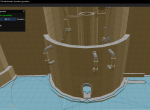
The zone is the Mechamatic Guardian (the robot in Secrets of Feydwer). The specific spot is on the very top floor. The main portion of the floor is a circular room that is bisected by a wall. Embedded in the center of that wall is a smaller circular room that holds the "Brain" of the robot. The archway in question is the only entrance to this brain room.

Thanks for all the feedback so far.
 
1588797793402.png

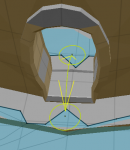
Looks like there is a break in the mesh right there. This could be due to various things, such as a height or radius restriction. The simpliest method of addressing this would be to load the mech guardian mesh, navigate to this room and add an offmesh link to bridge the gap between the two sections of the mesh.
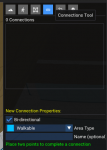
1588797989601.png1588798015046.png this shows you where the option for the connection tool is. Simply click the icon, then click on both sides of the break to create the path. The entry and exit points are where you click. The center of the door way is the optimal location to avoid running into the edges of the door frame.


The second option would be to do as @Sic mentioned, and that is to create a walkable volume in this area as seen in the following image.
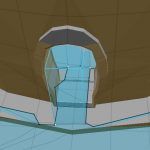
1588797959595.png In this example. You would need to go to the "Mark Areas Tool" one icon left of the one in the above screenshot. Hit create new. Click on the 4 points shown in the image or some variation of it. Select "Walkable" from the dropdown. Then hit save. For the walkable bit to work you need only have the connection from the two sides connect and create a blue path all the way through. It doesn't matter how small the connection is, only that there is a connection. Like with the above explanation, it's best to keep it as centered as possible. In the image I've provided I've made the volume too large and the left side is overlapping the wall and entry through the doorway would likely create a collision between the character and the entry way.
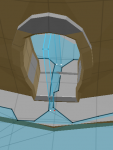
1588798299478.pngThis is a much more accurate method. The area where there was no mesh has now bridged the gap between the two sides, is thin, yet reaching either side will now be possible, but it reduces the likely hood that you will collide with the outer edges of the doorframe.

I do hope this information is helpful.
 
Thanks a ton, very descriptive and I can't wait to try out my modifications!
 
This really helped my understanding of the mesh navigator, but I'm still not sure on one thing. Is it possible to update an existing mesh?

For example, I downloaded the best gnome mountain mesh I could find here https://www.redguides.com/community/resources/kaen01-custom-nav-meshes.1057/

I'd like to add a couple of custom no walk areas to some problematic spots around the Ambassador of Loving (there's a cannon that shoots you up vertically, which messes with MQ2Nav) and a around spawn spot with a hole that MQ2Nav loves to fall down. I've tried the 'save' option and it created the new mesh, but it appears to just rebuild the mesh as opposed to updating kaen01's.

What are the steps I should follow?
 
Is it possible to update an existing mesh?

i've only updated 2 mesh(i) because that's above my paygrade, but both were saved into the mq2nav folder that is ... inside the mq2nav folder. \MQ2\Release\MQ2Nav\MQ2Nav

there is at least an 80 percent chance my saved mesh(i) going to that folder was user error on my part for not configuring something, but when i replaced the meshes in the base MQ2Nav folder w/ my custom throw-shit-at-the-wall-and-see-what-sticks efforts, they worked!

so, if you read this before someone who knows what they are doing replies, this might get you started. and look and see if that folder is there. you might find some of your saved gems!
 
Adding the walkable as you guys described has worked wonderfully. Thanks!!
 
Used this to fix a mesh in the tizmak caves in Great Divide and it started working instantly. I copied this custom mesh to a backup folder in case it gets written over my mesh updater. I take it that is the best process for custom meshes?

Thanks
 
Used this to fix a mesh in the tizmak caves in Great Divide and it started working instantly. I copied this custom mesh to a backup folder in case it gets written over my mesh updater. I take it that is the best process for custom meshes?

Thanks
I would submit them to the mesh repo so everyone benefits, but yes — if you’re wanting to keep it and still run the updater then I would recommend keeping a backup copy.
 
I would submit them to the mesh repo so everyone benefits, but yes — if you’re wanting to keep it and still run the updater then I would recommend keeping a backup copy.

I sent it as attachment to Wired420 I take it that is the way to submit it? - Thanks
 
Question - Improving navigation holes?

Users who are viewing this thread

Back
Top
Cart