
-
 Hail, we're RedGuides. We want you to play six (yes, 6!) EverQuest characters at once. We have scripts and a friendly community to help, please join our playstyle and say hello! 👋
You are using an out of date browser. It may not display this or other websites correctly.
You should upgrade or use an alternative browser.
You should upgrade or use an alternative browser.

Release HunterHUD 7-31-2023
- Thread starter kaen01
- Start date


- Commits
- 2
The old Eastern Waste zone uses the new ToV eastern waste named list. Is this something I can switch myself or is it in the plug-in?
Code:
[116] = 311680, --Hunter of Eastern Wastes Old Eastern Wastes=eastwastes
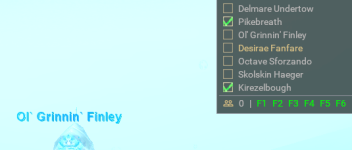

Sic updated HunterHUD with a new update entry:
Updated Ol` Grinnin` Finley to match in-game vs achievement window
Read the rest of this update entry...
Updated Ol` Grinnin` Finley to match in-game vs achievement window
- Updated Ol` Grinnin` Finley to match in-game vs achievement window
- changed to hunterhud folder with init.lua
Read the rest of this update entry...
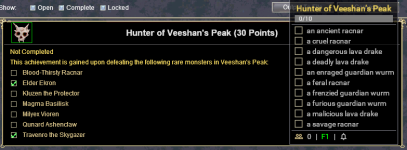
Sic updated HunterHUD with a new update entry:
fixed old school Veeshan's Peak
Read the rest of this update entry...
fixed old school Veeshan's Peak
- fixed old school Veeshan's Peak
Read the rest of this update entry...

i love this plugin, is it possible to extend it? Add a NAV button right from the name, and if you click on it, you run there (if possible)?
Thanks a lot
Thanks a lot
Already does that. Just double click the name.i love this plugin, is it possible to extend it? Add a NAV button right from the name, and if you click on it, you run there (if possible)?
Thanks a lot

Yama
SUSPENDED
You can already nav to the names if you click on iti love this plugin, is it possible to extend it? Add a NAV button right from the name, and if you click on it, you run there (if possible)?
Thanks a lot
thank you, will check that out!
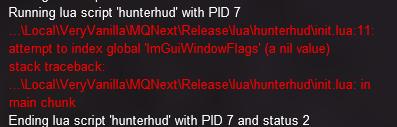
Any ideas why I would be getting this? nothing changed with the hunterhud and was working great the other day
I have no idea if I screwed something up in settings but HH normally looks like this:
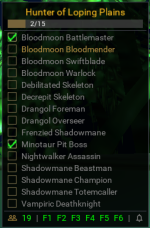
But it's now looking like this. If you click on the highlighted mob HH is showing as up, it highlights the entire list left to right. Does anyone know how to fix it? I want to say i've tried almost everything.

But it's now looking like this. If you click on the highlighted mob HH is showing as up, it highlights the entire list left to right. Does anyone know how to fix it? I want to say i've tried almost everything.
you docked it on top of your screen, just click and drag it down a bitI have no idea if I screwed something up in settings but HH normally looks like this:
View attachment 51567
But it's now looking like this. If you click on the highlighted mob HH is showing as up, it highlights the entire list left to right. Does anyone know how to fix it? I want to say i've tried almost everything.
View attachment 51568
That is what I thought at first, but it's not docked top or bottom. The snip I took was in the middle of my screen. Also, there isn't way way to resize the window, it is that size regardless of what I do.
If I click minimize it shrinks down to proper size but when I do any toggles (spawned only / missing hunts) it expands back to the original sideways.
If I click minimize it shrinks down to proper size but when I do any toggles (spawned only / missing hunts) it expands back to the original sideways.
if you need to reset all your imgui size/shape etc, you can do that by clicking this "clear saved ImGui Window settings" buttonThat is what I thought at first, but it's not docked top or bottom. The snip I took was in the middle of my screen. Also, there isn't way way to resize the window, it is that size regardless of what I do.
If I click minimize it shrinks down to proper size but when I do any toggles (spawned only / missing hunts) it expands back to the original sideways.
/mqsettings
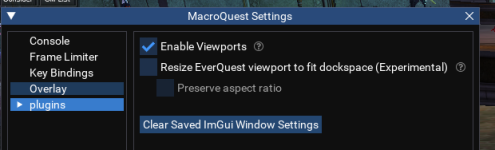
if you need to reset all your imgui size/shape etc, you can do that by clicking this "clear saved ImGui Window settings" button
/mqsettings
View attachment 51575
I actually found and used that button thinking it was the answer but it did not fix this particular problem.
*One thing to note, I am using this on *TEST* currently and it might have something to do with the patch from the other day. I am not sure.
very likely.I actually found and used that button thinking it was the answer but it did not fix this particular problem.
*One thing to note, I am using this on *TEST* currently and it might have something to do with the patch from the other day. I am not sure.
as brain said - test is pretty much a "things gonna look like they look" for a bit
Yep, perfectly understandable. I was just thinking I messed up a setting but this does make more sense.very likely.
as brain said - test is pretty much a "things gonna look like they look" for a bit
I appreciate your time, thank you.

For info, I'm also getting the same issue as @AvrusBane on Test - I tied the /mqsettings reset Imgui reset but still the same - I did find some settings in MacroQuest_Overlay.ini but when I tried to change the size value, I still had the same issue and when quiting hh (/hh stop) the values were reset to this again
Edit: I have also done a fresh install into a new folder and get the same issue without making any other changes
Code:
[Window][HunterHUD]
Pos=163,719
Size=1628,96
Collapsed=0
DockId=0x00000009,0
Edit: I have also done a fresh install into a new folder and get the same issue without making any other changes
Last edited:

gpag
Active member
Also having the same issue as others with the ui being weird. However, i stumbled across if you go open your achievements window, the UI for hunterhud gets "resized" and stops at its normal view. I have to do this for each time I log on, but it works. Also playing on test. Thanks!

celestialtaco
Member
/hh missing doesn't seem to be working, just displays the help dialogue; /hh missing also missing from the help dialogue

also i havent much been updating it, as i have no toons to go check the high level zones in new expansions, but the zone table in the Lua is pretty easy to update. coming the new year i will try and get a team leveled up and ready to rocks
Just wanted to share the list of LDON zones corrected.
[229] = 704380, --Hunter of Cauldron of Lost Souls
[230] = 701080, --Hunter of Bloodied Quarries
[231] = 702180, --Hunter of Sunken Library
[232] = 703280, --Hunter of Silent Gallery
[233] = 705480, --Hunter of Forlorn Caverns
[234] = 709880, --Hunter of Drowning Crypt
[235] = 706580, --Hunter of Halls of War
[236] = 707680, --Hunter of Shifting Tower
[237] = 708780, --Hunter of Maw of the Menagerie
[238] = 710980, --Hunter of Dreary Grotto
[239] = 715380, --Hunter of Ancient Aqueducts
[240] = 702080, --Hunter of Wind Bridges
[241] = 713180, --Hunter of Fading Temple
[242] = 714280, --Hunter of Spider Den
[243] = 716480, --Hunter of Asylum of Invoked Stone
[244] = 720880, --Hunter of Mushroom Grove
[245] = 717580, --Hunter of Gladiator Pits
[246] = 718680, --Hunter of Royal Observatory
[247] = 719780, --Hunter of Hushed Banquet
[248] = 721980, --Hunter of Chambers of Eternal Affliction
[249] = 726380, --Hunter of Foreboding Prison
[250] = 723080, --Hunter of Drudge Hollows
[251] = 724180, --Hunter of River of Recollection
[252] = 725280, --Hunter of Frosted Halls
[253] = 727480, --Hunter of Sepulcher of the Damned
[254] = 731880, --Hunter of Chapel of the Witnesses
[255] = 728580, --Hunter of Fortified Lair of the Taskmasters
[256] = 729680, --Hunter of Sandfall Corridors
[257] = 730780, --Hunter of Forgotten Wastes
[258] = 732980, --Hunter of Ritualistic Summoning Grounds
[259] = 737380, --Hunter of Root Garden
[260] = 734080, --Hunter of Hidden Vale
[261] = 735180, --Hunter of Balancing Chamber
[262] = 736280, --Hunter of Heart of the Menagerie
[263] = 738480, --Hunter of Cesspits of Putrescence
[264] = 742880, --Hunter of Accursed Sanctuary
[265] = 739580, --Hunter of Blazing Forge
[266] = 740680, --Hunter of Sweeping Tides
[267] = 741780, --Hunter of Morbid Laboratory
[268] = 743980, --Hunter of Aisles of Blood
[269] = 745080, --Hunter of Arena of Chance
[270] = 746180, --Hunter of Antiquated Palace
[271] = 747280, --Hunter of Theater of Imprisoned Horrors
[272] = 748380, --Hunter of Halls of Sanguinary Rites
[273] = 749480, --Hunter of Barracks of War
[274] = 750580, --Hunter of Prismatic Corridors
[275] = 751680, --Hunter of Grand Library
[276] = 752780, --Hunter of Infernal Sanctuary
[229] = 704380, --Hunter of Cauldron of Lost Souls
[230] = 701080, --Hunter of Bloodied Quarries
[231] = 702180, --Hunter of Sunken Library
[232] = 703280, --Hunter of Silent Gallery
[233] = 705480, --Hunter of Forlorn Caverns
[234] = 709880, --Hunter of Drowning Crypt
[235] = 706580, --Hunter of Halls of War
[236] = 707680, --Hunter of Shifting Tower
[237] = 708780, --Hunter of Maw of the Menagerie
[238] = 710980, --Hunter of Dreary Grotto
[239] = 715380, --Hunter of Ancient Aqueducts
[240] = 702080, --Hunter of Wind Bridges
[241] = 713180, --Hunter of Fading Temple
[242] = 714280, --Hunter of Spider Den
[243] = 716480, --Hunter of Asylum of Invoked Stone
[244] = 720880, --Hunter of Mushroom Grove
[245] = 717580, --Hunter of Gladiator Pits
[246] = 718680, --Hunter of Royal Observatory
[247] = 719780, --Hunter of Hushed Banquet
[248] = 721980, --Hunter of Chambers of Eternal Affliction
[249] = 726380, --Hunter of Foreboding Prison
[250] = 723080, --Hunter of Drudge Hollows
[251] = 724180, --Hunter of River of Recollection
[252] = 725280, --Hunter of Frosted Halls
[253] = 727480, --Hunter of Sepulcher of the Damned
[254] = 731880, --Hunter of Chapel of the Witnesses
[255] = 728580, --Hunter of Fortified Lair of the Taskmasters
[256] = 729680, --Hunter of Sandfall Corridors
[257] = 730780, --Hunter of Forgotten Wastes
[258] = 732980, --Hunter of Ritualistic Summoning Grounds
[259] = 737380, --Hunter of Root Garden
[260] = 734080, --Hunter of Hidden Vale
[261] = 735180, --Hunter of Balancing Chamber
[262] = 736280, --Hunter of Heart of the Menagerie
[263] = 738480, --Hunter of Cesspits of Putrescence
[264] = 742880, --Hunter of Accursed Sanctuary
[265] = 739580, --Hunter of Blazing Forge
[266] = 740680, --Hunter of Sweeping Tides
[267] = 741780, --Hunter of Morbid Laboratory
[268] = 743980, --Hunter of Aisles of Blood
[269] = 745080, --Hunter of Arena of Chance
[270] = 746180, --Hunter of Antiquated Palace
[271] = 747280, --Hunter of Theater of Imprisoned Horrors
[272] = 748380, --Hunter of Halls of Sanguinary Rites
[273] = 749480, --Hunter of Barracks of War
[274] = 750580, --Hunter of Prismatic Corridors
[275] = 751680, --Hunter of Grand Library
[276] = 752780, --Hunter of Infernal Sanctuary

In The Bloodfalls from ToL Expansion the named Pli Xin Laiko in the HUD list is spelled wrong. It's actually Pli Xin Liako. Also, in Basilica of Adumbration from the same expansion Xetheg, Luclin's Warden is actually spelled Xetheg, Luclin`s Warden. Change the ' to an `. That is all, TY

JudeauChop
Member
First off, I LOVE this Lua.
Just found an issue. I've been working my way thruogh the Alaris Hunter achievements.
In Sepulcher of Order, the zone is actually divided into 3 (I think, still working on it) subzones. The main subzone (The Sepulcher of Order) contains all of the hunter targets on its list.
However, the 2 side zones (Sepulcher West and East), the HUD is empty, even though they each have 4-5 hunter target in them.
For example:
Sepucher West has: The Digger, Wavecrasher, Deepblade and the Chosen.
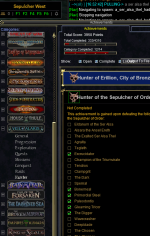
I can try to get more info. Its no biggie on my end, but was hoping to be helpful
Thanks again for the great HUD!
Just found an issue. I've been working my way thruogh the Alaris Hunter achievements.
In Sepulcher of Order, the zone is actually divided into 3 (I think, still working on it) subzones. The main subzone (The Sepulcher of Order) contains all of the hunter targets on its list.
However, the 2 side zones (Sepulcher West and East), the HUD is empty, even though they each have 4-5 hunter target in them.
For example:
Sepucher West has: The Digger, Wavecrasher, Deepblade and the Chosen.
I can try to get more info. Its no biggie on my end, but was hoping to be helpful
Thanks again for the great HUD!


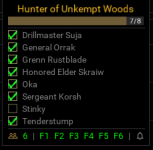
Looks like this is happening on Live nowI have no idea if I screwed something up in settings but HH normally looks like this:
View attachment 51567
But it's now looking like this. If you click on the highlighted mob HH is showing as up, it highlights the entire list left to right. Does anyone know how to fix it? I want to say i've tried almost everything.
View attachment 51568
Ok, this is funky. With hunterhud running, open your ingame map and click on anyzone and Hunterhud resizes itself.Looks like this is happening on Live now
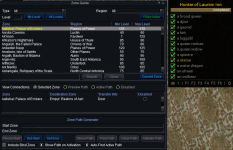

Kingkiller71
Well-known member
/sob this awesomeness and the rest of the Red Guides stuff has made me slowly cry inside knowing I did all of classic, Kunark, Luclin and some of the other expansions Hunter achievements just on my druid when I thought the newer expansions were not for me. Now I am able to get a decent group together with RG software, it makes me regret not doing the hunters for the rest of my characters.
Not sure I want to go back and redo some of those god awful ones for my other characters.
Not sure I want to go back and redo some of those god awful ones for my other characters.

WOAHHHHHHHHHHH, I just did it and it fixed itself ...to see it change shape was crazy and MAGICAL.Ok, this is funky. With hunterhud running, open your ingame map and click on anyzone and Hunterhud resizes itself.
View attachment 56154


Death, scroll up to post 157 by Oldman66, fixed it for me. watch the magic.Hunterhud has gone Vertical?
View attachment 56160
Users who are viewing this thread
Total: 1 (members: 0, guests: 1)
Share: