• You've discovered RedGuides, an EverQuest multi-boxing and scripting community 🧙‍♀️⚙️. We want you to play several EQ characters at once, come join us and say hello! 👋

  • A TLP without truebox has thawed (Very Vanilla ready)
    Frostreaver

Problem - Huge CPU usage from EQ

Joined
Mar 19, 2018
RedCents
2,023¢
Hey all,

I box up to 18 toons, thanks to the amazing software here at RedGuides. I'm having a problem that has been pretty persistent as I started adding more toons to my arsenal. My CPU usage skyrockets over time. It's completely fine when I first get the toons loaded in and started up, using only 30% or so of my max CPU. Then over time, seemingly random instances of EQ will use up more and more CPU, forcing me to restart due to lag and crashes pretty often. One toon will be using .5% of the CPU, while others shoot up over time and eat up 10% or something similarly high. I use the FPS limiter available via /mqsettings; I have the background FPS set to as low as it will go, and I have the foreground FPS set to 60 FPS.

Has anyone encountered this problem? Is there anything else I can do to try to keep my CPU usage lower? Not extremely tech-savvy, so any input is much appreciated.

Thanks.
 
Sounds like your CPU is getting hot, and self throttling so it doesnt fry itself. Id get temp monitoring software from your motherboard manufacture, and watch to see how warm its getting. Anything over 80c most start to throttle, thermal alarm at 90c, and shutdown at 95c.
 
Sounds like your CPU is getting hot, and self throttling so it doesnt fry itself. Id get temp monitoring software from your motherboard manufacture, and watch to see how warm its getting. Anything over 80c most start to throttle, thermal alarm at 90c, and shutdown at 95c.

Temp is looking ok. Nothing is over 70, most cores are under 60. Is that acceptable?
 
Don't forget to check the kneuter valve, muffler bearings, and blinker fluid. If those don't help, I recommend the $2500 pc upgrade option. :bang:
 
No luck on the .ini, unfortunately.

Weirdly, MacroQuest is using up 15% of my CPU on that computer. When I use my other computer it only uses 5% or so. Any thoughts on this? Or any other ideas for what could be going on?
 
MQ or EQ? im assuming you mean EQ? couple off the wall ideas, make sure you didnt edit the Vcore settings. Been auto on EQ since feb (make sure you didnt read only the file). Is hyper threading enabled? is it a newer CPU that has built in graphics, and your GPU is dumping over to it?
 
MQ or EQ? im assuming you mean EQ? couple off the wall ideas, make sure you didnt edit the Vcore settings. Been auto on EQ since feb (make sure you didnt read only the file). Is hyper threading enabled? is it a newer CPU that has built in graphics, and your GPU is dumping over to it?
Nothing has been edited at all. I assume hyper threading is enabled, I did nothing to disable it. It's an intel i9-13900. How would I know if the GPU were dumping over to it, and what would that entail?

Sorry, not very technologically literate over here.
 
make sure you didnt edit the Vcore settings.
Quick Question. WHat do you mean by this. Setting all cores to -1 was a must to use all cores available in your computer right?
Nothing has been edited at all. I assume hyper threading is enabled, I did nothing to disable it. It's an intel i9-13900. How would I know if the GPU were dumping over to it, and what would that entail?

Sorry, not very technologically literate over here.
What Video card are you running? Its seems you have a newer computer so IDK what can cause what you are stating
 
Quick Question. WHat do you mean by this. Setting all cores to -1 was a must to use all cores available in your computer right?

What Video card are you running? Its seems you have a newer computer so IDK what can cause what you are stating
You used to do that. You dont anymore, EQ manages it now.

Newer processors (like the one mentioned) can perform GPU functions. So if the GPU is loaded (thinks its loaded really), maybe its trying to utilize the CPU built in graphics function to lighten the load, causing the CPU to spike under load, as it handles new responsibilities.

That is a very new mid range CPU, and should barely be moving even running.. 48+ instances. As mentioned earlier, for the price of just the CPU, can build an entire box that runs 50 lol.
 
Nothing has been edited at all. I assume hyper threading is enabled, I did nothing to disable it. It's an intel i9-13900. How would I know if the GPU were dumping over to it, and what would that entail?

Sorry, not very technologically literate over here.
I assume you did not buy your computer? The i9 13900k or kf series are the flagship high-end models of the Intel series processors. As Durango mentioned, it should easily run 50. My 6-box runs from 0.2% to 0.4% on average with a 12900k.
 
Sounds like your CPU is getting hot, and self throttling so it doesnt fry itself. Id get temp monitoring software from your motherboard manufacture, and watch to see how warm its getting. Anything over 80c most start to throttle, thermal alarm at 90c, and shutdown at 95c.
Could also be hard-drive is getting ready to go...if you hear little clicky sounds every so often...or the connections between your hd and motherboard could be faulty ...this all happens over time from regular use...or if like me your laptop fan has given out..
 
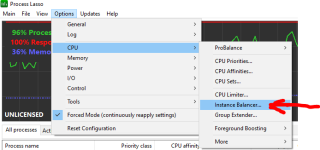
Not sure if this will address your issues but on my setup I Process Lasso... idk/ymmv

and run their feature "Instance Balancer"
https://bitsum.com/?inproduct


again, Don't know if this will make any difference for you but thought I would share. I run 54-60 toons on my PC with no issues.
 
You used to do that. You dont anymore, EQ manages it now.

Newer processors (like the one mentioned) can perform GPU functions. So if the GPU is loaded (thinks its loaded really), maybe its trying to utilize the CPU built in graphics function to lighten the load, causing the CPU to spike under load, as it handles new responsibilities.

That is a very new mid range CPU, and should barely be moving even running.. 48+ instances. As mentioned earlier, for the price of just the CPU, can build an entire box that runs 50 lol.
Interesting i will have to look into this as i have set all for -1 in EQini
 
I assume you did not buy your computer? The i9 13900k or kf series are the flagship high-end models of the Intel series processors. As Durango mentioned, it should easily run 50. My 6-box runs from 0.2% to 0.4% on average with a 12900k.

Something is definitely weird. No, I upgraded pretty much everything in my PC to top-of-the-line to try to address this issue. But I have instances of EQ eating up so much CPU it's wild. I have no idea what's going on.
 
You used to do that. You dont anymore, EQ manages it now.

Newer processors (like the one mentioned) can perform GPU functions. So if the GPU is loaded (thinks its loaded really), maybe its trying to utilize the CPU built in graphics function to lighten the load, causing the CPU to spike under load, as it handles new responsibilities.

That is a very new mid range CPU, and should barely be moving even running.. 48+ instances. As mentioned earlier, for the price of just the CPU, can build an entire box that runs 50 lol.
Is there any workaround to this?
 
I get that is a joke, but you can build a computer for around 500$ that can support 50+ toons.

Yes and no. You can do it with the 5700G and integrated graphics. You can get the CPU/MB from Microcenter for $220, the ram for $150, the 1TB NVME for $49 and the PSU for $50. The case is probably another $50-75 depending on the one you want to use. The 5700G can actually run 90-100 toons if you use over 64gbs of ram.
 
Something is definitely weird. No, I upgraded pretty much everything in my PC to top-of-the-line to try to address this issue. But I have instances of EQ eating up so much CPU it's wild. I have no idea what's going on.
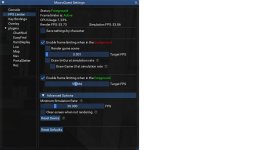
Are you using framelimiter to limit fps or even make it not render background instances ?

Don't just limit background FPS turn off the render completely it does not impact performance.

Another issue could be pet classes EQ has a nasty leak that will increase cpu/memory usage over time when constantly zoning with a pet up.
 
That is kinda cool. Hvae you compared use of it vs non use? Id image so, but id like to know your experience and usefulness of this.
 
@Grpsmashin I don't have anything to compare. I've been using it for years now. ymmv, different hardware might have a different outcome.

I also have core parking disabled. I read it should be off by default on high performance power settings, but you never know. **What is core parking?

Here is a screenshot of the crew loaded up this AM. Besides optimizing EQ per the normal setting, my only other setting is to enable the MQ FPS limiters settings which are awesome and your best bang for the buck so to speak!


1669394175191.png
 
Totally bizarre, I just don't get it. My computers are basically completely top of the line after upgrading them to try to address this issue, and the issue hasn't resolved at all.

The only thing I have left to replace is the SSD. Could that be causing a problem? Everything else got replaced and upgraded massively. Aside from the graphics cards, which are GeForce 3080s.
 
Totally bizarre, I just don't get it. My computers are basically completely top of the line after upgrading them to try to address this issue, and the issue hasn't resolved at all.

The only thing I have left to replace is the SSD. Could that be causing a problem? Everything else got replaced and upgraded massively. Aside from the graphics cards, which are GeForce 3080s.
Yep it could, and/or specifically if you're file scanning (a/v or defender, or file syncing) any file changes in your eq/mq/RG folders
 
Yep it could, and/or specifically if you're file scanning (a/v or defender, or file syncing) any file changes in your eq/mq/RG folders
Thank you Sic. I've made sure A/V and defender are off, how can I check on the file syncing?
 
Totally bizarre, I just don't get it. My computers are basically completely top of the line after upgrading them to try to address this issue, and the issue hasn't resolved at all.

The only thing I have left to replace is the SSD. Could that be causing a problem? Everything else got replaced and upgraded massively. Aside from the graphics cards, which are GeForce 3080s.

Whats your framelimiter settings ?
 
Hey all,

I box up to 18 toons, thanks to the amazing software here at RedGuides. I'm having a problem that has been pretty persistent as I started adding more toons to my arsenal. My CPU usage skyrockets over time. It's completely fine when I first get the toons loaded in and started up, using only 30% or so of my max CPU. Then over time, seemingly random instances of EQ will use up more and more CPU, forcing me to restart due to lag and crashes pretty often. One toon will be using .5% of the CPU, while others shoot up over time and eat up 10% or something similarly high. I use the FPS limiter available via /mqsettings; I have the background FPS set to as low as it will go, and I have the foreground FPS set to 60 FPS.

Has anyone encountered this problem? Is there anything else I can do to try to keep my CPU usage lower? Not extremely tech-savvy, so any input is much appreciated.

Thanks.
Try a manual adjustment...you usually feel much better afterwards


pc GIF
pc virus GIF
 
Could also be hard-drive is getting ready to go...if you hear little clicky sounds every so often...or the connections between your hd and motherboard could be faulty ...this all happens over time from regular use...or if like me your laptop fan has given out..
People still use hard drives? Maybe for storage but for the boot drive? Doubtful with that processor. Kind of like self parking feature for a Model T.
 
Problem - Huge CPU usage from EQ

Users who are viewing this thread

Back
Top
Cart