• You've discovered RedGuides, an EverQuest multi-boxing and scripting community 🧙‍♀️⚙️. We want you to play several EQ characters at once, come join us and say hello! 👋

  • A TLP without truebox has thawed (Very Vanilla ready)
    Frostreaver

Problem - Help Debugging Computer freezing on MQ Next

Fearbringer

Active member
Joined
Nov 12, 2021
RedCents
900¢
Ran MQLive for 2 days, no problem at all. Ran Bard, Necro, Shaman, Zerker on MQNext, No problem. As soon as I zone the SK, freeze. I can't even access the task manager to file dump. Going to try and uninstall MQ2Eskay and reinstall now.
 
Ran MQLive for 2 days, no problem at all. Ran Bard, Necro, Shaman, Zerker on MQNext, No problem. As soon as I zone the SK, freeze. I can't even access the task manager to file dump. Going to try and uninstall MQ2Eskay and reinstall now.
sorry to hear that fearbringer, that doesn't really sound like an mq2eskay thing, especially if you can't even bring up task manager. dlls aren't really "installed" in such a way that a "uninstall and resinstall" would change anything.
 
Ok, I looked at both sides of EQ and Redguides Launcher and did a compare file pull. Out of the total amount of files from the original install, somehow 2 were missing. I cannot locate the 2 missing files I believe are causing these freezes, but I will look closer.

So what have I done was closed out RG launcher, unwatched Eskay, reloaded RG Launcher, went back and watched Eskay, then reinstalled, and refreshed. I did another compare and it was even with the 2 files there.

Going to run this and see if i can narrow it down.
 
Ok, I looked at both sides of EQ and Redguides Launcher and did a compare file pull. Out of the total amount of files from the original install, somehow 2 were missing. I cannot locate the 2 missing files I believe are causing these freezes, but I will look closer.

So what have done was closed out RG launcher, unwatched Eskay, reloaded RG Launcher, went back and watched Eskay, then reinstalled, and refreshed. I did another compare and it was even with the 2 files there.

Going to run this and see if i can narrow it down.
Unwatching/watching eskay isn't a thing that will do anything. Your paid for resources are automatically downloaded.

The only resources that watching or unwatching changed are non-auto included macros and eventually non-auto included luas

We will definitely want to try and determine why you are freezing to a non recoverable state.

Would start with the usual:
1. Windows updated?
2. Drivers updated?
3. Is your pc overheating or peaking out on resources (cpu usage, hard drive usage, memory usage) etc

Do you have any non traditional software running? Like any overlay programs?
 
I wonder why when I load sk it crashes?

1. Yes, tripled checked all updates were good to go.
2. Drivers are updated.
3. Everything checks out ok.

When I run Live, there are no issues at all.
 
That is correct, by reloading reguides launcher it ran for 3 minutes and then froze up. I wish I could take a screen shot.

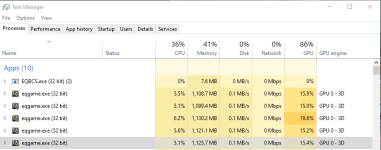
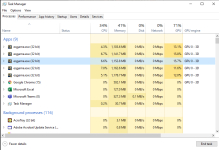
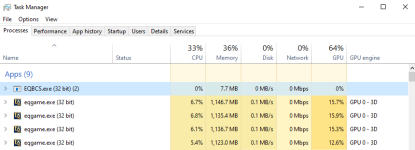
Here's what I was able to screenshot

GPU is working towards 80-95%. Would this cause a freeze, because it seems as if it froze up when it was at 54%, may have jumped and then froze before I could see it hit 100%.

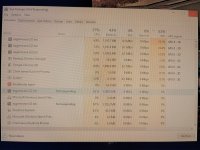
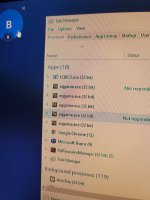
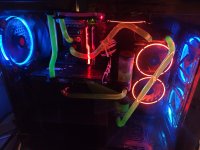
Here's a picture of the task manager I took with my phone.
 

Attachments

  • GPU.png
    GPU.png
    24 KB · Views: 6
  • GPU2.png
    GPU2.png
    25.8 KB · Views: 6
  • LLoad.png
    LLoad.png
    90.1 KB · Views: 6
  • More.png
    More.png
    4.3 KB · Views: 5
  • GPU.png
    GPU.png
    46.1 KB · Views: 6
  • 20211214_010747.jpg
    20211214_010747.jpg
    5.9 MB · Views: 13
Is MQ or RG offering .pdb files anywhere for each compile for a more accurate debug with VStudio?
 
Is MQ or RG offering .pdb files anywhere for each compile for a more accurate debug with VStudio?
For the above it’s not creating a crash dump, it’s just freezing. But to answer your question, no, crashes are automatically reported for RG unless you turn it off.
 
Yes I get that but wouldn't attaching the debugger with the compile .pdb files tell you exactly where it is freezing?
 
No. You would have to debug it. But you can force a crash dump with Task Manager and get a dump file.

None of which would tell you anything if the issue is that antivirus is blocking execution.
 
L
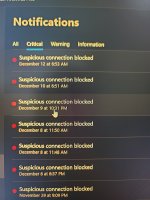
I see you have BitDefender. In the BitDefender logs, is it showing that a threat was detected?


Let me check, and what website or program am I looking for on bitdefender?

But nothing yesterday it looks like

Just froze, no notifications on the bitdefender

And I have to unplug my computer to restart it each time
 

Attachments

  • 20211214_132310.jpg
    20211214_132310.jpg
    2.4 MB · Views: 7
  • 20211214_133932.jpg
    20211214_133932.jpg
    2.9 MB · Views: 7
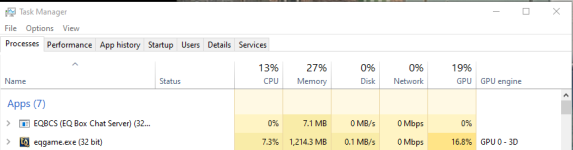
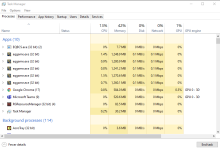
Ok, baseline EQ running 5 accounts Lvl120 with a EVGA 1080, Ryzen 7, 32GM, etc:
68.2% GPU Usage - 5% and + 15% for a total max output of 83.2%

MQLive, same hardware and separated Eskay because it seemed as if Eskay was more demanding on the GPU:
Eskay Live 16.8% and seemed to +\- 5% so a total max output of 21.8%

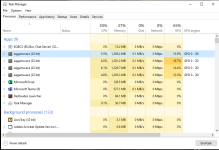
MQ Live on the other 4 toons for GPU usage:
Live 62.3% and seemed to go +\- 10% so a max output of 72.3%

Next Eskay was 20.4% with a +\- 7% for a total output of 27.4%

Other 4 toons on Next:
Next @ 59.5% with what seemed to be +\- 9% for a max output of 68.5% GPU

Ok Thus...
Baseline was a max of 83.2%
Live was a max of 94.1%
Next was a max of 95.9%

There's more statistical interpolation and extrapolation that can be done with these numbers.

Drawing the hypothesis of freeze due to video card fluctuation beyond capability.

Will keep analysis ongoing and report back.
 

Attachments

  • baseline.png
    baseline.png
    69 KB · Views: 4
  • SK Live.png
    SK Live.png
    27.5 KB · Views: 5
  • Other Live.png
    Other Live.png
    72.5 KB · Views: 5
  • NextSK.png
    NextSK.png
    38.8 KB · Views: 6
  • NextOther.png
    NextOther.png
    38.6 KB · Views: 5
  • 20211214_201403.jpg
    20211214_201403.jpg
    3.1 MB · Views: 8
Last edited by a moderator:
you should set up framelimiter - you say your issue might be WITH frame limiter, but based on your cpu/gpu usage, it doesn't look like you are using it at all. i have 0 gpu usage on all my frame limiter toons over several different computers over various levels of computer power (even on the super duper i5 crap computer with onboard video, 0%)

you keep mentioning mq2eskay, but you also mention running 54 toons? and 4 of them freeze? and you don't think it is pc related?.

you probably have a core issue resulting in the red herring of chasing your shadowknight

I would also 100% ensure you have your eqclient.ini setup correctly.

if you have your eqclient core locking you can run into performance issues. every entry for CPUAFFINITY in your eqclient should be "-1"

6 toons would be CPUAFFINITY0 - CPUAFFINITY5
INI:
cpuaffinity0=-1
cpuaffinity1=-1
cpuaffinity2=-1
cpuaffinity3=-1
cpuaffinity4=-1
cpuaffinity5=-1

also, please just make 1 post, don't make a new post for every sentence or thought you have

based on your posts, i would guess you have an issue with your gpu getting overloaded.

if you are at 15-20% gpu on a single toon definitely sounds like you are maxing that out
 
I run a similar comp, evga 1080 same ram similar processor. What Sic said, if your not using the frame limiter I would set that up. Even without it, that seems like a lot memory and gpu use. Maybe check out the gpu for driver update or fan issues?
 

Attachments

  • Untitled.png
    Untitled.png
    42.6 KB · Views: 10
Is this a repeatable problem? ie Every time you load up Next, and then Zone your SK he crashes the System?

When Running 54 on MQ I have had 4 Toon freeze while zoning during the last few days. No Crash Dump, but I kill the process, reload and away we go. Its been a random toon..and its been on 2 different computers - so I dont think its Toon related or PC related.
I never had this occur on MQ2. so it maybe something with frame limiter.

I didnt even take any notice of Task Manager when it occured for me - but Ill check if it occurs again.
Hi @Sic,

Fearbringer didnt write this. This was a question I wrote, just to determin if the problem is repeatable, and you have merged it into his posts.

I am the one running 54 toons - and I have had a client Freeze on Zoning. Never had a Computer lock up entirely. I was just saying - if a client freezes on zoning, I just move on. Nothing to worry about.

BUT - If every single time he zones the SK, it Locks up the entire PC then it is another issue entirely. Root Cause is probably an Iksar SK or something stoopid like that
 
Hi @Sic,

Fearbringer didnt write this. This was a question I wrote, just to determin if the problem is repeatable, and you have merged it into his posts.

I am the one running 54 toons - and I have had a client Freeze on Zoning. Never had a Computer lock up entirely. I was just saying - if a client freezes on zoning, I just move on. Nothing to worry about.

BUT - If every single time he zones the SK, it Locks up the entire PC then it is another issue entirely. Root Cause is probably an Iksar SK or something stoopid like that
Ah thanks. There were like 12 posts of fears that were like 1 line or photo that got merged, I must have grabbed one of yours by mistake. Thanks for the clarity as that definitely was a point of confusion, and apologies
 
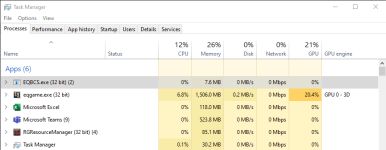
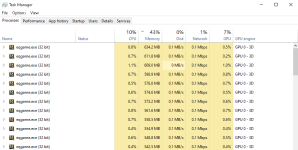
Update: So I enabled framelimiter (per the YouTube video) and the GPU usage dropped to almost no usage, thank you. In a 12 hour continuous run of Next, it froze once, about 11 hours into the aa grind. What I noticed is that switching back and forth from toons may have caused it. But I will go and look at CPUAFFINITY and report back. Below is a picture of 5 toons running with Framelimiter.
 

Attachments

  • FL.png
    FL.png
    64.9 KB · Views: 10
Sic,
All of the CPUAffinity 1-5 were set to:
cpuaffinity0=1
cpuaffinity1=1
cpuaffinity2=2
cpuaffinity3=3
cpuaffinity4=4
cpuaffinity5=5

I set all of them to -1. I am curious, what does this do?
 
Sic,
All of the CPUAffinity 1-5 were set to:
cpuaffinity0=1
cpuaffinity1=1
cpuaffinity2=2
cpuaffinity3=3
cpuaffinity4=4
cpuaffinity5=5

I set all of them to -1. I am curious, what does this do?
I'm not Sic but -1 allows old EQ to utilize all your chips cpu's rather than just one cpu on the chip. affinity=1 is the first cpu and affinity=6 is the 6th.
affinity=-1 is use all the cpu.
 
Sic,
All of the CPUAffinity 1-5 were set to:
cpuaffinity0=1
cpuaffinity1=1
cpuaffinity2=2
cpuaffinity3=3
cpuaffinity4=4
cpuaffinity5=5

I set all of them to -1. I am curious, what does this do?
yes this is wrong, all of them you want set to -1

this lets windows handle your core management instead of locking your eq instances
 
Regarding Sifter's answer -- More accurately, setting CPUAffinity to -1 lets Windows choose which core to use rather than specifying. EQ doesn't use multiple cores, so "utilize all your hips cpu's" is a bit of a misnomer in that context.

In this original configuration:
Code:
cpuaffinity0=1
cpuaffinity1=1
cpuaffinity2=2
cpuaffinity3=3
cpuaffinity4=4
cpuaffinity5=5

It says: The first instance of EQ should use core 1, the second instance of EQ should use core 1, the third instance of EQ should use core 2, the fourth should use core 3, the fifth should use core 4, and the 6th should use core 5. That means that your first two instances are sharing the same core. Further, in most systems you have either Hyperthreading (Intel) or Simultaneous Multithreading (AMD) which means that the odd numbered cores in this scenario are actual the additional hyperthread cores rather than physical cores. So in the above example, your first two clients are running on the same (virtual) core, your second two clients are running on the same physical core (one physical, one virtual), and your last two are running on the same physical core (one physical one virtual). So if you have say -- a quad core processor then you're only using 3 of your 4 cores.

As Sic mentioned, setting it to -1 says "Let Windows handle this for me" rather than binding to a specific core, which is in general the best practice. If you were specifying cores, you would likely specify them to even numbers. (But again, don't do that, just let windows handle it).
 
Regarding Sifter's answer -- More accurately, setting CPUAffinity to -1 lets Windows choose which core to use rather than specifying. EQ doesn't use multiple cores, so "utilize all your hips cpu's" is a bit of a misnomer in that context.

In this original configuration:
Code:
cpuaffinity0=1
cpuaffinity1=1
cpuaffinity2=2
cpuaffinity3=3
cpuaffinity4=4
cpuaffinity5=5

It says: The first instance of EQ should use core 1, the second instance of EQ should use core 1, the third instance of EQ should use core 2, the fourth should use core 3, the fifth should use core 4, and the 6th should use core 5. That means that your first two instances are sharing the same core. Further, in most systems you have either Hyperthreading (Intel) or Simultaneous Multithreading (AMD) which means that the odd numbered cores in this scenario are actual the additional hyperthread cores rather than physical cores. So in the above example, your first two clients are running on the same (virtual) core, your second two clients are running on the same physical core (one physical, one virtual), and your last two are running on the same physical core (one physical one virtual). So if you have say -- a quad core processor then you're only using 3 of your 4 cores.

As Sic mentioned, setting it to -1 says "Let Windows handle this for me" rather than binding to a specific core, which is in general the best practice. If you were specifying cores, you would likely specify them to even numbers. (But again, don't do that, just let windows handle it).


Thank you (and Sic) for this!

I had no idea this was a thing, and will update my eqclient cpuaffinity settings now.

With that said, is there a section on redguides, or the internet for that matter, that has other tips and tricks for the eqclient file (to optimize usage?)

Warmest regards.
 
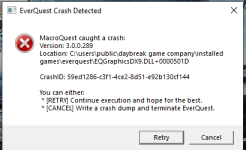
Ran Next for about 12 hours with CPUA set to -1 and also Framelimiter set to active. Almost no issues at all. Had one crash and I was able to catch this. I can send it to you.
 

Attachments

  • Crash.png
    Crash.png
    27.5 KB · Views: 7
Last edited:
don't need to send anything. you can also ctrl+c on the dialog.

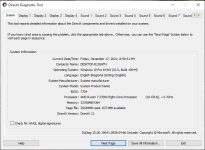
didn't look at it yet but now i'm convinced that installing the direct x installer fixes some of these crashes for some reason.
 
Interesting thread, does the -1 always work?
First instance on same computer.
Code:
CPUAffinity0=0
CPUAffinity1=1
CPUAffinity2=2
CPUAffinity3=3
CPUAffinity4=4
CPUAffinity5=5
CPUAffinity6=6
CPUAffinity7=7
CPUAffinity8=8
CPUAffinity9=9
CPUAffinity10=10
CPUAffinity11=11
CPUAffinity12=12
CPUAffinity13=13
CPUAffinity14=14
CPUAffinity16=0

Second Instance on same computer
Code:
CPUAffinity0=0
CPUAffinity1=1
CPUAffinity2=2
CPUAffinity3=3
CPUAffinity4=0
CPUAffinity5=1
CPUAffinity6=2
CPUAffinity7=3
CPUAffinity8=8
CPUAffinity9=9
CPUAffinity10=2
CPUAffinity11=3
CPUAffinity12=0
CPUAffinity13=1
CPUAffinity14=2
CPUAffinity15=3
CPUAffinity16=0
CPUAffinity17=1
CPUAffinity18=2
CPUAffinity19=3
CPUAffinity20=4
CPUAffinity21=5
 
Interesting thread, does the -1 always work?
First instance on same computer.
Code:
CPUAffinity0=0

> Here < is a link from Fanras, with some additional linkies to eq forum threads.

but yeah general consensus for a while is "let windows handle your core assignments"
 
I'd like to see an article explaining what is meant by "assigns it to the turbo core." That's not terminology I'm familiar with outside of Intel Turbo Boost which wouldn't apply to AMD at all and doesn't make sense in this context.

Given that what that is doing is specifying processor affinity, and you can still set processor affinity in Windows 10 using task manager if you really wanted to, I'd need more information before I believe what's in that post.
 
Last edited:
Fair point on that, the rest of the stuff on fanra's page is pretty spot on for adjusting settings so I would have thought that would be correct too, but these things can be pretty obtuse :)

I've still got all mine set to -1 tbh, although I use isboxer too and I believe the cpu strategy from that overrides the CPU affinity thing anyways so probably no point changing it up as it is

EDIT: actually, now I've looked into them, they're an absolute mess with what's specified. I should look into this, hehe
 
I thought I had installed Direct X.
don't need to send anything. you can also ctrl+c on the dialog.

didn't look at it yet but now i'm convinced that installing the direct x installer fixes some of these crashes for some reason.

Here is what I currently have regarding DirectX
 

Attachments

  • Direct X.png
    Direct X.png
    54.6 KB · Views: 9
I hope someone finds this helpful.
I've been having "new" crashing and freezing on zone issue. I tried everything related to EQ performance in all the guides listed. Eventually got to installing the free version of wineq so at least when it froze I could alt tab to Process Lasso and kill the locked instance.

I finally came to my senses and checked the program I'd been trusting to make EQ perform it's best.

Turns out process lasso had and was assigning eqgame.exe a low memory priority. I set this to normal. Much better so far.
 
I had some issues with MQnext freezing, but the issue turned out to be a bad MQ2React condition that I set which is spamming the hell out of me. If you run react, a bad condition could potentially be the culprit.
 
Update after a few weeks: The aforementioned solution(s) have solved the crashing issue I was having. No problems since.
 
Problem - Help Debugging Computer freezing on MQ Next

Users who are viewing this thread

Back
Top
Cart