
-
 Hail, we're RedGuides. We want you to play six (yes, 6!) EverQuest characters at once. We have scripts and a friendly community to help, please join our playstyle and say hello! 👋
-
 We've added LLM sections to our Terms & Rules and Resource Rules, for everyone's sanity & in-game safety.
Read more
a. Do not replace your voice with an LLM. This goes for your posts and your scripts. Drafting and editing with a tool is fine, but don't take you out of what you share.
b. Do not replace your EQ character's voice with an LLM. We don't want scripts that speak over/ooc,/shoutor other public channels. This has been an unwritten rule that's kept casino scripts off the site for decades, but we're now compelled to make it clear: keep automated communication private.
Why Does RG Review Scripts?
Nearly every LLM-written Lua script we see is making your character do impossible things, and rarely in a way that's beneficial to you. We've seen heavy server hammering,/targetover impossible distances when/nav spawnwould passively accomplish the same thing, a spawn search that fires 20+ times per second, and other pointless actions that are likely annoying GMs.
You are welcome to use LLMs as a tool to structure, draft, and edit your work, but please read critically before hitting/lua run
You are using an out of date browser. It may not display this or other websites correctly.
You should upgrade or use an alternative browser.
Problem - Game Crashing
- Thread starter Tarleigh
- Start date

- Commits
- 191
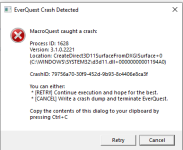
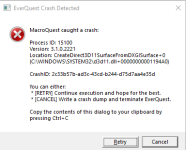
Make sure you're on the most up to date version.Having trouble getting this figured out. Fresh install, drivers up to date, new ui turned off, any help would be greatly appreciated.
View attachment 56836View attachment 56837

VV Live is on 2231

You're on 2221
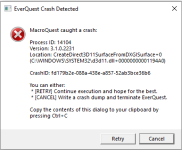

PC running random overlay?Updated, no luck. I've been having this problem since the patch.
View attachment 56842


Lord Sivion
Ultimate seasoned veteran member
Make sure you have exclusions for your Macroquest, Redguides, and Everquest folders in your AV software. AV can do some stupid things when it comes to running all of these things.
Is that confirmed? I guess RG is not really the case here to exclude.Make sure you have exclusions for your Macroquest, Redguides, and Everquest folders in your AV software. AV can do some stupid things when it comes to running all of these things.
Lord Sivion
Ultimate seasoned veteran member
I had issues personally with one of my PC's and Defender. Once excluding those file locations, problems went away. I have seen others have this problem as well with AV just causing havok. And honesly, it's an easy thing to try to find out if it helps.Is that confirmed? I guess RG is not really the case here to exclude.
Last edited:
I don't believe there is any overlay. I've made exclusions so everything should run. It is really weird though, its almost like when I get to a certain part of the zone I have them (crystal caverns) it crashes. Once at that spot my toon will crash just as soon as the game loads. If I send him back to home from character select I can get back in and run all around PoK and back to crystal caverns without issue, until I get to the end of the entrance tunnel and then I crash again and he won't load up. My other characters load up fine at the entrance, but I haven't walked them down to see if they will crash at that spot also.
Does the crash happen without MQ loaded? That will help determine if it's an issue with that game or not.I don't believe there is any overlay. I've made exclusions so everything should run. It is really weird though, its almost like when I get to a certain part of the zone I have them (crystal caverns) it crashes. Once at that spot my toon will crash just as soon as the game loads. If I send him back to home from character select I can get back in and run all around PoK and back to crystal caverns without issue, until I get to the end of the entrance tunnel and then I crash again and he won't load up. My other characters load up fine at the entrance, but I haven't walked them down to see if they will crash at that spot also.
brilucdestiny
Active member
Originally, I was gonna ask if this crash happens to all your characters or only one or two? But then I saw that you are seeing this happening even without MQ Loaded. new video card perhaps?...

BlueBug
Seasoned veteran member
Any luck getting up and running?It happens with and without MQ loaded.
BB~
Just got back into town, but no I never was able to get it running right. I have an old Radeon RX480, dxdiag shows that dx12 is installed and supports 11. I did try to run down the tunnel as described above in crystal caverns with a different character and it did produce the same result, another crash. Also, I don't know if it matters, but when 1 character crashes it freezes my pc and all 3 end up crashing along with it.
Users who are viewing this thread
Total: 1 (members: 0, guests: 1)
Share: