• Hail, we're RedGuides. We want you to play six (yes, 6!) EverQuest characters at once. We have scripts and a friendly community to help, please join our playstyle and say hello! 👋
  • We've added LLM sections to our Terms & Rules and Resource Rules, for everyone's sanity & in-game safety.
    Read more
    a. Do not replace your voice with an LLM. This goes for your posts and your scripts. Drafting and editing with a tool is fine, but don't take you out of what you share.
    b. Do not replace your EQ character's voice with an LLM. We don't want scripts that speak over /ooc, /shout or other public channels. This has been an unwritten rule that's kept casino scripts off the site for decades, but we're now compelled to make it clear: keep automated communication private.

    Why Does RG Review Scripts?
    Nearly every LLM-written Lua script we see is making your character do impossible things, and rarely in a way that's beneficial to you. We've seen heavy server hammering, /target over impossible distances when /nav spawn would passively accomplish the same thing, a spawn search that fires 20+ times per second, and other pointless actions that are likely annoying GMs.

    You are welcome to use LLMs as a tool to structure, draft, and edit your work, but please read critically before hitting /lua run
Find Item Window

Release Find Item Window 1.0.4

aquietone submitted a new resource:

Find Item Window - because emu needs to find items too

This lua script recreates the find item window from live EQ for EMU servers where it does not exist.

If you play on live, you likely don't care about this resource.

In addition, it has some very, very simple cross toon search capabilities using MQ2DanNet, which can be used to find and request items from other online toons. It doesn't have the most robust logic for requesting items, and will only attempt one time as long as they are in the same zone and within trading distance of the...

Read more about this resource...
 
aquietone submitted a new resource:

If you play on live, you likely don't care about this resource.

I disagree, this is an awesome tool. I use this on live all the time now.

The only thing that I see missing, I cannot search for items on other toons, if I do not have them on the main toon.
(unless I am missing something)

Other than that, this is great, thank you so much.
 
I disagree, this is an awesome tool. I use this on live all the time now.

The only thing that I see missing, I cannot search for items on other toons, if I do not have them on the main toon.
(unless I am missing something)

Other than that, this is great, thank you so much.
Would it be possible to connect to any Dannet char and do an output for the searching?

Just trying to think out the box
 
yeah i'm not too concerned about searching when you can already do
/dg /status itemall someitem

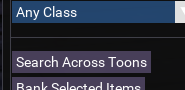
Also, this button on the left is supposed to let you search across toons for stuff you don't have yourself:
1675294291956.png

so you aren't limited to the search button on each of the item rows on the right.

There's a search bar on the search window that opens up where you can search whatever.

The problem is those searches are currently exact item name searches only, since when clicking search on a given row, i have an exact item name to input. For the free search i probably need to make it allow non-exact searches.
 
I was trying to add INT to the show stats but it crashes, i thought maybe I could just add additional lines to where shows stats are. I am guessing I am missing something.
ImGui.TableNextColumn() ImGui.Text('%s', item.item.Avoidance()) ImGui.TableNextColumn() ImGui.Text('%s', item.item.INT())

local ColumnID_Avoidance = 12 local ColumnID_INT = 13

elseif sort_spec.ColumnUserID == ColumnID_Avoidance then delta = (a and a.item.Avoidance() or 0) - (b and b.item.Avoidance() or 0) elseif sort_spec.ColumnUserID == ColumnID_INT then delta = (a and a.item.INT() or 0) - (b and b.item.INT() or 0)

ImGui.TableSetupColumn('Avoidance', ImGuiTableColumnFlags.DefaultSort, 1, ColumnID_Avoidance) ImGui.TableSetupColumn('INT', ImGuiTableColumnFlags.DefaultSort, 1, ColumnID_INT)
 
Great Lua script. I'm not sure if I am doing something wrong or not but whenever I am typing in or search for an item across my toons that are connected to dannet and then I hit the request button nothing seems to happen. Even if the toon I am requesting an item from is in the same zone or not, in my case it would be the Guild Hall or PoK. Am I not doing something correctly or has anybody else experienced This issue ? Thank you for creating a great Lua script and keep up the good work
 
Could it be possible to add a "check all" button to this?

After I search for something it would be great to just check all in the list.
 
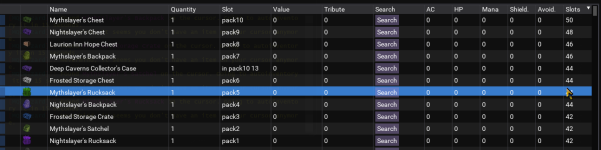
I wanted to be able to search all of my Containers, so I can decide how to order my bags (I am OCD about the largest bag being at the end of the list) so I added the Container Slots to the additional information. Would you like the code changes to merge into the base code? I know you could probably have figured out how to do it in much less time than it took me, but it was my first venture into modifying an ImGUI window.
1726777294705.png

Here is the patch file output:
Patch Info
Code:
diff -r C:\Games\MQNext_RGManager\lua\find.lua C:\Games\MQNext_RGManager\lua\find_bags.lua
349a350,351
>         ImGui.TableNextColumn()
>         ImGui.Text('%s', item.item.Container())
388a391
> local ColumnID_SlotQty = 13
441a445,446
>         elseif sort_spec.ColumnUserID == ColumnID_SlotQty then
>             delta = (a and a.item.Container() or 0) - (b and b.item.Container() or 0)
521c526
<     if showStats then numColumns = numColumns + 5 end
---
>     if showStats then numColumns = numColumns + 6 end
539a545
>             ImGui.TableSetupColumn('Slots', ImGuiTableColumnFlags.DefaultSort, 1, ColumnID_SlotQty)
 
I was trying to add INT to the show stats but it crashes, i thought maybe I could just add additional lines to where shows stats are. I am guessing I am missing something.

ImGui.TableNextColumn()
ImGui.Text('%s', item.item.Avoidance())
ImGui.TableNextColumn()
ImGui.Text('%s', item.item.INT())


local ColumnID_Avoidance = 12
local ColumnID_INT = 13


elseif sort_spec.ColumnUserID == ColumnID_Avoidance then
delta = (a and a.item.Avoidance() or 0) - (b and b.item.Avoidance() or 0)
elseif sort_spec.ColumnUserID == ColumnID_INT then
delta = (a and a.item.INT() or 0) - (b and b.item.INT() or 0)


ImGui.TableSetupColumn('Avoidance', ImGuiTableColumnFlags.DefaultSort, 1, ColumnID_Avoidance)
ImGui.TableSetupColumn('INT', ImGuiTableColumnFlags.DefaultSort, 1, ColumnID_INT)
Theres an additional line where you have to tell the system how many columns to display when you check the ShowStats checkbox:

if showStats then numColumns = numColumns + 6 end
 
Hey aquietone, do you allow pull requests for this resource? I have made a couple of changes for my QOL
1. Display how many slots a bag in the list has, so I can sort my bags largest to smallest to put them in order on my character / bank (I know, I am OCD about that)
2. For the class list, I added a selection 'Not My Class' that will allow me to see everything I have that is not usable by my character. That in conjunction with the sort by tribute gives me a quick tribute list.
 
Release Find Item Window

Users who are viewing this thread

Back
Top
Cart