
Install the app
How to install the app on iOS
Follow along with the video below to see how to install our site as a web app on your home screen.
Note: This feature may not be available in some browsers.
-
 You've discovered RedGuides, an EverQuest multi-boxing and scripting community 🧙♀️⚙️. We want you to play several EQ characters at once, come join us and say hello! 👋
You are using an out of date browser. It may not display this or other websites correctly.
You should upgrade or use an alternative browser.
You should upgrade or use an alternative browser.
eqgame crash 3/18/2025
- Thread starter Nebras
- Start date
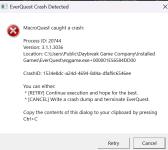

you posted this in the redguide's launcher discussion thread - that's an mq/eq crash unrelated to the rg launcher - I'm going to move this to its own thread.
also next time please "Copy the contents" instead of pasting a picture.
if you are using the new ui engine, I would start by disabling that and then try again.
just as an FYI - the reason we ask for you to do the control+c and then control+v, is it would past a copyable plain text crash id, rather than trying to transcribe it from a picture - there are readers and other stuff, which aren't quite ideal, and sometimes if you're trying to look at something on your phone it is near impossible to get that info easily over.thanks sic.
the crash system requires an "exact" match of id, so you have to have a 100% correct entire crash id
I tried this but I get the same crash.if you are using the new ui engine, I would start by disabling that and then try again.
alright I understand now:just as an FYI - the reason we ask for you to do the control+c and then control+v, is it would past a copyable plain text crash id, rather than trying to transcribe it from a picture - there are readers and other stuff, which aren't quite ideal, and sometimes if you're trying to look at something on your phone it is near impossible to get that info easily over.
the crash system requires an "exact" match of id, so you have to have a 100% correct entire crash id
this is the ID:
- Process ID: 20744
- CrashID: 1534e8dc-a24d-4694-8d4a-dfaf9c6546ee
---------------------------
EverQuest Crash Detected
---------------------------
MacroQuest caught a crash:
Process ID: 28284
Version: 3.1.1.3038
Location: ResetOverlay+0 (C:\Users\ADMIN\AppData\Local\VeryVanilla\MacroQuest\Release\MQ2Main.dll+00000000001BBFE0)
CrashID: 25886bd7-9e29-483f-a7f2-6e638010ef85
You can either:
* [RETRY] Continue execution and hope for the best.
* [CANCEL] Write a crash dump and terminate EverQuest.
Copy the contents of this dialog to your clipboard by pressing Ctrl+C
---------------------------
Retry Cancel
---------------------------
new crash report, anyone knows how to fix this?
I get it when I click on chosen server.
EverQuest Crash Detected
---------------------------
MacroQuest caught a crash:
Process ID: 28284
Version: 3.1.1.3038
Location: ResetOverlay+0 (C:\Users\ADMIN\AppData\Local\VeryVanilla\MacroQuest\Release\MQ2Main.dll+00000000001BBFE0)
CrashID: 25886bd7-9e29-483f-a7f2-6e638010ef85
You can either:
* [RETRY] Continue execution and hope for the best.
* [CANCEL] Write a crash dump and terminate EverQuest.
Copy the contents of this dialog to your clipboard by pressing Ctrl+C
---------------------------
Retry Cancel
---------------------------
new crash report, anyone knows how to fix this?
I get it when I click on chosen server.
are you going fullscreen or doing something like unplugging devices? (these are full stabs in the dark based on nothing)---------------------------
EverQuest Crash Detected
---------------------------
MacroQuest caught a crash:
Process ID: 28284
Version: 3.1.1.3038
Location: ResetOverlay+0 (C:\Users\ADMIN\AppData\Local\VeryVanilla\MacroQuest\Release\MQ2Main.dll+00000000001BBFE0)
CrashID: 25886bd7-9e29-483f-a7f2-6e638010ef85
You can either:
* [RETRY] Continue execution and hope for the best.
* [CANCEL] Write a crash dump and terminate EverQuest.
Copy the contents of this dialog to your clipboard by pressing Ctrl+C
---------------------------
Retry Cancel
---------------------------
new crash report, anyone knows how to fix this?
I get it when I click on chosen server.
if you're not already, please ensure you're NOT using the new equi engine
this is your call stack @brainiac is likely the only person who can see/do something with this
INI:
>    [Inline Frame] MQ2Main.dll!wil::com_ptr_t<IDXGISwapChain,wil::err_exception_policy>::operator=(IDXGISwapChain *) Line 288    C++
     MQ2Main.dll!mq::MQGraphicsEngineDX11::AcquireDevice(IDXGISwapChain * SwapChain) Line 440    C++
     [Inline Frame] MQ2Main.dll!mq::MQGraphicsEngineDX11::OnPresent(IDXGISwapChain *) Line 497    C++
     MQ2Main.dll!mq::DXGISwapChainHook::Present_Detour(unsigned int SyncInterval, unsigned int Flags) Line 185    C++
[External Code]so far I have seen three types of errorrs in addition to the one above:
Error 2:
---------------------------
EverQuest Crash Detected
---------------------------
MacroQuest caught a crash:
Process ID: 26360
Version: 3.1.1.3038
Location: D3DKMTOpenResource+0 (C:\WINDOWS\SYSTEM32\d3d11.dll+00000000000B07E0)
CrashID: 1498f5e7-f52c-41ed-a19a-a404fbaad88b
You can either:
* [RETRY] Continue execution and hope for the best.
* [CANCEL] Write a crash dump and terminate EverQuest.
Copy the contents of this dialog to your clipboard by pressing Ctrl+C
---------------------------
Retry Cancel
---------------------------
and Error 3:
---------------------------
EverQuest Crash Detected
---------------------------
MacroQuest caught a crash:
Process ID: 14152
Version: 3.1.1.3038
Location: C:\Users\Public\Daybreak Game Company\Installed Games\EverQuest\eqgame.exe+0000000000000000
CrashID: 10701e6c-e666-4256-bc1f-8d2683992b54
You can either:
* [RETRY] Continue execution and hope for the best.
* [CANCEL] Write a crash dump and terminate EverQuest.
Copy the contents of this dialog to your clipboard by pressing Ctrl+C
---------------------------
Retry Cancel
---------------------------
Things I did before running MQquest:
- turn game into windowed mode
- turned off new UI
could this be because of the windows user security settings by any chance?
Error 2:
---------------------------
EverQuest Crash Detected
---------------------------
MacroQuest caught a crash:
Process ID: 26360
Version: 3.1.1.3038
Location: D3DKMTOpenResource+0 (C:\WINDOWS\SYSTEM32\d3d11.dll+00000000000B07E0)
CrashID: 1498f5e7-f52c-41ed-a19a-a404fbaad88b
You can either:
* [RETRY] Continue execution and hope for the best.
* [CANCEL] Write a crash dump and terminate EverQuest.
Copy the contents of this dialog to your clipboard by pressing Ctrl+C
---------------------------
Retry Cancel
---------------------------
and Error 3:
---------------------------
EverQuest Crash Detected
---------------------------
MacroQuest caught a crash:
Process ID: 14152
Version: 3.1.1.3038
Location: C:\Users\Public\Daybreak Game Company\Installed Games\EverQuest\eqgame.exe+0000000000000000
CrashID: 10701e6c-e666-4256-bc1f-8d2683992b54
You can either:
* [RETRY] Continue execution and hope for the best.
* [CANCEL] Write a crash dump and terminate EverQuest.
Copy the contents of this dialog to your clipboard by pressing Ctrl+C
---------------------------
Retry Cancel
---------------------------
Things I did before running MQquest:
- turn game into windowed mode
- turned off new UI
could this be because of the windows user security settings by any chance?
Last edited:
Users who are viewing this thread
Total: 1 (members: 0, guests: 1)
Share: