• Hail, we're RedGuides. We want you to play six (yes, 6!) EverQuest characters at once. We have scripts and a friendly community to help, please join our playstyle and say hello! 👋
  • We've added LLM sections to our Terms & Rules and Resource Rules, for everyone's sanity & in-game safety.
    Read more
    a. Do not replace your voice with an LLM. This goes for your posts and your scripts. Drafting and editing with a tool is fine, but don't take you out of what you share.
    b. Do not replace your EQ character's voice with an LLM. We don't want scripts that speak over /ooc, /shout or other public channels. This has been an unwritten rule that's kept casino scripts off the site for decades, but we're now compelled to make it clear: keep automated communication private.

    Why Does RG Review Scripts?
    Nearly every LLM-written Lua script we see is making your character do impossible things, and rarely in a way that's beneficial to you. We've seen heavy server hammering, /target over impossible distances when /nav spawn would passively accomplish the same thing, a spawn search that fires 20+ times per second, and other pointless actions that are likely annoying GMs.

    You are welcome to use LLMs as a tool to structure, draft, and edit your work, but please read critically before hitting /lua run

eqgame crash 3/18/2025

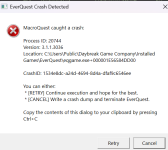
I get this error when I try to launch everquest with MQ running. any ideas?

View attachment 68997
you posted this in the redguide's launcher discussion thread - that's an mq/eq crash unrelated to the rg launcher - I'm going to move this to its own thread.

also next time please "Copy the contents" instead of pasting a picture.

if you are using the new ui engine, I would start by disabling that and then try again.
 
thanks sic.
just as an FYI - the reason we ask for you to do the control+c and then control+v, is it would past a copyable plain text crash id, rather than trying to transcribe it from a picture - there are readers and other stuff, which aren't quite ideal, and sometimes if you're trying to look at something on your phone it is near impossible to get that info easily over.

the crash system requires an "exact" match of id, so you have to have a 100% correct entire crash id
alright I understand now:

this is the ID:

  • Process ID: 20744
  • CrashID: 1534e8dc-a24d-4694-8d4a-dfaf9c6546ee
 
---------------------------
EverQuest Crash Detected
---------------------------
MacroQuest caught a crash:

Process ID: 28284
Version: 3.1.1.3038
Location: ResetOverlay+0 (C:\Users\ADMIN\AppData\Local\VeryVanilla\MacroQuest\Release\MQ2Main.dll+00000000001BBFE0)

CrashID: 25886bd7-9e29-483f-a7f2-6e638010ef85

You can either:
* [RETRY] Continue execution and hope for the best.
* [CANCEL] Write a crash dump and terminate EverQuest.

Copy the contents of this dialog to your clipboard by pressing Ctrl+C

---------------------------
Retry Cancel
---------------------------


new crash report, anyone knows how to fix this?

I get it when I click on chosen server.
 
---------------------------
EverQuest Crash Detected
---------------------------
MacroQuest caught a crash:

Process ID: 28284
Version: 3.1.1.3038
Location: ResetOverlay+0 (C:\Users\ADMIN\AppData\Local\VeryVanilla\MacroQuest\Release\MQ2Main.dll+00000000001BBFE0)

CrashID: 25886bd7-9e29-483f-a7f2-6e638010ef85

You can either:
* [RETRY] Continue execution and hope for the best.
* [CANCEL] Write a crash dump and terminate EverQuest.

Copy the contents of this dialog to your clipboard by pressing Ctrl+C

---------------------------
Retry Cancel
---------------------------


new crash report, anyone knows how to fix this?

I get it when I click on chosen server.
are you going fullscreen or doing something like unplugging devices? (these are full stabs in the dark based on nothing)

if you're not already, please ensure you're NOT using the new equi engine

this is your call stack @brainiac is likely the only person who can see/do something with this
INI:
>    [Inline Frame] MQ2Main.dll!wil::com_ptr_t<IDXGISwapChain,wil::err_exception_policy>::operator=(IDXGISwapChain *) Line 288    C++
     MQ2Main.dll!mq::MQGraphicsEngineDX11::AcquireDevice(IDXGISwapChain * SwapChain) Line 440    C++
     [Inline Frame] MQ2Main.dll!mq::MQGraphicsEngineDX11::OnPresent(IDXGISwapChain *) Line 497    C++
     MQ2Main.dll!mq::DXGISwapChainHook::Present_Detour(unsigned int SyncInterval, unsigned int Flags) Line 185    C++
     [External Code]
 
so far I have seen three types of errorrs in addition to the one above:

Error 2:
---------------------------
EverQuest Crash Detected
---------------------------
MacroQuest caught a crash:

Process ID: 26360
Version: 3.1.1.3038
Location: D3DKMTOpenResource+0 (C:\WINDOWS\SYSTEM32\d3d11.dll+00000000000B07E0)

CrashID: 1498f5e7-f52c-41ed-a19a-a404fbaad88b

You can either:
* [RETRY] Continue execution and hope for the best.
* [CANCEL] Write a crash dump and terminate EverQuest.

Copy the contents of this dialog to your clipboard by pressing Ctrl+C

---------------------------
Retry Cancel
---------------------------

and Error 3:

---------------------------
EverQuest Crash Detected
---------------------------
MacroQuest caught a crash:

Process ID: 14152
Version: 3.1.1.3038
Location: C:\Users\Public\Daybreak Game Company\Installed Games\EverQuest\eqgame.exe+0000000000000000

CrashID: 10701e6c-e666-4256-bc1f-8d2683992b54

You can either:
* [RETRY] Continue execution and hope for the best.
* [CANCEL] Write a crash dump and terminate EverQuest.

Copy the contents of this dialog to your clipboard by pressing Ctrl+C

---------------------------
Retry Cancel
---------------------------


Things I did before running MQquest:
- turn game into windowed mode
- turned off new UI


could this be because of the windows user security settings by any chance?
 
Last edited:
eqgame crash 3/18/2025

Users who are viewing this thread

Back
Top
Cart