today I noticed a message which caused easynav to stop:
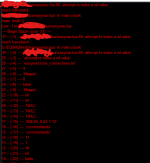



/ooc, /shout or other public channels. This has been an unwritten rule that's kept casino scripts off the site for decades, but we're now compelled to make it clear: keep automated communication private./target over impossible distances when /nav spawn would passively accomplish the same thing, a spawn search that fires 20+ times per second, and other pointless actions that are likely annoying GMs./lua run


Updated the zip file to place the files in the lua folder instead of /lua/lua
Updated file structure to work through the launcher download.
lua/easynavgui
lua/easynav
lua/easynav/zone_connections.ini
emu servers may or may not (and in the case of laz, do not) publish the info needed in order for the easyfind plugin to populate zone connections, so the plugin won't work there. It will load but without any data, doesn't serve much purpose.Not sure why, but, my Zone Guide Window is completely blank. Does anyone know the file I need to have or move to get the Zone Guide Window populated? Without that, EasyNav won't work for me. This is for EMU (Project Laz)... and while I know they have some custom zones and EasyFind wont work for those zones, I'd like it to work a little better for the rest.
If it is blank in all zones then probably what Aquietone said. If it is just some custom zones you would need to add the zones to the Lua/easynav/zone_connections.iniNot sure why, but, my Zone Guide Window is completely blank. Does anyone know the file I need to have or move to get the Zone Guide Window populated? Without that, EasyNav won't work for me. This is for EMU (Project Laz)... and while I know they have some custom zones and EasyFind wont work for those zones, I'd like it to work a little better for the rest.
Place this in your ZoneConnections.yaml file under your guildhall name guildhalllrg for the lobby issue update the location with the location of lobby door. The all to me and you are in the guildhall use the box in the gui and type guildhalllrg and click all. The All2MyZone button won't work because of the zone name being returned as an instance name or something like that. But if you specify in the travelto box the actual zone name guildhalllrg it should work.when use the gui and I hit the to my zone stuff. How do I make the toons use the shabby lobby door to get out of the guild hall? Palatial Guild Hall is the one I am using. also my toons wont run to that guild hall when I tell them to via the tomyzone buttons how would I go about fixing this issue?
-   type: ZoneConnection
            location: [-14.24, 86.10, 1.01]
            script: |
                mq.cmd('/itemtarget "Shabby Lobby Door"')
                mq.delay(2000)
                mq.cmd('/click right item')
                mq.delay(2000)
                mq.cmd('/notify "open the door" menuselect')
targetZone: guildlobbyit works for the door on the right(small guild hall) the door on the left the toons zone in then zone out to sunrisehills and run to lobby then click on the door to go to the big guild hall....and they just keep doing that non stopPlace this in your ZoneConnections.yaml file under your guildhall name guildhalllrg for the lobby issue update the location with the location of lobby door. The all to me and you are in the guildhall use the box in the gui and type guildhalllrg and click all. The All2MyZone button won't work because of the zone name being returned as an instance name or something like that. But if you specify in the travelto box the actual zone name guildhalllrg it should work.
Code:- type: ZoneConnection location: [-14.24, 86.10, 1.01] script: | mq.cmd('/itemtarget "Shabby Lobby Door"') mq.delay(2000) mq.cmd('/click right item') mq.delay(2000) mq.cmd('/notify "open the door" menuselect') targetZone: guildlobby
Is the GuildHall you are trying to zone into Palatial "GuildHallLg" ? Sounds like your trying to zone to the wrong shortnameit works for the door on the right(small guild hall) the door on the left the toons zone in then zone out to sunrisehills and run to lobby then click on the door to go to the big guild hall....and they just keep doing that non stop
Moved easynav.lua to /easynav/init.lua

    drachnidhive:
        -   type: ZoneConnection
            switch: 4
            location: [283, 1108, 451]
            targetZone: dreadspire
        -   type: ZoneConnection
            location: [22, 4, -6]
            targetZone: westkorlach
identifier: 2you are looking for the easyfind thread.How do I recommend this edit/fix to the YAML file? Post here or is there a better route via GIT?
ZoneConnections.yaml
YAML:drachnidhive: - type: ZoneConnection switch: 4 location: [283, 1108, 451] targetZone: dreadspire - type: ZoneConnection location: [22, 4, -6] targetZone: westkorlach identifier: 2


