• You've discovered RedGuides, an EverQuest multi-boxing and scripting community 🧙‍♀️⚙️. We want you to play several EQ characters at once, come join us and say hello! 👋

  • A TLP without truebox has thawed (Very Vanilla ready)
    Frostreaver

Discussion - Disabling Particles

Joined
Oct 26, 2020
RedCents
2,075¢
Question, anyone know why my particles keep turning back on. I am doing the following:
- Alt + O
- Display Tab
- Particles Tabs for: Spells, Env, Player
* Chanking Density to off

Clip Plane, taking it down to 10-15%...

It seems to work for a while...but then today I log in and it's turned on high and all the way for all chars. What's causing this setting to reverse back to on and higher clip plane? It happens on my older WIn 10 crapboxes and newer window 10 machine?

Thesis:
I suspect it's a char I've logged on somewhere that by default has them on and then when I log on it resets it for all.

Note: before I get schooled, I do have framelimiter on and I'm not rendering until active...but as soon as I do....all that shit tries to render (specially on enchanter bots) and eats up a shit ton of resources and/or crash/freeeze.

Appreciate any tips on how to turn this shit off, it's eating up resources and after extended time locking up instances

~AI (whoa my handle initials ... goosebumps)

Robot Ai GIF
 
Question, anyone know why my particles keep turning back on. I am doing the following:
- Alt + O
- Display Tab
- Particles Tabs for: Spells, Env, Player
* Chanking Density to off

Clip Plane, taking it down to 10-15%...

It seems to work for a while...but then today I log in and it's turned on high and all the way for all chars. What's causing this setting to reverse back to on and higher clip plane? It happens on my older WIn 10 crapboxes and newer window 10 machine?

Thesis:
I susped it's a char I've logged on somewhere that by default has them on and then when I log on it resets it for all.

Appreciate any tips on how to turn this shit off, it's eating up resources and after extended time locking up instances

Note: before I get schooled, I do have framelimiter on and I'm not rendering until active...but as soon as I do....all that shit tries to render (specially on enchanter bots) and eats up a shit ton of resources and/or crash/freeeze.

~AI (whoa my handle initials ... goosebumps)

Robot Ai GIF
yes.

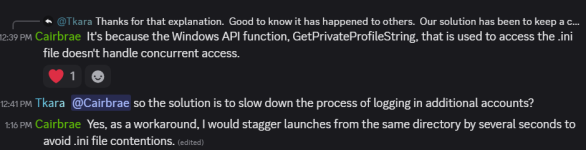
it is likely and possible that one of your toons tries to log in and the eqclient.ini is "locked" and so eq loads defaults.

then that toon ends up being the last toon to log out (or if it is something that is updated upon zoning, you zone and then all your toons swap to that) which gets saved when you cleanly log out.

Devs have confirmed that is an issue, but unlikely they'll do anything about it.

what you can do about it is 2 parts:
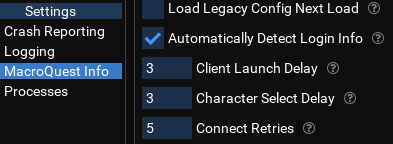
- increase your autologin delay, this will give more time to log in without getting file smashed
- - change this "client launch delay" to something bigger, like 5 or even 10
1767977727087.png
- set your eqclient.ini to "read only", that way if a toon does get smashed and logs in with defaults, it won't save to your eqclient next time you log in

sic said:
yes. what can happen is this:
  • toons all try and log in at the same time
  • for various reasons, they end up having some read/write conflict with the eqclient.ini
  • eq then loads default values since it cant get the values on the eqclient.ini
  • now a toon (could be 1 of our several) has default values, and if that is the last one to log out, those values are now the ones stored in the eqclient.ini
some folks get their eqclient.ini set how they want and then set it to "read only"
  • this doesn't prevent the "clobber" that results in the toon loading the defaults
    • but it does make it so those defaults can't save
  • imo this isn't ideal because if changes are made to the game (eqclient.ini) that are important, you'd miss out on it, and also can no longer change stuff in your settings panel
the real fix, is determining what the hang up is loading characters in increasing the time between launching an additional toon can help checking that your A/V, or file syncing isn't hitting those files could also be beneficial
1767977884182.png
 
yes.

it is likely and possible that one of your toons tries to log in and the eqclient.ini is "locked" and so eq loads defaults.

then that toon ends up being the last toon to log out (or if it is something that is updated upon zoning, you zone and then all your toons swap to that) which gets saved when you cleanly log out.

Devs have confirmed that is an issue, but unlikely they'll do anything about it.

what you can do about it is 2 parts:
- increase your autologin delay, this will give more time to log in without getting file smashed
- - change this "client launch delay" to something bigger, like 5 or even 10
View attachment 74135
- set your eqclient.ini to "read only", that way if a toon does get smashed and logs in with defaults, it won't save to your eqclient next time you log in


View attachment 74136
@Sic you @da Man (har)! Thanks will give it a try. Enjoy your Bday.
~AI
 
Discussion - Disabling Particles

Users who are viewing this thread

Back
Top
Cart