• You've discovered RedGuides, an EverQuest multi-boxing and scripting community 🧙‍♀️⚙️. We want you to play several EQ characters at once, come join us and say hello! 👋

  • A TLP without truebox has thawed (Very Vanilla ready)
    Frostreaver

Problem - CWTN Plugin lag?

Joined
Oct 26, 2020
RedCents
2,075¢
Sic/CWTN.

I am experiencing the oddest thing with the CWTN Plug-ins, they've been lagging (super slow response) since the last two patch cycle (this is isolated to this old laptop only). I haven't changed any display configuration setting on the laptop, but for whatever reason the cleric plug-in specially laaagggggsss as in it's like 10-30 seconds behind in the fight.

I've killed all graphics, spells, environment options, Clip Plane's at zero on these toons, Got the FPS maxed in background and foreground...nothing. The only real change i've done recently is upgraded the little weapon glowy ornamentations from anniversaries for the whole team...but even with that turned off it's still happening. It's super odd, because it's only on the CWTN screens, not kiss assist and only on this box.

Still running 10-12 accts, but i'm only getting lag in CWTN...Any tips? Not really sure what's the cause.
 
Solution
double check you didn't enable onedrive or some other syncing
double check you don't have antivirus scanning any of your mq2 files - especially your cwtnbuff files every time they update
double check you don't have mq2log turned on or eq logs for that matter

cwtn plugin lag is almost always due to how cwtnbuffs works - we keep your buffs/songs in a file that is read-written to by other toons. eventually this will be moved over to something that doesn't read/write to files - but in the meantime if you have anything like onedrive or other syncing software running, or anything like defender or antivirus file scanning when files change you can experience issues as mentioned.
I'm going to merge this with the other thread. if the OP wants to update, i can unlock this thread (just pm me or something).
if everyone bumped this thread with "i don't have issues" it would become a very long thread =p
 
Hi folks,

Anyone else getting EQ stutter with CWTN plugins or is it just me?
Prior to using MQ2Clr/zer/eskay I had no issues.

Just wanting to know if this is normal when running on all 5 toons.

Thanks.
 
Stutter/Lag/ Weird Shit/ Glitches in the Matrix can occur for a number of reasons.

If we want to do some fault finding:

Turn it off and on.
- Stutter can be a slow memory leak. EQBCS2 will definitely cause stutter over time and need to be rebooted at least once a week. Havent had the same issue with Dannet - so if you havent already - Bite the bullet and make the change.

Check what else is running.
- Make sure Steam/Nvidia is not downloading patches, or make sure your girlfriend is not streaming pOrn from the bedroom and stealing all the bandwidth.

Use Frame limiter. or EQWire to manage your background processes.
- Check your CPU Load/Memory Usage. Load them in one at a time and you will be able to see where your Computer hits its limit.
Ideally you want your main toon to be running 60fps, and any background toon to be 30fps. Anything less is Mediocre!


Heaps of other stuff to check - but if you can check all these things and still have issues then post a bit about your setup.

What PC art thou using?
Are you using MQ or MQ2
Are you using IsBoxer? VIrtual eqclient.ini files
Are you using Multiple Directories for EQ?
Are you loading EQBCS, then MQ, then Launching EQ, or Launching EQ then Loading MQ?

Also post screenshot of your Task/Processes when things start stuttering?
 
I recently had a big issue with stuttering. It would be fine when first starting the game but degrade quickly. I thought it was EQ or macro related. But actually found out it was an issue with a G-Sync monitor. Disabling G-Sync resolved it. Do you have a monitor using FreeSync or G Sync?
 
Hi folks,

Anyone else getting EQ stutter with CWTN plugins or is it just me?
Prior to using MQ2Clr/zer/eskay I had no issues.

Just wanting to know if this is normal when running on all 5 toons.

Thanks.
I'm currently having this same issue and mine is directly related to cwtnbuffs plugin. I know that it regularly writes/reads to a file and it can cause issues if your AV is scanning that folder(mine is not). I've ended up just having to create a hotkey so I can toggle "/bcga //plugin mq2cwtnbuffs" after I get all characters buffed or need to rebuff.
 
Stutter/Lag/ Weird Shit/ Glitches in the Matrix can occur for a number of reasons.

If we want to do some fault finding:

Turn it off and on.
- Stutter can be a slow memory leak. EQBCS2 will definitely cause stutter over time and need to be rebooted at least once a week. Havent had the same issue with Dannet - so if you havent already - Bite the bullet and make the change.

Check what else is running.
- Make sure Steam/Nvidia is not downloading patches, or make sure your girlfriend is not streaming pOrn from the bedroom and stealing all the bandwidth.

Use Frame limiter. or EQWire to manage your background processes.
- Check your CPU Load/Memory Usage. Load them in one at a time and you will be able to see where your Computer hits its limit.
Ideally you want your main toon to be running 60fps, and any background toon to be 30fps. Anything less is Mediocre!


Heaps of other stuff to check - but if you can check all these things and still have issues then post a bit about your setup.

What PC art thou using?
Are you using MQ or MQ2
Are you using IsBoxer? VIrtual eqclient.ini files
Are you using Multiple Directories for EQ?
Are you loading EQBCS, then MQ, then Launching EQ, or Launching EQ then Loading MQ?

Also post screenshot of your Task/Processes when things start stuttering?
Using a high end machine from nearly 2 years ago when I built:
i9 9900k
Gigabyte Aorus Xtreme
2080ti
64gb ram
SSD's
No anti virus.

Using MQNext
Not using any of those
One is on Steam and the rest normal
Loading EQ Patcher than MQ > EQBC

I recently had a big issue with stuttering. It would be fine when first starting the game but degrade quickly. I thought it was EQ or macro related. But actually found out it was an issue with a G-Sync monitor. Disabling G-Sync resolved it. Do you have a monitor using FreeSync or G Sync?
Never had this issue prior to CWTN plugins.

Monitor: Acer predator x38p G-Sync
 

Attachments

  • task manager.PNG
    task manager.PNG
    42.8 KB · Views: 12
Some of the things that have caused this for me:

1. Check that Windows Update isn't background updating
2. Turn off antivirus realtime protection
3. Turn off windows scheduled indexing
4. Unload/reload dannet if running
 

every time something like this has come up it has ended up being either a: antivirus or b: drive/file syncing

please look at the above linked thread.

I would double-check you didn't enable onedrive or some other syncing
I would double-check you don't have antivirus scanning any of your eq or mq files - like your eq logs (if on) or cwtnbuff files every time they update
I would double-check you don't have mq2log turned on or eq logs for that matter

and please post in the appropriate area.
 
Just an update.

So I have been following what Sic and others have mentioned, nothing fixed the issue. However it seems to be linked to mq2cwtnbuffs ( Thanks @Voden ). When I turned this off, problem goes away.

Any fix around this?

Thanks.
 
Just an update.

So I have been following what Sic and others have mentioned, nothing fixed the issue. However it seems to be linked to mq2cwtnbuffs. When I turned this off, problem seems to go away.

Any fix around this?

Thanks.
yes, figuring out what is scanning or syncing when the cwtnbuffs file updates as i mentioned this morning on discord, and earlier in this thread. this will almost certainly be the answer.

that or you might have a hard drive failing

but that is what we use for buffing and checking buffs. so no, no way around that other than unload mq2cwtnbuffs after you've loaded in the game (because the plugins load it when they load), which would prohibit you from doing buffs.

your monitor has nothing to do with this btw - it is almost certainly related to file being scanned, file being sync'd, or another issue related to reading/writing the file - like you trying to share files across a network (syncing), onedrive or similar (syncing), antivirus of any flavor scanning files on file update/changes.

all of those things should be have a whitelist for your mq AND eq directories (eq directory so you can run eqlogs without lagging, and mq directories for severl reasons including this specific one.
 
Having a strange issue with what seems to be Mage Plugin? This machine often runs 16-18 instances of EQ with no lag. (thanks to the FPS limiter! <3)

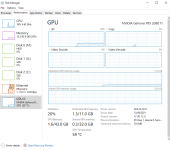
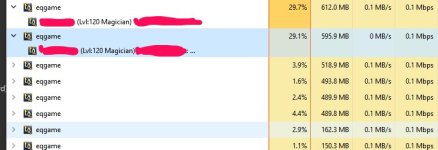
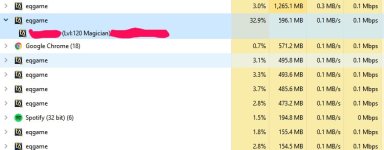
8 instances loaded currently, and the two mages are juicing CPU to the point it reaches Max (100%) and then lags out just the mages. Camped the two mages and loaded up 12 toons and ran for an hour no lag. Reloaded the 2 mages (same group), and they continue to max out CPU. If I restart machine, they run fine for 30min or so, then begin to max out the CPU.

Screenshot_032922_105115_AM.jpg

Removed one mage from group to see if there was some sort of issue with them communicating in the same group, but the one mage is still juicing the CPU.

Screenshot_032922_110236_AM.jpg


-MQ FPS limiter is active
-No antivirus running
-No one drive active

Any thoughts? Thanks!
 
Did you unload mq2mage and magically it goes away? I'm not aware of anything that would make your CPU usage go up like that, and my mages aren't doing that at this time.

If unloading mq2 doesn't change anything, I would then unload mq, if unloading mq does nothing, I would do an eq file check, and I would then delete/rename any files that have those character names in them and try again.

If unloading mq fixed it, I would check for any of the 30-50 other plugins you are running, Lua scripts, reacts, etc.
 
Hey Sic,

Good call! I unloaded mq2mag first, no change. Then unloaded mq2, no change. Still lagging.

Will mess with file check and deleting character files, then report back.

Thank you
 
Hey Sic,

Good call! I unloaded mq2mag first, no change. Then unloaded mq2, no change. Still lagging.

Will mess with file check and deleting character files, then report back.

Thank you
Yup, then if loading them without mq loaded still results in it, then definitely not an mq and thus not an mq2mage thing
 
Last edited:
Problem - CWTN Plugin lag?

Users who are viewing this thread

Back
Top
Cart