• You've discovered RedGuides, an EverQuest multi-boxing and scripting community 🧙‍♀️⚙️. We want you to play several EQ characters at once, come join us and say hello! 👋

  • A TLP without truebox has thawed (Very Vanilla ready)
    Frostreaver

Problem - CWTN Plugin lag? (1 Viewer)

Joined
Oct 26, 2020
RedCents
2,075¢
Sic/CWTN.

I am experiencing the oddest thing with the CWTN Plug-ins, they've been lagging (super slow response) since the last two patch cycle (this is isolated to this old laptop only). I haven't changed any display configuration setting on the laptop, but for whatever reason the cleric plug-in specially laaagggggsss as in it's like 10-30 seconds behind in the fight.

I've killed all graphics, spells, environment options, Clip Plane's at zero on these toons, Got the FPS maxed in background and foreground...nothing. The only real change i've done recently is upgraded the little weapon glowy ornamentations from anniversaries for the whole team...but even with that turned off it's still happening. It's super odd, because it's only on the CWTN screens, not kiss assist and only on this box.

Still running 10-12 accts, but i'm only getting lag in CWTN...Any tips? Not really sure what's the cause.
 
Solution
double check you didn't enable onedrive or some other syncing
double check you don't have antivirus scanning any of your mq2 files - especially your cwtnbuff files every time they update
double check you don't have mq2log turned on or eq logs for that matter

cwtn plugin lag is almost always due to how cwtnbuffs works - we keep your buffs/songs in a file that is read-written to by other toons. eventually this will be moved over to something that doesn't read/write to files - but in the meantime if you have anything like onedrive or other syncing software running, or anything like defender or antivirus file scanning when files change you can experience issues as mentioned.
Sic/CWTN.

I am experiencing the oddest thing with the CWTN Plug-ins, they've been lagging (super slow response) since the last two patch cycle (this is isolated to this old laptop only). I haven't changed any display configuration setting on the laptop, but for whatever reason the cleric plug-in specially laaagggggsss as in it's like 10-30 seconds behind in the fight.

I've killed all graphics, spells, environment options, Clip Plane's at zero on these toons, Got the FPS maxed in background and foreground...nothing. The only real change i've done recently is upgraded the little weapon glowy ornamentations from anniversaries for the whole team...but even with that turned off it's still happening. It's super odd, because it's only on the CWTN screens, not kiss assist and only on this box.

Still running 10-12 accts, but i'm only getting lag in CWTN...Any tips? Not really sure what's the cause.
sounds like you need to check your computer load, ventilation, etc.

sounds like it is being over worked


if check your cpu being pegged, or disk drive, or overheating etc
 
sounds like you need to check your computer load, ventilation, etc.

sounds like it is being over worked
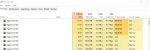
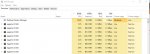
Makes sense, fans are going fine. Just not sure why it's only on the CWTN plugin screens. They actually run fine if I as an example unload CWTN and run kissassist on them, no lag. It's crazy...like you see the top 4 are the CWTN plugins...they're running at double or triple what KA is doing.

Screenshot - Copy.jpg
 
Last edited by a moderator:
Makes sense, fans are going fine. Just not sure why it's only on the CWTN plugin screens. They actually run fine if I as an example unload CWTN and run kissassist on them, no lag.
might be an issue with your harddrive being slow / bout to die - we check on cwtnbuffs file pretty frequently, so if your hard drive is on its last legs i could see that being an issue
 
might be an issue with your harddrive being slow / bout to die - we check on cwtnbuffs file pretty frequently, so if your hard drive is on its last legs i could see that being an issue
Hmm...i'll start looking into that. It's interesting because i'm basically only running eq, chrome, and antivirus. The hard-drive on this box is empty...it is really old but empty. This started like a week and half two weeks ago...and running less boxes only slightly improves it...and it's only this box...which probably means hardware for sure. What would explain that almost doubling difference? Because i can run all 12 in ka and it runs fine...i mean the load does get to 80-90ish at times...but this doubling on the CWTN plugs is weird and unusual because that wasn't happening before. Timing wise it started right after the last bout of eq maintenance.
 
Hmm...i'll start looking into that. It's interesting because i'm basically only running eq, chrome, and antivirus. The hard-drive on this box is empty...it is really old but empty. This started like a week and half two weeks ago...and running less boxes only slightly improves it...and it's only this box...which probably means hardware for sure. What would explain that almost doubling difference? Because i can run all 12 in ka and it runs fine...i mean the load does get to 80-90ish at times...but this doubling on the CWTN plugs is weird and unusual because that wasn't happening before.
well cwtn and i gave some suggestions.

without being physically at your box it is hard to tell you what hardware issues are causing your problem - but my guess is the hard drive as i mentioned before

I would double check you didn't enable onedrive or some other syncing
I would double check you don't have antivirus scanning any of your mq2 files - especially your cwtnbuff files every time they update
 
might also be if you're using a network drive to sync the buffs files and such. They change frequently, uploading/downloading of the file can lock it to prevent read/write access.
Thanks guys. Crazy as it sounds it was thinking it could be the mq2dpsadv. For whatever reason i always have to do /loadskin default on the CWTN screens to get that to load and they're all running that plugin. I might try unloading that see if it makes a difference.
 
Thanks guys. Crazy as it sounds it was thinking it could be the mq2dpsadv. For whatever reason i always have to do /loadskin default on the CWTN screens to get that to load and they're all running that plugin. I might try unloading that see if it makes a difference.
well you said it was only cwtn stuff and not without cwtn stuff - so that shouldn't make any difference.

if now you're thinking it isn't a cwtn running issue

I would double check you don't have mq2log turned on or eq logs for that matter
 
well you said it was only cwtn stuff and not without cwtn stuff - so that shouldn't make any difference.

if now you're thinking it isn't a cwtn running issue

I would double check you don't have mq2log turned on or eq logs for that matter
Hammer time! lol...just kidding. I'm gonna take it offline and pop it open. It's weird because it isn't running hot at all and it's only when i load the cwtn plugins that it doubles the load and only recently.
 
Hmm...i'll start looking into that. It's interesting because i'm basically only running eq, chrome, and antivirus. The hard-drive on this box is empty...it is really old but empty. This started like a week and half two weeks ago...and running less boxes only slightly improves it...and it's only this box...which probably means hardware for sure. What would explain that almost doubling difference? Because i can run all 12 in ka and it runs fine...i mean the load does get to 80-90ish at times...but this doubling on the CWTN plugs is weird and unusual because that wasn't happening before. Timing wise it started right after the last bout of eq maintenance.
if you have OneDrive enabled on these folders- Shouldn't be using it to sync your HDD as if it's uploading it could cause what you're describing.
 
double check you didn't enable onedrive or some other syncing
double check you don't have antivirus scanning any of your mq2 files - especially your cwtnbuff files every time they update
double check you don't have mq2log turned on or eq logs for that matter

cwtn plugin lag is almost always due to how cwtnbuffs works - we keep your buffs/songs in a file that is read-written to by other toons. eventually this will be moved over to something that doesn't read/write to files - but in the meantime if you have anything like onedrive or other syncing software running, or anything like defender or antivirus file scanning when files change you can experience issues as mentioned.
 
Last edited:
Solution
since you're running on a stated "older machine", have you considered getting mq2eqwire?

and again, to beat a dead horse --- make sure you check the stuff cwtn and i have said


Me: I would double check you didn't enable onedrive or some other syncing
Me: I would double check you don't have antivirus scanning any of your mq2 files - especially your cwtnbuff files every time they update
Me: I would double check you don't have mq2log turned on or eq logs for that matter

CWTN: if you have OneDrive enabled on these folders- Shouldn't be using it to sync your HDD as if it's uploading it could cause what you're describing.
Onedrive isn’t on or syncing
Checked mq2log and it isn‘t loaded
Haven’t tried disabling the antivirus yet. That’ll be next, once things settle down for the night i’m going to open this old girl up, clean the fans, reseat the memory chips and check the HD fittings make sure nothing came lose. Then i’m going to restart, clear all the temp files, maybe run a defrag and try it without the antivirus on. It’s really odd…kind of fun trying to figure out what‘s be behind it.

Appreciate your help guys. Stay tuned
 
Onedrive isn’t on or syncing
Checked mq2log and it isn‘t loaded
Haven’t tried disabling the antivirus yet. That’ll be next, once things settle down for the night i’m going to open this old girl up, clean the fans, reseat the memory chips and check the HD fittings make sure nothing came lose. Then i’m going to restart, clear all the temp files, maybe run a defrag and try it without the antivirus on. It’s really odd…kind of fun trying to figure out what‘s be behind it.

Appreciate your help guys. Stay tuned
if your AV is scanning your mq2 directory any time there is an update/change to any of the files in there - that could very well be it
 
if your AV is scanning your mq2 directory any time there is an update/change to any of the files in there - that could very well be it
Yea i’ll unload it when i test again. Its just odd because it was working fine for weeks, nothings changed. This literally started after that last patch and its only lagging the plugin instances.

Morning All, Good news today, things running well:
  1. Reseated memory & hard-drive connectors
  2. Spray can party on the fans, little dirty but they were working fine.
  3. Checked the anti-virus scanning thing and you guys were right it was actively scanning files. I turned it off for this test run.
Things running normal again. I'll keep ya posted if I run into any other hiccups.

Screenshot - Copy.jpg
 
One thing that I would check as well is your event logs. Right click on your start button and select event viewer. Custom views and then Administrative Events.

Check that for reoccuring errors. Most of the errors in there are going to be able to be fixed, warnings are ignorable for now.

Also you are cheating yourself out of performance if you don’t switch your power mode to High Performance or Ultimate mode. - Check out BitSum Lasso software for the automatic optimizer that changes modes from power save to performance based upon the apps you are running. Ie eqgame.exe.

This goes for your graphics card as well. Go into your settings and turn from power save to performance.

Sic is dead on with EQWire. It would cut your RAM usage in half. It will allow you to have your background FPS setting into EQ at max and still have lower memory usage then what you are experiencing.
 
One thing that I would check as well is your event logs. Right click on your start button and select event viewer. Custom views and then Administrative Events.

Check that for reoccuring errors. Most of the errors in there are going to be able to be fixed, warnings are ignorable for now.

Also you are cheating yourself out of performance if you don’t switch your power mode to High Performance or Ultimate mode. - Check out BitSum Lasso software for the automatic optimizer that changes modes from power save to performance based upon the apps you are running. Ie eqgame.exe.

This goes for your graphics card as well. Go into your settings and turn from power save to performance.
Nice, yea little more homework now seeing these errors. There's a couple I've got to figure out here.

Sic is dead on with EQWire. It would cut your RAM usage in half. It will allow you to have your background FPS setting into EQ at max and still have lower memory usage then what you are experiencing.
Agree. I saw the video and I'm adding it to the punch-list to-buy. I've been doing the quality of life plug-ins first. Cleric, Enchanter, Zerker...so Heals, Mez, DPS is sorted. Trying to figure out if wire or a tank plug-in is next.

I've been on the fence on the tank plug-in. I wanted to try each class and still prefer war, but SK and Pal's from team's 2 and 3 have their plusses too. So far I've been using the KA/INI's from the resources area that i customized a little and they work fantastic. Same with the DPS plug-ins, only team 2 uses zerkers, team 1 is mages, team 3 is rangers and KA works great for those.

I may pull the trigger on eqwire next since the configurations are more stable now.
 
I run a warrior with it and it’s unbeatable in group content with my 6 box crew. I have a lot of friends running Sks. They are super happy with them.
 
Honestly as far as quality of life goes EQWire is legit. Your CPU is definitely on the high end of usage. I normally run about 8% per instance of EQ without EQWire. But with it I go down to around 1% or lower per instance. Your current load accounts for roughly 40% of your CPU usage. You could easily half that and get your CPU usage within a reasonable margin of it's overall percentage. The price point on it is lower than a plugin as well. So certainly worth it if you ask me.
 
I run a warrior with it and it’s unbeatable in group content with my 6 box crew. I have a lot of friends running Sks. They are super happy with them.
Ditto, my war/mage clan is HARD to kill...I mean two fully EM's Fire pets, plus a war...it's just insane how much dps that team outsputs.

On a tangent the whole non-prestige/ftp/krono pop playstyle is a ton of fun. It tests the limits of your team more, it's kind of a lot more fun to have that chance to hit the limit of those teams. It's also a completely different build for each class. For me it's fun that I can't squeak by on gear or clickies, it truly comes down to how good you are as a tank or in that class. There's a cap on what you can take on hence why those teams usually have bard/enchanter ready so if I bite more than I can chew they can queue up the madness.
 
Sic is dead on with EQWire. It would cut your RAM usage in half. It will allow you to have your background FPS setting into EQ at max and still have lower memory usage then what you are experiencing.
Yup, even the freebie mq2fps gives good gains... my cpu instances are only around 3% each with that
 
Hello posting on here to see if anyone else has this problem. Running my 6 box my tank seems to lag out and have a hard time catching up to my other characters internet wise which really messes me up. They are all using the CTWN class plugins besides the wizard and i just started noticing this happen a few days ago. It seems to only be effecting my shadowknight.
 
Hello posting on here to see if anyone else has this problem. Running my 6 box my tank seems to lag out and have a hard time catching up to my other characters internet wise which really messes me up. They are all using the CTWN class plugins besides the wizard and i just started noticing this happen a few days ago. It seems to only be effecting my shadowknight.
please make sure to post in the correct location. there is literally an entire section for cwtn plugins.

what else are you using other than cwtn plugins? you likely have 30-50 other plugins.

are you saying if you unload the plugin on your tank (eskay or war) that it goes away?

then I would ask:

do you have your antivirus scanning your MQ directory? (should not do this)
do you have any file syncing of your MQ2 directory like one drive? (should also not do this)

Previous thread about this was antivirus scanning

there's nothing to eskay specific that would do that - but all of them use cwtnbuffs and write to a file - so if you're doing anything unusual with those files - scanning mq2 frequently, trying to sync/share them, etc, you can and will have performance issues.

"catching up to my other characters internet wise" - I don't really understand what you're trying to communicate here.

I know EQ currently has an issue where toons don't always see spawns in the correct location - this is an EQ issue not an mq/mq2 issue (as you can observer it with myseq), so i don't know if that is the issue you're having.

are you seeing toons in a location on one screen and in a different location on another? because that would be the issue i mentioned above which isn't a cwtn issue
 
i know i am running mule assist, kissassist, mq2aaspend and i just loaded the frame rate limiter (trying to fix this problem) other than that none of my other settings have been messed with. i dont think i have one drive set up and i dont think my antivirus is scanning this folder but i also dont know how to check, but this just started to happen and i havent changed anything on my antivirus.
 
i know i am running mule assist, kissassist, mq2aaspend and i just loaded the frame rate limiter (trying to fix this problem) other than that none of my other settings have been messed with. i dont think i have one drive set up and i dont think my antivirus is scanning this folder but i also dont know how to check, but this just started to happen and i havent changed anything on my antivirus.
frame limiter is a MacroQuest "next" thing, so i think you might mean eqwire?

"i dunno" isn't really an answer and i can't guess for you :(

you'll want to check the first 2 things i mentioned, and then you still didn't answer the 3rd question i asked.

you should also not run mq2mule/muleassist/kissassist and other potentially conflicting things at the same time on your eskay.

aaspend is very unlikely going to cause you the issues you mentioned, but i suspect if you do a `/plugin list` you would see 30+ plugins. so again without knowing answers to some of the questions i asked previously it is a wild stab in the dark.
 
ok give me a minute im trying to read and try things out let me give you the list of plugins i have. and what i mean by internet wise is i will set them a camp say in great divide and set him tank mode and send my monk out to pull....the monk brings the mob into the camp and the sk will not attack and when i tab over the mob wont be on his xt window and the monk hasnt moved on his screen but on my other 5 characters everything is happening normally. just weird that it is only happening on my sk.
 
mq2 sk, fps, mage, afnuke, aaspend, camera, monk, shaman, dpsadv, damageparser, beastlord, berzerker, cleric, enchanter, cwtnbuffs, warrior, mule, advpath, posse, targetinfo, rez, portalsetter, nav, moveutils, map, itemdisplay, exchange, eqbugfix, eqbc, easyfind, chatwnd, cast, autologin, autoaccept. also unloading and loading the plugin did not seem to fix it.
 
ok give me a minute im trying to read and try things out let me give you the list of plugins i have. and what i mean by internet wise is i will set them a camp say in great divide and set him tank mode and send my monk out to pull....the monk brings the mob into the camp and the sk will not attack and when i tab over the mob wont be on his xt window and the monk hasnt moved on his screen but on my other 5 characters everything is happening normally. just weird that it is only happening on my sk.
my point wasn't about getting a list of the plugins. my point was what i said before about which can be best summarized with:

1. "are you sure it is mq2eskay, does your issue resolve if you unload mq2eskay".
2. can you confirm your antivirus isn't scanning your mq2 folder on changes
3. can you confirm you don't have any file syncing on your mq2 on changes
4. are you seeing toons in a location on one screen and in a different location on another? because this sounds like a current eq issue (particularly with instances)
 
mq2 sk, fps, mage, afnuke, aaspend, camera, monk, shaman, dpsadv, damageparser, beastlord, berzerker, cleric, enchanter, cwtnbuffs, warrior, mule, advpath, posse, targetinfo, rez, portalsetter, nav, moveutils, map, itemdisplay, exchange, eqbugfix, eqbc, easyfind, chatwnd, cast, autologin, autoaccept. also unloading and loading the plugin did not seem to fix it.
ok, so unload mq2eskay didn't resolve the issue on your shadowknight, then isn't an mq2eskay issue. it still might be an mq2cwtnbuffs issue - which would likely be caused by the aforementioned file scanning or syncing. you absolutely want to check there, and answer the other questions
 
ok so after diddling around a bit my antivirus is not renewed atm so it is downzies and my one drive is not signed in so im pretty sure it isnt doing anything either i just dont know how to check if these things are doing what you are saying, i kind of just leave those things alone. How would i go about checking if the antivirus is scanning those files? i have an expired norton 360
 
@thezaynetrain is this something you just started noticing? Have you changed anything else recently? Is your OS up to date? Can you look at your processes and see what your ram and cpu usage is?
 
SWAG: Do you use "/log on" to feed data to any of your plugins? (i.e. damage parsing) If so, and you drive the SK, and monitor how your group is doing on DPS from your SK...then check your log file for the SK. If you leave your "/log on" constantly, that file may be HUGE. Delete that file (and start it over) OR run with "/log off" and see if that plays a role.

Reference: I had log files over 1GB in size. When I deleted them, I noticed an uptick in performance. Also note, I could be completely wrong... but for the sake of troubleshooting...

Good luck!
 
Last edited:
@thezaynetrain is this something you just started noticing? Have you changed anything else recently? Is your OS up to date? Can you look at your processes and see what your ram and cpu usage is?
Hello I did not change anything that I have been using for about a year but I think my issue may have just been bad internet. My cpu usage was very high and memory usage was very high but that all stoped when I started using a render frame plugin and the problem still happened. I just got home from work so I’m going to play a bit on a stable internet and see if it happens again. Just kind of odd it was only happening on one character. I will post again in a day or two once they get the plug-in working again after patch day.
 
SWAG: Do you use "/log on" to feed data to any of your plugins? (i.e. damage parsing) If so, and you drive the SK, and monitor how your group is doing on DPS from your SK...then check your log file for the SK. If you leave your "/log on" constantly, that file may be HUGE. Delete that file (and start it over) OR run with "/log off" and see if that plays a role.

Reference: I had log files over 1GB in size. When I deleted them, I noticed an uptick in performance. Also note, I could be completely wrong... but for the sake of troubleshooting...

Good luck!
Rodger gonna turn this off asap. I’m not very concerned with keeping dps logs gonna try some things when I get some free time today but I’m thinking it may be just internet throttling.
 
If you don't have a specific reason not to do so, you might want to consider MqNext. Using the MQNext Migrator following the step by step instructions here, the migration is just a matter of some minutes.
Beside other improvements, MQNext has a build in FPS Limiter which outperforms even payed older FPS-limiting solutions.
I had a great performance-improvement after the migration. With the migrator mentioned it was an easy task.
In the long run, almost everyone is going to migrate to MQNext, so why not doing it right now?
 
If you don't have a specific reason not to do so, you might want to consider MqNext. Using the MQNext Migrator following the step by step instructions here, the migration is just a matter of some minutes.
Beside other improvements, MQNext has a build in FPS Limiter which outperforms even payed older FPS-limiting solutions.
I had a great performance-improvement after the migration. With the migrator mentioned it was an easy task.
In the long run, almost everyone is going to migrate to MQNext, so why not doing it right now?
he is on test
 
Problem - CWTN Plugin lag?

Users who are viewing this thread

Back
Top
Cart