• You've discovered RedGuides, an EverQuest multi-boxing and scripting community 🧙‍♀️⚙️. We want you to play several EQ characters at once, come join us and say hello! 👋

  • A TLP without truebox has thawed (Very Vanilla ready)
    Frostreaver

Guide - CWTN "Class Window" UI Info + Video (1 Viewer)

Status
Not open for further replies.

Sic

Administrator
Moderator
Joined
May 5, 2016
RedCents
49,476¢
Pronouns
He/Him
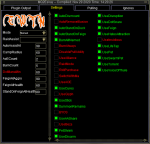
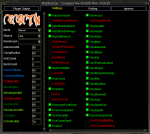
All of the CWTN class plugins uses the shortname for their "/" command example: /shd for SK, /clr for cleric, /bst for beastlord etc
so loading the window is "/shd show", "/clr show", "/bst show", "/ber show", etc.


Q. The UI Window Doesn't save my settings?
A. This is intentional.
The UI acts as a "hot swap" allowing you to adjust on the fly.
If you want to "save" your settings, adjust it with the slash command.

Explained here > UI Video @ 9:10 <


Q. My UI window isn't saving the location
A. > CWTN UI Vid < follow these steps:
1. move it to where you want it
2. close the window
3. /ber show to reshow it - eq will now have the window saved


Q. The Window isn't loading?!?
A. This is demonstrated in the vid.
If you don't want to watch it, make sure you reloaded your UI if you are loading it for the first time
/reloadui
or
/loadskin default
the plugin actually tells you to do that in your mq window.
then it is just your plugin class command and "show" example: /shd show
 
Is the UI part of the plugin or is it independent from the UI in Sic's videos for instance?
 
How do I get the settings UI screen to reappear if it goes away on mq2war or mq2monk? I have some how lost this window and can not get it back. Tried /war showsettings, /war ui, and a few others, none reopened this missing window.

I've been away for while :(
 
Yup, /reload worked, the /war show just gave that reload your default UI message. Thanks for the video link, it explained perfectly.
 
If it's your first time loading the plugin, or you had the plugin unloaded when you logged into the character, then loaded the plugin you have to reload the UI in order for it to make the window.
 
Sorry guys. I've broken the UI already. ffs...

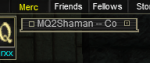
I usually like to keep the UI minimized on screen somewhere like this:

1606919816684.png

Some background, I don't die often because I am usually pretty safe, therefore this:

1606920224998.png

So my shaman died, he's level 55 or 56 now but somehow he's still bound in Mines of Gloomingdeep because I don't think about it ever. If you've ever done this then you know EQ flips out and disconnects you when it tries to load a L55 toon into the tutorial zone instead of respawning you somewhere else gracefully or something. After that the UI was stuck minimized. Or at least I thought that's how it happened but now i am not so sure, it definitely happened around that moment but i don't know how it could be related. More on that later though.

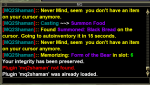
I can hit X on the minimized version to close it completely, then type /shm show to bring it back in minimized form... i just can't maximize it again. I thought okay well i'll just unload the plugin completely, nope:

1606920034002.png

As you can see, its still shaman-ing just fine despite the UI window being hosed up.

/plugin mq2shaman unload produces that red plugin not found message.
/plugin mq2shaman load produces the already loaded message.

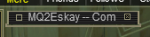
As i type this, I decided to sanity check this behavior against MQ2Eskay, he died too but is bound in Crescent Reach so he didn't have the terrible disconnect ruckus that the shaman had.

1606920398247.png

Also stuck minimized.... Oh no... i've broken that one too.

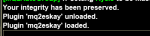
Tried the load/unload thing with a bit more success.

1606920473655.png

However this didn't let me maximize the UI. Perhaps /reloadui?

1606920584364.png

Success! Maybe this will work on Shaman too? Nope. Still stuck in minimized. Any ideas on how to fix this?

Thanks! Sorry!
 
Sorry guys. I've broken the UI already. ffs...

I usually like to keep the UI minimized on screen somewhere like this:

View attachment 26159

Some background, I don't die often because I am usually pretty safe, therefore this:

View attachment 26161

So my shaman died, he's level 55 or 56 now but somehow he's still bound in Mines of Gloomingdeep because I don't think about it ever. If you've ever done this then you know EQ flips out and disconnects you when it tries to load a L55 toon into the tutorial zone instead of respawning you somewhere else gracefully or something. After that the UI was stuck minimized. Or at least I thought that's how it happened but now i am not so sure, it definitely happened around that moment but i don't know how it could be related. More on that later though.

I can hit X on the minimized version to close it completely, then type /shm show to bring it back in minimized form... i just can't maximize it again. I thought okay well i'll just unload the plugin completely, nope:

View attachment 26160

As you can see, its still shaman-ing just fine despite the UI window being hosed up.

/plugin mq2shaman unload produces that red plugin not found message.
/plugin mq2shaman load produces the already loaded message.

As i type this, I decided to sanity check this behavior against MQ2Eskay, he died too but is bound in Crescent Reach so he didn't have the terrible disconnect ruckus that the shaman had.

View attachment 26163

Also stuck minimized.... Oh no... i've broken that one too.

Tried the load/unload thing with a bit more success.

View attachment 26164

However this didn't let me maximize the UI. Perhaps /reloadui?

View attachment 26165

Success! Maybe this will work on Shaman too? Nope. Still stuck in minimized. Any ideas on how to fix this?

Thanks! Sorry!
you need to grab the bottom and drag it larger. if you log out with a window minimized, it gets stuck shrunk like that sometimes.
 
Weird. I just made a lvl 1 toon, went heroic and EQ didn't flip out on me. It just booted me to POK.
 
Weird. I just made a lvl 1 toon, went heroic and EQ didn't flip out on me. It just booted me to POK.
if you don't move your bind location and you level up (not sure if heroic'ing rebinds you), when you die you will try and zone to mines of glooming deep and if you are above that level, it will disconnect you.
 
Hi!

I might be missing something just under my nose, but I can't seem to find a "save settings" after I have changed settings in the settings tab in MQ2Cleric and MQ2Eskay(only 2 plugins I have) window in game.
(and pulling tab)
Ignores are saved

Edit: can't save the plugin windows place in the UI. It's reseted every time I log in
 
Hi!

I might be missing something just under my nose, but I can't seem to find a "save settings" after I have changed settings in the settings tab in MQ2Cleric and MQ2Eskay(only 2 plugins I have) window in game.
(and pulling tab)
Ignores are saved
Howdy ketriheart,
The windows don't save your settings - they are "hotswap" toggles. This allows you to have your "baseline stuff" and then adjust on the fly as needed, without worrying that next time you log in you had some peculiar settings because of a mission or temporary situation you needed.

If you want to save a setting you would issue the slash command to save it.

example: /clr usemelee off <--- this would save that setting for your cleric

Please refer to the mq2cleric FAQ, mq2eskay FAQ and the CWTN UI video as this is explained in those locations - and if you missed this info, there's going to be a bunch of useful stuff in those resrouces that you probably don't know you need/want to know.

Q. The UI Window Doesn't save my settings?
A. This is intentional. The UI acts as a "hot swap" allowing you to adjust on the fly. If you want to "save" your settings, adjust it with the slash command.
Explained here > UI Video @ 9:10 <
 
Every time I load mq2beast or mq2eskay the /shdshow command doesn't work, I need to do a /loadskin default on all my accounts. MQ2nav has to be unloaded and then reloaded each time to show the nav bar. Is this normal behavior?
 
Every time I load mq2beast or mq2eskay the /shdshow command doesn't work, I need to do a /loadskin default on all my accounts. MQ2nav has to be unloaded and then reloaded each time to show the nav bar. Is this normal behavior?
for the cwtn class plugins - if you load the plugins after you are already in game and no other cwtn plugins are loaded - then yes, you need to reload your ui.

this means that eq had not been told to load that xml window, and once the plugin is loaded, upon reload it will load that window. This is the same with any of the plugins that use addition UI elements - like mq2portalsetter, mq2dpsadv, the cwtn stuff etc.

you should give the CWTN UI Video a watch > HERE < (i talk about your specific question at like 1:30ish)

if you try and /shd show and the xml element isn't available it will tell you that you need to reload your UI. Same with those other plugins when they don't see the xml element available.

re: the nav ui bar - that's a bug with imgui where sometimes the window is invisible - it is actually *there* as it actively blocks clicking stuff behind it - but it's just invisible. This isn't anything you did, and is something that I know brain and crew are aware of - I've seen it happen if you zone or log in/out with the window visible - I normally just pull the window up when its needed rather than keep it visible all the time.
 
Last edited:
My /war show window wont expand passed being minimized. How do i reset window size? Pushing the button to do so does nothing

1609944696635.png

Edit: Cleric is doing this too now.
 
Last edited:
this means you logged out with it minimized - you need to grab the bottom right corner and drag it to the size you want.

Weird, I tried to get that to work a dozen times and it never worked until now. Guess i wasnt trying hard enough.
 
Sometimes i have some minimized window locked like that, and unable to grab the bottom right corner. Figured out that was due to my ui. So sometimes when you can't grab the corner, try to load default ui to do it. It worked for me.
 
Is there a way I am overlooking to save the setting with the CWTN plugins? I freaking love the plugins, but I can't lie that it sucks having to go through every click box on every toon every time I log/relog, etc., when I have 10+ toons logged in at a time sometimes. Is there any way to save settings that will keep those settings even if you log off?

Thanks!
 
Is there a way I am overlooking to save the setting with the CWTN plugins? I freaking love the plugins, but I can't lie that it sucks having to go through every click box on every toon every time I log/relog, etc., when I have 10+ toons logged in at a time sometimes. Is there any way to save settings that will keep those settings even if you log off?

Thanks!
yes as posted in every FAQ for each of the class plugins, and in the CWTNUI Information guide - there is. You should review these things.

Q. The UI Window Doesn't save my settings?
A. This is intentional. The UI acts as a "hot swap" allowing you to adjust on the fly. If you want to "save" your settings, adjust it with the slash command.
Explained here > UI Video @ 9:10 <

the window are for temporary changes - if you want to keep a setting you change the setting with a slash command

 
So, is there an actual CWTN UI interface that we can download or is it just part of the out of the box character plugins
 
So, is there an actual CWTN UI interface that we can download or is it just part of the out of the box character plugins
the ui window is just a window that comes with everything - there's no full interface or anything.

I use zliz if that's what you're asking about.
 
Hi all,

Is there a way to get my ui to save windows in particular spots? In particular, my zerker's MQ2BerZerker output window somehow always covers about half my screen when I log in, and I have to adjust it every time. I read that you need to do a regular /camp routine to get it to save in a new spot, but that hasn't worked.

Also, every time I log in I need to adjust the size of the group window, on every toon. It always needs to be pulled down so the command hotkeys aren't covering up the names and health/mana bars of the group members.

I use Sparxx UI.

Thanks for any input you might have.
 
Hi all,

Is there a way to get my ui to save windows in particular spots? In particular, my zerker's MQ2BerZerker output window somehow always covers about half my screen when I log in, and I have to adjust it every time. I read that you need to do a regular /camp routine to get it to save in a new spot, but that hasn't worked.

Also, every time I log in I need to adjust the size of the group window, on every toon. It always needs to be pulled down so the command hotkeys aren't covering up the names and health/mana bars of the group members.

I use Sparxx UI.

Thanks for any input you might have.
I moved your thread to the cwtn section since you're asking about mq2berzerker mainly.
Please review the CWTN Class Window UI Info

it is also in the FAQ

Q. The UI Window Doesn't save my settings?
A. This is intentional. The UI acts as a "hot swap" allowing you to adjust on the fly. If you want to "save" your settings, adjust it with the slash command.
Explained here > UI Video @ 9:10 <

Q. My UI window isn't saving the location
A. >CWTN UI Video< follow these steps:
1. move it to where you want it
2. close the window
3. /ber show to reshow it - eq will now have the window saved

to answer about the group window you'll need to check out the information in the mq2targetinfo page > HERE < --- I use ZLIZ and i just edited my custom ui group window large enough that i don't need to resize it. check out > this < post specifically for sparxx -- that group window is likely out of date, but you may be able to snake out the size information you need
 
Last edited:
I logged in tonight and all of my CWTN plugins were unloaded and none of the chat windows would show up. I was unable to get any of the windows to show up even after unloading and reloading the plugins. During this process, I discovered that my Berserker plugin license had expired. Once I reupped the berserker plugin I was able to show them all again. Is the berzerker plugin required to show the others' windows?
 
I logged in tonight and all of my CWTN plugins were unloaded and none of the chat windows would show up. I was unable to get any of the windows to show up even after unloading and reloading the plugins. During this process, I discovered that my Berserker plugin license had expired. Once I reupped the berserker plugin I was able to show them all again. Is the berzerker plugin required to show the others' windows?
no they are not.

you likely didn't have them loaded when you logged into the game and simply need to load the plugins and then /reloadui as explained in the cwtn ui thread and the faq for all of the plugins. if you are already in game and need to load an xml - you need to reloadui after eq is told that you're loading this new file

when you patch you should check the patch tab of the patcher to ensure you downloaded the latest update - just in case you had a hiccup there
1614487597520.png
1614487604621.png
 
Hello,
I have just purchased some plugins. Every time I log in to the character all the settings return to default which is very frustrating.
Please could somebody advise?
Kind regards.
 
Changing values in the MQ2<Class> plugin, is temporary. To persist the value, you must use the /<class> <variable> <value>
 
Guide - CWTN "Class Window" UI Info + Video
Status
Not open for further replies.

Users who are viewing this thread

Back
Top
Cart