
-
 Hail, we're RedGuides. We want you to play six (yes, 6!) EverQuest characters at once. We have scripts and a friendly community to help, please join our playstyle and say hello! 👋
You are using an out of date browser. It may not display this or other websites correctly.
You should upgrade or use an alternative browser.
You should upgrade or use an alternative browser.
Problem - Crashing when I did the most recent update.
- Thread starter Dysanor
- Start date

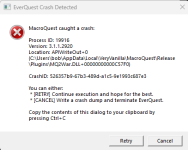
Good thing the update was 23 min ago .. hope we don't start crashing againContinuous crashes with update installed 30 minutes ago.


why does everybody hate me.
copy the text from the window and paste it instead of posting a screenshot. I can't select text in a screenshot you sillies.
edit: looks like that crash didn't get reported anyways, probably because you hit the limit of crash report submissions for the time period. Crash occurred in MQ2War anyways, its a plugin issue, go post about it in the cwtn forum.
copy the text from the window and paste it instead of posting a screenshot. I can't select text in a screenshot you sillies.
edit: looks like that crash didn't get reported anyways, probably because you hit the limit of crash report submissions for the time period. Crash occurred in MQ2War anyways, its a plugin issue, go post about it in the cwtn forum.

BlueBug
Seasoned veteran member
---------------------------why does everybody hate me.
copy the text from the window and paste it instead of posting a screenshot. I can't select text in a screenshot you sillies.
edit: looks like that crash didn't get reported anyways, probably because you hit the limit of crash report submissions for the time period. Crash occurred in MQ2War anyways, its a plugin issue, go post about it in the cwtn forum.
EverQuest Crash Detected
---------------------------
MacroQuest caught a crash:
Process ID: 7336
Version: 3.1.1.2920
Location: APIWriteOut+0 (C:\RedGuides\Plugins\MQ2Cleric.DLL+00000000000C6430)
CrashID: 675f624c-a504-45fe-a26c-120f18910cb5
You can either:
* [RETRY] Continue execution and hope for the best.
* [CANCEL] Write a crash dump and terminate EverQuest.
Copy the contents of this dialog to your clipboard by pressing Ctrl+C
---------------------------
Retry Cancel
---------------------------
Merry Christmas to All!
Hope this is the right place for this. I just started experiencing continuous crashes when attempting to load my crew. It appears to be an issue with MQWar, even though I'm not loading that character.
Here is the crash message I keep getting:
---------------------------
EverQuest Crash Detected
---------------------------
MacroQuest caught a crash:
Process ID: 23296
Version: 3.1.1.2920
Location: APIWriteOut+0 (C:\Users\bob\AppData\Local\VeryVanilla\MacroQuest\Release\Plugins\MQ2War.DLL+00000000000C57F0)
CrashID: dffea5ce-1237-4df9-bc73-851e2fa32aa4
You can either:
* [RETRY] Continue execution and hope for the best.
* [CANCEL] Write a crash dump and terminate EverQuest.
Copy the contents of this dialog to your clipboard by pressing Ctrl+C
---------------------------
Retry Cancel
---------------------------
Fixing this is beyond me. I buy CWTN plugins and just rely on them working.
My MQWar subscription is good until July 25th 2025.
Appreciate your help getting this resolved.
Thanks,
Dysanor
Hope this is the right place for this. I just started experiencing continuous crashes when attempting to load my crew. It appears to be an issue with MQWar, even though I'm not loading that character.
Here is the crash message I keep getting:
---------------------------
EverQuest Crash Detected
---------------------------
MacroQuest caught a crash:
Process ID: 23296
Version: 3.1.1.2920
Location: APIWriteOut+0 (C:\Users\bob\AppData\Local\VeryVanilla\MacroQuest\Release\Plugins\MQ2War.DLL+00000000000C57F0)
CrashID: dffea5ce-1237-4df9-bc73-851e2fa32aa4
You can either:
* [RETRY] Continue execution and hope for the best.
* [CANCEL] Write a crash dump and terminate EverQuest.
Copy the contents of this dialog to your clipboard by pressing Ctrl+C
---------------------------
Retry Cancel
---------------------------
Fixing this is beyond me. I buy CWTN plugins and just rely on them working.
My MQWar subscription is good until July 25th 2025.
Appreciate your help getting this resolved.
Thanks,
Dysanor
BlueBug
Seasoned veteran member
Yup, this works. But defeats that the reason for RG =(Having any of the CWTN plugins causes it to crash. If you delete the CWTN plugins (DLLs from the plugin directory) it works again.
S
aaaaa
Well hmm - since this update I get this error. I uninstalled and reinstalled everything and still:
---------------------------
EverQuest Crash Detected
---------------------------
MacroQuest caught a crash:
Process ID: 4116
Version: 3.1.1.2920
Location: APIWriteOut+0 (Y:\macroquest\Plugins\MQ2Shaman.DLL+00000000000C65B0)
CrashID: 9ec00efa-d3ad-47d8-9b8c-ebdfa30bb924
You can either:
* [RETRY] Continue execution and hope for the best.
* [CANCEL] Write a crash dump and terminate EverQuest.
Copy the contents of this dialog to your clipboard by pressing Ctrl+C
---------------------------
Retry Cancel
---------------------------
As long as I keep the shaman plugin out the rest works fine:
---------------------------
EverQuest Crash Detected
---------------------------
MacroQuest caught a crash:
Process ID: 4116
Version: 3.1.1.2920
Location: APIWriteOut+0 (Y:\macroquest\Plugins\MQ2Shaman.DLL+00000000000C65B0)
CrashID: 9ec00efa-d3ad-47d8-9b8c-ebdfa30bb924
You can either:
* [RETRY] Continue execution and hope for the best.
* [CANCEL] Write a crash dump and terminate EverQuest.
Copy the contents of this dialog to your clipboard by pressing Ctrl+C
---------------------------
Retry Cancel
---------------------------
As long as I keep the shaman plugin out the rest works fine:

Kilas_Army
Member
Same here. Just started with latest update to commons.
---------------------------
EverQuest Crash Detected
---------------------------
MacroQuest caught a crash:
Process ID: 36804
Version: 3.1.1.2920
Location: APIWriteOut+0 (C:\Users\EQ\AppData\Local\VeryVanilla\MacroQuest\Release\Plugins\mq2war.DLL+00000000000C57F0)
CrashID: 650c0b34-4189-4f3e-bea6-3cc13f38a7d6
You can either:
* [RETRY] Continue execution and hope for the best.
* [CANCEL] Write a crash dump and terminate EverQuest.
Copy the contents of this dialog to your clipboard by pressing Ctrl+C
---------------------------
Retry Cancel
---------------------------
---------------------------
EverQuest Crash Detected
---------------------------
MacroQuest caught a crash:
Process ID: 36804
Version: 3.1.1.2920
Location: APIWriteOut+0 (C:\Users\EQ\AppData\Local\VeryVanilla\MacroQuest\Release\Plugins\mq2war.DLL+00000000000C57F0)
CrashID: 650c0b34-4189-4f3e-bea6-3cc13f38a7d6
You can either:
* [RETRY] Continue execution and hope for the best.
* [CANCEL] Write a crash dump and terminate EverQuest.
Copy the contents of this dialog to your clipboard by pressing Ctrl+C
---------------------------
Retry Cancel
---------------------------
Yeah I'm getting the same crash on startup, although mine effects the other cwtn plugins too (tried deleting the mq2shaman.dll but then it just crashes because of the SK one). I'm sure it'll get fixed soon!
Edit: I *think* you can just download the previous version of the dll file from the "History" tab and replace it, should work.
Edit: I *think* you can just download the previous version of the dll file from the "History" tab and replace it, should work.
So worked! Thank you!Yeah I'm getting the same crash on startup, although mine effects the other cwtn plugins too (tried deleting the mq2shaman.dll but then it just crashes because of the SK one). I'm sure it'll get fixed soon!
Edit: I *think* you can just download the previous version of the dll file from the "History" tab and replace it, should work.
Reporting the same error here, haven't tried to redownload the previous version yet (will do it later, thanks @WillardJ85 for suggesting a solution  )
)
)---------------------------
EverQuest Crash Detected
---------------------------
MacroQuest caught a crash:
Process ID: 23152
Version: 3.1.1.2920
Location: APIWriteOut+0 (C:\Users\<redacted>\AppData\Local\VeryVanilla\MacroQuest\Release\Plugins\mq2shaman.DLL+00000000000C65B0)
CrashID: c6ee9ce7-1741-41a0-9e80-fe205c19338c
You can either:
* [RETRY] Continue execution and hope for the best.
* [CANCEL] Write a crash dump and terminate EverQuest.
Copy the contents of this dialog to your clipboard by pressing Ctrl+C
---------------------------
Retry Cancel
---------------------------

Just today, I started having an error on startup that appears to be associated with M2Q Necro. I tried opening up the dump file but it's just a massive log that I can make heads from tails with. Nothing changed since I last played other than it looks like there was an MQ update last night (that I applied this morning). Any ideas?
---------------------------
EverQuest Crash Detected
---------------------------
MacroQuest caught a crash:
Process ID: 5504
Version: 3.1.1.2920
Location: APIWriteOut+0 (C:\Users\ojizo\AppData\Local\VeryVanilla\MacroQuest\Release\Plugins\MQ2Necro.DLL+00000000000C6470)
CrashID: d3c2b648-c97d-498e-aaa2-995e86ca8ba0
You can either:
* [RETRY] Continue execution and hope for the best.
* [CANCEL] Write a crash dump and terminate EverQuest.
Copy the contents of this dialog to your clipboard by pressing Ctrl+C
---------------------------
Retry Cancel
---------------------------
---------------------------
EverQuest Crash Detected
---------------------------
MacroQuest caught a crash:
Process ID: 5504
Version: 3.1.1.2920
Location: APIWriteOut+0 (C:\Users\ojizo\AppData\Local\VeryVanilla\MacroQuest\Release\Plugins\MQ2Necro.DLL+00000000000C6470)
CrashID: d3c2b648-c97d-498e-aaa2-995e86ca8ba0
You can either:
* [RETRY] Continue execution and hope for the best.
* [CANCEL] Write a crash dump and terminate EverQuest.
Copy the contents of this dialog to your clipboard by pressing Ctrl+C
---------------------------
Retry Cancel
---------------------------

Wrong forum
Merry Christmas! Sorry for the hassle, but. I've checked my licenses, it's good until July 25. I can log in without MQ. I have reloaded the launcher, reloaded the plugin. Same crash message. Everything was great yesterday.
---------------------------
EverQuest Crash Detected
---------------------------
MacroQuest caught a crash:
Process ID: 25160
Version: 3.1.1.2920
Location: APIWriteOut+0 (D:\Users\irshm\AppData\Local\VeryVanilla\MacroQuest\Release\Plugins\mq2war.DLL+00000000000C57F0)
CrashID: 7871fd5a-231c-4ec5-986f-89a8f2f505f9
You can either:
* [RETRY] Continue execution and hope for the best.
* [CANCEL] Write a crash dump and terminate EverQuest.
Copy the contents of this dialog to your clipboard by pressing Ctrl+C
---------------------------
Retry Cancel
---------------------------
---------------------------
EverQuest Crash Detected
---------------------------
MacroQuest caught a crash:
Process ID: 25160
Version: 3.1.1.2920
Location: APIWriteOut+0 (D:\Users\irshm\AppData\Local\VeryVanilla\MacroQuest\Release\Plugins\mq2war.DLL+00000000000C57F0)
CrashID: 7871fd5a-231c-4ec5-986f-89a8f2f505f9
You can either:
* [RETRY] Continue execution and hope for the best.
* [CANCEL] Write a crash dump and terminate EverQuest.
Copy the contents of this dialog to your clipboard by pressing Ctrl+C
---------------------------
Retry Cancel
---------------------------

Did you repatch/redownload? There was a fix very recently
I did around 8am EST, but just noticed there was a new patch! Houston we are fixed! Disregard and thanks Gents! Merry Mutherfucking Christmas!Did you repatch/redownload? There was a fix very recently
the patch has been posted.
Please make sure you patch.
I'm spending a lot of this morning replying to PMs/DMs with the link to this thread, which says to update, and then still getting "im crashing from updating" while running the build that was crashing, which is now updated.
Please update.
Please make sure you patch.
I'm spending a lot of this morning replying to PMs/DMs with the link to this thread, which says to update, and then still getting "im crashing from updating" while running the build that was crashing, which is now updated.
Please update.
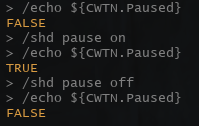
Patched this morning based on the crashing reports and seems to have broken then. Updating any values in the UI / via slash command is not updating the data types. Screen shots below where I paused and unpaused, yet ${CWTN.Paused} stayed static as False, and also changed modes but ${CWTN.Mode} never updates. It's not specific to a particular plugin. I've tested rogue, shaman, cleric and monk and they're all exhibiting the same behavior across multiple PCs.
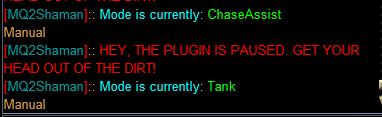
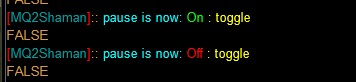
Thanks. I'll take a look at it tomorrow.Patched this morning based on the crashing reports and seems to have broken then. Updating any values in the UI / via slash command is not updating the data types. Screen shots below where I paused and unpaused, yet ${CWTN.Paused} stayed static as False, and also changed modes but ${CWTN.Mode} never updates. It's not specific to a particular plugin. I've tested rogue, shaman, cleric and monk and they're all exhibiting the same behavior across multiple PCs.
View attachment 67443View attachment 67442
The cwtn type stuff was crashing today, which I stopped, and the types I checked all were updating as expected, but I'll take a look tomorrow

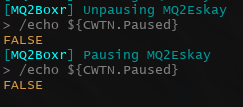
Did the last update bork the CWTN.Paused status? Boxhud is no longer showing true and neither is an echo unless I am doing something wrong.
View attachment 67447
Thanks. I'll take a look at it tomorrow.
The cwtn type stuff was crashing today, which I stopped, and the types I checked all were updating as expected, but I'll take a look tomorrow
well this thread title doesn't match, which is why i left a 3 day redirect on the other thread that comes in here called "CWTN Datatypes Not Updating" :pMy bad, sorry. Didn't think to look back in the thread for that. Won't do that again!

so very annoying when everything works for me as expected
@Psy thank you so much for your time this evening. I appreciate it very much.
With Psy's help and being able to talk-it-out to replicate the scenario that was happening, I was able to determine the issue, and hopefully have a final update for this crash -> more crash -> no crash but also no CWTN.Stuff
With Psy's help and being able to talk-it-out to replicate the scenario that was happening, I was able to determine the issue, and hopefully have a final update for this crash -> more crash -> no crash but also no CWTN.Stuff
Users who are viewing this thread
Total: 1 (members: 0, guests: 1)
Share: