• You've discovered RedGuides, an EverQuest multi-boxing and scripting community 🧙‍♀️⚙️. We want you to play several EQ characters at once, come join us and say hello! 👋

  • A TLP without truebox has thawed (Very Vanilla ready)
    Frostreaver

Problem - Crashing on load using WinEQ2

Joined
Apr 9, 2016
RedCents
855¢
Hello there. I've been having an issue for a while crashing on loading when using WinEQ2 and attempting to load multiple clients. It may just be my imagination, but the likelihood of a crash is less if I wait until the character select screen is up before I launch the new client, but still sometimes get a crash anyway. I usually wait about 10 seconds before trying to load the next client, but probably 30% of the time, I will get a crash. I'm also having a consistent issue with crashing when unloading MQ2Posse, which may be a separate issue. I have a crash dump for both I can email or upload if someone can tell me where to send them. Thanks in advance.
 
Hey hey, I use both wineq2 (love it) and mq2posse, no crashes.

Can you post the plugin section from your macroquest.ini?

I find it's best to load up MQ2 first, then wineq2.
 
Heya. Thanks for the speedy response. I do in fact load MQ2 (as administrator), then MQ2EQBCS and finally WinEQ2. I have posted by Macroquest ini file here as well.

Rich (BB code):
[MacroQuest]
MacroPath=.\Macros
LogPath=.\Logs
MacroQuestWinClassName=__MacroQuestTray
MacroQuestWinName=MacroQuest2
DebugSpewToFile=0
FilterSkills=0
FilterTarget=0
FilterMoney=0
FilterFood=0
FilterMacro=0
FilterEncumber=0
FilterDebug=0
FilterMQ=0
KeepKeys=1
LaxColor=0
AllErrorsDumpStack=1
AllErrorsFatal=0
HUDMode=UnderUI
MQ2LoadingMsg=0
ExactSearchCleanNames=0
CreateMQ2NewsWindow=1
TimeStampChat=0
BeepOnTells=1
FlashOnTells=1
IfDelimiter=,
IfAltDelimiter=~

[Aliases]
/a=/anonymous
/addfriend=/echo AddFriend
/addignore=/echo AddMobIgnore
/addimmune=/echo AddMezImmune
/addpull=/echo AddMobPull
/afktoolson=/echo Reset AFKTools AFKToolsOn
/assistat=/echo Reset Melee AssistAt
/autofireon=/echo toggle AutoFireOn
/autorez=/multiline ; /docommand /varset AutoRez 0 ; /docommand /varset changetoini 1 ; /echo Setting AutoRez to ON
/autorezon=/echo toggle AutoRezOn
/b=/bazaar
/ba=/bazaar
/backoff=/echo backoff
/buffson=/echo toggle BuffsOn
/c=/consider
/campfire=/echo Summon Campfire
/camphere=/echo toggle ReturnToCamp
/campradius=/echo Reset General CampRadius
/cha=/channel
/chase=/echo toggle ChaseAssist
/chasedistance=/echo Reset General ChaseDistance
/chaseoff=/echo Reset General ChaseAssist 0
/chaseon=/echo Reset General ChaseAssist 1
/clericcamp=/multiline ; /docommand /varset changetoini 1 ; /docommand /varset clericcamp 1
/d=/duel
/debug=/echo toggle Debug
/debugall=/echo DebugAll
/debugbuffs=/echo toggle DebugBuffs
/debugcombat=/echo toggle DebugCombat
/debugheal=/echo toggle DebugHeal
/debugmez=/echo toggle DebugMez
/debugmove=/echo toggle DebugMove
/debugpull=/echo toggle DebugPull
/depositstuff=/echo NinjadvLoot depositing items to guildbank
/divinebuff=/multiline ; /docommand /varset DivineBuffOn 1 ; /docommand /varset divinegem 11 ; /docommand /varset changetoini 1 ; /echo Toggling NULL to OFF
/doaggro=/echo set: Aggro
/Dot=/echo set: DoDot
/dpsinterval=/echo Reset DPS DPSInterval
/dpson=/echo Reset DPS DPSOn
/dpsskip=/echo Reset DPS DPSSkip
/dpsspam=/echo toggle DPSSpam
/exclude=/echo exclude:
/exp=/echo ${Me.PctExp}% experience...
/f=/feedback
/fa=/fastdrop
/fire=/echo SpellSet: Fire
/followtoon=/multiline ; /docommand /varset FollowToonName ${Target.Name} ; /docommand /varset changetoini 1 ; /echo Following ${If[${FollowToonName.Equal[NULL ]},OFF,${FollowToonName}]}
/g=/gsay
/gmlist=/who all gm
/gu=/guildsay
/healson=/echo Reset Heals HealsOn
/holdcamp=/multiline ; /docommand /varset changetoini 1 ; /docommand /varset AlwaysHoldCamp 1 ; /echo Toggling Always Hold Camp to OFF
/hp=/echo Current Health: ${Me.CurrentHPs} -- Max Health: ${Me.MaxHPs}
/ice=/echo SpellSet: Ice
/instantrelease=/multiline ; /docommand /varset changetoini 1 ; /docommand /varset InstantRelease 0 ; /echo Toggling Instant Release when dead to ON
/interrupton=/echo toggle CastingInterruptOn
/key=/keys
/kisscheck=/echo KissCheck
/kissedit=/echo kissedit
/ktdismount=/echo KTDismount
/ktdoor=/echo KTDoorClick
/kthail=/echo KTHail
/ktinvite=/echo KTInvite
/ktsay=/echo KTSay
/kttarget=/echo KTTarget
/load=/loadspells
/lootdestroy=/echo LootIniItem Destroy ${Cursor.Name}
/lootignore=/echo LootIniItem Ignore ${Cursor.Name}
/lootkeep=/echo LootIniItem Keep ${Cursor.Name}
/looton=/echo Reset General LootOn
/lootsell=/echo LootIniItem Sell ${Cursor.Name}
/m=/msg
/magic=/echo SpellSet: Magic
/mana=/echo Current Mana: ${Me.CurrentMana} -- Max Mana: ${Me.MaxMana}
/manatonuke=/multiline ; /docommand /varset changetoini 1 ; /docommand /varset Manatonuke
/maxradius=/echo Reset Pull MaxRadius
/maxzrange=/echo Reset Pull MaxZRange
/medcombat=/echo toggle MedCombat
/medstart=/echo Reset General MedStart
/meleedistance=/echo Reset Melee MeleeDistance
/meleeon=/echo toggle MeleeOn
/mercassistat=/echo Reset Merc MercAssistAt
/mezon=/echo Reset Mez MezOn
/MezzImmune=/echo MezzImmune:
/mountitem=/multiline ; /docommand /varset changetoini 1 ; /docommand /varset mountitem
/movewhenhit=/echo toggle MoveWhenHit
/named=/echo named:
/newif=/if
/newtank=/docommand /varset newtank 1
/npc=/who npc
/parse=/echo Parse
/pethealpoint=/multiline ; /docommand /varset changetoini 1 ; /docommand /varset pethealpoint
/pethold=/echo toggle PetHold
/peton=/echo toggle PetOn
/pettoyson=/echo toggle PetToysOn
/pettoysplz=/echo PetToysPlease
/promised=/multiline ; /docommand /varset usepromheals 0 ; /docommand /varset promgem 11 ; /varset changetoini 1 ; /echo Toggling Promised Heals to ON
/qmgroup=/multiline ; /docommand /varset changetoini 1 ; /docommand /varset QMGroup 0 ; /echo Toggling Quiet Miracle on Group to ON
/r=/reply
/raidhealpoint=/multiline ; /docommand /varset changetoini 1 ; /docommand /varset raidhealpoint
/rebuffon=/echo toggle RebuffOn
/sellstuff=/echo NinjadvLoot selling items to vendor
/setae=/echo Set AE
/setaggro=/echo Set Aggro
/setbuffs=/echo Set Buffs
/setburn=/echo Set Burn
/setcure=/echo Set Cure
/setdps=/echo Set DPS
/setheals=/echo Set Heals
/slotid=/echo ${SelectedItem.InvSlot}
/status=/echo toggle Show
/switch=/echo Switch Target
/t=/tell
/ta=/tap
/tbmhealpoint=/multiline ; /docommand /varset changetoini 1 ; /docommand /varset tbmhealpoint
/tloc=/echo ${Target.Name}'s Location is ${Target.Y} ${Target.X} ${Target.Z}
/usedruid=/multiline ; /docommand /varset usedruid 1 ; /docommand /varset changetoini 1 ; /echo Setting Use Druid Buffs to OFF
/usefellowship=/multiline ; /docommand /varset changetoini 1 ; /docommand /varset UseFellowship 0 ; /echo Toggling Fellowship Usage to ON
/w=/who
/writespells=/echo Write my spells

[Substitutions]
omg=Oh My God

[Plugins]
mq2autoaccept=1
mq2bzsrch=1
mq2cast=1
mq2chatwnd=1
mq2custombinds=1
mq2debuffs=1
mq2eqbugfix=1
mq2events=1
mq2exchange=1
mq2hud=1
mq2ic=1
mq2itemdisplay=0
mq2labels=1
mq2map=1
mq2melee=1
mq2moveutils=1
mq2nonagwindows=1
mq2rez=1
mq2eqbc=1
MQ2Posse=1
MQ2AutoCamp=1
Mq2log=1
MQ2Navigation=0
MQ2AdvPath=1
MQ2Nav=1
MQ2AFNuke=0
mq2autologin=mq2autologin
MQ2AASpend=1

[Key Binds]
RANGED_Nrm=clear
RANGED_Alt=clear
MQ2CHAT_Nrm=.
MQ2CSCHAT_Nrm=/
EQBC_Nrm=clear
MELEE_Nrm=Z
RANGE_Nrm=X
MUTILS_FWD_Nrm=W
MUTILS_BCK_Nrm=S
MUTILS_LFT_Nrm=A
MUTILS_RGT_Nrm=D
MUTILS_STRAFE_LFT_Nrm=clear
MUTILS_STRAFE_RGT_Nrm=clear
MUTILS_AUTORUN_Nrm=alt+]
MUTILS_FWD_Alt=Up
MUTILS_BCK_Alt=Down
MUTILS_LFT_Alt=Left
MUTILS_RGT_Alt=Right
MUTILS_STRAFE_LFT_Alt=clear
MUTILS_STRAFE_RGT_Alt=clear
MUTILS_AUTORUN_Alt=clear
NAVKEY_forward_Nrm=W
NAVKEY_forward_Alt=Up
NAVKEY_back_Nrm=S
NAVKEY_back_Alt=Down
NAVKEY_left_Nrm=A
NAVKEY_left_Alt=Left
NAVKEY_right_Nrm=D
NAVKEY_right_Alt=Right
NAVKEY_strafe_left_Nrm=clear
NAVKEY_strafe_left_Alt=clear
NAVKEY_strafe_right_Nrm=clear
NAVKEY_strafe_right_Alt=clear
NAVKEY_autorun_Nrm=alt+]
NAVKEY_autorun_Alt=clear
NAVKEY_jump_Nrm=Space
NAVKEY_jump_Alt=clear
NAVKEY_run_walk_Nrm=ctrl+R
NAVKEY_run_walk_Alt=clear
NAVKEY_duck_Nrm=X
NAVKEY_duck_Alt=clear

[SWho Filter]
Holding=1

[Captions]
MQCaptions=1
Update=35
Player1=${If[${NamingSpawn.Mark},${NamingSpawn.Mark} - ,]}${If[${NamingSpawn.Trader},Trader ,]}${If[${NamingSpawn.Invis},(${NamingSpawn.DisplayName}),${NamingSpawn.DisplayName}]}${If[${NamingSpawn.AFK}, AFK,]}${If[${NamingSpawn.Linkdead}, LD,]}${If[${NamingSpawn.LFG}, LFG,]}${If[${NamingSpawn.GroupLeader}, LDR,]}
Player2=${If[${NamingSpawn.Mark},${NamingSpawn.Mark} - ,]}${If[${NamingSpawn.Trader},Trader ,]}${If[${NamingSpawn.Invis},(${NamingSpawn.DisplayName}),${NamingSpawn.DisplayName}]}${If[${NamingSpawn.Surname.Length}, ${NamingSpawn.Surname},]}${If[${NamingSpawn.AFK}, AFK,]}${If[${NamingSpawn.Linkdead}, LD,]}${If[${NamingSpawn.LFG}, LFG,]}${If[${NamingSpawn.GroupLeader}, LDR,]}
Player3=${If[${NamingSpawn.Mark},${NamingSpawn.Mark} - ,]}${If[${NamingSpawn.Trader},Trader ,]}${If[${NamingSpawn.Invis},(${NamingSpawn.DisplayName}),${NamingSpawn.DisplayName}]}${If[${NamingSpawn.Surname.Length}, ${NamingSpawn.Surname},]}${If[${NamingSpawn.AFK}, AFK,]}${If[${NamingSpawn.Linkdead}, LD,]}${If[${NamingSpawn.LFG}, LFG,]}${If[${NamingSpawn.GroupLeader}, LDR,]}${If[${NamingSpawn.Guild.Length},\n<${If[${NamingSpawn.GuildStatus.NotEqual[member]},${NamingSpawn.GuildStatus} of ,]}${NamingSpawn.Guild}>,]}
Player4=${If[${NamingSpawn.Mark},${NamingSpawn.Mark} - ,]}${If[${NamingSpawn.Trader},Trader ,]}${If[${NamingSpawn.AARank},${NamingSpawn.AATitle} ,]}${If[${NamingSpawn.Invis},(${NamingSpawn.DisplayName}),${NamingSpawn.DisplayName}]}${If[${NamingSpawn.Surname.Length}, ${NamingSpawn.Surname},]}${If[${NamingSpawn.Suffix.Length}~${If[${NamingSpawn.Suffix.Left[1].Equal[,]}~${NamingSpawn.Suffix}~ ${NamingSpawn.Suffix}]}~]}${If[${NamingSpawn.AFK}, AFK,]}${If[${NamingSpawn.Linkdead}, LD,]}${If[${NamingSpawn.LFG}, LFG,]}${If[${NamingSpawn.GroupLeader}, LDR,]}${If[${NamingSpawn.Guild.Length},\n<${If[${NamingSpawn.GuildStatus.NotEqual[member]},${NamingSpawn.GuildStatus} of ,]}${NamingSpawn.Guild}>,]}
NPC=${If[${NamingSpawn.Mark},${NamingSpawn.Mark} - ,]}${If[${NamingSpawn.Assist},>> ,]}${NamingSpawn.DisplayName}${If[${NamingSpawn.Assist}, - ${NamingSpawn.PctHPs}%<<,]}${If[${NamingSpawn.Surname.Length},\n(${NamingSpawn.Surname}),]}
Corpse=${NamingSpawn.DisplayName}'s corpse
Pet=${If[${NamingSpawn.Mark},${NamingSpawn.Mark} - ,]}${If[${NamingSpawn.Assist},>> ,]}${NamingSpawn.DisplayName}${If[${NamingSpawn.Assist}, - ${NamingSpawn.PctHPs}%<<,]}${If[${NamingSpawn.Master.Type.Equal[PC]},\n(${NamingSpawn.Master}),]}
[Caption Colors]
PC=OFF
PC-Color=ff00ff
PCCon=OFF
PCPVPTeam=OFF
PCRaid=OFF
PCRaid-Color=ff7f
PCClass=OFF
PCGroup=OFF
PCGroup-Color=ffff00
PCTrader=ON
PCTrader-Color=ff7f00
NPC=OFF
NPC-Color=ff0000
NPCCon=ON
NPCClass=OFF
NPCMerchant=ON
NPCMerchant-Color=ff7f00
NPCBanker=ON
NPCBanker-Color=c800ff
NPCAssist=ON
NPCAssist-Color=ffff00
NPCMark=ON
NPCMark-Color=ffff00
PetNPC=OFF
PetNPC-Color=ff0000
PetPC=OFF
PetPC-Color=ffff00
PetClass=OFF
PetClass-Color=ff0000
Corpse=OFF
Corpse-Color=ff0000
CorpseClass=OFF
CorpseClass-Color=ff0000
 
Hrm, nothing jumping out at me. I'd change both of these to 0

Rich (BB code):
mq2events=1
mq2autologin=mq2autologin

It's safe to turn itemdisplay back to 1, if you run update.exe

Rich (BB code):
mq2itemdisplay=0

See if that does you any good. I'm guessing you want autologin and events, but double check and make sure it's not causing the crash.
 
Also, just in case you need it, I have attached the crash dump for the WinEQ2 associated launch dumps as well.

- - - Updated - - -

Hrm, nothing jumping out at me. I'd change both of these to 0

Rich (BB code):
mq2events=1
mq2autologin=mq2autologin

It's safe to turn itemdisplay back to 1, if you run update.exe

Rich (BB code):
mq2itemdisplay=0

See if that does you any good. I'm guessing you want autologin and events, but double check and make sure it's not causing the crash.

I have already ran update to get rid of the MQ2Itemdisplay issues. I was crashing constantly when right-clicking items before that. Also, I just recently enabled MQ2autologin and was experiencing these crashes for weeks before I even discovered MQautologin existed. I will go ahead and disable MQ2events as well and see if that fixes it. I also just uploaded the crash dump in a separate reply. Thanks for all your assistance; it's much appreciated.
 

Attachments

Hrm, I'm a bit stumped. I want to try and isolate the problem.

1) What happens when you rapidly load multiple instances without MQ2?
2) What happens when you rapidly load multiple instances without WinEQ2?
3) What about neither?
 
I will have to give that a try. May be a few hours before I can get back on, but will post the results when I can. Is there any way to read the crash dump to see what DLLs or other applications might be causing the issue?
 
I put a delay between loading each instance of EQ (through winEQ + MQ2AutoLogin) of roughly 10-12 seconds. I load up to 10 accounts in sequence, and will occasionally get 1 that MQ doesn't attach to. If I load faster I will either get a crash, or the ingame EQ settings get reset to default. I understand some folks can manage with only a 5 second delay, I think one person on the source boards posted he needed a 30 second delay. These are all from the same source folders. As I understand it, someone suggested it may be due to accessing basically the same files too quickly. Though I profess I am just repeating what I have read, and my own experience.

Are you loading the toons through script or by hand? I believe I also recall some folks alt+tab'ing to load new sessions sometimes basically have the alt button "stick" on one instance.

Not to derail the thread there, just tossing out (what I hope may be) useful information =)
 
Not derailing at all; I have been thinking along the same lines. I have been starting them manually by hand by clicking on shortcuts in a WinEQ folder I setup, but just recently saw some of the scripts people had developed. I may try adopting that and see if I can incrementally increase the time between launches (start with 15 seconds) to eliminate the crashes. As far as the MQPosse unload crash, should I just start a different thread on that in this same forum? I can reproduce that issue pretty much 100% of the time. I do happen to be running Kissassist at the same time, so not sure if that's an issue unloading while it's running?

Btw.. would you mind posting your startup script here? I've seen some of the ones posted in previous threads, but always good to have more sources :)
 
I've been crashing after about 45 minutes of running MQ2 since the new patch, I've updated the newest .exe, replaced my kissassist with new and the old versions, I'm at a lost really. I've replaced the entire compile and started fresh and I'm still crashing to desktop at the same time on all my characters. I also use WinEQ2.0
 
I have winEQ on the G drive along with EQ.The "Echo" are not needed really, just gives me forewarning which account is about to be launched incase I want to stop AutoLogin. If you wait for it to log in past the log in screen (but before the server selection) and hit the END key, it stops autologin from picking a server and toon. IE I want to pick toonX for today, but I am too lazy to edit autologin's INI. (if you wait for server selection, there is no time to stop it picking the toon, heh)

This is saved as a .BAT file on my desktop. I have a number of them depending on the plan for the night... Lowbie.Bat or Team1.Bat or RAID.Bat. (just open with a text editor, and save as a BAT file)
Rich (BB code):
cls
@ECHO off
G:
timeout /t 1
CD G:\Games\WinEQ2
timeout /t 5
@ECHO Launching Necro Gnomie!
START WinEQ2.exe /plugin:WinEQ2-EQ.dll "NEC~MAG~ROG~MNK"
timeout /t 20
@ECHO Launching Shammy
START WinEQ2.exe /plugin:WinEQ2-EQ.dll "CLR~SHM~SK~BRD"
timeout /t 20
@ECHO Launching Palladin Frogprince!
START WinEQ2.exe /plugin:WinEQ2-EQ.dll "PAL~ENC~DRU~WAR"
timeout /t 20
START WinEQ2.exe /plugin:WinEQ2-EQ.dll "Shaman2"
timeout /t 20
START WinEQ2.exe /plugin:WinEQ2-EQ.dll "Druid2"
timeout /t 20
START WinEQ2.exe /plugin:WinEQ2-EQ.dll "Pally2"
timeout /t 20
@ECHO Launching Ranger
START WinEQ2.exe /plugin:WinEQ2-EQ.dll "Rang3"
timeout /t 20
@ECHO Launching Shaman or BL
START WinEQ2.exe /plugin:WinEQ2-EQ.dll "Sham3"
timeout /t 20
@ECHO Launching Enchanter or Mage
START WinEQ2.exe /plugin:WinEQ2-EQ.dll "Mage3"
timeout /t 20
@ECHO Launching Cleric or SK
START WinEQ2.exe /plugin:WinEQ2-EQ.dll "CLR/SK3"
timeout /t 20
@ECHO Launching Bard3
START WinEQ2.exe /plugin:WinEQ2-EQ.dll "Bard3"
 
Well, I just tried using a script and the results seem to confirm the issue Warl0ck45 described, in that if I launch too quickly, I get MQ2 crash dumps. I ended up having to put a 20 second delay due to the fact that the EULA screen takes so long to timeout ;not sure any way to avoid this? After increasing the delay to 20 seconds, all but the last session loaded without a crash. The last one actually gave me a Lavish Software WinEQ2 crash message, but doesn't appear to be related to MQ2. I will keep testing the script, but early results were promising. Still curious about the MQPosse dumps though, so may start a separate thread on that, assuming that's the proper protocol?
 
I've been crashing after about 45 minutes of running MQ2 since the new patch, I've updated the newest .exe, replaced my kissassist with new and the old versions, I'm at a lost really. I've replaced the entire compile and started fresh and I'm still crashing to desktop at the same time on all my characters. I also use WinEQ2.0

:ohdear:
kyleo, this deserves its own thread. My initial thought is to try EQ without MQ2 running, just WinEQ and plain old everquest and see if you get any crashes. But yeah, make a thread. We'll get you back up and running, I promise!

Still curious about the MQPosse dumps though, so may start a separate thread on that, assuming that's the proper protocol?

Yes, please send us or [email protected] dumps in regards to posse. That's a core plugin for us.
 
Well, I guess I spoke too soon. Still getting random crashes when loading a character profile using WinEQ2 (via shortcut) and using MQ2. I am using the following script (names changed) with a 30 second delay and still get random crashes loading 1 out of the 4 characters and sometimes 2 of the 4 crash on load. I have also attached the mini-dump here below in case anyone can help me.

Rich (BB code):
#Persistent
;;;;;Tray Menu Setup
Menu:
Menu, Tray, Tip, Everquest Launcher
Menu, Tray, NoStandard
Menu, Tray, Add, Start Everquest, EQ-1
Menu, Tray, Add
Menu, Tray, Add, Exit Script, ExitSub
return

MQLaunched = 0

EQ-1:
If A_ThisMenuItem = Start Everquest
{

;Start MQ2, EQBCS, and WinEQ 2.0
IfExist D:\Users\myuser\Desktop\MQ2\Release\MacroQuest2.exe
{
	Process, Exist, MacroQuest2.exe
	If (!ErrorLevel= 0)
	{
		MQLaunched = 1
	} else {
		;;;;;;Change the directory information for where you have installed MacroQuest2.exe 
		;;;;;;and WinEQ2.exe and working folders accordingly in the few lines. Below are examples
		;;;;;;using another drive other than the C: and our favority Redguides install folders!
		run, D:\Users\myuser\Desktop\MQ2\Release\MacroQuest2.exe, D:\Users\myuser\Desktop\MQ2\Release\
		sleep 100 ; 1 sec pause
		run, D:\Users\myuser\Desktop\MQ2\Release\MQ2EQBCS.exe, D:\Users\myuser\Desktop\MQ2\Release\
		sleep 100 ; 1 sec pause
		run, D:\Program Files (x86)\WinEQ2\WinEQ2.exe, D:\Program Files (x86)\WinEQ2
		MQLaunched = 1
	}

} else {
	MsgBox, MacroQuest not found at D:\Users\myuser\Desktop\MQ2\Release\MacroQuest2.exe
	Goto, ExitSub
}
	
sleep 1000 ;1 sec pause

;Start Everquest from directory
	If MQLaunched >=1
	{
		;;;;;;;Replace the xxxxxxx sections with your users pathing for desktop and the XXXXXXXX 
		;;;;;;;with the WinEQ character link name. You can duplicate each run section to add or
		;;;;;;;remove more or less accounts you're logging into from the same computer.
		run, C:\Users\myuser\Desktop\WinEQ Profiles\EverQuest - WinEQ 2.0 char1.lnk
		sleep 30000 ;10 sec pause

		run, C:\Users\myuser\Desktop\WinEQ Profiles\EverQuest - WinEQ 2.0 char2.lnk
		sleep 30000 ;10 sec pause

		run, C:\Users\myuser\Desktop\WinEQ Profiles\EverQuest - WinEQ 2.0 char3.lnk
		sleep 30000 ;10 sec pause

		run, C:\Users\myuser\Desktop\WinEQ Profiles\EverQuest - WinEQ 2.0 char4.lnk
		sleep 30000 ;10 sec pause

	} else {
		MQLaunched = 0
		Msgbox, Macroquest2 not running
	}
} else {
	Msgbox, Menu broke
}

ExitSub:
ExitApp
 

Attachments

I am am running the main script as admin when I launch it. Will that automatically make the processes invoked in the script run as admin or do I need to go in File explorer and change each of them manually to always run as
 
i can load 6 toons without going past the EULA screen running from same folder, using wineq and mq2, though i do not run any scripts, no auto login, or shortcuts. i just right click tray and load the clients as fast as i can without issues, maybe try launching via the tray instead of a script? might just be a shortcut is throughing an error
 
Interesting. I most definitely can't launch more than 1 at a time without waiting for the character load screen. That is 100% reproducible. I just recently went to the script method as I thought forcing an artificial delay of 20-30 seconds would prevent the issue, but still running into the crashes. Before that, I was just opening my WinEQ2 profiles folder and clicking on a shortcut (.lnk file) that looks like this:

Rich (BB code):
"D:\Program Files (x86)\WinEQ2\WinEQ2.exe" /plugin:WinEQ2-EQ.dll "char1"

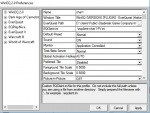
where "char1" is a profile I setup in WinEQ2 that looks like this:

WinEQ.PNG
 
I am am running the main script as admin when I launch it. Will that automatically make the processes invoked in the script run as admin or do I need to go in File explorer and change each of them manually to always run as


Each one.

everquest.exe
wineq.exe
macroquest2.exe

Right click properties and make sure they are set to run as admin. see if that helps
 
Still testing this by the way. I made the changes to run all the excecutables as admin and didn't have the issue on load up this morning. Will test it a few more times and see what happens. Thanks again for all the support.
 
If I load faster I will either get a crash, or the ingame EQ settings get reset to default.

I'm not using isboxer or winEQ (yet), and this is exactly what I'm experiencing when I click 5 separate links in rapid succession to load my 5 instances. I then put the password in for each of the 5 instances one at a time. About half the time one of the instances will have default eqclient.ini settings.
 
Problem - Crashing on load using WinEQ2

Users who are viewing this thread

Back
Top
Cart