not sure whats up but yowsa. Pardon me i dont know alot. im sure its something i did. but its been running smooth then bam. after i was setting up the auto loading of my toons it happened. Correlation doesnt imply causastion, but worth mentioning it. thanks,

Install the app
How to install the app on iOS
Follow along with the video below to see how to install our site as a web app on your home screen.
Note: This feature may not be available in some browsers.
-
 You've discovered RedGuides, an EverQuest multi-boxing and scripting community 🧙♀️⚙️. We want you to play several EQ characters at once, come join us and say hello! 👋
You are using an out of date browser. It may not display this or other websites correctly.
You should upgrade or use an alternative browser.
You should upgrade or use an alternative browser.
Problem - Crashing alot. Direct x?
- Thread starter mikemike
- Start date
- Status
- Not open for further replies.
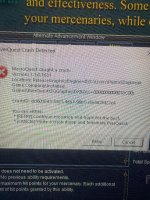


EQ has a lot of crashes right now and there are several threads about all the various things.not sure whats up but yowsa. Pardon me i dont know alot. im sure its something i did. but its been running smooth then bam. after i was setting up the auto loading of my toons it happened. Correlation doesnt imply causastion, but worth mentioning it. thanks,
There's not really much you can do.
If you are using the new UI, it might be worth trying to turn that off.
Otherwise your best bet is just to make sure all of your drivers are updated for your computer and all of your computer parts
thanks buds!
yah im on live
shoot i can login all the way, i launch MQ and BAM kicks everything
i cant load more than 4 accounts. but was on all day and yesterday all day too no trouble at all. other than my horrid skills LOL
it turns out the console was causing the crash. for some reason it was loading in wrong i think.
yah im on live
shoot i can login all the way, i launch MQ and BAM kicks everything
i cant load more than 4 accounts. but was on all day and yesterday all day too no trouble at all. other than my horrid skills LOL
it turns out the console was causing the crash. for some reason it was loading in wrong i think.
Attachments
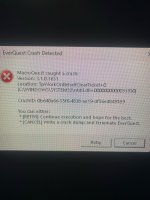
Hey guys! so i definitively found why i have been crashing, and this may help someone out. including you pimps..
The console is crashing the game. If you move the console off screen, OR if your plugins are out of screen you WILL crash. SO, there is an auto login with the console at the wrong size, going outside of the border and BAM crash. 100% of the time. If i clear the console, the graphics clean up and i know i can launch. i have to take the console down BEFORE it loads to char screen.
All i gotta do is click the console off on this screen here... otherwise.... it aint running.
The console is crashing the game. If you move the console off screen, OR if your plugins are out of screen you WILL crash. SO, there is an auto login with the console at the wrong size, going outside of the border and BAM crash. 100% of the time. If i clear the console, the graphics clean up and i know i can launch. i have to take the console down BEFORE it loads to char screen.
All i gotta do is click the console off on this screen here... otherwise.... it aint running.
Attachments
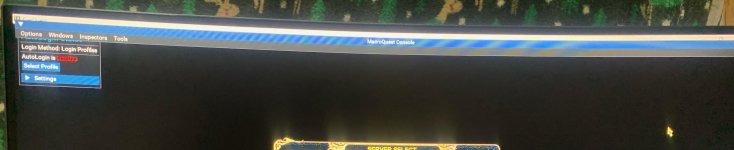
Im pretty sure this little console is causing me all of my problems. I cant get more than four accounts to login, but the crashes are now predictable. IF i make it to char screen and its choppy then i know i have a problem. CLosing out the console doesnt work, and im not sure what that plugin is called to simply unload it. one console is enough for me LOL
I deleted your image since it had your toon name blatantly in it - don't do that. (and i merged your 3 threads together)
you can edit your macroquest.ini so you don't show the console
change
also check you don't have any conflicting overlaying software running - Nahimic is the #1 contender
"i don't have nahimic" - every person who has issues caused by nahimic --- please double check if you don't know
you can edit your macroquest.ini so you don't show the console
change
ShowMacroQuestConsole=1 to ShowMacroQuestConsole=0 in your macroquest.inialso check you don't have any conflicting overlaying software running - Nahimic is the #1 contender
"i don't have nahimic" - every person who has issues caused by nahimic --- please double check if you don't know
Last edited:
thanks bud i make mistake lol ill keep trying im super close!
Ok so it says macroquest console is already at zero in the ini. but it still loads
dangit. got it to stop loading and still have problems loading more than four accounts. i dont have that narimbu thingy i double checked. my computer is brand new and it can handle 30 accounts lol
Ok so it says macroquest console is already at zero in the ini. but it still loads
dangit. got it to stop loading and still have problems loading more than four accounts. i dont have that narimbu thingy i double checked. my computer is brand new and it can handle 30 accounts lol


RGTorv
Active member
- Joined
- Jul 7, 2023
- RedCents
- 445¢
dd6018d3-5921-4eb7-96b1-c5e4d2f422e4anybody want to write down the crash id for me so i can look it up?
- Joined
- Jul 27, 2020
- RedCents
- 92¢
Hey, I know I have nahimic, can I go and delete or uninstalle it?I deleted your image since it had your toon name blatantly in it - don't do that. (and i merged your 3 threads together)
you can edit your macroquest.ini so you don't show the console
changeShowMacroQuestConsole=1toShowMacroQuestConsole=0in your macroquest.ini
also check you don't have any conflicting overlaying software running - Nahimic is the #1 contender
"i don't have nahimic" - every person who has issues caused by nahimic --- please double check if you don't know
Thanks,
are you repeatedly crashing?Hey, I know I have nahimic, can I go and delete or uninstalle it?
Thanks,
- Joined
- Jul 27, 2020
- RedCents
- 92¢
I would not say repeatedly. If I have 9 or more accounts loaded at the same time, then chances for crashing are probably 70 to 30(not crashing)are you repeatedly crashing?

Close your EQ windows. Open eqclient.ini in everquest directory and add
Put this here too because it's actually showing up before the newer thread in search.
UseNewUIEngine=0 under [Defaults] section. Seems to be stopping a lot of the crashes, and doing it that way will keep you from crashing while trying to set it. From what I can tell so far it has to do with the new ui being in the background windows. Was crashing with new ui on and it stopped completely when I turned it off.Put this here too because it's actually showing up before the newer thread in search.
Last edited:
- Status
- Not open for further replies.
Users who are viewing this thread
Total: 1 (members: 0, guests: 1)
Share: