• You've discovered RedGuides, an EverQuest multi-boxing and scripting community 🧙‍♀️⚙️. We want you to play several EQ characters at once, come join us and say hello! 👋

  • A TLP without truebox has thawed (Very Vanilla ready)
    Frostreaver

Lua - Crashes when loading LUA scripts

Xunil

Member
Joined
Mar 8, 2021
RedCents
61¢
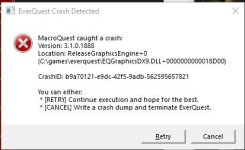
When Lua scripts first came out. I loaded one and it worked about 60 seconds and MQ crashed. I sort of ignored that and just chalked it up to a new thing. Fast forward to now. I decided to try again. I downloaded a new Lua script (alphabuff) and typed the run command. I saw the Lua windows popup and instantly MQ crashed. I tried again, crashed again.

Any ideas what I am doing wrong? Because I don't see this as a major complaint by others.
luacrash.JPG
 
I'll just say that, 1) it's not "Lua Scripts" that crash when you load this. It's THE Lua script "Alpha Buff" it sounds like. Have you asked your question in that resource discussion? I use dozens of Lua scripts daily, this isn't a Lua issue.
 
It appears to do this on any Lua script. I have downloaded 3 now. I will test more.
 
aer you trying to resize the Lua window by chance in fullscreen? i think what @DEADCiTiES may be pointing at is an issue ive seen before ... make sure your playing in windowed mode
 
I am indeed in windowed mode, but it crashes the second I click enter on the run Lua command. I will do more testing today.
 
I looked up the crash ID from your screenshot. But the dump was deleted. I tried to look at similar, but nothing of any use appeared.
If you get a fresh crash please press CTRL+C while the crash window is open to copy the contents to clipboard and paste it using CTRL+V here.
 
havent tried for a few days, but i started getting crashes every time i tried running \Lua RUN TCN. it had been working fine then suddenly started crashin on every account, which all run from different folders.
havent tried running any other Lua's , however at the same time one account i did start haveing one crash on running mac overseer. havent changed any settings except to update MQ2 and its appropriate files.
 
I think I may have found the issue. I was able to use the overseer without crashing, but when I drug the overseer Lua box near the edge, it immediately crashed and I believe this is why all the others were crashing, because the Lua box would have been outside the window.

Unfortunately the alphabuffs is large and would always crash because it will go outside the windowed limitation. The Quick Hud Lua was crashing bc it was on the edge.

I can't really run all 6 chars in full screen mode. Is there any work around for this other than making sure Lua windows never get outside the EQ window of each character?
 
I think I may have found the issue. I was able to use the overseer without crashing, but when I drug the overseer lua box near the edge, it immediately crashed and I believe this is why all the others were crashing, because the LUA box would have been outside the window.

Unfortunately the alphabuffs is large and would always crash because it will go outside the windowed limitation. The Quick Hud Lua was crashing bc it was on the edge.

I can't really run all 6 chars in full screen mode. Is there any work around for this other than making sure lua windows never get outside the EQ window of each character?
1699828720415.png
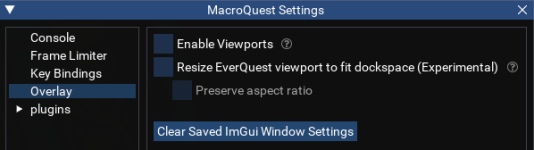
Try going to /mqsettings
then Overlay
Then enable viewports
This should allow the windows to be dragged outside of the EQ window.

If this resolves the issue, the authors probably need an early out for any Begin/BeginChild windows to avoid the crash.
 
I was thinking it could be related to imgui elements being off screen and was going to suggest trying to click clear saved imgui window settings to get them on screen again.
 
Interestingly enough unchecking and rechecking viewports (without moving anything) immediately caused a crash.
 
I use Discord and Gina as well, but no other that I am aware of. I do use 2 monitors, but the crashes are when using the primary monitor. I will try to troubleshoot some more, thanks all!
 
I use Discord and Gina as well, but no other that I am aware of. I do use 2 monitors, but the crashes are when using the primary monitor. I will try to troubleshoot some more, thanks all!
Check you don't have nahimic
 
Check you don't have nahimic
Yeah, I looked for that, it messed me up on the Lua for guild porter. The corsair fan controller I believe also can be an issue.

This issue seems to only be when it leaves the EQ window. I will do some more troubleshooting. It's definitely consistent. I may try some safemode boots and see if its still there.
 
Reviving this. Still an issue and I know for sure now, that it is when the Lua window goes outside of the window of EQ. With the new Plugins all being Lua, I am hitting it again. I had tried @ChatWithThisName suggestion playing with enable viewports, but that didn't resolve it as it was already checked.

Sure is annoying! I don't know what other overlay may be causing the issue, so not sure how to debug.
 
Reviving this. Still an issue and I know for sure now, that it is when the LUA window goes outside of the window of EQ. With the new Plugins all being LUA, I am hitting it again. I had tried @ChatWithThisName suggestion playing with enable viewports, but that didn't resolve it as it was already checked.

Sure is annoying! I don't know what other overlay may be causing the issue, so not sure how to debug.
You could check discord, steam, nahimic, nvidia, MSI, razer, logitech, xbox, etc. for conflicting overlays.
Have you tried with that enable viewports setting disabled since you said its checked already?
 
Last edited:
Reviving this. Still an issue and I know for sure now, that it is when the LUA window goes outside of the window of EQ. With the new Plugins all being LUA, I am hitting it again. I had tried @ChatWithThisName suggestion playing with enable viewports, but that didn't resolve it as it was already checked.

Sure is annoying! I don't know what other overlay may be causing the issue, so not sure how to debug.
AGAIN, turn OFF viewports.
 
AGAIN, turn OFF viewports.
The initial statement was to enable it. Disabling it does indeed stop the crashing, thanks for that. I would like to eventually be able to take it outside the window. Just not sure how to troubleshoot it.
 
Lua - Crashes when loading LUA scripts

Users who are viewing this thread

Back
Top
Cart