• You've discovered RedGuides, an EverQuest multi-boxing and scripting community 🧙‍♀️⚙️. We want you to play several EQ characters at once, come join us and say hello! 👋

  • A TLP without truebox has thawed (Very Vanilla ready)
    Frostreaver

Problem - Crash report

Status
Not open for further replies.
Joined
Dec 26, 2023
RedCents
965¢
I only get this when using autologin on my bard. It happen about 90% of the time now. I can log in to any other toon on that account (or any other account) with this issue then swap to bard without issues. Sometimes it silent crashes and only shows this window when Im on that client.


---------------------------
EverQuest Crash Detected
---------------------------
MacroQuest caught a crash:

Process ID: 18188
Version: 3.1.1.3783
Location: ImGui::RenderTextClipped+0 (C:\Users\david\AppData\Local\VeryVanilla\MacroQuest\Release\imgui-64.dll+000000000000D830)

CrashID: f7eb2bf8-c8c6-4c06-aa77-a9c1c666dcbe

You can either:
* [RETRY] Continue execution and hope for the best.
* [CANCEL] Write a crash dump and terminate EverQuest.

Copy the contents of this dialog to your clipboard by pressing Ctrl+C

---------------------------
Retry Cancel
---------------------------
 
see where it says ctrl c to copy and paste the information you should do tht and post that instead of a picture, makes it easier for the people that can look up that information to use the numbers, instead of trying to type from a picture
 
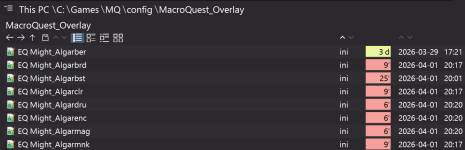
Find that file in your MQ config folder
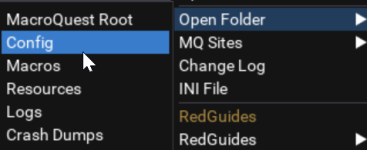
If you need to find that folder you can right click your macroquest tray icon and there's a section to find various folders near the top

1775089536988.png

Note that these toons are obviously EMU toons sharing my name so i have no concern showing you... generally we dont share character info around here.
I also use a custom program instead of windows file explorer but you can still see where i'm at I think :)

1775089646660.png
 
Last edited:
Find that file in your MQ config folder
If you need to find that folder you can right click your macroquest tray icon and there's a section to find various folders near the top

View attachment 76496

Note that these toons are obviously EMU toons sharing my name so i have no concern showing you... generally we dont share character info around here.
I also use a custom program instead of windows file explorer but you can still see where i'm at I think :)

View attachment 76497
Thanks. I'll give it a look. What do I change the file name to? Does it matter?
 
Thanks. I'll give it a look. What do I change the file name to? Does it matter?
The only reason you're renaming it is so you don't actually lose the file if it's not the problem.

That way if you identify that it's not the problem you can just return it to the original name with no issue.

However lots of people have had issues like this based on corrupt overlay files.

I can't actually look at any of the crash information sorry about that. Was just a guess.
 
Problem - Crash report
Status
Not open for further replies.

Users who are viewing this thread

Back
Top
Cart