• Hail, we're RedGuides. We want you to play six (yes, 6!) EverQuest characters at once. We have scripts and a friendly community to help, please join our playstyle and say hello! 👋
  • We've added LLM sections to our Terms & Rules and Resource Rules, for everyone's sanity & in-game safety.
    Read more
    a. Do not replace your voice with an LLM. This goes for your posts and your scripts. Drafting and editing with a tool is fine, but don't take you out of what you share.
    b. Do not replace your EQ character's voice with an LLM. We don't want scripts that speak over /ooc, /shout or other public channels. This has been an unwritten rule that's kept casino scripts off the site for decades, but we're now compelled to make it clear: keep automated communication private.

    Why Does RG Review Scripts?
    Nearly every LLM-written Lua script we see is making your character do impossible things, and rarely in a way that's beneficial to you. We've seen heavy server hammering, /target over impossible distances when /nav spawn would passively accomplish the same thing, a spawn search that fires 20+ times per second, and other pointless actions that are likely annoying GMs.

    You are welcome to use LLMs as a tool to structure, draft, and edit your work, but please read critically before hitting /lua run

Question - Command to set Raid Main Assist (MA)

I have limited ability to test this but it seems to work.
Target the person you want as Raid Main Assist then:
INI:
/notify RaidWindow RAID_MainAssistButton leftmouseup
If it was the same character every time perhaps your hotbutton could be something like:
INI:
/target "CHARACTERNAME"
/notify RaidWindow RAID_MainAssistButton leftmouseup

Thank you, I'll give it a shot!

It worked! Do you know the correct name for the Master Looter button so i can do that one too?
 
Last edited:
Should be:
INI:
/notify RaidWindow RAID_MasterLooterButton leftmouseup

Is there a way to select the player in the RaidWindow itself. For example, select character 1 of Group one as it is listed in the raid window? What I discovered is that just targeting the player does not work. You actually have to select the player in the Raid window itself and then it will target them and let you change to MA. If you just target the player it will just make whoever you had last selected in the Raid window the MA.
 
Is there a way to select the player in the RaidWindow itself. For example, select character 1 of Group one as it is listed in the raid window? What I discovered is that just targeting the player does not work. You actually have to select the player in the Raid window itself and then it will target them and let you change to MA. If you just target the player it will just make whoever you had last selected in the Raid window the MA.

This seems to work (select character 1 of Group one as it is listed in the raid window):
INI:
/notify RaidWindow RAID_PlayerList listselect 1
/notify RaidWindow RAID_MainAssistButton leftmouseup
 
This seems to work (select character 1 of Group one as it is listed in the raid window):
INI:
/notify RaidWindow RAID_PlayerList listselect 1
/notify RaidWindow RAID_MainAssistButton leftmouseup

Thank you, I'll give it a shot. How do you find out the names of the different buttons and sections of a given window like that?
 
Thank you, I'll give it a shot. How do you find out the names of the different buttons and sections of a given window like that?
not sure Kellon's method but this is how a few of us do it

have this in my mq2hud.ini, with a loadhud dev and toggled on with F11

Code:
[dev]
LastMouseOverText    = 7,7,20,0,    0,255,255   ,${If[${EverQuest.LastMouseOver.MouseOver},${EverQuest.LastMouseOver.Name},]}
LastMouseOverText1   = 7,7,21,1,    0,0,0       ,${If[${EverQuest.LastMouseOver.MouseOver},${EverQuest.LastMouseOver.Name},]}
LastMouseOverText2   = 7,7,19,1,    0,0,0       ,${If[${EverQuest.LastMouseOver.MouseOver},${EverQuest.LastMouseOver.Name},]}
LastMouseOverText3   = 7,7,21,-1,   0,0,0       ,${If[${EverQuest.LastMouseOver.MouseOver},${EverQuest.LastMouseOver.Name},]}
LastMouseOverText4   = 7,7,19,-1,   0,0,0       ,${If[${EverQuest.LastMouseOver.MouseOver},${EverQuest.LastMouseOver.Name},]}

This allows us to mouse over anything and get the information for it

example:

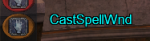
spell gem bar is CastSpellWnd
1607004023928.png
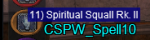
gem 11 is "CSPW_Spell10" (beause first spell gem is CSPW_Spell0)
1607004036190.png

or
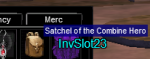
here we can see your first topmost bagslot is InvSlot23
1607004091767.png

So for this specific example:
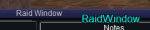
We can see the raid window is called "RaidWindow"
1607003797795.png
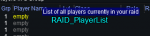
and the section that has all the things to select is called "RAID_PlayerList"
1607003817162.png

then we just toss a listselect and the # we want

and then we can check over the MainAssist button and see it is called "RAID_MainAssistButton"
1607003876352.png
 
not sure Kellon's method but this is how a few of us do it

have this in my mq2hud.ini, with a loadhud dev and toggled on with F11

Code:
[dev]
LastMouseOverText    = 7,7,20,0,    0,255,255   ,${If[${EverQuest.LastMouseOver.MouseOver},${EverQuest.LastMouseOver.Name},]}
LastMouseOverText1   = 7,7,21,1,    0,0,0       ,${If[${EverQuest.LastMouseOver.MouseOver},${EverQuest.LastMouseOver.Name},]}
LastMouseOverText2   = 7,7,19,1,    0,0,0       ,${If[${EverQuest.LastMouseOver.MouseOver},${EverQuest.LastMouseOver.Name},]}
LastMouseOverText3   = 7,7,21,-1,   0,0,0       ,${If[${EverQuest.LastMouseOver.MouseOver},${EverQuest.LastMouseOver.Name},]}
LastMouseOverText4   = 7,7,19,-1,   0,0,0       ,${If[${EverQuest.LastMouseOver.MouseOver},${EverQuest.LastMouseOver.Name},]}

We can see the raid window is called "RaidWindow"
View attachment 26213
and the section that has all the things to select is called "RAID_PlayerList"
View attachment 26214

then we just toss a listselect and the # we want

and then we can check over the MainAssist button and see it is called "RAID_MainAssistButton"
View attachment 26215

Oh wow! Awesome! Thank you!
 
not sure Kellon's method but this is how a few of us do it

have this in my mq2hud.ini, with a loadhud dev and toggled on with F11

Code:
[dev]
LastMouseOverText    = 7,7,20,0,    0,255,255   ,${If[${EverQuest.LastMouseOver.MouseOver},${EverQuest.LastMouseOver.Name},]}
LastMouseOverText1   = 7,7,21,1,    0,0,0       ,${If[${EverQuest.LastMouseOver.MouseOver},${EverQuest.LastMouseOver.Name},]}
LastMouseOverText2   = 7,7,19,1,    0,0,0       ,${If[${EverQuest.LastMouseOver.MouseOver},${EverQuest.LastMouseOver.Name},]}
LastMouseOverText3   = 7,7,21,-1,   0,0,0       ,${If[${EverQuest.LastMouseOver.MouseOver},${EverQuest.LastMouseOver.Name},]}
LastMouseOverText4   = 7,7,19,-1,   0,0,0       ,${If[${EverQuest.LastMouseOver.MouseOver},${EverQuest.LastMouseOver.Name},]}

This allows us to mouse over anything and get the information for it

example:

spell gem bar is CastSpellWnd
View attachment 26216
gem 11 is "CSPW_Spell10" (beause first spell gem is CSPW_Spell0)
View attachment 26217

or
here we can see your first topmost bagslot is InvSlot23
View attachment 26218

So for this specific example:
We can see the raid window is called "RaidWindow"
View attachment 26213
and the section that has all the things to select is called "RAID_PlayerList"
View attachment 26214

then we just toss a listselect and the # we want

and then we can check over the MainAssist button and see it is called "RAID_MainAssistButton"
View attachment 26215
This is Golden info!
 
Question - Command to set Raid Main Assist (MA)

Users who are viewing this thread

Back
Top
Cart