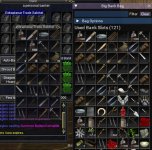
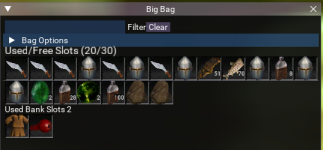
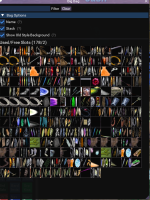
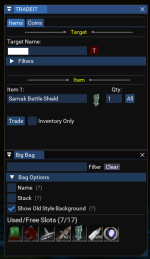
--- @type Mq
local mq = require("mq")

--- @type ImGui
require("ImGui")

local openGUI = true
local shouldDrawGUI = true

-- Constants
local ICON_WIDTH = 40
local ICON_HEIGHT = 40
local COUNT_X_OFFSET = 39
local COUNT_Y_OFFSET = 23
local EQ_ICON_OFFSET = 500
local BAG_ITEM_SIZE = 40
local INVENTORY_DELAY_SECONDS = 0
local BANK_DELAY_SECONDS = 0

-- EQ Texture Animation references
local animItems = mq.FindTextureAnimation("A_DragItem")
local animBox = mq.FindTextureAnimation("A_RecessedBox")

-- Bag Contents
local items = {}

-- bank contents
local bankItems = {}

-- Bag Options
local sort_order = { name = false, stack = false }

-- GUI Activities
local show_item_background = true

local start_time = os.time()
local bank_start_time = os.time()
local filter_text = ""

local function help_marker(desc)
    ImGui.TextDisabled("(?)")
    if ImGui.IsItemHovered() then
        ImGui.BeginTooltip()
        ImGui.PushTextWrapPos(ImGui.GetFontSize() * 35.0)
        ImGui.TextUnformatted(desc)
        ImGui.PopTextWrapPos()
        ImGui.EndTooltip()
    end
end

-- Sort routines
local function sort_inventory()
    -- Various Sorting
    if sort_order.name and sort_order.stack then
        table.sort(items, function(a, b) return a.Stack() > b.Stack() or (a.Stack() == b.Stack() and a.Name() < b.Name()) end)
    elseif sort_order.stack then
        table.sort(items, function(a, b) return a.Stack() > b.Stack() end)
    elseif sort_order.name then
        table.sort(items, function(a, b) return a.Name() < b.Name() end)
    end
end

-- Sort routines
local function sort_bank()
    -- Various Sorting
    if sort_order.name and sort_order.stack then
        table.sort(bankItems, function(a, b) return a.Stack() > b.Stack() or (a.Stack() == b.Stack() and a.Name() < b.Name()) end)
    elseif sort_order.stack then
        table.sort(bankItems, function(a, b) return a.Stack() > b.Stack() end)
    elseif sort_order.name then
        table.sort(bankItems, function(a, b) return a.Name() < b.Name() end)
    end
end

-- The beast - this routine is what builds our inventory.
local function create_inventory()
    if (os.difftime(os.time(), start_time)) > INVENTORY_DELAY_SECONDS or table.getn(items) == 0 then
        start_time = os.time()
        items = {}
        for i = 23, 34, 1 do
            local slot = mq.TLO.Me.Inventory(i)
            if slot.Container() and slot.Container() > 0 then
                for j = 1, (slot.Container()), 1 do
                    if (slot.Item(j)()) then
                        table.insert(items, slot.Item(j))
                    end
                end
            elseif slot.ID() ~= nil then
                table.insert(items, slot) -- We have an item in a bag slot
            end
        end
        --sort_inventory()
    end
end

-- The beast - this routine is what builds our inventory.
local function create_bank()
    if (os.difftime(os.time(), bank_start_time)) > BANK_DELAY_SECONDS or table.getn(bankItems) == 0 then
        bank_start_time = os.time()
        bankItems = {}
        for i = 0, 23, 1 do
            local slot = mq.TLO.Me.Bank(i)
            if slot.Container() and slot.Container() > 0 then
                for j = 1, (slot.Container()), 1 do
                    if (slot.Item(j)()) then
                        table.insert(bankItems, slot.Item(j))
                    end
                end
            elseif slot.ID() ~= nil then
                table.insert(bankItems, slot) -- We have an item in a bag slot
            end
        end
        sort_bank()
    end
end

-- Converts between ItemSlot and /itemnotify pack numbers
local function to_pack(slot_number)
    return "pack"..tostring(slot_number-22)
end

-- Converts between ItemSlot2 and /itemnotify numbers
local function to_bag_slot(slot_number)
    return slot_number + 1
end

-- Converts between ItemSlot and /itemnotify pack numbers
local function to_bank(slot_number)
    return "bank"..tostring(slot_number + 1)
end

-- Converts between ItemSlot2 and /itemnotify numbers
local function to_bank_slot(slot_number)
    return slot_number + 1
end

-- Displays static utilities that always show at the top of the UI
local function display_bag_utilities()
    ImGui.PushItemWidth(200)
    local text, selected = ImGui.InputText("Filter", filter_text)
    ImGui.PopItemWidth()
    if selected then filter_text = text end
    ImGui.SameLine()
    if ImGui.SmallButton("Clear") then filter_text = "" end
end

-- Display the collapasable menu area above the items
local function display_bag_options()

    if not ImGui.CollapsingHeader("Bag Options") then
        ImGui.NewLine()
        return
    end

    if ImGui.Checkbox("Name", sort_order.name) then
        sort_order.name = true
    else
        sort_order.name = false
    end
    ImGui.SameLine()
    help_marker("Order items from your inventory sorted by the name of the item.")

    if ImGui.Checkbox("Stack", sort_order.stack) then
        sort_order.stack = true
    else
        sort_order.stack = false
    end
    ImGui.SameLine()
    help_marker("Order items with the largest stacks appearing first.")

    if ImGui.Checkbox("Show Old Style Background", show_item_background)
    then
        show_item_background = true
    else
        show_item_background = false
    end
    ImGui.SameLine()
    help_marker("Removes the background texture to give your bag a cool modern look.")

    ImGui.Separator()
    ImGui.NewLine()
end

-- Helper to create a unique hidden label for each button.  The uniqueness is
-- necessary for drag and drop to work correctly.
local function btn_label(item)
    if not item.slot_in_bag then
        return string.format("##slot_%s", item.ItemSlot())
    else
        return string.format("##bag_%s_slot_%s", item.ItemSlot(), item.ItemSlot2())
    end
end

---Draws the individual item icon in the bag.
---@param item item The item object
local function draw_item_icon(item)

    -- Capture original cursor position
    local cursor_x, cursor_y = ImGui.GetCursorPos()

    -- Draw the background box
    if show_item_background then
       ImGui.DrawTextureAnimation(animBox, ICON_WIDTH, ICON_HEIGHT)
    end

    -- This handles our "always there" drop zone (for now...)
    if not item then
        return
    end

    -- Reset the cursor to start position, then fetch and draw the item icon
    ImGui.SetCursorPos(cursor_x, cursor_y)
    animItems:SetTextureCell(item.Icon() - EQ_ICON_OFFSET)
    ImGui.DrawTextureAnimation(animItems, ICON_WIDTH, ICON_HEIGHT)

    -- Overlay the stack size text in the lower right corner
    ImGui.SetWindowFontScale(0.68)
    local TextSize = ImGui.CalcTextSize(tostring(item.Stack()))
    if item.Stack() > 1 then
        ImGui.SetCursorPos((cursor_x + COUNT_X_OFFSET) - TextSize, cursor_y + COUNT_Y_OFFSET)
        ImGui.DrawTextureAnimation(animBox, TextSize, 4)
        ImGui.SetCursorPos((cursor_x + COUNT_X_OFFSET) - TextSize, cursor_y + COUNT_Y_OFFSET)
        ImGui.TextUnformatted(tostring(item.Stack()))
    end
    ImGui.SetWindowFontScale(1.0)

    -- Reset the cursor to start position, then draw a transparent button (for drag & drop)
    ImGui.SetCursorPos(cursor_x, cursor_y)
    ImGui.PushStyleColor(ImGuiCol.Button, 0, 0, 0, 0)
    ImGui.PushStyleColor(ImGuiCol.ButtonHovered, 0, 0.3, 0, 0.2)
    ImGui.PushStyleColor(ImGuiCol.ButtonActive, 0, 0.3, 0, 0.3)
    ImGui.Button(btn_label(item), ICON_WIDTH, ICON_HEIGHT)
    ImGui.PopStyleColor(3)

    -- Tooltip
    if ImGui.IsItemHovered() then
        if ImGui.IsKeyDown(16) then
            ImGui.BeginTooltip()
                ImGui.TextUnformatted(item.Name())
                if item.NoDrop() then ImGui.TextUnformatted("NO DROP") end
            ImGui.EndTooltip()
        else
            ImGui.SetTooltip(item.Name())
        end
    end

    if ImGui.IsItemClicked(ImGuiMouseButton.Left) then
        if item.ItemSlot2() == -1 then
           mq.cmd("/itemnotify "..item.ItemSlot().." leftmouseup")
        else
            print(item.ItemSlot2())
            mq.cmd("/itemnotify in "..to_pack(item.ItemSlot()).." "..to_bag_slot(item.ItemSlot2()).." leftmouseup")
        end
    end

    -- Right-click mouse works on bag items like in-game action
    if ImGui.IsItemClicked(ImGuiMouseButton.Right) then mq.cmdf('/useitem "%s"', item.Name()) end

    local function mouse_over_bag_window()
        local window_x, window_y = ImGui.GetWindowPos()
        local mouse_x, mouse_y = ImGui.GetMousePos()
        local window_size_x, window_size_y = ImGui.GetWindowSize()
        return  (mouse_x > window_x and mouse_y > window_y) and (mouse_x < window_x + window_size_x and mouse_y < window_y + window_size_y)
    end

    -- Autoinventory any items on the cursor if you click in the bag UI
    if ImGui.IsMouseClicked(ImGuiMouseButton.Left) and mq.TLO.Cursor() and mouse_over_bag_window() then
        mq.cmd("/autoinventory")
    end
end

---Draws the individual item icon in the bag.
---@param item item The item object
local function draw_bank_icon(item)

    -- Capture original cursor position
    local cursor_x, cursor_y = ImGui.GetCursorPos()

    -- Draw the background box
    if show_item_background then
       ImGui.DrawTextureAnimation(animBox, ICON_WIDTH, ICON_HEIGHT)
    end

    -- This handles our "always there" drop zone (for now...)
    if not item then
        return
    end

    -- Reset the cursor to start position, then fetch and draw the item icon
    ImGui.SetCursorPos(cursor_x, cursor_y)
    animItems:SetTextureCell(item.Icon() - EQ_ICON_OFFSET)
    ImGui.DrawTextureAnimation(animItems, ICON_WIDTH, ICON_HEIGHT)

    -- Overlay the stack size text in the lower right corner
    ImGui.SetWindowFontScale(0.68)
    local TextSize = ImGui.CalcTextSize(tostring(item.Stack()))
    if item.Stack() > 1 then
        ImGui.SetCursorPos((cursor_x + COUNT_X_OFFSET) - TextSize, cursor_y + COUNT_Y_OFFSET)
        ImGui.DrawTextureAnimation(animBox, TextSize, 4)
        ImGui.SetCursorPos((cursor_x + COUNT_X_OFFSET) - TextSize, cursor_y + COUNT_Y_OFFSET)
        ImGui.TextUnformatted(tostring(item.Stack()))
    end
    ImGui.SetWindowFontScale(1.0)

    -- Reset the cursor to start position, then draw a transparent button (for drag & drop)
    ImGui.SetCursorPos(cursor_x, cursor_y)
    ImGui.PushStyleColor(ImGuiCol.Button, 0, 0, 0, 0)
    ImGui.PushStyleColor(ImGuiCol.ButtonHovered, 0, 0.3, 0, 0.2)
    ImGui.PushStyleColor(ImGuiCol.ButtonActive, 0, 0.3, 0, 0.3)
    ImGui.Button(btn_label(item), ICON_WIDTH, ICON_HEIGHT)
    ImGui.PopStyleColor(3)

    -- Tooltip
    if ImGui.IsItemHovered() then
        if ImGui.IsKeyDown(16) then
            ImGui.BeginTooltip()
                ImGui.TextUnformatted(item.Name())
                if item.NoDrop() then ImGui.TextUnformatted("NO DROP") end
            ImGui.EndTooltip()
        else
            ImGui.SetTooltip(item.Name())
        end
    end

    if ImGui.IsItemClicked(ImGuiMouseButton.Left) then
        if item.ItemSlot2() == -1 then
           mq.cmd("/itemnotify ".. to_bank(item.ItemSlot()) .." leftmouseup")
        else
            print(item.ItemSlot2())
            mq.cmd("/itemnotify in "..to_bank(item.ItemSlot()).." "..to_bank_slot(item.ItemSlot2()).." leftmouseup")
        end
    end

    -- Right-click mouse works on bag items like in-game action
    if ImGui.IsItemClicked(ImGuiMouseButton.Right) then mq.cmdf('/useitem "%s"', item.Name()) end

    local function mouse_over_bag_window()
        local window_x, window_y = ImGui.GetWindowPos()
        local mouse_x, mouse_y = ImGui.GetMousePos()
        local window_size_x, window_size_y = ImGui.GetWindowSize()
        return  (mouse_x > window_x and mouse_y > window_y) and (mouse_x < window_x + window_size_x and mouse_y < window_y + window_size_y)
    end

    -- Autoinventory any items on the cursor if you click in the bag UI
    if ImGui.IsMouseClicked(ImGuiMouseButton.Left) and mq.TLO.Cursor() and mouse_over_bag_window() then
        mq.cmd("/autoinventory")
    end
end

-- If there is an item on the cursor, display it.
local function display_item_on_cursor()
    if mq.TLO.Cursor() then
        local cursor_item = mq.TLO.Cursor -- this will be an MQ item, so don't forget to use () on the members!
        local mouse_x, mouse_y = ImGui.GetMousePos()
        local window_x, window_y = ImGui.GetWindowPos()
        local icon_x = mouse_x - window_x + 10
        local icon_y = mouse_y - window_y + 10
        local stack_x = icon_x + COUNT_X_OFFSET
        local stack_y = icon_y + COUNT_Y_OFFSET
        local text_size = ImGui.CalcTextSize(tostring(cursor_item.Stack()))
        ImGui.SetCursorPos(icon_x, icon_y)
        animItems:SetTextureCell(cursor_item.Icon() - EQ_ICON_OFFSET)
        ImGui.DrawTextureAnimation(animItems, ICON_WIDTH, ICON_HEIGHT)
        if cursor_item.Stackable() then
            ImGui.SetCursorPos(stack_x, stack_y)
            ImGui.DrawTextureAnimation(animBox, text_size, ImGui.GetTextLineHeight())
            ImGui.SetCursorPos(stack_x - text_size, stack_y)
            ImGui.TextUnformatted(tostring(cursor_item.Stack()))
        end
    end
end

---Handles the bag layout of individual items
local function display_bag_content()

        create_inventory()
        ImGui.SetWindowFontScale(1.25)
        ImGui.SetCursorPosY(ImGui.GetCursorPosY() - 20)
        ImGui.TextUnformatted(string.format("Used/Free Slots (%s/%s)", table.getn(items), mq.TLO.Me.FreeInventory()))
        ImGui.SetWindowFontScale(1.0)

        ImGui.PushStyleVar(ImGuiStyleVar.ItemSpacing, ImVec2.new(0, 0))
        local bag_window_width = ImGui.GetWindowWidth()
        local bag_cols = math.floor(bag_window_width / BAG_ITEM_SIZE)
        local temp_bag_cols = 1

        for index, _ in ipairs(items) do
            if string.match(string.lower(items[index].Name()), string.lower(filter_text)) then
                draw_item_icon(items[index])
                if bag_cols > temp_bag_cols then
                    temp_bag_cols = temp_bag_cols + 1
                    ImGui.SameLine()
                else
                    temp_bag_cols = 1
                end
            end
        end
        ImGui.PopStyleVar()

        ImGui.Separator()
        create_bank()
        ImGui.TextUnformatted(string.format("Used Bank Slots %s", table.getn(bankItems)))
        ImGui.SetWindowFontScale(1.0)

        ImGui.PushStyleVar(ImGuiStyleVar.ItemSpacing, ImVec2.new(0, 0))
        bag_window_width = ImGui.GetWindowWidth()
        bag_cols = math.floor(bag_window_width / BAG_ITEM_SIZE)
        temp_bag_cols = 1

        for bindex, b_ in ipairs(bankItems) do
            if string.match(string.lower(bankItems[bindex].Name()), string.lower(filter_text)) then
                draw_bank_icon(bankItems[bindex])
                if bag_cols > temp_bag_cols then
                    temp_bag_cols = temp_bag_cols + 1
                    ImGui.SameLine()
                else
                    temp_bag_cols = 1
                end
            end
        end
        ImGui.PopStyleVar()
end

local function apply_style()
   ImGui.PushStyleColor(ImGuiCol.TitleBg, .62, .53, .79, .40)
   ImGui.PushStyleColor(ImGuiCol.TitleBgActive, .62, .53, .79, .40)
   ImGui.PushStyleColor(ImGuiCol.TitleBgCollapsed, .62, .53, .79, .40)
   ImGui.PushStyleColor(ImGuiCol.Button, .62, .53, .79, .40)
   ImGui.PushStyleColor(ImGuiCol.ButtonHovered, 1, 1, 1, .87)
   ImGui.PushStyleColor(ImGuiCol.ResizeGrip, .62, .53, .79, .40)
   ImGui.PushStyleColor(ImGuiCol.ResizeGripHovered, .62, .53, .79, 1)
   ImGui.PushStyleColor(ImGuiCol.ResizeGripActive, .62, .53, .79, 1)
   BigBagGUI()
   ImGui.PopStyleColor(8)
end

--- ImGui Program Loop
function BigBagGUI()
    if openGUI then
        openGUI, shouldDrawGUI = ImGui.Begin(string.format("Big Bag"), openGUI, ImGuiWindowFlags.NoScrollbar)
        if shouldDrawGUI then
            display_bag_utilities()
            display_bag_options()
            display_bag_content()
            display_item_on_cursor()
        end
        ImGui.End()
    else
        return
    end
end

mq.imgui.init("BigBagGUI", apply_style)

--- Main Script Loop
while openGUI do
   mq.delay("1s")
end







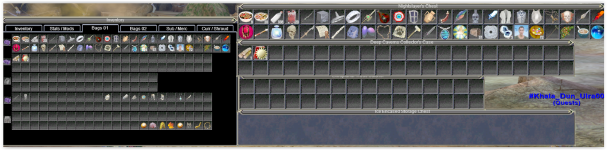
 I would like to see a three tab GUI with Inventory, Bank and Shared Bank. Hell even throw in a few more tabs for Dragons Hoard and The Tradeskill Bank.