Follow along with the video below to see how to install our site as a web app on your home screen.
Note: This feature may not be available in some browsers.
Hail, we're RedGuides. We want you to play six (yes, 6!) EverQuest characters at once. We have scripts and a friendly community to help, please join our playstyle and say hello! 👋
Not sure what all you have tried. I like to keep a clean map and type /mapshow named or /mapshow NPC only when I want them to show. I noticed a full map of mobs will lag out my screen when I open the map. and /mapshow reset when i want to clear the map again.
I just set mine set up opposite. I have my map set to /mapfilter npc /mapfilter pc /mapfilter familiar, (this removes these from showing on the map) this pretty much clears the map and doesn't make my ui lock up when opening the map. Then i use /mapshow named or /mapshow pc /mapshow nameofmob I want to see on map. then /mapshow reset to clear my map again. (in your case you are /mapshow reset to put the map back to how you have it set showing all) On the map I have Base 1, 2 and 3 layers selected, because i like to see all the layers on the map. Layer 2 does have the spawns listed in like SIC mentioned above.
This site uses cookies to help personalise content, tailor your experience and to keep you logged in if you register.
By continuing to use this site, you are consenting to our use of cookies.

 Hail, we're RedGuides. We want you to play six (yes, 6!) EverQuest characters at once. We have scripts and a friendly community to help, please join our playstyle and say hello! 👋

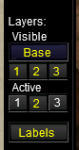

 Then i use /mapshow named or /mapshow pc /mapshow nameofmob I want to see on map. then /mapshow reset to clear my map again. (in your case you are /mapshow reset to put the map back to how you have it set showing all) On the map I have Base 1, 2 and 3 layers selected, because i like to see all the layers on the map. Layer 2 does have the spawns listed in like SIC mentioned above.