• You've discovered RedGuides, an EverQuest multi-boxing and scripting community 🧙‍♀️⚙️. We want you to play several EQ characters at once, come join us and say hello! 👋

  • A TLP without truebox has thawed (Very Vanilla ready)
    Frostreaver
Button Master

Release Button Master (1 Viewer) 05/09/2026

No permission to download
Very nice button replacement Lua :)
Any chance of allowing a hotbar to have a different height of buttons? ie, I want the entire hotbar to show buttons more like 10 height, 40 width, so they all have the shape of (for eg) an "ok" or "cancel" button in windows, instead of a square EQ action / hotbar button. It'd be ok for the whole hotbar to use this shape/height, to keep things simple.

Also, whenever a button caption runs over one line and gets wrapped, it no longer is centered, instead it is left aligned. Any chance of this always centering ?
 
I was following the advice I found, suggesting a button set for each class and/or specific toon, makes sense. This meant I created a bunch of sets with nothing in them yet, which brought to light that if you have an empty set you can assign it, possibly during working on another toon, and it'll all save then crash when next ran.
Looking into it, this is because it deletes or doesn't save "empty" sets from the config Lua, but doesn't remove the references to them in that same file. Then when it tries to reload, the individual sections have references to sets that have been removed (or just not saved) due to being empty.

This caused loads of crashes over the last couple days as I tried to get this configured, so if you have been getting reports of "it's broken" this would probably be why. As "just a user" it sort of happens for no reason / nothing you appeared to do wrong :)

I solved this by going in to the config and putting back the used/allocated set arrays, and adding a random existing button into each one. That'll at least get the config loading fine. You might want to force it to save out empty sets (best choice imo) or remove references to empty sets (problematic because other char settings can easily reference them), or maybe force some button to exist in an empty set, or something.
 
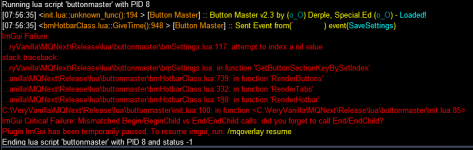
getting this half the time I start buttonmaster

View attachment 62477
that looks like what I was describing the cause and solution for in the post just above yours... When you say "half the time" do you mean sometimes, or always on one toon, or that it happens on one toon then doesn't happen on that toon then does?
Anyhow, your toon with the error has an empty buttonsection of some kind. Just make sure you never empty a section out. Or put some random junk one in ... should resolve it till it can be fixed in the script.
 
that looks like what I was describing the cause and solution for in the post just above yours... When you say "half the time" do you mean sometimes, or always on one toon, or that it happens on one toon then doesn't happen on that toon then does?
Anyhow, your toon with the error has an empty buttonsection of some kind. Just make sure you never empty a section out. Or put some random junk one in ... should resolve it till it can be fixed in the script.
Great tip!
Found some weird set in there that I removed, now it loads correctly! Thanks @mmoplayer
 
I have buttonmaster lua downloaded and when I go to /lua run buttonmaster the window doesn't pop up? Anyone else having this issue or know what im doing wrong? In game says its loaded up

grabbed you the link to buttonmaster discussion by going to resources and searching for buttonmaster.
If you post in their discussion thread, it's easier to find your question and get it answered in the context of the resource you need help with.

I see you're new. So just referring you to the correct location to post.

Another mod will come by shortly and give you a proper warning and relocate your thread to the discussion.


Each resource on RG has an Overview / Discussion Thread and either a link to their wiki or tabs with FAQ, Commands, Etc.
Please make sure to post in the respective discussion thread, and check the FAQ/Commands/Wiki for information before posting.
 
this is my fav Lua but ive become dependent on it and like tonight i was hitting esc to close my bags and it closed BM and i cant get it back up ive read every page on here and tried everything i read nothing works so sadly i have to spend another couple hours redoing all my macros on eq hotbars i know wont fail me
 
this is my fav lua but ive become dependent on it and like tonight i was hitting esc to close my bags and it closed BM and i cant get it back up ive read every page on here and tried everything i read nothing works so sadly i have to spend another couple hours redoing all my macros on eq hotbars i know wont fail me
Hey my dude, sorry that happened, but if you simply closed a bm "tab", using /btn # should bring it up... Default being 1.

This is listed in the mq chat log when it closes and the overview of the resource here.
Best of luck!
 
I broke the thing and had to restart the other thing

I was copying hotkeys from in-game bars to BM via dragging them, and went to copy a modrod hotkey without that rod in my inventory:


ImGui Failure:
...uides\VeryVanilla\lua\buttonmaster\bmEditButtonPopup.lua:47: attempt to perform arithmetic on a nil value
stack traceback:
...uides\VeryVanilla\lua\buttonmaster\bmEditButtonPopup.lua: in function 'RenderEditButtonPopup'
C:\Games\RedGuides\VeryVanilla\lua\buttonmaster\init.lua:102: in function <C:\Games\RedGuides\VeryVanilla\lua\buttonmaster\init.lua:85>
ImGui Critical Failure: Mismatched Begin/BeginChild vs End/EndChild calls: did you forget to call End/EndChild?
Plugin ImGui has been temporarily paused. To resume imgui, run: /mqoverlay resume
Ending lua script 'buttonmaster' with PID 1 and status -1

Very edge case, I just summoned the modrod and continued about my business, figured I'd report it, however.
 
1720847268572.png


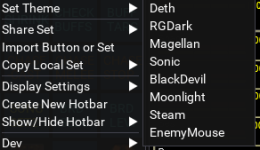
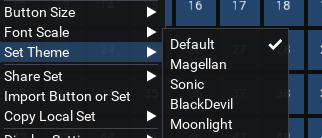
The default theme is not listed as a theme option, so if you choose a theme via the GUI you cant get back to the default theme

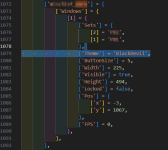
For anyone that lost the default theme and want to go back to it....
  1. /Lua stop buttonmaster
  2. Open config/ButtonMaster.Lua
  3. Find your toon's section
  4. Remove the entire entry for Theme (see highlighted section in screenshot)
  5. Save file
  6. /Lua run buttonmaster
1720847537110.png
 
One quick question: I deleted by mistake a very elaborate Set I had configured. Is there anyway to retrieve it? Anywhere in the files where it might be saved? Thanks!

EDIT: nevermind, I found the Buttonmaster-Backups folder. What a lifesaver!!! :)
 
Last edited:
So how does this save?

I keep losing recently created buttons. Sometimes they save, most of the time they don't.
Normally the Button Master saves immediately. I have never had it not save buttons. The only time I have seen something like this is when I was making changes on multiple characters and it over-writes changes to another character's setup, but I havent seen that in a long time, since they updated the way it works to propgate the changes.
 
I have an issue with buttonmaster. I've moved it to the bottom left corner of my screen and can no longer move it, click any buttons. It acts as if not even there, like I'm clicking on an open part of my screen.
I'm on PeQ emulator server.
Restarting my toon resolved this issue.
 

Attachments

  • 1722874133621.png
    1722874133621.png
    38.8 KB · Views: 0
Last edited:
I have an issue with buttonmaster. I've moved it to the bottom left corner of my screen and can no longer move it, click any buttons. It acts as if not even there, like I'm clicking on an open part of my screen.
I'm on PeQ emulator server.
Restarting my toon resolved this issue.
That might not be Buttonmaster, but ImGUI. It happens to me where I can't interact with the GUI but can still use console commands. Either I wait until it catches up where I can interact again, or hit escape to close windows/lose target a couple times which sometimes helps.
 
I've run into another problem. i run buttonmaster on startup however I don't see it anywhere on my screen. How do i get it to show on my screen? It's not hiding behind anything, i've looked.

Any ideas on correcting this?
 
I've run into another problem. i run buttonmaster on startup however I don't see it anywhere on my screen. How do i get it to show on my screen? It's not hiding behind anything, i've looked.

Any ideas on correcting this?
/btn 1

bild_2024-08-06_075448355.png
 
I also was checking out the different themes and AFTER saving, realized I could not get back to default.
My aproach was a little different as I had not seen the one from @LamahHerder first.

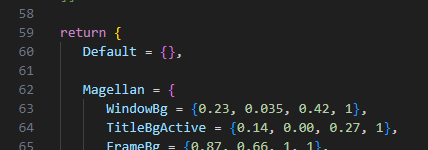
I added a default theme to the list...

Screenshot 2024-08-08 093817.png

I opened the buttonmaster > extra > theme.Lua
I then added the following to the list of themes, and save the file.

[CODE lang="Lua" title="Default Theme" highlight="1"]Default = {},

[/CODE]

Screenshot 2024-08-08 093622.png
(Be sure to include the comma at the end of the line)

Start or Restart ButtonMaster and voila, you can now change back to the default at any time.
I've already used in now a couple of time.

- M
 
Well I have tried searching an I can not find an answer. Could any one help with this?

Code:
/noparse /dgga /output inventory "C:\Games\outfile\Inventory-"${Me.Class.ShortName()}

I trying to have a button that tells the whole group to output their inventory to the same folder, but with their class to distinguish.
 
I'm looking for the file that saves the button set I've made. Where would I find that file so I can share it on my other computer?
 
this is my fav lua but ive become dependent on it and like tonight i was hitting esc to close my bags and it closed BM and i cant get it back up ive read every page on here and tried everything i read nothing works so sadly i have to spend another couple hours redoing all my macros on eq hotbars i know wont fail me
Thats a very.... severe reaction... did you try reloading the Lua? did you try using the `/btn #` command to toggle the visibility? BM does not capture or do anything with "esc" so I am puzzled why you think this would have caused it to close.
 
View attachment 63213


The default theme is not listed as a theme option, so if you choose a theme via the GUI you cant get back to the default theme

For anyone that lost the default theme and want to go back to it....
  1. /lua stop buttonmaster
  2. Open config/ButtonMaster.lua
  3. Find your toon's section
  4. Remove the entire entry for Theme (see highlighted section in screenshot)
  5. Save file
  6. /lua run buttonmaster
View attachment 63215
fixed.
 
Well I have tried searching an I can not find an answer. Could any one help with this?

Code:
/noparse /dgga /output inventory "C:\Games\outfile\Inventory-"${Me.Class.ShortName()}

I trying to have a button that tells the whole group to output their inventory to the same folder, but with their class to distinguish.
I dont think noparse works with dgga you want to use


Code:
/output inventory "C:\Games\outfile\Inventory-"$\{Me.Class.ShortName()}
 
I dont think noparse works with dgga you want to use


Code:
/output inventory "C:\Games\outfile\Inventory-"$\{Me.Class.ShortName()}

I actually figured it out late last night but was too tired to post anything.

Code:
/noparse /dgga /output inventory "C:\Games\outfile\Inventory-${Me.CleanName}"

I am going from memory but can double check when I get home.

If you don't do the no parse, it puts the name of the driver instead of the receiver. And I put a /timed 100 after the second one when I did the button for recipes, so it didn't get the five-minute warning.
 
If you don't do the no parse, it puts the name of the driver instead of the receiver.

Avoiding this is the purpose of the $\ rather than $.

So if Bob tells Jim /dex Jim /echo ${Me} it will return Bob.
If Bob tells Jim /dex Jim /echo $\{Me} it will return Jim.
 
I actually figured it out late last night but was too tired to post anything.

Code:
/noparse /dgga /output inventory "C:\Games\outfile\Inventory-${Me.CleanName}"

I am going from memory but can double check when I get home.

If you don't do the no parse, it puts the name of the driver instead of the receiver. And I put a /timed 100 after the second one when I did the button for recipes, so it didn't get the five-minute warning.
the dgga to evaluate on the receiving end is to escape it with $\{} note: $\{Me.Class.ShortName()} vs ${Me.Class.ShortName()}
 
If you have a folder in your MQNext folder called "output" and running dannet you can use this.
Code:
/noparse /dgae /output inventory "C:\MQNext\output\Inv_${Me.CleanName}_${Me.Class.ShortName}_${Me.Level}"
 
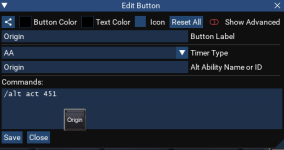
adding AA hotbuttons by clicking makes the AA number wrong by 120
for example, Origin is 331 but this is what is added.

1725191602561.png
 
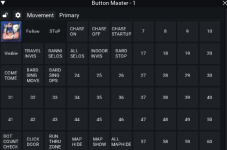
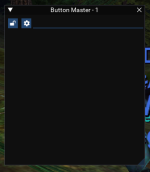
Upon running the lua command my gui box pops up however there is nothing but a lock and settings icon. TIA for any help
That is correct. You will want to first create a Button Set and then put Buttons in the set. You can do this by right clicking the gear icon.
 
Have a question maybe someone can help me. I want to click a button and have it turn for example red for 45 seconds. Basically CD but I want it to stay a certain color. When CD done it will turn to the color green which will mean it is rdy to be pressed again. If anyone can give me simple way I can go about it . Thankss
 
Release Button Master

Users who are viewing this thread

  • P
Back
Top
Cart