
-
 Hail, we're RedGuides. We want you to play six (yes, 6!) EverQuest characters at once. We have scripts and a friendly community to help, please join our playstyle and say hello! 👋
You are using an out of date browser. It may not display this or other websites correctly.
You should upgrade or use an alternative browser.
You should upgrade or use an alternative browser.

Release Button Master 2026-10-03
- Thread starter SpecialEd
- Start date
I have a question about copying Buttonmaster settings between computers. On computer A, I have everything set up and working correctly. I would like to duplicate that on computer B without having to manually re-create all of the buttons. I have copied the Buttonmaster folder under Lua on computer A. On computer B, I pasted that folder (and sub-folders) under Lua so that side by side they look identical. On computer B, I run the Buttonmaster Lua and the window opens with the correct buttons. Two issues I haven't been able to sort out though. On computer A, I had 4 tabs of buttons. When it opens on computer B, it is missing 1 tab completely. The bigger issue is while the buttons are showing correctly, when I push a button on computer B, nothing happens. Noting shows up in the MQ window and no actions occur. If unassign that button, then manually retype exactly what was there before I unassigned it....it works as intended. Is there something I am doing wrong when copying things across?

Th majority of the times I have seen this error is when I have 'cleared' a hotkey. What it does it leaves an entry in the .ini file that causes the error. I then have to search through the ini file, find the problem entry, then delete it so it can then load all of the rest of the entries successfully. I will try to replicate the issue and write up an explanation of what is happening and how to fix it. It probably needs to be added t o the FAQ for ButtonMaster
truculent1
Member
FWIW, Cannonballdex's modifications (Post #164) fixes the wonky permanent 100 buttons/cutting off buttons unless your button size is 6 issue I had been having. If anyone else was having that issue, give it a try.

kraqur1
Active member
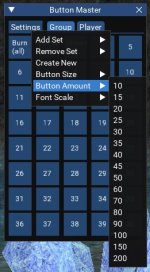
Added a new menu to change the amount of buttons used in the script. It will change on the fly and save to amount to the ini file so when you reload the plugin it will load the correct amount you had previously selected.
If you want to add this as an update to the main script feel free. No credit needed. Just something I added for myself and figured I would share
Attachments
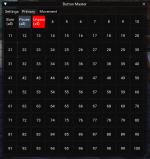

Have you tried looking at the theme editor? You can access it from the imgui demo off of the console window menuWorking on the look of the ImGui interface for BM. Here is what I have so far. Does anyone have any suggestions? Once I get the look down I will work on applying it to other LUA scripts
View attachment 53342

- Commits
- 191
Dark mode. This is the way.Working on the look of the ImGui interface for BM. Here is what I have so far. Does anyone have any suggestions? Once I get the look down I will work on applying it to other LUA scripts
View attachment 53342
Can you give me a bit more detail here? I am unsure how to access thisHave you tried looking at the theme editor? You can access it from the imgui demo off of the console window menu
Kaen pointed me to the direction of the console. /mqconsole show
I will take a look, thanks for the suggestion
Last edited:
What about the text wrapping?Is the text wrapping a limitation from ImGui?
What about the text wrapping?
It doesnt from what I read.What about the text wrapping?
I’m not sure what you are trying to get at. Yes text does wrap if you want it to wrap. Or not wrap. There are many options.What about the text wrapping?
It doesnt from what I read.
Known IssuesI’m not sure what you are trying to get at. Yes text does wrap if you want it to wrap. Or not wrap. There are many options.
Button Label wrapping doesn't work, yet. I'm bugging @dannuic to add somethings. If it's important, @ him with some love.
Taken from the Overview tab
Solution is to implement your own labeling behavior rather than using default button text. Basically draw button with no text and then use more powerful text functions on top.
Button text is just basic only. As with most things in ImGui you’re given a lot of building blocks you can use to customize if the simple defaults don’t work for you
Not sure what dannuic has to do with this but this was info I shared long time ago. Think that’s part of the problem with this not being updated in so long
Button text is just basic only. As with most things in ImGui you’re given a lot of building blocks you can use to customize if the simple defaults don’t work for you
Not sure what dannuic has to do with this but this was info I shared long time ago. Think that’s part of the problem with this not being updated in so long


Mq uses timed. Not delay or pause, those are eqQuestion: Pause/Delay
if its already posted i apologize as i can find a thread regarding my question.
Any pay to have a delay or pause on buttonmaster lua? tried /pause 20 or /delay2s both returns back invlaid. thanks

not really sure /timed so is /timed 5 would = 5 seconds?
thx
/timed uses decaseconds, so /timed 50 would be 5 seconds

did you make a hotkey leading with a number?Button master is causing me to crash to desktop today. It's happening when I click on a tab other than settings.

0ptic
Member
Turns out I did (not intentionally) and removing it in the ini fixed the issue. Thanks!did you make a hotkey leading with a number
I am having a few issues popping up with BM....for some time I have had an issue where if I attempted to resize the button master window or move it in anyway it would immediately freeze the account. Starting today, when use a hot button /Lua run buttonmaster it fires up but it loads with the window rolled up so I normally hit the little dropdown arrow on the left side of the bm title bar and it expands the window to show all the buttons. Now when I go to expand the window it completely locks up the account. Need to use task editor to kill the instance and relaunch it. Is there anything I can do to fix it?
For buttonmaster, the little issue with the wrapping hiding a button depending on exactly how wide it is. I think I found a quick and easy solution if you can see if it would work for your source.
Line 415 has the calculation for the columns. I increased the 5 at the end to 8, and it seems to make it much better at not actually hiding a button completely. I tested it with quite a few different button sizes, but not all of them, since I normally have my button size
local cols = math.floor(ImGui.GetWindowSize() / (btnSize + 8))
Line 415 has the calculation for the columns. I increased the 5 at the end to 8, and it seems to make it much better at not actually hiding a button completely. I tested it with quite a few different button sizes, but not all of them, since I normally have my button size
local cols = math.floor(ImGui.GetWindowSize() / (btnSize + 8))
So I made some change to my buttons, and now the UI keeps crashing. I tried to download the latest updates, but the download zip does not contain the buttonmaster.Lua file. It only has the util and LIP files. Where can I get the latest buttonmaster Lua?
This is the error that I am getting
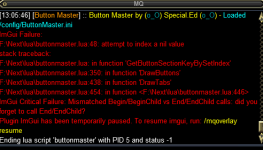
This is the error that I am getting
Last edited:
Do you have a button starting with a number? this is the most common crash issue with BM.So I made some change to my buttons, and now the UI keeps crashing. I tried to download the latest updates, but the download zip does not contain the buttonmaster.lua file. It only has the util and LIP files. Where can I get the latest buttonmaster lua?
This is the error that I am getting
View attachment 55583
I checked the ini, but I can not find any labels that start with a number.Do you have a button starting with a number? this is the most common crash issue with BM.
Looks like one of your buttons may have a syntax issue of some sort and make sure you are not duplicating a button index. So check your ini file and make sure eachSo I made some change to my buttons, and now the UI keeps crashing. I tried to download the latest updates, but the download zip does not contain the buttonmaster.lua file. It only has the util and LIP files. Where can I get the latest buttonmaster lua?
This is the error that I am getting
[Button_#] is unique and properly defined.
Code:
[Button_5]
ButtonColorRGB=14,96,10
Cmd1=/cwtna pause 0
Label=Pause OFF

[Button_6]
Cmd1=/dgge /keypress forward hold
Cmd2=/dgge /timed 20 /keypress forward
Label=Fwrd MarchLooking at my setup, I have the latest version which stores everything inside the \Lua\buttonmaster folder instead of root of Lua. So it runs the init.Lua file when youI tried to download the latest updates, but the download zip does not contain the buttonmaster.lua file. It only has the util and LIP files. Where can I get the latest buttonmaster lua?
/lua run buttonmasterYou could try extracting the buttonmaster folder from the download and putting it in your \Lua folder. Move the other buttonmaster.Lua into a backup somewhere and then try it.
OK that worked. Even got the new button size thing. I think what was crashing me is that I tried to rename the Primary tab to Group. It doesn't seem to like that. I will rebuild my buttons and see if it gets stable. Thanks for the info.Looking at my setup, I have the latest version which stores everything inside the \lua\buttonmaster folder instead of root of lua. So it runs the init.lua file when you/lua run buttonmaster
You could try extracting the buttonmaster folder from the download and putting it in your \lua folder. Move the other buttonmaster.lua into a backup somewhere and then try it.

hi @orbitz , I just saw your post, yes it is to close the popup. add a /bcg if you wish for control to the groupMy apologies if I missed it...can you place the Button Master buttons on a second monitor by chance?
Also, @Redfrog what does your button labeled Close Ad do? I am hoping it is a way to kill the updrade pop up on all clients?
Edit: Is there someplace where people are sharing their buttons? Sic's Hotkey guide is the bible for me as a foundation but it would be great to see all the creative stuff everyone comes up with.
/notify AlertWnd ALW_Dismiss_Button leftmouseup

Not sure if this has been posted but I do know that one of the common errors is that if your button master button starts with a number it bricks the config.
an easy way to reproduce this on accident that should probably be coded out (check if cmd1-5 are empty?)
1. open button master
2. "Create new" on a button with a number
3. without editing "Save"
4. log out and when you login wonder why you can't launch buttonmaster
^^^ example of a button that was created that bricked my buttonmaster
an easy way to reproduce this on accident that should probably be coded out (check if cmd1-5 are empty?)
1. open button master
2. "Create new" on a button with a number
3. without editing "Save"
4. log out and when you login wonder why you can't launch buttonmaster
Code:[Button_406] Label=14
^^^ example of a button that was created that bricked my buttonmaster

How to make it Black, this is great.Working on the look of the ImGui interface for BM. Here is what I have so far. Does anyone have any suggestions? Once I get the look down I will work on applying it to other LUA scripts
View attachment 53342
Also,
When you open up a button to type in text into the box, could that box be expandable. When typing or editing buttons with multilines, it is quite the hassle if you can not see all the line.
I'm not saying this is the best fix or that I'm smart but I really hate doing troubleshooting with my friends on why their buttonmaster doesn't work so I've found this fixes the issue
where adding the '#' ..
fixes the issue with the initial buttons labels starting with a number when someone doesn't change the label and then saves
this has the unintended side effect of making the buttons look like this

which is still preferable to troubleshooting to me
Code:
local GetButtonBySetIndex = function(Set, Index)
    return settings[settings[Set][Index]] or { Unassigned = true, Label = '#' .. tostring(Index) }
end
where adding the '#' ..
fixes the issue with the initial buttons labels starting with a number when someone doesn't change the label and then saves
this has the unintended side effect of making the buttons look like this
which is still preferable to troubleshooting to me
You have to apply a theme to it. It requires some minor edits to the buttonmaster init.Lua and you need two "theme" files that go in the same folder as the init.Lua.How to make it Black, this is great.
Also,
When you open up a button to type in text into the box, could that box be expandable. When typing or editing buttons with multilines, it is quite the hassle if you can not see all the line.
Then when you run it you run as /Lua run buttonmaster "themeName" For example the black is /Lua run buttonmaster Deth
The theme name are case sensitive
I have attached my ButtonMaster folder is has the files and the edits
You can open the themes.Lua file in a text editor to see the names of available themes
Attachments
Users who are viewing this thread
Total: 1 (members: 0, guests: 1)
Share: