
-
 Hail, we're RedGuides. We want you to play six (yes, 6!) EverQuest characters at once. We have scripts and a friendly community to help, please join our playstyle and say hello! 👋
You are using an out of date browser. It may not display this or other websites correctly.
You should upgrade or use an alternative browser.
You should upgrade or use an alternative browser.

Release Button Master (1 Viewer) 2026-10-03
- Thread starter SpecialEd
- Start date

How do you save the location and window size for the next login?
Should just be move it, size it, stop it, start it.
Are you running the script on multiple toons at once while setting things up?
They all have the box up. Should I close them all and redo the main one?
Each toon will get the default size to start - do them one at a time and don't leave the script running on other toons while getting the size/position setup
Did >> /Lua stop buttonmaster on all of them and did Did >> /Lua run buttonmaster on the main toon
Same thing : (
Did >> /lua stop buttonmaster on all of them and did Did >> /lua run buttonmaster on the main toon
Same thing : (
So everyone stopped, you started the driver and it got default size/position? Did you move/size it and stop/start after that?
I got to work. I did a comparison with a new zip.
initialRun =true >>>set it to initialRun = false
Fixed.
Thank you for the help, what a PITA.
What line are you modifying? I don't see any zips with that set to true outside of the intentional check
The original zip is good. Is the file I played with last night. I cause this crap on my own.
Started from scratch. I am doing too many things at once.
I didn't know about game.cfg for starting this plugin up.
Seem like I have almost everything working now. Going to m2next, Danet, and learning new commands got me overwhelmed.
Sorry for wasting your time.
Started from scratch. I am doing too many things at once.
I didn't know about game.cfg for starting this plugin up.
Seem like I have almost everything working now. Going to m2next, Danet, and learning new commands got me overwhelmed.
Sorry for wasting your time.

Push it pull it twist it bop itShould just be move it, size it, stop it, start it.

Grimlock
Well-known member
Are there plans for the button window to have a gamma level so I could turn the transparency down and see through the box ? I don't "need" to click through the box but I would love to be able to see through it without closing it , if not I will plan accordingly because yeah . Button Master is worth the real estate on the monitor.

oh, i like this idea, i wonder if you could have mouse over and faded levels - that would be legit.Are there plans for the button window to have a gamma level so I could turn the transparency down and see through the box ? I don't "need" to click through the box but I would love to be able to see through it without closing it , if not I will plan accordingly because yeah . Button Master is worth the real estate on the monitor.
also, in case this helps you with real estate grimlock - you can actually drag it OUTSIDE of everquest, like onto another monitor
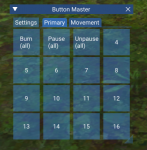

how do we get buttons to show after they disappear? are there any commands for hide/show? already tried /Lua stop buttonmaster and unloaded and reloaded mq2lua, i cant get them to pop back up.
Shadowfinger
Member
Any way to hide the titlebar?

Grimlock
Well-known member
something i have discovered in playing with button master , the toon you create the buttons from creates a parent-child situation crash that only occurs if you try to edit the button from a toon you didn't create the button on it crashes it . is there a way to sperate the button config between toons so i can have sperate set ups between toons . something like a buttonmaster.toonname config , i use events file from a master file and i like that for a lot of things , but button master i think would be better served with single toon files in my humble opinion , but like i was saying above , even if there isn't i will use this resource . very nice work .
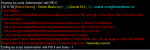
I run buttonmaster today and see this error
One of your buttons has an empty label value
One of your buttons has an empty label value
This is my buttonmaster.ini
INI:
[Button_1]
Cmd1=/bcaa //burn
Cmd2=/timed 500 /bcaa //burn
Label=Burn (all)

[Button_2]
Cmd1=/bcaa //multi ; /twist off ; /mqp on
Label=Pause (all)

[Button_3]
Cmd1=/bcaa //mqp off
Label=Unpause (all)

[Button_4]
Cmd1=/bca //nav id ${Target.ID}
Label=Nav Target (bca)

[Button_5]
Label=1

[Please don't post your character names]
1=Primary
2=Movement

[Global]
ButtonCount=5
ButtonSize=6

[Set_Movement]
1=Button_4

[Set_Primary]
1=Button_5

[Sets]
1=Primary
2=MovementThis is my buttonmaster.ini
change button 5 label to something non numeric

game_sparks
Member
Request for the ability to resize the Create New Button window. I'd love to drag that thing all the way over 

hi @SpecialEd , Hoping you can take a look at this or anyone can chime in, thanks. It loads with /Lua run but when I right click and the mouse goes over assign, it crashes out. I downloaded and put the files in the correct places. It does load fine and I can move it around and such. I can restart it after typing /mqoverlay resume and then /Lua run buttonmaster. But the same thing happens when the mouse goes over the assign.
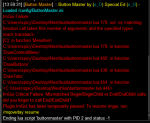 EDIT: I think I got it sorted out...Was I missing that I had everything loaded but I had to make a change in the Config file first? BEFORE I can right click to assign or anything.
EDIT: I think I got it sorted out...Was I missing that I had everything loaded but I had to make a change in the Config file first? BEFORE I can right click to assign or anything.
Last edited:
hi @SpecialEd , Hoping you can take a look at this or anyone can chime in, thanks. It loads with /lua run but when I right click and the mouse goes over assign, it crashes out. I downloaded and put the files in the correct places. It does load fine and I can move it around and such. I can restart it after typing /mqoverlay resume and then /lua run buttonmaster. But the same thing happens when the mouse goes over the assign.
One of your button configs is probably missing a label. dm your ini if you don't figure it out
You posted while I was typing back.. :P Yes, I loaded it and tried to right click on a blank button.. so it is creating it, but labels it a numeric value and therefore crashes? When it dawned on me to go look at the ini I saw and changed the number to a word..ran it again..now I see I can edit in the Lua window.One of your button configs is probably missing a label. dm your ini if you don't figure it out

Hey guys, this thing is pretty nice! Are the button sizes alterable, besides just the text? Is there any sort of option for transparency?
I haven't figured how to undock it from my EQ window as Sic mentioned, so it's an eyesore in my visual real estate. Minimizing is cool, but it won't function that way.
I haven't figured how to undock it from my EQ window as Sic mentioned, so it's an eyesore in my visual real estate. Minimizing is cool, but it won't function that way.
/mqsettingsHey guys, this thing is pretty nice! Are the button sizes alterable, besides just the text? Is there any sort of option for transparency?
I haven't figured how to undock it from my EQ window as Sic mentioned, so it's an eyesore in my visual real estate. Minimizing is cool, but it won't function that way.
then "enable viewports"
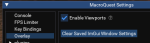
should be an example in the > functions, features, etc <
Well, holy cheese on bread... I had checked that originally, didn't do anything, unchecked it to leave it alone. Everything makes more sense now. I probably should have gone through the documentation you guys put together. Thanks man./mqsettings
then "enable viewports"
View attachment 34923
should be an example in the > functions, features, etc <

Several people asked if I could share my ini, so here it is.
All these buttons are designed to work if clicked from any toon in my group.
Some of them call socials on a specific toon, which in turn activates or deactivates Reacts, which is beyond the scope of this post.
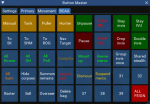
All these buttons are designed to work if clicked from any toon in my group.
Some of them call socials on a specific toon, which in turn activates or deactivates Reacts, which is beyond the scope of this post.
INI:
[Button_11]
ButtonColorRGB=165,117,0
Cmd1=/bcaa //afollow off
Cmd2=/multiline ; /cwtn pause off; /cwtn resetcamp
Cmd3=/multiline ; /bct SKName //shd mode 4; /bct ShamaName //shm mode 1
Cmd4=/multiline ; /bcaa //grouproles set SKName 1; /bcaa //grouproles set SKName 2
Cmd5=/multiline ; /bct RogName //mac kissassist SKName; /timed 40 /bct RogName //camphere on; /timed 50 /bct RogName //chaseoff
Label=Tank

[Button_19]
ButtonColorRGB=165,117,0
Cmd1=/bca //afollow off
Cmd2=/multiline ; /cwtn pause off; /cwtn resetcamp
Cmd3=/multiline ; /bct SKName //shd mode 5; /bct ShamaName //shm mode 1
Cmd4=/multiline ; /bcaa //grouproles set SKName 1; /bcaa //grouproles set SKName 2; /bcaa //grouproles set SKName 3
Cmd5=/multiline ; /bct RogName //mac kissassist SKName; /timed 40 /bct RogName //camphere on; /timed 50 /bct RogName //chaseoff
Label=Puller

[Button_2]
Cmd1=/bcaa //multi ; /twist off ; /mqp on
Label=Pause (all)

[Button_20]
ButtonColorRGB=165,117,0
Cmd1=/bca //afollow off
Cmd2=/multiline ; /cwtn pause off; /cwtn resetcamp
Cmd3=/multiline ; /bct SKName //shd mode 8; /bct ShamaName //shm mode 2; /bct ShamaName //shm usemelee on
Cmd4=/multiline ; /bcaa //grouproles set SKName 1; /bcaa //grouproles set SKName 2; /bcaa //grouproles unset SKName 3
Cmd5=/multiline ; /bct RogName //mac kissassist SKName; /timed 40 /bct RogName //camphere off; /timed 50 /bct RogName //chaseon
Label=Hunter

[Button_21]
ButtonColorRGB=0,85,0
Cmd1=/bct RogName //mqp off
Cmd2=/cwtn pause off
Label=Unpause

[Button_22]
ButtonColorRGB=85,0,0
Cmd1=/bct RogName //mqp on
Cmd2=/cwtn pause on
Label=Pause

[Button_28]
Cmd1=/bcaa //target RogName
Cmd2=/bcaa //nav target
Label=To ROG

[Button_29]
Cmd1=/bcaa //target SKName
Cmd2=/bcaa //nav target
Label=To SK

[Button_3]
Cmd1=/bcaa //mqp off
Label=Unpause (all)

[Button_31]
Cmd1=/bcaa //target ShamaName
Cmd2=/bcaa //nav target
Label=To SHM

[Button_4]
Cmd1=/bcaa //nav id ${Target.ID}
Label=Nav Target

[Button_40]
ButtonColorRGB=0,85,0
Cmd1=/bcaa //dosocial "stay invis"
Cmd2=/bcaa //dosocial "a-hide"
Label=Stay invis

[Button_41]
ButtonColorRGB=85,0,0
Cmd1=/bcaa //dosocial "visible"
Label=Drop invis

[Button_42]
ButtonColorRGB=0,85,0
Cmd1=/bct SKName //dosocial "stay ivu"
Cmd2=/bct RogName //dosocial "a-hide"
Label=Stay IVU

[Button_43]
ButtonColorRGB=0,85,0
Cmd1=/bct ShamaName //timed 2 /alt activate 630
Cmd2=/bct SKName //alt activate 1212
Cmd3=/bct RogName //dosocial "a-hide"
Label=Double invis

[Button_5]
ButtonColorRGB=164,116,0
Cmd1=/cwtn mode 0
Cmd2=/bct RogName //end
Label=Manual

[Button_53]
Cmd1=/bcaa //squelch /multiline ; /end; /afollow off; /stick off; /moveto off; /nav stop; /play off
Cmd2=/cwtn pause on
Cmd3=/cwtn mode 0
Label=STOP ALL
TextColorRGB=255,0,0

[Button_55]
Cmd1=/squelch /multiline ; /end; /afollow off; /stick off; /moveto off; /nav stop; /play off
Cmd2=/${Me.Class.ShortName} mode 0
Cmd3=/${Me.Class.ShortName} pause on
Label=STOP ME
TextColorRGB=255,0,0

[Button_57]
Cmd1=/bct RogName //end
Cmd2=/cwtn mode 0
Cmd3=/cwtn pause on
Cmd4=/bcaa //alt activate 511
Label=All throne
TextColorRGB=0,255,0

[Button_59]
Cmd1=/bct RogName //end
Cmd2=/cwtn mode 0
Cmd3=/cwtn pause on
Cmd4=/bcaa //useitem "primary anchor"
Label=All GH
TextColorRGB=0,255,0

[Button_60]
Cmd1=/bct RogName //end
Cmd2=/cwtn mode 0
Cmd3=/cwtn pause on
Cmd4=/bcaa //useitem drankard's stein
Label=All PoK
TextColorRGB=0,255,0

[Button_64]
Cmd1=/bcaa //dosocial "Visible"
Cmd2=/bcaa //useitem fellowship registration insignia
Label=Campfire
TextColorRGB=165,117,0

[Button_67]
Cmd1=/bct SKName //useitem wicked steed
Cmd2=/bct ShamaName //useitem snow griffin saddle
Cmd3=/bct RogName //multiline ; /useitem ghostrider's spirit; /timed 20 /doability sneak; /timed 20 /doability hide
Label=Mount up
TextColorRGB=0,255,0

[Button_68]
Cmd1=/bcaa //dismount
Label=Dismount
TextColorRGB=255,207,0

[Button_70]
Cmd1=/bct RogName //dosocial "3 burn"
Cmd2=/cwtn burnnow
Label=All burn
TextColorRGB=255,135,0

[Button_71]
ButtonColorRGB=164,0,0
Cmd1=/bct RogName //dosocial "Escape"
Cmd2=/bcaa //dosocial "feign"
Label=ALL FEIGN

[Button_73]
Cmd1=/bct RogName //dosocial "rev mercs"
Label=Revive mercs
TextColorRGB=0,255,0

[Button_75]
Cmd1=Shared Stealth
Cmd2=/bct RogName //alt activate 1507
Label=Shared stealth

[Button_76]
Cmd1=/noparse /bcga //if (${Mercenary.State.Equal[ACTIVE]}) /nomodkey /notify MMGW_ManageWnd MMGW_SuspendButton LeftMouseUp
Label=Suspend mercs
TextColorRGB=255,206,0

[Button_81]
Cmd1=/bcaa //hidecorpses all
Label=Hide corpses

[Button_83]
Cmd1=/bct SKName //target id ${Target.ID}
Cmd2=/bct SKName //alt activate 7007
Label=Summon remains

[Button_84]
Cmd1=/bct ShamaName //alt activate 630
Label=Group invis once

[Button_87]
Cmd1=/bct SKName //target id ${Target.ID}
Cmd2=/bct SKName //cast 9
Label=Manual pull
TextColorRGB=255,0,0

[Button_91]
Cmd1=/bcaa //autoloot barter
Label=Barter

[Button_93]
Cmd1=/bca //target //nav id ${Target.ID}
Cmd3=/bcaa //timed 50 /autoloot sell
Label=Sell

[Button_94]
Cmd1=/bcaa //mac overseer
Label=Overseer

[Button_95]
Cmd1=/bcaa //mac deleteinbag 10
Label=Delete bag

[Button_1]
Cmd1=/bcaa //burn
Cmd2=/timed 500 /bcaa //burn
Label=Burn (all)

[Char_Servername_ShamaName_Config]
1=Primary
2=Movement
3=BCAA

[Char_Severname_RogName_Config]
1=Primary
2=Movement
3=BCAA

[Char_Servername_SKName_Config]
1=Primary
2=Movement
3=BCAA

[Global]
ButtonCount=95
ButtonSize=6
Font=1

[Set_BCAA]
1=Button_5
2=Button_11
3=Button_19
4=Button_20
5=Button_21
6=Button_55
7=Button_40
8=Button_42
9=Button_29
10=Button_31
11=Button_28
12=Button_4
13=Button_22
14=Button_53
15=Button_41
16=Button_43
17=Button_57
18=Button_59
19=Button_60
20=Button_64
21=Button_67
22=Button_73
23=Button_84
24=Button_75
25=Button_70
26=Button_81
27=Button_83
28=Button_87
29=Button_68
30=Button_76
33=Button_91
34=Button_93
35=Button_94
36=Button_95
40=Button_71

[Set_Movement]
1=Button_4

[Set_Primary]
1=Button_1
2=Button_2
3=Button_3

[Sets]
1=Primary
2=Movement
3=BCAA

ok, I have done the impossible. I have lost the ability to display my buttons. I have ran the following commands trying to resolve this, to no avail.
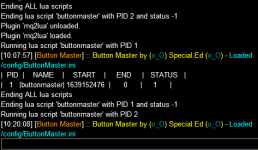
I then went to /mqsettings > plugins > Lua and clicked "Show Lua GUI" and nothing displays. This use to display a new box were you could run some scripts I think. Not sure what I did but this was all working earlier today. Any suggestions? Re-install buttonmaster maybe, but that does not explain why the Lua GUI will not display...
Setup: Next on Test... testing...
/plugin mq2lua unload
/plugin mq2lua load
/lua run buttonmaster
/lua ps
/btn
/lua ps
/btn
/lua stop
/lua run buttonmaster
/btn
I then went to /mqsettings > plugins > Lua and clicked "Show Lua GUI" and nothing displays. This use to display a new box were you could run some scripts I think. Not sure what I did but this was all working earlier today. Any suggestions? Re-install buttonmaster maybe, but that does not explain why the Lua GUI will not display...
Setup: Next on Test... testing...
Attachments


WhyteTech
Ye Whom says Dumb things
Possibly by chance you had the viewport option enabled an the Gui windows were just on a different monitor?ok, I have done the impossible. I have lost the ability to display my buttons. I have ran the following commands trying to resolve this, to no avail.
/plugin mq2lua unload
/plugin mq2lua load
/lua run buttonmaster
/lua ps
/btn
/lua ps
/btn
/lua stop
/lua run buttonmaster
/btn
View attachment 35660
I then went to /mqsettings > plugins > lua and clicked "Show Lua GUI" and nothing displays. This use to display a new box were you could run some scripts I think. Not sure what I did but this was all working earlier today. Any suggestions? Re-install buttonmaster maybe, but that does not explain why the Lua GUI will not display...
Setup: Next on Test... testing...
I did this to myself. and it sucked.
Users who are viewing this thread
Total: 2 (members: 0, guests: 2)
Share: