• You've discovered RedGuides, an EverQuest multi-boxing and scripting community 🧙‍♀️⚙️. We want you to play several EQ characters at once, come join us and say hello! 👋

  • A TLP without truebox has thawed (Very Vanilla ready)
    Frostreaver
Button Master

Release Button Master (2 Viewers) 05/09/2026

No permission to download

SpecialEd

Lua Slayer
Joined
Apr 4, 2021
RedCents
5,705¢
SpecialEd submitted a new resource:

Button Master - Buttons 4 all

It's a tabbed button panel.

Installation: copy the buttonmaster directory into your lua folder
Running: /lua run buttonmaster/start

View attachment 31738

Want more buttons? Resize the window.
Want more tabs? Right click settings.
Want to edit a button? Right click the button.
Want to move shit around? Drag those little fuckers where you want em.
Want to make buttons bigger/smaller? Edit the ini (Config -> ButtonSize) (3-10 is sane, it gets multiplied by 10...

Read more about this resource...
 
One issue I'm seeing is if I set up a button like

/noparse /bcga //if (${Me.Class.ShortName.Equal[BRD]}) /mac kissassist ${Group.MainAssist}

it seems like the /noparse is getting dropped or something. Ingame it sends /if (FALSE) /mac kissassist <assist's name> to every toon.
 
Last edited:
One issue I'm seeing is if I set up a button like

/noparse /bcga //if (${Me.Class.ShortName.Equal[BRD]}) /mac kissassist ${Group.MainAssist}

it seems like the /noparse is getting dropped or something. Ingame it sends /if (FALSE) /mac kissassist <assist's name> to every toon.

This seems to be a limitation in the way Lua (mq.cmd) runs commands - it goes through (Hide)DoCommand, which parses any variables. I'm bugging dan to see what can be done.
 
This seems to be a limitation in the way lua (mq.cmd) runs commands - it goes through (Hide)DoCommand, which parses any variables. I'm bugging dan to see what can be done.

A temporary work around -

Make alias -
/alias /bcgnbrd /noparse /bcga //if (${Me.Class.ShortName.Equal[BRD]})
Update hotkey -
/bcgnbrd /mac kissassist assist tanky
 
Would it be possible to make the font scale with the button size? Or maybe an INI entry for font size?
 
looks great - will try as sson as i go for next, which will i have to check first, i guess.

One thing i had on wishlist for mq2mybuttons which would now be great to have here instead: depressed/undepressed status to toggle commands like pauses, follow, mimic etc.
 
looks great - will try as sson as i go for next, which will i have to check first, i guess.

One thing i had on wishlist for mq2mybuttons which would now be great to have here instead: depressed/undepressed status to toggle commands like pauses, follow, mimic etc.

I'm hesitant to entertain this feature because it's really just tracking the button state - you can still end up with clients that didn't get the command for whatever reason (eqbc/dannet issues). As a best practice, I recommend explicit on/off hotkeys for things that toggle - that way you can mash them a few times if certain clients aren't listening.
 
I managed to break it. It doesn't like it if you delete the button numbers and don't replace it with anything. It will let you do it while it's running and run fine, until you re-run it later.

1627015375662.png

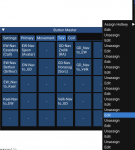
So what I had originally done was delete the numbers and just left them blank to create empty space between the buttons for my readability. Another thing if you do this is if you right click on one of those buttons you get a large list to edit/unassign for every button with the same name.


1627015989781.png
 
I think the readability will take care of itself when colors come later. You'd leave the numbers but make them a color, that you'll ignore, so you can better organize your buttons. If Ed allows text colors too you could just make the number and button same color and it will look blank.
 
Love this panel, it has allowed me to reclaim 2 rows of hot buttons :)

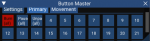
I have noticed that the button numbering is a little off, I'm not sure it factors in the scroll bar. In the example below button 11 does not appear unless I widen the window a little

Buttons.png
 
Got a question. Is there a list of commands for Button Master? The only one I see is to start it (/Lua run buttonmaster/start). Is there a command to turn it off? How do you start if back up if one closes the window by clicking the x?

Messing around with it I closed the window (no command to close it) and then tried to start it again and got a message that said it was still running and would not start another instance.

Zeb
 
Got a question. Is there a list of commands for Button Master? The only one I see is to start it (/lua run buttonmaster/start). Is there a command to turn it off? How do you start if back up if one closes the window by clicking the x?

Messing around with it I closed the window (no command to close it) and then tried to start it again and got a message that said it was still running and would not start another instance.

Zeb

/btn will toggle the visibility
/Lua ps - shows running Lua scripts
/Lua stop id or name will stop a script by id or name
 
Thanks.... I keep trying to use /buttonmaster , /buttonmaster show and a few others. So I will play with it some more and see if I can break it. Hahahahaha!

Zeb
 
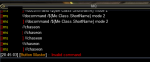
A couple other things I've run into. If you have a button and delete the contents of a line you end up with an empty line that throws an invalid command error

1627091197419.png

Also, if you do Clear and Save you can end up creating extra button entries.

Code:
[Button_386]
Label=16

[Button_387]
Label=16

[Button_388]
Label=16

[Button_389]
Label=16

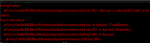
Something that I was doing in the process of editing buttons, clearing them, and saving them would eventually cause the Lua to crash like below. The only way I could get the Lua to load again was to go into the ini and clear out all of those button entries.

From what I remember this crash was while switching tabs:

1627115747259.png

These two were from right clicking on the buttons.

1627119921054.png

1627120042776.png

This is what I deleted to get it to stop crashing:

Code:
[Button_383]
Cmd1=/loc
Cmd2=

Label=16-Test
[Button_386]
Label=16

[Button_387]
Label=16

[Button_388]
Label=16

[Button_389]
Label=16

[Button_390]
Cmd1=/loc
Label=16

[Button_391]
Label=16

[Button_392]
Label=16

[Button_393]
Label=16

[Button_394]
Cmd1=/loc
Label=Test

[Button_395]
Label=16

[Button_396]
Label=16

[Button_397]
Cmd1=/loc
Cmd2=
Label=Testloc

[Button_399]
Label=16
 
Thanks @Tibberu for that great post. I was having a similar issue where ButtonMaster would explode upon changing tabs all of a sudden too. Your post helped me figure out what the issue was and get rid of it. All good now!
 
i accidently hit the [X] .. how do i get the buttons back?

restarting the script didnt work because it was already running
 
Last edited:
I use sic hotkeys but want to switch to using Buttonmaster. Most of it works fine but not the group invis key. It works fine as an action key but not in Buttonmaster.

/noparse /bcg //if (${Me.Class.ShortName.Equal[BRD]}) /multiline ; /mqp on; /twist off; /alt activate 3704; /alt activate 231

returns to the MQ window :

//if (FALSE)/MULTILINE; /mqp on; /twist off; /alt activate 3704; /alt activate 231

and does not invis the group.

Any idea what I need to change?
 
As stated above, you can't do a /noparse on the buttons. You have to make an alias: /alias /bmbrd /noparse /bcg //if (${Me.Class.ShortName.Equal[BRD]})
 
SpecialEd updated Button Master with a new update entry:

Bug Fix / Lib update

This addresses an issue when collapsing the Button Master window (imgui Begin/End calls). This also updates some of the script dependencies (you will have to move stuff around - see below).

Instructions -

1) Remove the lua/buttonmaster folder (not your config/ButtonMaster.ini!!!)
2) Copy the contents of the lib/ folder from the zip to your lua/lib directory (create the lua/lib directory if you don't have it yet)
You should now have lua/lib/ed/utils.lua, lua/lib/Write.lua
3) Copy...

Read the rest of this update entry...
 
How do you auto-start this plugin, without doing the /Lua run buttonmaster when I log in?
Thank you.
 
You would a cfg like the new in game.cfg to launch it


Is everything in Eqnext going to be like this, if I want them to launch at startup?
This is the first thing I am doing in EQ next after I did the migrate tool.
 
cfg files have always been around - there was just some goofy behavior previously that tripped some people up. Ingame.cfg is the ideal way to launch macros, load/unload plugins and start Lua scripts when you load into the world.

Note: launching multiple Lua scripts from cfg files one after another is currently causing crashes for some

Instead of something like this -

[CODE title="Bad Example"]
/Lua run myfirstscript
/Lua run mysecondscript
/plugin mq2something unload[/CODE]

Do something like this -

[CODE title="Good Example"]
/Lua run myfirstscript
/timed 100 /Lua run mysecondscript
/plugin mq2something unload[/CODE]
 
Release Button Master

Users who are viewing this thread

Back
Top
Cart