• You've discovered RedGuides, an EverQuest multi-boxing and scripting community 🧙‍♀️⚙️. We want you to play several EQ characters at once, come join us and say hello! 👋

  • A TLP without truebox has thawed (Very Vanilla ready)
    Frostreaver
Resource icon

Release BuffBot2 2.0

No permission to download
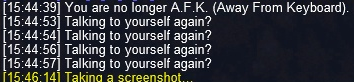
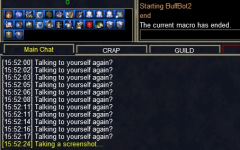
Just installed this today because it looks amazing, but I am having some trouble I would love some assistance with. I will post the edited buffbot2.ini file after screen shots. When I /mac buffbot2, the druid toon it's on says "starting buffbot2. Yes, mq2cast is loaded as well. I only listed one spell to keep it simple for now and expand on it. If I send a tell to the druid saying "buff", he stands and buffs as long as I do not have the buff already. However, the info below shows up on the druids screen ;

1644191382563.png

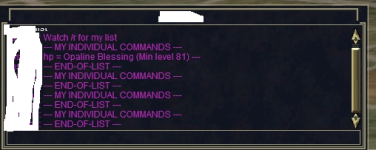
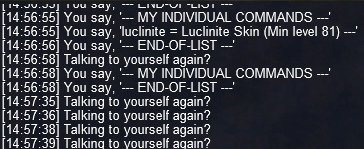
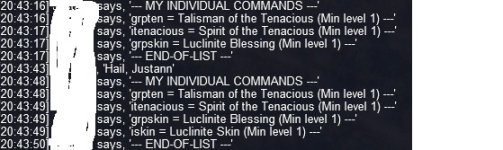
Second issue, is wih listing the spell(s) available. I took the opaline buff off the asking toon and sent a tell stating "list" and I get non-stop tells as seen below and then his screen has the "talking to yourself" over and over. First image is the druid screen and second is the asking took in the tells. I'm sure I messed something up in the ini, thats why I pasted it below. I see part of a thread above with a similar issue, but because it appears it was several updates ago, not sure it applied here. Please let me know your thoughts as I think I am real close to getting this sorted out!

1644191627072.png

from the asking toon

1644191671984.png

buffbot2.ini below

[General]
SpellSet=NULL
StartupAnnounceMessage=/gu ${Me.Class} BuffBot is ready for service
StartupClearWindows=FALSE
UseLogging=TRUE
ListAll=TRUE
ListChat=/r
ListChatDelay=3
ListCommandsPerChatLine=2
PCChat=/t
PCChatDelay=5
SpellRefreshWarning=10
GroupInviteWaitTime=15
CastMaxAttempts=3
CastGiveUpTime=75
AutoInventoryMaxAttempts=5
ReagentDataset=10028,Peridot,10029,Emerald,10024,Pearl,10015,Malachite,10026,Cat's Eye Agate,9962,Tiny Jade Inlaid Coffin,13068,Bat Wing,13076,Fish Scales
AcceptedItems=peridot,emerald,krono,minor engraved velimn rune,median engraved velimn rune,lesser engraved velimn rune,greater engraved velimn rune,glowing engraved velimn rune,Tiny Jade Inlaid Coffin
BuffZoneCheck=NULL
BuffZoneShortNames=NULL
BuffZoneErrorAction=NULL
VerifyPCToggle=NULL
VerifyPCList=NULL
VerifyGuildToggle=NULL
VerifyGuildList=NULL

[Druid]
UseSpecialTask=FALSE
HailResponse=Welcome /tell me [buff] to cast all buffs or for a list (has brackets but formatting here wont allow them) of individual commands
SpellTotal=1

SpellName1=Opaline Blessing
SpellID1=0
SpellType1=gem1
SpellInternalKey1=buff,buffs,hp
SpellExternalKey1=hp
SpellMinTarget1=81
SpellMaxTarget1=0
SpellMustGroup1=FALSE
SpellTargetCorpse1=FALSE
SpellQuantity1=1
 
Last edited:
psymorph, I used your INI and it worked without issue using the commands buff and list.

Sorry, but I'm not sure what the problem is.
 
psymorph, I used your INI and it worked without issue using the commands buff and list.

Sorry, but I'm not sure what the problem is.

Thanks for the replay! That's strange because I thought I got the ini right LOL. I guess I'll have to play with it a bit more to see what else could be causing it if it's not the ini.

Thinking back, I may have left him in my group, so maybe the group had something to do with hit. I'll try it with him on his own and see
 
Thanks for the replay! That's strange because I thought I got the ini right LOL. I guess I'll have to play with it a bit more to see what else could be causing it if it's not the ini.

Thinking back, I may have left him in my group, so maybe the group had something to do with hit. I'll try it with him on his own and see
If you do figure it out, please post here. The program has been running steady for about a year, so I am always interested in learning about any possible problems.
 
If you do figure it out, please post here. The program has been running steady for about a year, so I am always interested in learning about any possible problems.
So I may have figured something out. I think it has to with the Buffbot2.mac file. When I install the macro from the launcher, the files appear. Buffbot2 config, buffbot2.mac, and buffbot2specialtask.inc. When I edit the buffbot2specialtask.inc, I get the info in the file below;

| BuffBot2SpecialTask.inc by MacQ
|
| This file is normally distributed as BuffBot2SpecialTask.inc.default, to use this file, you need to
| rename it to BuffBot2SpecialTask.inc ... (drop the .default extenstion in the file name).
|
| Create custom routiens in the SpecialTask subroutine that are executed within the BuffBot2 main loop.
|
| Copyright 2021 - 2022 by MacQ all rights reserved.
|
| This macro is only authorized for the personal use by members in good
| standing of the MacroQuest2 VIP or RedGuides VIP forums. If you did not
| pay for VIP access, then you are a cheap, non contributing bastard who
| sucks the life out of others and will die in hell.

Sub SpecialTask

/return

This states to use the specialtask file, I need to rename it and remove the .default extension only it does not download as buffbot2specialtask.inc.default. The .default is missing. When I add .default to the extension, I get the following;

mac error.jpg

So I changed the file name back to buffbot2specialtask.inc and when I tell the toon to list the available spells in /say instead of /tell, it works better because it does not send endless tells to the recipient. It does however say it multiple times and it's still insisting I'm talking to myself. See below;

1646003172783.png

Is there someting in the buffbot2.mac that references the buffbot2specialtask.inc file that can be removed if we don't want to use a special task? I'm wonderting if it's trying to use the default downloaded file and that's what is causing the issue. It's the only thing I can think of that could be causing it.

Or, can we use the special task to cast tranquil blessings before casting a group spell? Most want druid skin and talisman and I started using it on my mage and they want group emberweave. If they can cast tranquil blessings before casting the group spell, we could get their whole box group!

Thanks!
 
Last edited:
I think I got it figured out with the help of a guildmate. For the Druid, if you have the ini with the spells setup below, it will not show the individual skin option when the buffbot druid has luclinite blessing on themself. When you have luclinite skin on, it shows blessing, but it does not show the lower level skin when the higher level blessing is on. Is there a way to have the macro ignore all buffs on the toon running buffbot?

ini below;

[Druid]
UseSpecialTask=FALSE
HailResponse=Welcome /tell me [buff] to cast all buffs or
  • for a list of individual commands
    SpellTotal=4

    SpellName1=Talisman of the Tenacious
    SpellID1=0
    SpellType1=gem12
    SpellInternalKey1=grpbuff,grpten
    SpellExternalKey1=grpten
    SpellMinTarget1=1
    SpellMaxTarget1=0
    SpellMustGroup1=TRUE
    SpellTargetCorpse1=FALSE
    SpellQuantity1=1

    SpellName2=Spirit of the Tenacious
    SpellID2=0
    SpellType2=gem10
    SpellInternalKey2=buff,itenacious
    SpellExternalKey2=itenacious
    SpellMinTarget2=1
    SpellMaxTarget2=0
    SpellMustGroup2=FALSE
    SpellTargetCorpse2=FALSE
    SpellQuantity2=1

    SpellName3=Luclinite Blessing
    SpellID3=0
    SpellType3=gem9
    SpellInternalKey3=grpbuff,grpskin
    SpellExternalKey3=grpskin
    SpellMinTarget3=1
    SpellMaxTarget3=0
    SpellMustGroup3=TRUE
    SpellTargetCorpse3=FALSE
    SpellQuantity3=1

    SpellName4=Luclinite Skin
    SpellID4=0
    SpellType4=gem13
    SpellInternalKey4=buff,iskin
    SpellExternalKey4=iskin
    SpellMinTarget4=1
    SpellMaxTarget4=0
    SpellMustGroup4=FALSE
    SpellTargetCorpse4=FALSE
    SpellQuantity4=1

    Image of response when the druid buffbot has luclinite blessing on him and then the skin option appears when he does not.

    bbot.jpg
 
So I may have figured something out. I think it has to with the Buffbot2.mac file. When I install the macro from the launcher, the files appear. Buffbot2 config, buffbot2.mac, and buffbot2specialtask.inc. When I edit the buffbot2specialtask.inc, I get the info in the file below;

| BuffBot2SpecialTask.inc by MacQ
|
| This file is normally distributed as BuffBot2SpecialTask.inc.default, to use this file, you need to
| rename it to BuffBot2SpecialTask.inc ... (drop the .default extenstion in the file name).
|
| Create custom routiens in the SpecialTask subroutine that are executed within the BuffBot2 main loop.
|
| Copyright 2021 - 2022 by MacQ all rights reserved.
|
| This macro is only authorized for the personal use by members in good
| standing of the MacroQuest2 VIP or RedGuides VIP forums. If you did not
| pay for VIP access, then you are a cheap, non contributing bastard who
| sucks the life out of others and will die in hell.

Sub SpecialTask

/return

This states to use the specialtask file, I need to rename it and remove the .default extension only it does not download as buffbot2specialtask.inc.default. The .default is missing. When I add .default to the extension, I get the following;

View attachment 38380

So I changed the file name back to buffbot2specialtask.inc and when I tell the toon to list the available spells in /say instead of /tell, it works better because it does not send endless tells to the recipient. It does however say it multiple times and it's still insisting I'm talking to myself. See below;

View attachment 38381

Is there someting in the buffbot2.mac that references the buffbot2specialtask.inc file that can be removed if we don't want to use a special task? I'm wonderting if it's trying to use the default downloaded file and that's what is causing the issue. It's the only thing I can think of that could be causing it.

Or, can we use the special task to cast tranquil blessings before casting a group spell? Most want druid skin and talisman and I started using it on my mage and they want group emberweave. If they can cast tranquil blessings before casting the group spell, we could get their whole box group!

Thanks!

Sorry, I don't know anything about a Launcher. I would just download the zip and unpack its contents (three files a .MAC a .INI and a .INC) in your macro folder.

The buffbot2specialtask.inc is an include file that is merged into the macro during runtime (sorry to get all techy with you). It's only there as a place to create your own custom subroutine to execute within BuffBot2 as it runs, but you will have to know how to write macro code to use it. I use it but nothing to do with buffing. The buffbot2specialtask.inc file comes with an "empty" subroutine, those are the two lines Sub SpecialTask and /return. Also, setting UseSpecialTask=FALSE for each character class ensures there is no "call" to the SpecialTask subroutine. I doubt buffbot2specialtask.inc has anything to do with the problem you are seeing, so I would not mess with it or anything to do with creating a SpecialTask unless you are skilled at macro programming.

As far as casting certain buffs before other buffs, you set the order of the buffs in the class section of the .INI file.

Since my Download contains a working version of the macro with the corresponding INI, instead of messing with the .INI, maybe you want to try this. Save whatever .INI you created, download my zip, unpack the three files in your macro folder and run the macro (/mac buffbot2) on your druid, it should work out-of-the-box, except that my download only contains spells up to lvl 115, but at least you can validate that it operates correctly, then you can build on that.
 
I think I got it figured out with the help of a guildmate. For the Druid, if you have the ini with the spells setup below, it will not show the individual skin option when the buffbot druid has luclinite blessing on themself. When you have luclinite skin on, it shows blessing, but it does not show the lower level skin when the higher level blessing is on. Is there a way to have the macro ignore all buffs on the toon running buffbot?

ini below;

[Druid]
UseSpecialTask=FALSE
HailResponse=Welcome /tell me [buff] to cast all buffs or
  • for a list of individual commands
    SpellTotal=4

    SpellName1=Talisman of the Tenacious
    SpellID1=0
    SpellType1=gem12
    SpellInternalKey1=grpbuff,grpten
    SpellExternalKey1=grpten
    SpellMinTarget1=1
    SpellMaxTarget1=0
    SpellMustGroup1=TRUE
    SpellTargetCorpse1=FALSE
    SpellQuantity1=1

    SpellName2=Spirit of the Tenacious
    SpellID2=0
    SpellType2=gem10
    SpellInternalKey2=buff,itenacious
    SpellExternalKey2=itenacious
    SpellMinTarget2=1
    SpellMaxTarget2=0
    SpellMustGroup2=FALSE
    SpellTargetCorpse2=FALSE
    SpellQuantity2=1

    SpellName3=Luclinite Blessing
    SpellID3=0
    SpellType3=gem9
    SpellInternalKey3=grpbuff,grpskin
    SpellExternalKey3=grpskin
    SpellMinTarget3=1
    SpellMaxTarget3=0
    SpellMustGroup3=TRUE
    SpellTargetCorpse3=FALSE
    SpellQuantity3=1

    SpellName4=Luclinite Skin
    SpellID4=0
    SpellType4=gem13
    SpellInternalKey4=buff,iskin
    SpellExternalKey4=iskin
    SpellMinTarget4=1
    SpellMaxTarget4=0
    SpellMustGroup4=FALSE
    SpellTargetCorpse4=FALSE
    SpellQuantity4=1

    Image of response when the druid buffbot has luclinite blessing on him and then the skin option appears when he does not.

    View attachment 38423
Yes there might be a way, but I need to think about it. Obviously casting a group spell will also include (i.e., hit) the BuffBot, so let me mess around with that a bit.
 
I got it working 99% last night. A guidemate figured out that if you change the Spellmustgroup from TRUE to FALSE (even though it's a group spell), it will still cast the group buff without having to form a group, so all good there! It appears there is a bug with the 117 luclinite skin and/or 120 Luclinite Blessing spell. If the druid has Luclinite Blessing on him, he will not offer Luclinite Skin in the list of available spells, but will cast it if you know the command. So it has something to do with listing the available spells when the druid has a higher level spell on him already. Since LB is 120 and LS is 117, he omits 117 unless you block/click off LB from him

The magician does not have this issue as even though he has circle of emberweave coat (120) on, he still lists Scorching skin (118) as an option when hailed. May have something to do with the ini I made I'm sure.

[Magician]
UseSpecialTask=FALSE
HailResponse=Welcome /tell me [buff] to cast all buffs, [item or toy] to cast all items/toys or
  • for a list of individual commands
    SpellTotal=9

    SpellName1=Circle of Emberweave Coat
    SpellID1=0
    SpellType1=gem13
    SpellInternalKey1=grp,grpbuffme,grpskin
    SpellExternalKey1=grpskin
    SpellMinTarget1=81
    SpellMaxTarget1=0
    SpellMustGroup1=FALSE
    SpellTargetCorpse1=FALSE
    SpellQuantity1=1

    SpellName2=Grant Shak Dathor's Armaments
    SpellID2=0
    SpellType2=gem12
    SpellInternalKey2=item,items,toy,toys,wep
    SpellExternalKey2=wep
    SpellMinTarget2=1
    SpellMaxTarget2=0
    SpellMustGroup2=FALSE
    SpellTargetCorpse2=FALSE
    SpellQuantity2=3

    SpellName3=Grant Crystasia's Heirlooms
    SpellID3=0
    SpellType3=gem3
    SpellInternalKey3=item,items,toy,toys,heirloom
    SpellExternalKey3=heirloom
    SpellMinTarget3=1
    SpellMaxTarget3=0
    SpellMustGroup3=FALSE
    SpellTargetCorpse3=FALSE
    SpellQuantity3=0

    SpellName4=Grant Ocoenydd's Plate
    SpellID4=0
    SpellType4=gem4
    SpellInternalKey4=item,items,toy,toys,armor
    SpellExternalKey4=armor
    SpellMinTarget4=1
    SpellMaxTarget4=0
    SpellMustGroup4=FALSE
    SpellTargetCorpse4=FALSE
    SpellQuantity4=0

    SpellName5=Summon Modulation Shard
    SpellID5=0
    SpellType5=alt
    SpellInternalKey5=buff,buffs,item,items,toy,toys,rod
    SpellExternalKey5=rod
    SpellMinTarget5=1
    SpellMaxTarget5=120
    SpellMustGroup5=FALSE
    SpellTargetCorpse5=FALSE
    SpellQuantity5=1

    SpellName6=Grant Visor of Shoen
    SpellID6=0
    SpellType6=gem5
    SpellInternalKey6=item,items,toy,toys,mask
    SpellExternalKey6=mask
    SpellMinTarget6=1
    SpellMaxTarget6=0
    SpellMustGroup6=FALSE
    SpellTargetCorpse6=FALSE
    SpellQuantity6=0

    SpellName7=Group Perfected Invisibility
    SpellID7=0
    SpellType7=alt
    SpellInternalKey7=giv,dblinvis
    SpellExternalKey7=giv
    SpellMinTarget7=1
    SpellMaxTarget7=0
    SpellMustGroup7=TRUE
    SpellTargetCorpse7=FALSE
    SpellQuantity7=1

    SpellName8=Group Perfected Invisibility to Undead
    SpellID8=0
    SpellType8=alt
    SpellInternalKey8=givu,dblinvis
    SpellExternalKey8=givu
    SpellMinTarget8=1
    SpellMaxTarget8=0
    SpellMustGroup8=TRUE
    SpellTargetCorpse8=FALSE
    SpellQuantity8=1

    SpellName9=Scorching Skin
    SpellID9=0
    SpellType9=gem9
    SpellInternalKey9=dshield,buffme,indivskin
    SpellExternalKey9=indivskin
    SpellMinTarget9=81
    SpellMaxTarget9=0
    SpellMustGroup9=FALSE
    SpellTargetCorpse9=FALSE
    SpellQuantity9=1

    [Druid]
    UseSpecialTask=FALSE
    HailResponse=Welcome /tell me [buff] to cast all buffs or
    • for a list of individual commands
      SpellTotal=4

      SpellName1=Talisman of the Tenacious
      SpellID1=0
      SpellType1=gem12
      SpellInternalKey1=grpbuff,grpten
      SpellExternalKey1=grpten
      SpellMinTarget1=1
      SpellMaxTarget1=0
      SpellMustGroup1=FALSE
      SpellTargetCorpse1=FALSE
      SpellQuantity1=1

      SpellName2=Spirit of the Tenacious
      SpellID2=0
      SpellType2=gem10
      SpellInternalKey2=buff,itenacious
      SpellExternalKey2=itenacious
      SpellMinTarget2=1
      SpellMaxTarget2=0
      SpellMustGroup2=FALSE
      SpellTargetCorpse2=FALSE
      SpellQuantity2=1

      SpellName3=Luclinite Blessing
      SpellID3=0
      SpellType3=gem9
      SpellInternalKey3=grpbuff,grpskin
      SpellExternalKey3=grpskin
      SpellMinTarget3=1
      SpellMaxTarget3=0
      SpellMustGroup3=FALSE
      SpellTargetCorpse3=FALSE
      SpellQuantity3=1

      SpellName4=Luclinite Skin
      SpellID4=0
      SpellType4=gem13
      SpellInternalKey4=buff,iskin
      SpellExternalKey4=iskin
      SpellMinTarget4=1
      SpellMaxTarget4=0
      SpellMustGroup4=FALSE
      SpellTargetCorpse4=FALSE
      SpellQuantity4=1
 
SpellMustGroup## is ONLY for spells that you must be grouped with the caster, like a Necro corpse summon. Casting group buffs never requires the buff caster is grouped with the recipients ... well many years ago you had to set /tgb on ... but that command is deprecated and target group buff defaults now to on.

I don't know of a bug, but there is an order of precedence when it comes to buff stacking. For example, if someone you are trying to buff is wearing Luclinite Blessing (lvl 120) then if you cast Luclinite Skin it will not stick (overwrite) that higher level version of the same buff.

On all my buff bots, that have been successfully operating for over a year, I only cast the group versions of those popular Druid, Cleric and other buffs. I don't even bother to include the single (non group) version when buff bot has the group version. If you think, that is a waste of mana, it has not been an issue for me. For me keeping the INI to a short list, easy to maintain and debug is more important than offering a myriad of options.

I hope this helps.
 
Last edited:
Ahh, I was not aware of the /tgb being defaulted to on, thanks! Since the group buffs are working, I agree the individual ones are rather useless. I only wanted them there because I was not aware the group buffs would still cast.

Still not sure why the hail list does not include the 117 skin when the buffbot has the 120. When I take the 120 off of him, he displays both. But again, moot point because the group ones are better and that's the ones we want to cast.

Really appreciate you responding and working with me on this. The macro works great now that used your downloaded example and just modified the spells I wanted for each toon. Removing the spells from the default/example ini for the classes I was not using may also have contributed to some of the issues.

Either way, all great now...thanks again!
 
what levels do the buffers need to be for this to work my 97 wiz doesnt seem to work for ports it keeps telling me everything is blank.. even my old one it wont load the spells but it runs like it should i dont get it
 
MacQ updated BuffBot2 with a new update entry:

Version 2.0

Bug Fixes Minor Enhancements
  • Fixed logic to resolve problem with some buffs not listed after "list" command.
  • To shorten "list" message, removed .StacksTarget checking, original code remains but commented out.
  • Deprecated the ListAll variable.
  • Updated sample .ini to include latest buffs along with extra character classes.

Read the rest of this update entry...
 
What do I need to change, or can I omit the additional tell for buffs? I just want a simple "hail and buff" as I am not looking for ports, mag toys, etc. Just basic class typical buffs. A quick buff-and-go type deal.
 
What do I need to change, or can I omit the additional tell for buffs? I just want a simple "hail and buff" as I am not looking for ports, mag toys, etc. Just basic class typical buffs. A quick buff-and-go type deal.
Basically, you configure everything via the .INI file. This is a flexible program that allows quite a bit of "tuning". There is only one hard coded command, sent via tell, and that is list. Unfortunately, the program is not designed for a simple hail-and-buff condition. It's designed for you to configure a variety of commands. The sample .INI already includes most of the group buffs for a variety of classes, and out-of-the-box, the .INI is setup for the bot to respond to buff to start buffing. So a /tell with the word buff is about as simple as it's going to get.

You will need to read through the instructions to better understand the flexibility of this program and its relationship with the .INI file.

 
Last edited:
This is awesome, it was working before the expansion patch. Does it need an update? Getting the [MQ2]DoCommand - Couldn't parse /casting "${SpellName}" ${SpellType} Error. I deleted it and reinstalled it to make sure it wasn't something on my end.
 
This is awesome, it was working before the expansion patch. Does it need an update? Getting the [MQ2]DoCommand - Couldn't parse /casting "${SpellName}" ${SpellType} Error. I deleted it and reinstalled it to make sure it wasn't something on my end.
check that you have mq2cast loaded, its required
 
I had a question DMed to me about releasing an updated macro version for the new character level 125.

Spell level checking is not hard coded in the macro, it's a setting you configure in the INI. So, I do not plan a new release for level 125 as it's not required.
 
Hi, I am running into an issue where I'm getting a 'Sorry, I have no buffs that will stick on you' message when receiving a tell for buffs. I haven't changed anything in the INI and it had been working fine until very recently, like the past couple days or so. Not sure what is going on, but hopefully someone might be able to figure this out.

Edit: Also, buffs in general are not working anymore across a couple characters I have configured. I haven't changed anything at all, and both stopped working a few days ago, so there has to be some reason for that I'd imagine.
 
Last edited:
Hi, I am running into an issue where I'm getting a 'Sorry, I have no buffs that will stick on you' message when receiving a tell for buffs. I haven't changed anything in the INI and it had been working fine until very recently, like the past couple days or so. Not sure what is going on, but hopefully someone might be able to figure this out.

Edit: Also, buffs in general are not working anymore across a couple characters I have configured. I haven't changed anything at all, and both stopped working a few days ago, so there has to be some reason for that I'd imagine.

If your characters are now higher than 120, you should check your INI to see if you have SpellMaxTarget##=120 (where ## is the spell number on your list). You can set it to =125 or =0.

For more information about INI settings, here is the INI Instructions page:
 
Thanks, I'll double check! I'm on Mischief so my character level is currently 85, so that shouldn't be the issue, but I'll still take another look.
 
Is it possible to put comments in the BuffBot2.ini file?

It would be nice to add comments like.
| Lvl 1 - 46 Buffs

I buff PCs based on the lvl information here:

My main Char break pts are lvl 1-46, 47-62, 63-71, 72-76 and 77-125.
These pts are for when I am PLing toons directly. They may need a bit of adjustment to use group spell levels instead of individual spells.
 
Last edited:
Wrong forum
Useing Buffbot2 on a Druid to cast various translocation spells. On a char that is in a persona cast works. On a character that has personas but is in their original class this fails.
The druid tell window pops up but then finishes right away without casting a spell.

Is anyone else seeing this?
 
Each resource on RG has an Overview / Discussion Thread and either a link to their wiki or tabs with FAQ, Commands, Etc.
Please make sure to post in the respective discussion thread, and check the FAQ/Commands/Wiki for information before posting.
 
if you swtiched persona back and forth in the session you might have to unload and reload the plugin, and definately the macro.

/plugin mq2cast unload
/plugin mq2cast
 
problem casting on main persona char using buffbot2

Useing Buffbot2 on a Druid to cast various translocation spells. On a char that is in a persona cast works. On a character that has personas but is in their original class this fails.
The druid tell window pops up but then finishes right away without casting a spell.

Is anyone else seeing this?
 
if you swtiched persona back and forth in the session you might have to unload and reload the plugin, and definately the macro.

/plugin mq2cast unload
/plugin mq2cast
It is not the Druid casting the spell that has persona but the target that does.
 
As a test I switched target char to it's original class and logged that acct out to the desktop. Logged back in and tried to get a druid translocation port from the buffer. This failed. I then switched to the first persona created on that char and then tried to get a druid translocation port from the buffer. This succeeded. This same issue has been reported to me by 2 guild members now.
 
ahh so its the issue with the person requesting the transloc? thats weird, should call the buffbot maker for sure!
 
Further update. The druid casts hp/ac/mana regen, hp regen, DS spells on original character class on characters with personas without problem.

I am attaching the buffbot2.ini file I have edited but there are two of us supporting the buffers for our guild and I believe he has edited the file after I updated it and sent it to him and he is the one currently hosting the buffers and showing the issue. I have asked him to send me his updates but till then here is what I have.
 

Attachments

Release BuffBot2

Users who are viewing this thread

Back
Top
Cart