• You've discovered RedGuides, an EverQuest multi-boxing and scripting community 🧙‍♀️⚙️. We want you to play several EQ characters at once, come join us and say hello! 👋

  • A TLP without truebox has thawed (Very Vanilla ready)
    Frostreaver
Boxhud

Release Boxhud (4 Viewers) 04/06/2024

No permission to download
aquietone updated Boxhud with a new update entry:

03/26/2024

2.8.0
- Added new window setting 'Use global window name' in case you want to use the same ImGui window name across all characters
- Added new window setting 'Save window position in boxhud' in case you want to rely on ImGui configuration for window position (like if using global window name)
- Would one setting ever be used without the other? who knows
- Now checking if window is docked before applying saved position. If its docked, then it skips setting window size.

Read the rest of this update entry...
 
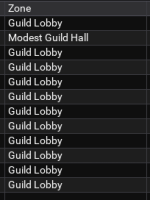
So, I am trying to see what zone everyone is in and it only seems to update the toon running boxhud.

Everyone is in the Modest Guild Hall:
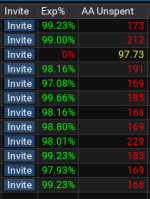
1712325940075.png

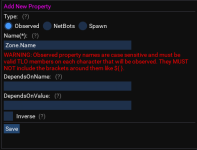
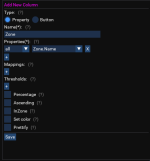
Set up:
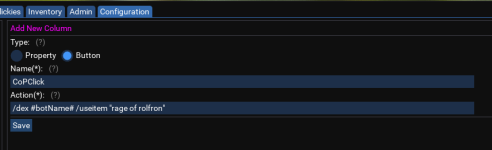
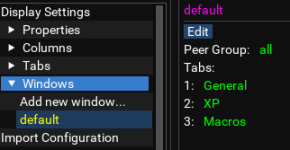
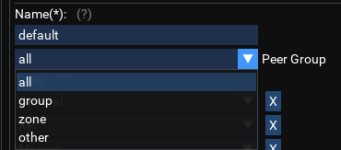
1712325987733.png 1712326176536.png


What am I doing wrong?
 

Attachments

  • 1712326117330.png
    1712326117330.png
    27.9 KB · Views: 0
I could use a hand with the following error if anyone has a moment.
C:\Next\Lua\boxhud\settings\settings.Lua:94: attempt to call field 'loadTheme' (a nil value)
stack traceback:
C:\Next\Lua\boxhud\settings\settings.Lua: in function 'ValidateOptionalSettings'
C:\Next\Lua\boxhud\settings\settings.Lua:118: in function 'ValidateSettings'
C:\Next\Lua\boxhud\settings\settings.Lua:191: in function 'LoadSettings'
C:\Next\Lua\boxhud\init.Lua:214: in function 'main'
C:\Next\Lua\boxhud\init.Lua:259: in main chunk
Ending Lua script 'boxhud' with PID 14 and status -1

I'm getting this when I /Lua run boxhud

I've tried a re-install but didn't want to mess around in the .Lua file and make any changes I wasn't sure I should make.
 
I could use a hand with the following error if anyone has a moment.
C:\Next\lua\boxhud\settings\settings.lua:94: attempt to call field 'loadTheme' (a nil value)
stack traceback:
C:\Next\lua\boxhud\settings\settings.lua: in function 'ValidateOptionalSettings'
C:\Next\lua\boxhud\settings\settings.lua:118: in function 'ValidateSettings'
C:\Next\lua\boxhud\settings\settings.lua:191: in function 'LoadSettings'
C:\Next\lua\boxhud\init.lua:214: in function 'main'
C:\Next\lua\boxhud\init.lua:259: in main chunk
Ending lua script 'boxhud' with PID 14 and status -1

I'm getting this when I /lua run boxhud

I've tried a re-install but didn't want to mess around in the .lua file and make any changes I wasn't sure I should make.
pushed a fix, should update in ~50 minutes when rg pulls from github again.
 
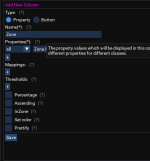
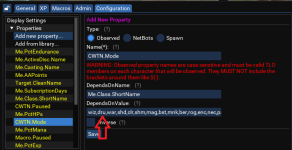
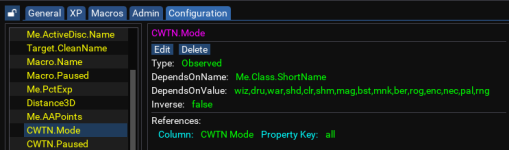
If anyone searches for help on this in the future, the CWTN properties in boxhud don't default to including DRU in the class list. It isn't a problem with MQ2Druid's TLOs or anything.
Copying a post from mq2druid as this likely applies to cwtn/sic mq2druid and mq2wizard plugins where they do not show toon info within boxhud by default at the time of this post. You will need to edit the properties for CWTN.Mode/Paused/etc to add wiz,dru as shown below;

1713828252222.png

1713827978513.png
 
Is there a setting i can change to make it more reliable on information? Some of the settings will show wrong. like I have cwtn.paused as one of my columns and sometimes it shows paused when it's not.
 
Is there a setting i can change to make it more reliable on information? Some of the settings will show wrong. like I have cwtn.paused as one of my columns and sometimes it shows paused when it's not.
Are they in the same zone? Just reset observers. I have had zero issues with Boxhud since release except for the occasional hiccup in reporting that reset observers always fix.
 
Are they in the same zone? Just reset observers. I have had zero issues with Boxhud since release except for the occasional hiccup in reporting that reset observers always fix.
Yes. All in the same zone. Just some columns are not updating in real time. I reset, it will give me current information, and then be out of date in 5 mins. I can't restart it constantly, so i generally just deal with it. But cwtn.paused is one i am constantly having to check. Character wont be paused but it will show paused.
 
Yes. All in the same zone. Just some columns are not updating in real time. I reset, it will give me current information, and then be out of date in 5 mins. I can't restart it constantly, so i generally just deal with it. But cwtn.paused is one i am constantly having to check. Character wont be paused but it will show paused.
There is a setting to toggle whether boxhud will work or not, but the setting is currently out of order.
 
Yes. All in the same zone. Just some columns are not updating in real time. I reset, it will give me current information, and then be out of date in 5 mins. I can't restart it constantly, so i generally just deal with it. But cwtn.paused is one i am constantly having to check. Character wont be paused but it will show paused.
How many toons at one time? Most I have running is 18 and never seen this issue. Additionally, have you added the properties for the classes you use correctly?
 
How many toons at one time? Most I have running is 18 and never seen this issue. Additionally, have you added the properties for the classes you use correctly?
anywhere from 12 to 36. And yes. It doesn't show nothing, it shows the wrong answer cause it wont update. When i reload, it shows the right answer. For example, I have a column that shows CWTN.paused status. it updates fine, until it stops, and it shows toons paused that aren't after a while, and stops updating across all characters i got loaded. If I reload, it works fine, for a few minutes, then it stops.
 
Ok, next question. Are you running grinds? Let's assume Restless Assault. Sometimes data is not updating correctly with multiple groups because of instance ID that I have seen. But when they are all together in say GH, they don't update unless I reset. But if I stay in GH for 6 hours, and come back and pause/unpause, etc.. no issues.

Trying to help but maybe I'm just convolution the issue.

Is the CWTN paused your own property or the built in? Boxhud only running on MT(s)?

Do you have the same settings for each instance of boxhud?
 
I noticed if you have the title bar on, and auto-scale height, it doesn't scale the window correctly. With the title bar off, it works correctly.
 
Boxhud stopped working. It only shows the toon running it. It was working fine before. Any troubleshooting ideas?
 
For anyone who plays many characters, I found it useful to add the lines below to your character. Lua right after 273 allows you to right-click on a name in Boxhud and have them /exit out.
Code:
        ImGui.SameLine()
        self:drawCmdButton('Exit##'..self.Name, '/dex %s /exit')

Cheers!
 
yeah, was trying not to nuke my settings file. I can relog and it will (probably) go back to where it was, i turned off my third monitor and everything went haywire. I have my imgui settings files marked as read only.
 
yeah, was trying not to nuke my settings file. I can relog and it will (probably) go back to where it was, i turned off my third monitor and everything went haywire. I have my imgui settings files marked as read only.
if you have boxhud set to save its own window settings, you can probably just edit your boxhud-settings-character.Lua file. otherwise at the very least i think that also contains the state of the lock button.
 
if you have boxhud set to save its own window settings, you can probably just edit your boxhud-settings-character.lua file. otherwise at the very least i think that also contains the state of the lock button.
I unchecked that when i got my third monitor cause everytime I logged in my windows were somewhere new (and totally not visible). Was a stopgap until I could figure out what the deal was.
 
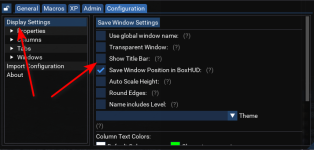
Quick question. The main toon I use BoxHud on, has a title bar so I can collapse the window down. Another toon I copied the configuration to did not have the title bar, and I could not find a way in the gui window to turn that on. I ended up going to the ini file for that character and setting it to true, but I was wondering if I missed it somewhere.
 
Quick question. The main toon I use BoxHud on, has a title bar so I can collapse the window down. Another toon I copied the configuration to did not have the title bar, and I could not find a way in the gui window to turn that on. I ended up going to the ini file for that character and setting it to true, but I was wondering if I missed it somewhere.
1731351625202.png
 
I am beyond in love with Boxhud, sans a very tiny annoyance:

It does not play nicely when docked/tabbed with other imgui windows; meaning, when it is next restarted, it will be in the same location, but will be in its own window... on top of the window with 3-4 tabs of other scripts' windows. I'll have to unlock and drag it back into that window to make it a tab again (and keeping it unlocked has the same effect).
 
I really like Boxhud, and I use it all the time... Makes it easier to switch between characters. However, today it is not loading right. My daily routine is simple, I log in all my guys, group and set roles. Hit my hotkey (Dannet command) to start Boxhud on everyone, usually there are no issues at all. Today, it only starts up on my MA (who I have the hotkey on), but wont start on anyone else. If I turn it on for everyone manually, on each screen that is the only one that shows up in the Boxhud window. I cant get them all in the same window. I have restarted multiple times, zoned, and tried everything I can think of. Checked to make sure my files are all updated. I dont know what else to do here.
 
This is very frustrating, I have deleted all my files, and done a fresh install, and I still cannot get my characters to link up.
 
I really like Boxhud, and I use it all the time... Makes it easier to switch between characters. However, today it is not loading right. My daily routine is simple, I log in all my guys, group and set roles. Hit my hotkey (Dannet command) to start Boxhud on everyone, usually there are no issues at all. Today, it only starts up on my MA (who I have the hotkey on), but wont start on anyone else. If I turn it on for everyone manually, on each screen that is the only one that shows up in the Boxhud window. I cant get them all in the same window. I have restarted multiple times, zoned, and tried everything I can think of. Checked to make sure my files are all updated. I dont know what else to do here.
This behaviour sounds to me like a issue with dannet peers not seeing each other, which would result in boxhud not establishing observer links to those peers.

off the cuff, I would suggest to check the following:
- is dannet running on all clients? It may not be loaded for some reason. you can verify in the /plugin list, output or plugin manager if you use that tool. Or simply /plugin dannet on each client
- Are you using a VPN? I've experienced issues like this on a VPN because...
- check your /dnet interface. It's possible the clients are on a different iface (say, vpn, wifi, loopback, eth0, etc). you can /dnet interface 0/1/2/3/etc to force each client to get onto a single one, then reload the plugin (in my experience, it may not be necessary)
- check your /dnet info.. and see if the clients are seeing each other
 
Release Boxhud

Users who are viewing this thread

Back
Top
Cart