
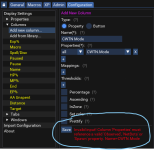
Worked like a charm, thanks!View attachment 50320 configuration, windows *my set is default*, peer groups (all, group, zone, other). These are your dannet "peers".

-
 Hail, we're RedGuides. We want you to play six (yes, 6!) EverQuest characters at once. We have scripts and a friendly community to help, please join our playstyle and say hello! 👋
You are using an out of date browser. It may not display this or other websites correctly.
You should upgrade or use an alternative browser.
You should upgrade or use an alternative browser.

Release Boxhud (2 Viewers) 04/06/2024
- Thread starter aquietone
- Start date
I had issues trying to add dragon and power glyphs to this. Every time I typed in the values it would say that does not appear to be correct do you want to use it anyway. So if you have the same issue adding in something to watch try this. go to search and type boxhud and find the character settings saved. opening that file and edit in what you need. Find properties go from there and follow the format. Hope this helps.
["Properties"] = {
["Me.PctHPs"] = {
["Type"] = "Observed";
["Name"] = "Me.PctHPs";
};
["Me.AltAbilityReady[5304]"] = {
["Type"] = "Observed";
["Name"] = "Me.AltAbilityReady[5304]";
};
["Me.AltAbilityReady[5104]"] = {
["Type"] = "Observed";
["Name"] = "Me.AltAbilityReady[5104]";
};
["Properties"] = {
["Me.PctHPs"] = {
["Type"] = "Observed";
["Name"] = "Me.PctHPs";
};
["Me.AltAbilityReady[5304]"] = {
["Type"] = "Observed";
["Name"] = "Me.AltAbilityReady[5304]";
};
["Me.AltAbilityReady[5104]"] = {
["Type"] = "Observed";
["Name"] = "Me.AltAbilityReady[5104]";
};
aquietone updated Boxhud with a new update entry:
20231014
Read the rest of this update entry...
20231014
2.6.8
- Update /target button to specify pc
Read the rest of this update entry...

yeah, its below!Anyone have a property for which auras you have up?
Code:
Me.Aura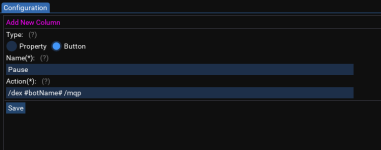

gpag
Active member
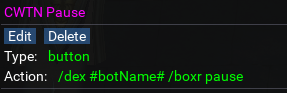
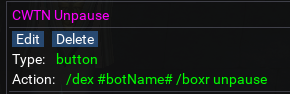
I have two buttons for pause on and pause off, because I don't love toggles for pausing and prefer definitive actions for what I want.
With the two-button approach, I believe you need the action to be: /dex #botName# /docommand /${Me.Class.ShortName} pause on
and then subsequently another for pause off.
With the two-button approach, I believe you need the action to be: /dex #botName# /docommand /${Me.Class.ShortName} pause on
and then subsequently another for pause off.
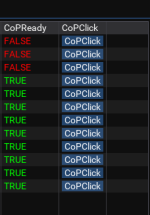


not there anymore, it uses init.Lua in the boxhud folderwhere is the boxhud.lua file thats supposed to be dropped into the lua folder along with the boxhud folder?

WhyteTech
Ye Whom says Dumb things
Suggestion for next update:
rerelease the CWTN properties Paused and Mode with the class pluggins that have been made since this was last updated.
I am noticing I have to continually add Ranger, Druid, and Paladin to the "Depends on Value"
It was wonderful of you to initially add those as part of the library as kind of "see what you can do with CWTN plugins", and I have no expectation of it being maintained, but thought i would suggest it.
Thank you for this wonderful tool!
rerelease the CWTN properties Paused and Mode with the class pluggins that have been made since this was last updated.
I am noticing I have to continually add Ranger, Druid, and Paladin to the "Depends on Value"
It was wonderful of you to initially add those as part of the library as kind of "see what you can do with CWTN plugins", and I have no expectation of it being maintained, but thought i would suggest it.
Thank you for this wonderful tool!

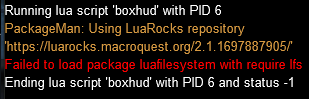

I can't run Boxhud anymore. When I type /lua run boxhud, I get the following prompt:
View attachment 53842
And after I click "Install", I get the following error:
View attachment 53843
I'm on Test server. Anyone know a fix?
you didn't mention if you checked the FAQ and followed those instructions or not

Utility - Boxhud - Extra info
 www.redguides.com

Hi Sic, thanks for the reply.you didn't mention if you checked the FAQ and followed those instructions or not
Utility - Boxhud - Extra info
View attachment 53854
I did check the FAQ and verified that I had the VC Redist package installed from Microsoft.
My PackageMan appears to be version 2.1.1697887905, so I think that's the latest version?
For the last QA, I'm not quite sure which command I need to manually run, it just says "something similar to".
There's a few other things you can try, https://www.redguides.com/community/resources/maui-muleassist-ui.2207/field?field=faq has a more complete list of stuff.Hi Sic, thanks for the reply.
I did check the FAQ and verified that I had the VC Redist package installed from Microsoft.
My PackageMan appears to be version 2.1.1697887905, so I think that's the latest version?
For the last QA, I'm not quite sure which command I need to manually run, it just says "something similar to".
The command mentioned as "something like" just means replace the correct path to your MQ folder, and replace that 2.0.5 version with the one the script output, like 2.1.1697887905
unless something has broken, that is what it does.Recommendation for BoxHUD
Color the player name and have it in ( ) based on Invis type
Example Invis undead = (toon Name) light blue color
Invis normal = (toon Name) dark blue color
Invis both = (toon Name) green
IVU you have to setup a property for yourself as that isn't visible from the spawn data which is what it uses for invis.
there's also invisdisplay Lua from sic specifically for invis.
unless something has broken, that is what it does.
IVU you have to setup a property for yourself as that isn't visible from the spawn data which is what it uses for invis.
there's also invisdisplay lua from sic specifically for invis.
ahh, that is the problem then. I need to setup that property for IVUunless something has broken, that is what it does.
IVU you have to setup a property for yourself as that isn't visible from the spawn data which is what it uses for invis.
there's also invisdisplay lua from sic specifically for invis.
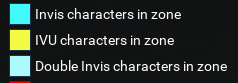
Are you on live or emu? On emu i don't seem to see the different invis colors but on live i do.
If i cast normal invis, its light blue. If i cast IVU its yellow.
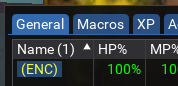
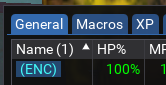
With added properties for Me.Invis[1] and Me.Invis[2]
You can also configure the colors on the config tab for these ..
If i cast normal invis, its light blue. If i cast IVU its yellow.
With added properties for Me.Invis[1] and Me.Invis[2]
You can also configure the colors on the config tab for these ..
aquietone updated Boxhud with a new update entry:
12/17/2023
Read the rest of this update entry...
12/17/2023
Automated update: 5bd4c43540a3245b1175bdf6e25414f146969977
Read the rest of this update entry...
aquietone updated Boxhud with a new update entry:
01/09/2024
Read the rest of this update entry...
01/09/2024
2.7.0
- Add new lock/unlock button to lock window movement and save window position and size
- Window position will save when locking the window position
Read the rest of this update entry...

Would it be possible to add the ability to fold up the window? I think it is the accordion control? I like to get the windows in a stack, and only unfold the actual window I want to see at the moment. Thanks for a great resource!
Check this show title bar setting on the config tab, then you can collapse it.Would it be possible to add the ability to fold up the window? I think it is the accordion control? I like to get the windows in a stack, and only unfold the actual window I want to see at the moment. Thanks for a great resource!
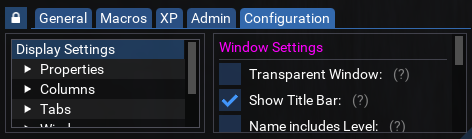
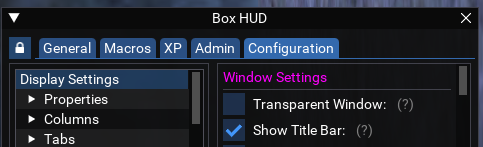
Well that was easy! Thanks for letting me know!

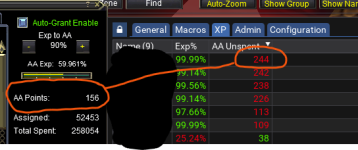
Update: Restarting Boxhud doesnt fix it but restarting my computer did fix it. Still no idea how the calculation got off to begin with though.

Seariz
Member
I'm making an 'Illusions' Tab for my group Driver character to be able to tell my enchanter to turn different group members into anything I want, and also to be able to tell each individual character to drop their illusion so I can put something else on them.
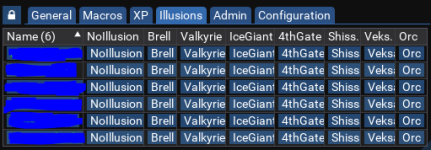
Question 1:
Is there a way to include a Scroll function, or do I need to create like 10 different Illusion pages to handle the 75ish illusions?
Question 2:
Is there a way to handle this command in a way that it will still target the Driver character when the command is issued? Currently, it doesn't work on the driver character, only on the bots.
Question 1:
Is there a way to include a Scroll function, or do I need to create like 10 different Illusion pages to handle the 75ish illusions?
Question 2:
Is there a way to handle this command in a way that it will still target the Driver character when the command is issued? Currently, it doesn't work on the driver character, only on the bots.
Code:
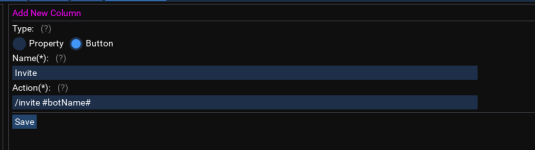
/dex #botName# /bct MyEnchanter //multiline ; /enc pause on ; /timed 10 /stopcast ; /timed 20 /target #botName# ; /timed 30 /useitem "Visage of the Valkyrie" ; /timed 50 /enc pause offSeariz
Member
For those who ever run into this issue themselves, the answer isI'm making an 'Illusions' Tab for my group Driver character to be able to tell my enchanter to turn different group members into anything I want, and also to be able to tell each individual character to drop their illusion so I can put something else on them.
View attachment 58350
Question 1:
Is there a way to include a Scroll function, or do I need to create like 10 different Illusion pages to handle the 75ish illusions?
Question 2:
Is there a way to handle this command in a way that it will still target the Driver character when the command is issued? Currently, it doesn't work on the driver character, only on the bots.
Code:/dex #botName# /bct MyEnchanter //multiline ; /enc pause on ; /timed 10 /stopcast ; /timed 20 /target #botName# ; /timed 30 /useitem "Visage of the Valkyrie" ; /timed 50 /enc pause off
Code:
/noparse /dex #botName# /dex EnchanterName /multiline ; /enc pause on ; /timed 10 /stopcast ; /timed 20 /target pc ${Me.Name} ; /timed 30 /useitem "Visage of the Valkyrie" ; /timed 50 /enc pause offAlthough still curious about a scroll feature. TY
i.. really don't think i have any desire to help people scroll boxhud to so many columns like that lol. if you want to, you can search the code for ImGuiTableFlags probably and find a horizontal scroll flag which might do the trick.For those who ever run into this issue themselves, the answer is
Code:/noparse /dex #botName# /dex EnchanterName /multiline ; /enc pause on ; /timed 10 /stopcast ; /timed 20 /target pc ${Me.Name} ; /timed 30 /useitem "Visage of the Valkyrie" ; /timed 50 /enc pause off
Although still curious about a scroll feature. TY
Adding buttons to boxhud for every single illusion clicky is pretty wild though, not in a good way imo. but you do you. Really seems like a better fit for a dedicated buttonmaster hotbar or something.
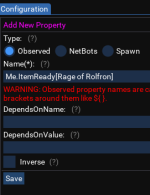
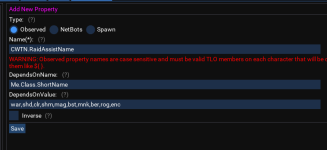
It has a hardcoded (i think.. i suppose it might be doing something more dynamic too but doubt it) short list of known TLOs that i just kinda added to try and protect people from observing something that doesn't exist and breaking running macros on toons when dannet parses those TLOs.I am trying to add the CWTN mode from the library and it gives the following error:
View attachment 58243
Its not preventing you from clicking save I don't think? Been a while since I looked though. Are you setting this up on a toon that doesn't have a CWTN plugin loaded?
aquietone updated Boxhud with a new update entry:
03/14/2024
Read the rest of this update entry...
03/14/2024
2.7.1
- Truncate numbers in netbots properties
Read the rest of this update entry...
aquietone updated Boxhud with a new update entry:
03/26/2024
Read the rest of this update entry...
03/26/2024
Automated update: dfc282df9b5193f814b27150e6081e448eeea3e2
Read the rest of this update entry...
Users who are viewing this thread
Total: 3 (members: 0, guests: 3)
Share: