• You've discovered RedGuides, an EverQuest multi-boxing and scripting community 🧙‍♀️⚙️. We want you to play several EQ characters at once, come join us and say hello! 👋

  • A TLP without truebox has thawed (Very Vanilla ready)
    Frostreaver
Boxhud

Release Boxhud 04/06/2024

No permission to download
Good evening. From someone who knows nothing about coding at all, I considered myself fortunate to not only get it running but also add a new tab called Invis Status and I added a new Property Me.Invis and it works! I have a few questions please:
Where do you have a repository of known command strings like Me.Invis that I can look up,
Why is it 'flickering' (regardless if toons are invis or not, the TRUE/FALSE lettering flickers (the other results like CWTN Paused doesn't flicker) and
What is the command for IVU ?

Sorry to bother you folks! It took hours of reading this all carefully to learn how it works and attempt to make my own properties to play.
Without seeing the code you placed in the script it would hard to diagnose.

mq.TLO.Me.Invis('UNDEAD')()

 
Good evening. From someone who knows nothing about coding at all, I considered myself fortunate to not only get it running but also add a new tab called Invis Status and I added a new Property Me.Invis and it works! I have a few questions please:
Where do you have a repository of known command strings like Me.Invis that I can look up,
Why is it 'flickering' (regardless if toons are invis or not, the TRUE/FALSE lettering flickers (the other results like CWTN Paused doesn't flicker) and
What is the command for IVU ?

Sorry to bother you folks! It took hours of reading this all carefully to learn how it works and attempt to make my own properties to play.
Great job customizing your Boxhud! That's not a simple feat (thankfully also not complex)!

Similarly related, you might want to check out InvisDisplay. I say this not only because its a wonderfully useful resource personally, but there's some verbiage in there identified by Sic I believe about the nuance regarding calling the status of invisibility and ITU/IVU across clients.
 
Great job customizing your Boxhud! That's not a simple feat (thankfully also not complex)!

Similarly related, you might want to check out InvisDisplay. I say this not only because its a wonderfully useful resource personally, but there's some verbiage in there identified by Sic I believe about the nuance regarding calling the status of invisibility and ITU/IVU across clients.
Well boxhud uses Dannet, so Dannet can ask the other player if they are, or are not
 
Great job customizing your Boxhud! That's not a simple feat (thankfully also not complex)!

Similarly related, you might want to check out InvisDisplay. I say this not only because its a wonderfully useful resource personally, but there's some verbiage in there identified by Sic I believe about the nuance regarding calling the status of invisibility and ITU/IVU across clients.
I did try invis display but it does not show ivu or reg invis. It just shows if someone has any type of invis on them and I would like to see both types.
 
Hey there. Love Boxhud, and have been using it with ISXBoxer, but I've been forced to have to use the "Enable Viewports" setting in MacroQuest Settings as for some reason something with ISXBoxer resets the Boxhud window. I've tried moving the boxhud window on all 6 clients then doing a "/lua stop boxhud" and "/lua start boxhud" and while it starts up in the right place, as soon as I click to another client and back it moves the window. I have a feeling it's something related to how ISXBoxer manages the game windows and forces resolution uniformity, but can't quite figure it out. Any ideas?
Same here. I use isboxer as well and not only this Lua but almost all of them reset when you change to a different toon. I've tried all kinds of things like making sure the same last toon gets logged with the windows where I want them. I've used the Shift key to move them around to avoid the placement as CWTN suggested in another thread. I've saved/closed them. I've made sure to white list the directory and give admn permissions to the windows user for the entire folder, and nothing seems to work. I'm 99.9% sure it's an isboxer issue at this point as there are only a few of us who have this issue and there may not be an easy resolution. The Lua windows actually react differently with each toon as well in that they save in different places. Very odd, but I've resigned to just working around it as I can not live without the Lua's =). I'm a new user of this one and I have to say I love it. Well done Aquietone!!! I know a few players that dropped isboxer when they began using this and I can kind of see why. Easy to see distance and easy to click on the toon to go to their window. I just can't personally get past seeing the toons on my other screen because they often get stuck, or have to do specific things with them and I want to see what the others are doing at the same time. I'll get past it one day I'm sure =)
 
I did try invis display but it does not show ivu or reg invis. It just shows if someone has any type of invis on them and I would like to see both types.
Mine shows both, by designating color? Green vs Blue vs Light Blue
 
So there is this for invisdisplay:

Q. Does this differentiate different invis types?
A. Only for the character's screen it is visible on.

I would like to be able to see at a glance for all my group what type of invis is on them.
 
So there is this for invisdisplay:

Q. Does this differentiate different invis types?
A. Only for the character's screen it is visible on.

I would like to be able to see at a glance for all my group what type of invis is on them.
I understand. So I usually make the safe bet (every time ive verified) that when my main (the tank) is 'green' everyone else has been too. But it is tricky with my crew that is split between two mini pcs
 
Okay, new problem. I initially posted this in the bugs forum and Kaen responded. I took my time before my last reply because I wanted to research this for myself and not just beg for the answers straight away only to find out the post was locked before I replied, lol.

Since this only involves Boxhud anyway, it is more appropriate to post here so Here is the summary and question:

I posted asking why my ranger running kissassist was throwing errors and kaen directed me to boxhud.

--------------------

I searched and found the section you were referring to (errors when running boxhud on one character with CWTN plugins and kissassist on another), but I did not see a clearly posted "this fixes it" eureka answer.

Tibberu posted in #70 "The issue I run into though is that it messes up Kissassist. Initially I was getting KA errors for Undefined Variable CWTN used on line <whatever>, kaen and Special Ed suggested declaring CWTN as a string in KA, which may have sort of worked (although I'm not sure if I did it correctly), however I would still get KA errors for No such 'string' member 'Mode' or 'Paused' and I'm not knowledgeable enough to know how to fix this. I was curious if there was a way to get around this or not have the CWTN TLOs sent to non-CWTN toons."

giogibyeie posted "And I still manual to issue a command in game to query CWTN toon status from running boxhud's toon before I run boxhud. i.e. "/dobserve cwtn_toon_name -q CWTN""

and aquietone replied "I keep on making the configuration of this script more and more complex, but I can look at adding the ability to define dependencies between observed properties, so that you can configure something like:

"only observe property X if property Y has value Z".

For example: Only observe CWTN.Mode if Me.Class.ShortName is in MNK,ROG,CLR,SHM,ENC,MAG,SHD,WAR.

ObservedProperties = {
{
Name='Me.Class.ShortName'
},
{
Name='CWTN.Mode',
DependsOnName='Me.Class.ShortName',
DependsOnValue='MNK,ROG,CLR,SHM,ENC,MAG,SHD,WAR'
}
}
https://www.redguides.com/community/posts/478096/react?reaction_id=1

Tibberu then later said, "One thing to make note of for folks, if you are doing the CWTN stuff like this:
{
Name='CWTN.Mode',
DependsOnName='Me.Class.ShortName',
DependsOnValue='MNK,ROG,WAR,SHD,MAG,ENC,CLR,BER,SHM'
},

You have to have an observed property for {Name='Me.Class.ShortName'} above the CWTN stuff or you'll get errors in the DependsOnName part."

Still not sure which .ini to use and which file to tuck it into? Sorry to be a pain. I did read through all this a few times. I am not a coder. :(
 
You don't edit any ini, just configure the cwtn tlos in boxhud the way I have them shown in the faq, with only the applicable classes listed. Your macro is going to keep displaying errors on your ranger as long as boxhud is asking your ranger for it's cwtn mode
 
You don't edit any ini, just configure the cwtn tlos in boxhud the way I have them shown in the faq, with only the applicable classes listed. Your macro is going to keep displaying errors on your ranger as long as boxhud is asking your ranger for it's cwtn mode
I am honestly not *that* much of an idiot but each time someone tries to clarify what to do, I still feel like I am looking through coke bottle glasses I think partially because I am coming from such an elementary place and the rest of you with your vast knowledge of coding are perhaps assuming some level of competence I do not possess.

I went to the FAQ and found exactly what you are trying to point me too. My problem is I am not sure how to apply what you are telling me still. Maybe I can illustrate with pictures since I am an idiot.

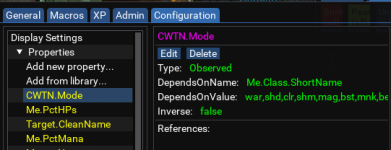
I can click on Boxhud's Config tab and I see I can "add from library" CWTN.Mode and if I click on CWTN.Mode, I see this:
1685152909490.png

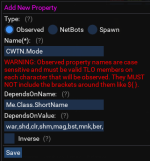
If I click on Edit under CWTN.Mode, I see:

1685152949075.png

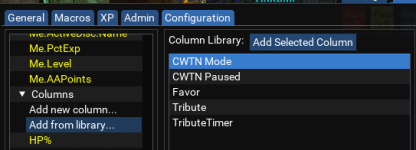
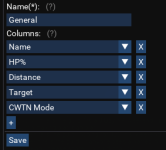
So, it already looks exactly like what you were asking me to do - but it's already there. So I now try to get this setting into a new column in the general tab. I click Add from library... (because I assume if I do this, it will automatically add the already perfectly configured CWTN.Mode to my columns list.
1685153109648.png

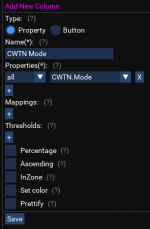
I click Add Selected Column which brings up a new window:

1685153192338.png

Not too sure what to do about this window. I know I only care about folks inzone so I check that box. I don't know what to do with the rest of the settings: Can I assume the Properties are configured correctly since I asked the program to inport what already appeared to be correct? But I see there are options to add Mappings and Thresholds but not sure if I have to add anything to those areas so I just left the InZone box checked and click Save. Now I see that CWTN Mode is now located in the lower list category. I figured out that to get that into the tab General, I now click on the Tab, then General and I see the list of current columns in my General tab. I click Edit, then I click the Plus to Add New Column, then click Save.

1685153510643.png

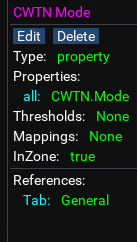
This all seems well and good, but if I go back to my 'lower' list and click on CWTN Mode to see what it looks like, I am concerned becasuse it dosen't show the DependsOnName or DependsOnValue variables

1685153716643.png

Is this correct then? If so, why was it causing me problems before?

Again, thank you for taking the time to help - I can understand if you are frustrated dealing with someone who knows nothing about coding. I have also tried teaching folks in areas I know about and I find myself biting my tongue at some of the basic things they ask too.
 
I think the overview tab walks through the whole flow of adding things and the options

1. Add a property. Property in this case would be like CWTN.Mode where you are telling boxhud you want it to pull the value of CWTN.Mode from every character. Since you want it to exclude ranger or whoever, you need to tell it to only include certain classes or to exclude certain classes which is how the DependsOnValue is used. You're telling it that it should only pull CWTN.Mode value of Me.Class.ShortName has value WAR or whatever other classes you ha e running cwtn plugins.
2. Once you've created the property you define a column that says how to display some property. Mappings are for if the property returned a 1 but you wanted it to say on or true instead type stuff. Thresholds are for numbers like if you wanted it to be green above 75 and red below 30. Don't really remember how in zone is used. It may apply to spawn info that it will pull from spawn data if the toons in the same zone as you.
3. After creating the column you can either add it to an existing tab like general or macros or XP or create your own tab.
4. Window config you can mostly ignore. Only need to look at that if you create a new tab, to then add that tab to the window.


I forget whether the class checking is case sensitive so for that DependsOnValue stuff, you may need ike WAR instead of war.
 
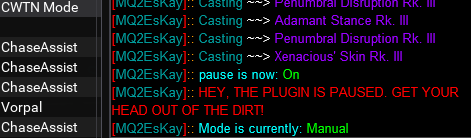
And something is wrong for sure because I put all my toons on manual and the column shows them all still on assist with the tank on Vorpal.
1685154501765.png
 
It can only display what dannets telling it.
Try u pausing cwtn or try ight clicking toons in boxhud and resetting them dunno
I was able to get them working again by right clicking and Reset Obs on them all.
 
I was able to get them working again by right clicking and Reset Obs on them all.
If a toon relogs or anything then usually you will end up with stale data for them and need to reset, like if a toon goes LD or you swap to another toon and back on an account or /exit and come back
 
Anyone else have issues where window disappears and will not come back? I tried /boxhud but nothing happens
 
Anyone else have issues where window disappears and will not come back? I tried /boxhud but nothing happens
Did imgui crash because of a conflict? This happens if another imgui resource has an issue. You should have had an error message at some point saying it crashed as well. Do you have a hotkey assigned to turn off imgui?
 
The script is running, other Lua based UI tools work fine, just the window does not show. I attempted to delete/create fresh config same issue.

I figured it out, it was hidden as transparent in bottom left, maybe a hotkey to reset location or command would be cool.
 
Last edited:
Running into an issue where when I swap to another screen and back boxhud isn't where I left it :D. I've tried /boxhud and /boxhud again to see if it saves window position but it doesn't. Any way to resolve?
 
Running into an issue where when I swap to another screen and back boxhud isn't where I left it :D. I've tried /boxhud and /boxhud again to see if it saves window position but it doesn't. Any way to resolve?
are you using isboxer? idk if there's a solution to that besides don't use isboxer
 
Yes indeed using isboxer

Same here and I have the same issue with several Lua windows. They only save to certain spots on the screen. I've learned to live with it until I grow out of isboxer, if that ever happens =)
 
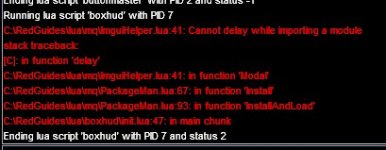
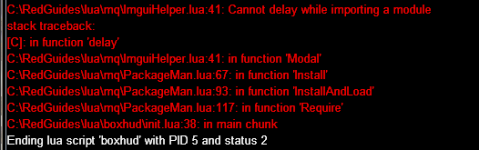
new computer, and can not get Boxhud to install / run. Spent way too much time trying to figure this out. Hoping someone can help.

- VCdist installed = done
- /Lua run load = done
- tried manually installing by downloading and extracting, and regularly through the RG patcher

box.jpg

=(
 
You can try finding where it calls PackageMan.Require and change it to PackageMan.Install and then once it has installed lfs, you can change it back
 
bought a second computer to test. I love and miss BoxHud <3

System b: (current): AMD 5800H + WIN11 home
System a: (sunday): AMD 7735HS + WIN11 home

Both Error trying to install BoxHud.

Screenshot 2023-07-05 121802.png

New error found, too: LEM installs and works for events, but certain functionality is not working. Specifically "Enable for entire raid", "disable for entire raid" & other right click options inside the UI. Having to manually check 54 toons for events was painful.

Both systems have been able to 54 man without crashing or experiencing other Lua and macro issues. Previous machines this year were intel based + WIN11 Home, and never had an issue installing BoxHud (nor LEM right click UI issues) . Not saying it is AMD based, as I am far from tech savvy, but seems odd
 
bought a second computer to test. I love and miss BoxHud <3

System b: (current): AMD 5800H + WIN11 home
System a: (sunday): AMD 7735HS + WIN11 home

Both Error trying to install BoxHud.

View attachment 49481

New error found, too: LEM installs and works for events, but certain functionality is not working. Specifically "Enable for entire raid", "disable for entire raid" & other right click options inside the UI. Having to manually check 54 toons for events was painful.

Both systems have been able to 54 man without crashing or experiencing other LUA and macro issues. Previous machines this year were intel based + WIN11 Home, and never had an issue installing BoxHud (nor LEM right click UI issues) . Not saying it is AMD based, as I am far from tech savvy, but seems odd
buying another computer to test boxhud is serious dedication
 
This error is happening on every script that requires installation of a luarocks module. The issue is already opened and closed on the mq GitHub repo. Don't think there's been a new build though.
 
Quick question about something that appears to have changed, probably on my side. The overview tab shows;

General Tab
- Name -- Character names in green if in same zone as the character running Boxhud, in ( ) if invis, or in red if not in same zone.


When I zone, all toons that are no longer in the new zone do not appear in red, they drop off boxhud. How can I get it to keep them as indicated above?

1692031957209.png name redacted for each toon no longer in zone

Thanks!
 
Quick question about something that appears to have changed, probably on my side. The overview tab shows;

General Tab
- Name -- Character names in green if in same zone as the character running Boxhud, in ( ) if invis, or in red if not in same zone.


When I zone, all toons that are no longer in the new zone do not appear in red, they drop off boxhud. How can I get it to keep them as indicated above?

View attachment 50319 name redacted for each toon no longer in zone

Thanks!
Go back a couple pages, you can set the observer data field to pull from out of zone char (wont show all details, but will show a few). sorry, at work, or id point exactly at it.
 
Quick question about something that appears to have changed, probably on my side. The overview tab shows;

General Tab
- Name -- Character names in green if in same zone as the character running Boxhud, in ( ) if invis, or in red if not in same zone.


When I zone, all toons that are no longer in the new zone do not appear in red, they drop off boxhud. How can I get it to keep them as indicated above?

View attachment 50319 name redacted for each toon no longer in zone

Thanks!
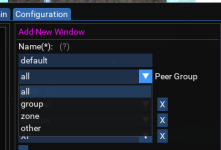
The general settings i think has a spot to select the dannet group to pull from, all, zone, group or custom.
 
Go back a couple pages, you can set the observer data field to pull from out of zone char (wont show all details, but will show a few). sorry, at work, or id point exactly at it.
I went through all 9 pages before posting this and I must have missed it. I'll take a second look when I get home, thanks!

I'm ripping the band-aid off by no longer using isboxer and this Lua is definitely an integral part of making that happen, so thanks!
 
Release Boxhud

Users who are viewing this thread

Back
Top
Cart