
-
 Hail, we're RedGuides. We want you to play six (yes, 6!) EverQuest characters at once. We have scripts and a friendly community to help, please join our playstyle and say hello! 👋
You are using an out of date browser. It may not display this or other websites correctly.
You should upgrade or use an alternative browser.
You should upgrade or use an alternative browser.

Release Bazaar.mac 2023.8.20.1
- Thread starter JerkChicken
- Start date

- Commits
- 1
I’ve seen that too, but honestly no clue where it came from. I do not recall seeing it as part of the previous two version of bazaar.
Are looking for what a vendor would sell and item for, or what a vendor will pay? The macro should not set your sell price for less then what a vendor will pay. It does not have the 20% minimal profit, but I kind of like the idea.
It would not be too hard to add, if there was enough want for it. When I first started the macro I was like throw all this info into the inI, then my INI got pretty bloated.
Are looking for what a vendor would sell and item for, or what a vendor will pay? The macro should not set your sell price for less then what a vendor will pay. It does not have the 20% minimal profit, but I kind of like the idea.
It would not be too hard to add, if there was enough want for it. When I first started the macro I was like throw all this info into the inI, then my INI got pretty bloated.
- Commits
- 1
JerkChicken updated Bazaar.mac with a new update entry:
Improved Non-English keyboards in /trader
Read the rest of this update entry...
Improved Non-English keyboards in /trader
Updated 2021.09.30 - JerkChicken
Version 2021.09.30.0
Added: UseLuaReview
Added: Lua interface for updating Bazaar.ini
Improved: Increased InitialPrice - Set the default selling price to 2000000
Improved: /trader Bazaar searching. Might help with non-English keyboards
Uses ctrl+alt+click to search items instead of typing out the item name
Does not fix it in /buyer mode. Still needs English keyboard.
Fixed: /buyer: Was not correctly grabbing...
Read the rest of this update entry...
- Commits
- 1
The latest update adds a GUI to help set your Bazaar.ini prices.
Works only on next and you need to install the Lua script.
Download the editBazaar.Lua from:
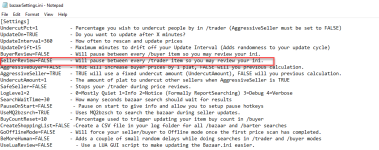
Enable review mode in the bazaarSettings.ini
--For /trader
SellerReview=TRUE
-- For /buyer
BuyerReview=TRUE
(Do not forget to return these to FALSE so the script will run without pause)
As this macro checks the price price of each item a GUI will popup allowing you to easily update your bazaar.ini
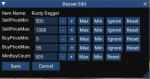
Works only on next and you need to install the Lua script.
Download the editBazaar.Lua from:
Enable review mode in the bazaarSettings.ini
--For /trader
SellerReview=TRUE
-- For /buyer
BuyerReview=TRUE
(Do not forget to return these to FALSE so the script will run without pause)
As this macro checks the price price of each item a GUI will popup allowing you to easily update your bazaar.ini

- Commits
- 2
Just a guess, but did you try setting InitialPrice=0Is there a way, if an item is not found for sale, that it just doesn't price it? Currently it sets the InitialPrice= I'd just like it to not list it at all.
My thinking is this won't put the item up for sale at 0 plat.? I would test it first. haha
- Commits
- 1
Honestly I'm not sure what it would do if you set InitialPrice=0 
@zeroktal Currently no. The script really wants you to sell your stuff.
What I have been thinking is that if its a new item to prompt you with a Lua popup asking you to set it. Right now there is no simple way to do that. I'm hoping that when Next becomes the Redguides default that we can package Lua scripts with Macros.
There are many who never adjust their bazaar.ini and there are some like me that review it regularly. It's a fun balance between adding uncommon features vs features I wont use but much of the community will. For instance I do not use percentage changes as I think it shouts bot, and I also run "/mac bazaar gooffline" but the macro still supports regular updating. So if anyone can drum up enough demand for something it's more likely to get moved to the focus list.
I will add the idea to the suggested improvement notes, but no promises on if it will make it in.
@zeroktal Currently no. The script really wants you to sell your stuff.
What I have been thinking is that if its a new item to prompt you with a Lua popup asking you to set it. Right now there is no simple way to do that. I'm hoping that when Next becomes the Redguides default that we can package Lua scripts with Macros.
There are many who never adjust their bazaar.ini and there are some like me that review it regularly. It's a fun balance between adding uncommon features vs features I wont use but much of the community will. For instance I do not use percentage changes as I think it shouts bot, and I also run "/mac bazaar gooffline" but the macro still supports regular updating. So if anyone can drum up enough demand for something it's more likely to get moved to the focus list.
I will add the idea to the suggested improvement notes, but no promises on if it will make it in.
- Commits
- 1
FYI If anyone adds the Merchant's Perk there is a good chance the this macro will not work as expected. It will only scan the first 100 slots.
I have not gotten it (the perk) yet (need to figure out how to hide it from the wife)
In theory
Bazaar.mac version 2021.09.30.0
Change 455
From: /for slot 0 to 100
To: /for slot 0 to 144
and
Change line 598
From: /for slot 0 to 100
To: /for slot 0 to 144
I have not gotten it (the perk) yet (need to figure out how to hide it from the wife)
In theory
Bazaar.mac version 2021.09.30.0
Change 455
From: /for slot 0 to 100
To: /for slot 0 to 144
and
Change line 598
From: /for slot 0 to 100
To: /for slot 0 to 144
- Commits
- 2
I can confirm an item with a set price of 0 will not list for sale once you hit begin trader.
- Commits
- 1
JerkChicken updated Bazaar.mac with a new update entry:
Support for Merchant's Perk
Read the rest of this update entry...
Support for Merchant's Perk
Version 21.10.20
Fast Release
Improved: (minor) updated the INI description notes
Added: Review parameter - Using "/mac bazaar Review" Enables review mode on this run only. (So you do not have to keep changing the settings INI)
Improved: Support for Merchant Perk, supports 144 /trader slots
Read the rest of this update entry...
I might be missing something, but the first time I ran the macro it setup a bunch of
No worries. But it seems to ignore those values on subsequent passes. There are a couple of items that I genuinely want to sell at a fixed price of 1pp (but not lower). The script has increased the price to just below the next highest seller (which makes sense normally), but these default min/max 1/1 values are ignored unless I change them. For example, changing the max to 100 does indeed cap the max sell value to 100pp. So, is there a way to set a min/max pp value of 1?
INI:
[Item Name]
SellPriceMin=1
SellPriceMax=1
No worries. But it seems to ignore those values on subsequent passes. There are a couple of items that I genuinely want to sell at a fixed price of 1pp (but not lower). The script has increased the price to just below the next highest seller (which makes sense normally), but these default min/max 1/1 values are ignored unless I change them. For example, changing the max to 100 does indeed cap the max sell value to 100pp. So, is there a way to set a min/max pp value of 1?
- Commits
- 1
I might be missing something, but the first time I ran the macro it setup a bunch of
INI:[Item Name] SellPriceMin=1 SellPriceMax=1
No worries. But it seems to ignore those values on subsequent passes. There are a couple of items that I genuinely want to sell at a fixed price of 1pp (but not lower). The script has increased the price to just below the next highest seller (which makes sense normally), but these default min/max 1/1 values are ignored unless I change them. For example, changing the max to 100 does indeed cap the max sell value to 100pp. So, is there a way to set a min/max pp value of 1?
This is a carry over from the old bazaar macro's and yes is make little sense with todays macro. I would have like to of changed it but it would have messed up a lot of people.
For :
SellPriceMin=1
SellPriceMax=
1= No Max or Minimal.
It does mention that in the Overview page, but Ill try to make that more clear.
- Commits
- 1
Thought that was fixed. I'll have to look into it again.Another bug seems to be that when another trader has a 1pp price, the min/max at 1/1 is again ignored and the macro tries to set a price of 0pp (which removes the item from the seller window).
Ok, I think I have both fixed locally. I made the following 4 small changes:
Line 648 & 730:
to
and
Line 655 & 736:
to
Basically, using a valid plat value as a flag was playing havoc with a couple of pieces of logic. The obvious problem (my first comment above) was that it made it impossible to actually set that flag value (1pp) as the value you wanted as your max or min. The second slightly more subtle problem was that if your INI was set to that default value of 1, and another trader was selling the item at that default value (1), the "check we are not selling below the min or above the max value" check (lines 716 and 722) would not run, and you would actually end up with a 0 value set in the min case (which removes the item from trader).
My fix has the added bonus that setting a max value of 0 removes it from your trader (possibly simplifying your macro code a lot, no more "ignore lists"), and a min value of 0 means don't sell this item if it's going for cheap (1pp or less), just remove it for me (this can act as a nice flag that you're probably just wasting bazaar bag space on that item).
You are right that making this change for everyone will make a mess (because their default values are all probably set to min/max of 1/1). I think if you decide you want to roll this out, you will need to regenerate their INIs, or at least remove all the 1/1s. This also means changing the default bazaarSettings min and max values.
Line 648 & 730:
Code:
/if (${Ini[${itemPrices},${thisItem},SellPriceMin]} != 1) {
    ...
}
Code:
/if (${Ini[${itemPrices},${thisItem},SellPriceMin]} != 0) {
    ...
}
and
Line 655 & 736:
Code:
/if (${Ini[${itemPrices},${thisItem},SellPriceMax]} != 1) {
    ...
}
Code:
/if (${Ini[${itemPrices},${thisItem},SellPriceMax]} != 0) {
    ...
}
Basically, using a valid plat value as a flag was playing havoc with a couple of pieces of logic. The obvious problem (my first comment above) was that it made it impossible to actually set that flag value (1pp) as the value you wanted as your max or min. The second slightly more subtle problem was that if your INI was set to that default value of 1, and another trader was selling the item at that default value (1), the "check we are not selling below the min or above the max value" check (lines 716 and 722) would not run, and you would actually end up with a 0 value set in the min case (which removes the item from trader).
My fix has the added bonus that setting a max value of 0 removes it from your trader (possibly simplifying your macro code a lot, no more "ignore lists"), and a min value of 0 means don't sell this item if it's going for cheap (1pp or less), just remove it for me (this can act as a nice flag that you're probably just wasting bazaar bag space on that item).
You are right that making this change for everyone will make a mess (because their default values are all probably set to min/max of 1/1). I think if you decide you want to roll this out, you will need to regenerate their INIs, or at least remove all the 1/1s. This also means changing the default bazaarSettings min and max values.
Last edited:
- Commits
- 1
I think one of the original macros did this, but bazaar3 does not.
If AggressiveSeller=FALSE then it should round down to the nearest 5 or zero in /trader mode.
Not sure that's what you want, It's intended to undercut your opponent by a fixed amount. ie You always want to uncut them by 10plat.
I'll add it to my notes to add the option to round when undercutting by a percentage as well. Not sure when that will get released. Again that will only round to a 5 or 0.
There is no rounding in /buyer mode. Not something I think would get added to /buyer unless there is a lot request for it. Most buyers I see (at least on my server) are buying low cost tradeskill stuff. You could lose a lot of plat fast paying 5 plat for something you could get for 1. /shrug
If you want to temporally added it to the macro then:
Macro Version Version 2021.10.20.0
Add "/call roundDown" to line 727
That will round it to a 5 or 0 to is looks less robotic.
If AggressiveSeller=FALSE then it should round down to the nearest 5 or zero in /trader mode.
Not sure that's what you want, It's intended to undercut your opponent by a fixed amount. ie You always want to uncut them by 10plat.
I'll add it to my notes to add the option to round when undercutting by a percentage as well. Not sure when that will get released. Again that will only round to a 5 or 0.
There is no rounding in /buyer mode. Not something I think would get added to /buyer unless there is a lot request for it. Most buyers I see (at least on my server) are buying low cost tradeskill stuff. You could lose a lot of plat fast paying 5 plat for something you could get for 1. /shrug
If you want to temporally added it to the macro then:
Macro Version Version 2021.10.20.0
Add "/call roundDown" to line 727
INI:
            } else {
                /varcalc newPrice ${lowestPrice} - ${UndercutAmount}
                /call roundDown
}- Commits
- 1
Any error message? Or can you better explain break.
I’m guessing it has to do with the name length, would have to be able to duplicate to know more
You might be able to just set SellPriceMax to -1 and set these items manually. This would depend on if it’s breaking at the INI lookup or the Bazaar search.
I’m guessing it has to do with the name length, would have to be able to duplicate to know more
You might be able to just set SellPriceMax to -1 and set these items manually. This would depend on if it’s breaking at the INI lookup or the Bazaar search.

- Commits
- 191
I suspect it's an issue with the comma or quote.Any error message? Or can you better explain break.
I’m guessing it has to do with the name length, would have to be able to duplicate to know more
You might be able to just set SellPriceMax to -1 and set these items manually. This would depend on if it’s breaking at the INI lookup or the Bazaar search.
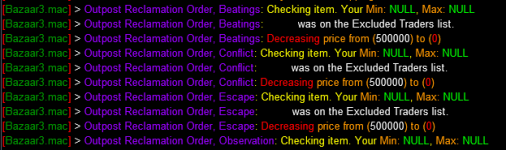
/keypress , or /keypress " I believe at one point there was some error handling for commas and it was removed as I wasn't sure what it was doing and I had no way to test it.
Last edited:
- Commits
- 1
I am guessing it's those quotes.

I remember testing comma's and I have had issue with quote in other stuff.
I will have to buy one of those as do some testing. I may need to strip the quotes before processing the INI call.
That may end up being a lot of changes throughout.
Once I get one of those and sit down to debug it Ill have an update.
I remember testing comma's and I have had issue with quote in other stuff.
I will have to buy one of those as do some testing. I may need to strip the quotes before processing the INI call.
That may end up being a lot of changes throughout.
Once I get one of those and sit down to debug it Ill have an update.
- Commits
- 1
Try thisView attachment 36143
This is despite the entries for those items existing in the INI. Any values set in the INI are also overwritten so I suspect setting a value of -1 will be no bueno.
At a guess the problem lies with the INI read code. Writing to the INI and searching the bazaar work fine.
Add the quotes to your Bazaar.ini file.
So that:
[Outpost Reclamation Order, Conflict]
SellPriceMin=500000
SellPriceMax=1500000
Becomes:
[Outpost Reclamation Order, "Conflict"]
SellPriceMin=500000
SellPriceMax=1500000
(Or whatever your SellPrice stuff is at)
- Commits
- 191
My guess is instr is treating it as a separate parameter.

- Commits
- 1
Should set it to false by default.
you can also delete all the notes from the INI as well.
The macro will create any missing settings and assign them to (hopefully) least annoying.
you can also delete all the notes from the INI as well.
The macro will create any missing settings and assign them to (hopefully) least annoying.

I don't think this exists, so I have a recommendation (and maybe will try to write some code, too)
I really don't like it when random vendors try to quickly unload items by pricing super low. So, I'd like to see a feature that looks at all other vendor prices for your items, excludes the extreme high/low prices, and produces a fair market value price.
Maybe that's a tough thing to code, but it's something I'm interested in and thought it might be a fun coding experiment.
I really don't like it when random vendors try to quickly unload items by pricing super low. So, I'd like to see a feature that looks at all other vendor prices for your items, excludes the extreme high/low prices, and produces a fair market value price.
Maybe that's a tough thing to code, but it's something I'm interested in and thought it might be a fun coding experiment.


DBG using it? thats how there vendors all have the same price!Have none of you had issues with DBG using this? Or suspected?
But nope run once or twice a week, /end, hand adjust what i want, and been fine.

rocketman8181
Active member
I had 2 random get hit with 7 days and both were using bazaar.mac.. Stoped using it and have not been hit again.
1st one I just ran most of the time
2nd I would set priced and use offline mode for day or so.
1st one I just ran most of the time
2nd I would set priced and use offline mode for day or so.
 suspension issues solved!!
Lord Sivion
Ultimate seasoned veteran member
I'm thinking that there are players that basically have identified suspiciously priced items, especially multiple items on the same trader to be using a macro to control it, and therefore /petition the trader. So then, if you walk away while the macro is running, an admin comes on, runs the scan to find the macro, and then..boom suspension. Only a guess though. Unless admins are randomly popping on to run scans on traders in the bazaar as sort of a "sweep" since it would be an easy target situation as they figure that is when people are running them and walking away from the computer. I can't see how this will apply if the macro is run once and then takes the player offline. So this might be the better option to be honest.This was the only thing linking 2 accounts for a 7 day that turned to a 14 day. 1 of those was literally baz only toon. Hence why I asked.
Lord Sivion
Ultimate seasoned veteran member
What do you mean?

Vexen
Member
Any macro is easily detected if a GM simply spends a little time observing the actions of the characters. If you're 2-6 boxing and all your casters are casting at same time or while tank is moving it is very obvious. Bazaar macro is no different. You typically tell who is using the macro to set pricing just by looking at the bazaar pricing. We as players want ease of use but at the same time, if they aren't tweaking the INI and just going out of the box, it is even easier to tell.
Was a sarcastic replyWhat do you mean?

Lord Sivion
Ultimate seasoned veteran member
Oh lol.Was a sarcastic reply

blahblahblah84
Well-known member
Is the documentation on this macro up to date? Is this statement from the overview still correct?
As I understand this, you can only really use increments of 5% because the macro will always round down. For example, if I chose UndercutPct=6, would it actually be the same as if I used UndercutPct=5??UndercutPct=5
Used in /trader mode.
Percentage you wish to undercut others by in /trader. This value is rounded down to the nearest amount ending in a 0 or 5. Only used when "AggressiveSeller" is set to FALSE.
Users who are viewing this thread
Total: 1 (members: 0, guests: 1)
Share: