
-
 Hail, we're RedGuides. We want you to play several EverQuest characters at once. We have scripts and a friendly community to help, please join our playstyle and say hello! 👋
You are using an out of date browser. It may not display this or other websites correctly.
You should upgrade or use an alternative browser.
You should upgrade or use an alternative browser.

Release AutoLogin (core plugin) (4 Viewers)
- Thread starter Redbot
- Start date

set my pw on main pc and none of others seem's like that worked if i set a pw on all pc it does not

You have to go to the config gui. You can only do it from there.Only issue I have had is cannot seem to change which toons in a folder are selected. Example: I have 10 toons in mainteam and depending on what Im doing I change which toons will load by checking or unchecking. Cannot seem to do that now. Am I missing something?

BlueBug
Seasoned veteran member
Ok all~~~~
Right click the MQ icon once loaded.
Under AutoLogin click on Open Config. Get a pop-up.
In the pop-up goto Settings. Tic "Load Legacy Config Next Load" or click "Load Legacy Config".
Boom!
This fixed it all for me.
BB~
EDIT; Worked.....until I screwed it up and tried to add an old toon. lol Then started with the same issues as everyone else
Right click the MQ icon once loaded.
Under AutoLogin click on Open Config. Get a pop-up.
In the pop-up goto Settings. Tic "Load Legacy Config Next Load" or click "Load Legacy Config".
Boom!
This fixed it all for me.
BB~
EDIT; Worked.....until I screwed it up and tried to add an old toon. lol Then started with the same issues as everyone else
Last edited:

Enormo
Well-known member
This is the exact same problem I am having with my groupMy hotkeys are not working either.. Well some do some dont.. I use Cnt+Alt+1 2 3 4 5 6 and so on.. 1 2 work.. 3 nothing.. 4 works.. 5 6 nothing.. I dont get why some work and some dont.. Also I am on a standard QWERTY Keyboard.. Never had this issue till this patch.
I'm finding to be happening for me as well. ctrl alt 1 and 3 unresponsive camped out both accounts completely and reloaded. then ctrl 1 worked but #3 had to be camped all the way out and back in again.My hotkeys are not working either.. Well some do some dont.. I use Cnt+Alt+1 2 3 4 5 6 and so on.. 1 2 work.. 3 nothing.. 4 works.. 5 6 nothing.. I dont get why some work and some dont.. Also I am on a standard QWERTY Keyboard.. Never had this issue till this patch.
Ive changed all my hotkeys and still doesnt work.. same toons messed up.. I then rebooted my PC.. and all the changes I made are all reverted.. It saved nothing. I changed hotkeys to 9 toons and even deleted a second profile.. but when i came back after reboot everything was reverted to before the patch? The ini file for toons seems to be gone now as well. So im guessing it was intigrated and cant fix it ourselfs

The computer that is not running mq loads everquest perfectly fine, the computer I run mq on is now fucked..... deleted mq, deleted everquest, clean install of everquest and I get in..... install mq and everything goes for a shit. Not sure why something that worked flawlessly is now fubar.
Ugg.. Thats a pain in arse. But can do it. ThanksYou have to go to the config gui. You can only do it from there.

I tried that but it didn't work.
When I go to Redguides > Discord I get this:

Join the RedGuides: EverQuest Multiboxing Discord Server!
An EverQuest Software and Multiboxing community | 3314 members
"It no work" isn't super helpful for us to help you troubleshoot. Jump on discord and explain the symptoms you're having and we'll see if we can help.The computer that is not running mq loads everquest perfectly fine, the computer I run mq on is now fucked..... deleted mq, deleted everquest, clean install of everquest and I get in..... install mq and everything goes for a shit. Not sure why something that worked flawlessly is now fubar.

- Commits
- 2
I chose not to use a master password and all of my toons login fine.
matthinson
Well-known member
Question about Autologin,
I use 3/4 different PC/Laptops and on my Main PC I setup autologin's....
When I try to transfer files to another PC/Laptop from main PC for autologin, it resets the autologin's to be blank on the receiving PC. Is there any way to prevent this from happening? Or is there an easier way to transfer files from 1 PC to the other without it " corrupting" the receiving PC's Autologin files? I'm just trying not to have to setup Autologin on every PC every time I make a change/ add new accts/ etc etc.
Any help would be appreciated!!
I use 3/4 different PC/Laptops and on my Main PC I setup autologin's....
When I try to transfer files to another PC/Laptop from main PC for autologin, it resets the autologin's to be blank on the receiving PC. Is there any way to prevent this from happening? Or is there an easier way to transfer files from 1 PC to the other without it " corrupting" the receiving PC's Autologin files? I'm just trying not to have to setup Autologin on every PC every time I make a change/ add new accts/ etc etc.
Any help would be appreciated!!
Hi all,
Big change eh?
Anywho, hopefully there is someone who is familiar with, or has already solved this specific issue watching the thread that can help.
I use ISBoxer, and have set it up to work with MQ2Autologin. As of the last update, it no longer works.
So, here's where I'm at:
Also, what's the master password about? Having set it, I see there's a button to reveal it, why?
Appreciate any reply's etc as I'm sure there's a few other folks wanting help also.
Big change eh?
Anywho, hopefully there is someone who is familiar with, or has already solved this specific issue watching the thread that can help.
I use ISBoxer, and have set it up to work with MQ2Autologin. As of the last update, it no longer works.
So, here's where I'm at:
- Ran EQ launcher and waited for the files to update.
- Ran InnerSpace and Redguides launcher.
- Updated MQ via the Redguides launcher.
- Start MQ via Redguides launcher.
- Started the login process for 1 character via InnerSpace (I always load a druid that can port back to Guild Hall first)
- Received a prompt to set a master password, which I entered as it looked like it was required.
- Login process waits at login screen ... until I get bored and kill the eq session.
- Next I look on the forums and see many folks having various issues, none appear to use ISBoxer
- Check in MQ2Autologin via the right click menu that my profile (I only use one) and characters are present, they are.
- I then try to log in a character without InnerSpace, just right click MQ from tray --> AutoLogin --> Profiles --> <my_profile> --> <my_character>
- EQ loads and waits at the login screen; the account name is populated with an account name that is different to the character I'm trying to load
- Get bored, kill eq process using [esc].
- clear the master password?
- load legacy config next time?
- re-enter all my passwords for each character?
pour myself a stiff drink. Done, feel better, still cant login.- run around the room waving my hands in the air yelling, don't panic! don't panic!
Also, what's the master password about? Having set it, I see there's a button to reveal it, why?
Appreciate any reply's etc as I'm sure there's a few other folks wanting help also.

Hi all
So I am still having an issue with autologin.
The issue is that the assigned hotkey for each character randomly will not work
Right now for example I loaded 6 characters from Team#1 profile
I try cycling through each character and 1 character hotkey setup wont work.
I've tried loading one at a time, but there is always a random character that wont work with the assigned hotkey.
I load Team#2, when all 6 characters are in world i try cycling though them, this time 4 out of 6 characters assigned hotkey wont work.
Don't have much time to mess with this now as I need to travel for work. But if anyone can offer some advice on how to resolve this issue it would be great.
Cheers
So I am still having an issue with autologin.
The issue is that the assigned hotkey for each character randomly will not work
Right now for example I loaded 6 characters from Team#1 profile
I try cycling through each character and 1 character hotkey setup wont work.
I've tried loading one at a time, but there is always a random character that wont work with the assigned hotkey.
I load Team#2, when all 6 characters are in world i try cycling though them, this time 4 out of 6 characters assigned hotkey wont work.
Don't have much time to mess with this now as I need to travel for work. But if anyone can offer some advice on how to resolve this issue it would be great.
Cheers

Not sure if it will help but I have seen a few posts where using the "Load Legacy Config" button loads all your login info and it works.Hi all,
Big change eh?
Anywho, hopefully there is someone who is familiar with, or has already solved this specific issue watching the thread that can help.
I use ISBoxer, and have set it up to work with MQ2Autologin. As of the last update, it no longer works.
So, here's where I'm at:
Will any of these help?
- Ran EQ launcher and waited for the files to update.
- Ran InnerSpace and Redguides launcher.
- Updated MQ via the Redguides launcher.
- Start MQ via Redguides launcher.
- Started the login process for 1 character via InnerSpace (I always load a druid that can port back to Guild Hall first)
- Received a prompt to set a master password, which I entered as it looked like it was required.
- Login process waits at login screen ... until I get bored and kill the eq session.
- Next I look on the forums and see many folks having various issues, none appear to use ISBoxer
- Check in MQ2Autologin via the right click menu that my profile (I only use one) and characters are present, they are.
- I then try to log in a character without InnerSpace, just right click MQ from tray --> AutoLogin --> Profiles --> <my_profile> --> <my_character>
- EQ loads and waits at the login screen; the account name is populated with an account name that is different to the character I'm trying to load
- Get bored, kill eq process using [esc].
If anyone can help, and / or shed some light on what is causing the issue that'd be grand.
- clear the master password?
- load legacy config next time?
- re-enter all my passwords for each character?
pour myself a stiff drink. Done, feel better, still cant login.- run around the room waving my hands in the air yelling, don't panic! don't panic!
Also, what's the master password about? Having set it, I see there's a button to reveal it, why?
Appreciate any reply's etc as I'm sure there's a few other folks wanting help also.
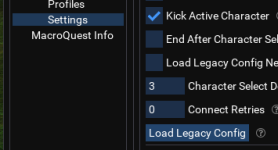
I shall give that a go.Not sure if it will help but I have seen a few posts where using the "Load Legacy Config" button loads all your login info and it works.
View attachment 57672
And pour another drink, you know, just in case.

for luck!And pour another drink, you know, just in case.

Yup, worked like a charm.Not sure if it will help but I have seen a few posts where using the "Load Legacy Config" button loads all your login info and it works.
View attachment 57672
Cheers


I have the same problem as @Naturesong. However, this did not resolve the problem.Not sure if it will help but I have seen a few posts where using the "Load Legacy Config" button loads all your login info and it works.
View attachment 57672
 It still just waits indefinitely, and I kill the process.
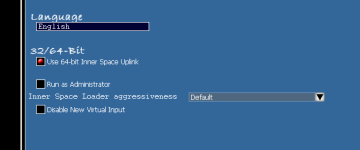
Are you running IsBoxer elevated (if you are uncheck run as admin)?I have the same problem as @Naturesong. However, this did not resolve the problem.
AlwaysAre you running IsBoxer elevated (if you are uncheck run as admin)?
No change. Inner Space prompts for elevation, so I presume you mean the configuration setting once open. I changed the setting in configuration to not Run as Administrator, and it's the same. It launches EQ, MQ is injected, AutoLogin loads, and it just sits there.Always
I also tried closing MQ, Inner Space, restarting them both and running MQ w/o admin rights. InnerSpace prompts for elevation every time I run it, no matter what, so... There's that.
When I do that, I think it's still running EQ as an elevated process, because it won't inject into EQ at all.
You have to go to the config gui. You can only do it from there.
I had the same problem as the poster you helped. I am constantly checking/unchecking toons for squads. Needing to digging through another menu and changing this is a massive step backwards in functionality.
I hope there is a fix coming, or the ability to retrograde. Losing core functionality feels bad.
Agreed. The issue you're experiencing and what I am experiencing are pretty big regressions and standard use-cases.I had the same problem as the poster you helped. I am constantly checking/unchecking toons for squads. Needing to digging through another menu and changing this is a massive step backwards in functionality.
I hope there is a fix coming, or the ability to retrograde. Losing core functionality feels bad.

Agreed. The issue you're experiencing and what I am experiencing are pretty big regressions and standard use-cases.
can you explain (maybe betterin discord), how constantly enabling/disabling single characters in a set from a context menu is a "Standard use case"?
How is doing this from the ui not better, where you can leave it open and just toggle it with a single double click?
edit: sorry meant to quote tempusx in here too
As another guy earlier in this thread, I'm having some struggles with hotkeys not being enabled; it seems to happen when I load a few chars simultaneously. It generally happens with 1-2 out of 6. Relogging the chars where hotkeys aren't working seems to fix it.
Would it be possible to add a stagger, maybe, when loading several chars? Like InnerSpace? Wait one second or something before running each char in a profile?
Would it be possible to add a stagger, maybe, when loading several chars? Like InnerSpace? Wait one second or something before running each char in a profile?
As another guy earlier in this thread, I'm having some struggles with hotkeys not being enabled; it seems to happen when I load a few chars simultaneously. It generally happens with 1-2 out of 6. Relogging the chars where hotkeys aren't working seems to fix it.
Would it be possible to add a stagger, maybe, when loading several chars? Like InnerSpace? Wait one second or something before running each char in a profile?
yeah it was supposed to have a delay but the delay seemed incidental (as in, we're not sure where the delay even came from, but it happened)... when the code changed the delay disppeared like magic.
Maybe i'll spam 6 chars a few more times. But i think we'll add a delay back in.
yeah it was supposed to have a delay but the delay seemed incidental (as in, we're not sure where the delay even came from, but it happened)... when the code changed the delay disppeared like magic.
Maybe i'll spam 6 chars a few more times. But i think we'll add a delay back in.

No worries, thanks for the reply!

How does one LoadAll checked characters from some profile in the new UI?
EDIT2: SOLVED Figured LoadAll is left click on the whole profile. Guess that is not so bad.
I believe it was right click in the old UI.
Still unsolved, how does one toggle a check mark for character in the new UI? Left click loads the character but right click should have brought the context menu no?
EDIT: another regression that I am seeing is that in old UI you could see which characters were loaded in the game when you inspected a profile. New UI does not show this status, or maybe it shows it somewhere else?
EDIT2: SOLVED Figured LoadAll is left click on the whole profile. Guess that is not so bad.
I believe it was right click in the old UI.
Still unsolved, how does one toggle a check mark for character in the new UI? Left click loads the character but right click should have brought the context menu no?
EDIT: another regression that I am seeing is that in old UI you could see which characters were loaded in the game when you inspected a profile. New UI does not show this status, or maybe it shows it somewhere else?
Ok, I added an old toon then everything went to shit. Can't log in or use hot key to switch between toons.
There has to be a better way to roll out a new plugin,.
How do we return the way it was?
Travel back in time.
Since you didn't actually describe your problem or what steps you took, and ended with a toxic attitude i'm going to assume you're not looking for help.
A considerable amount of work has gone into this upgrade and it is working for most people. As with all new things, some change is inevitable. We've been working all day to help respond to problems and fix issues.
How does one LoadAll checked characters from some profile in the new UI?
EDIT2: SOLVED Figured LoadAll is left click on the whole profile. Guess that is not so bad.
I believe it was right click in the old UI.
Still unsolved, how does one toggle a check mark for character in the new UI? Left click loads the character but right click should have brought the context menu no?
EDIT: another regression that I am seeing is that in old UI you could see which characters were loaded in the game when you inspected a profile. New UI does not show this status, or maybe it shows it somewhere else?
we're adding a "Launch All" optoin to the menu, and loaded indicators on the menus (more to come soon). Will be pushing an update soon which should fix some issues.
you can edit the checked state from the main ui, double click is the current action on each row of the Profiles section

DEADCiTiES
Well-known member
You can toggle the check mark by clicking open config from the main menu, select the profile you want to edit then double left click the name you want to toggle.How does one LoadAll checked characters from some profile in the new UI?
EDIT2: SOLVED Figured LoadAll is left click on the whole profile. Guess that is not so bad.
I believe it was right click in the old UI.
Still unsolved, how does one toggle a check mark for character in the new UI? Left click loads the character but right click should have brought the context menu no?
EDIT: another regression that I am seeing is that in old UI you could see which characters were loaded in the game when you inspected a profile. New UI does not show this status, or maybe it shows it somewhere else?
BlueBug
Seasoned veteran member
You're right. Big B. Don't mean to be an ass....but I know I was.Travel back in time.
Since you didn't actually describe your problem or what steps you took, and ended with a toxic attitude i'm going to assume you're not looking for help.
A considerable amount of work has gone into this upgrade and it is working for most people. As with all new things, some change is inevitable. We've been working all day to help respond to problems and fix issues.
I am looking for help but am very frustrated after trying to get it going and has nothing to do with y'all. Shit's gone left here at home.
Is there a way to completely delete the Auto Login and start over?
Thanks man.
DEADCiTiES
Well-known member
You can remove the profile and associated characters by clicking open config from the main menu, select the profile you want, then click remove. You can also remove individual characters by selecting the characters option, then right click the character name to edit / remove.You're right. Big B. Don't mean to be an ass....but I know I was.
I am looking for help but am very frustrated after trying to get it going and has nothing to do with y'all. Shit's gone left here at home.
Is there a way to completely delete the Auto Login and start over?
Thanks man.
Looking at the bottom button in the profiles section, should this be named Add Character instead of
 ?
?
It worked fine for me!
Got some toons loaded today without any drama.
The only thing I've not noticed, is the new home for - "(loaded)" - information.
In the original plugin, after loading a toon into game to the right of the toon name it said " (loaded) ".
Is that detail not in this new revision, or just moved somewhere and I haven't found it yet?
Regards and Best Wishes
Got some toons loaded today without any drama.
The only thing I've not noticed, is the new home for - "(loaded)" - information.
In the original plugin, after loading a toon into game to the right of the toon name it said " (loaded) ".
Is that detail not in this new revision, or just moved somewhere and I haven't found it yet?
Regards and Best Wishes

This is pretty minor, but I will ask..in the MQ icon>Profiles my groups got moved around into alphabetical order with the update. Under the Profiles (In the UI) I can see I can drag and drop the order of characters to load, that is AWESOME. Can I do this with the groups so I can have them in the order I want? I usually keep main group as the first listing in Profiles and list next most powerful, etc...with baz characters last. If I can make those changes the old way in editing a file and reloading MQ..no problem, I have not tried it yet. If there is a drag and drop solution I have yet to see, please let this dummy know. Thanks!
Users who are viewing this thread
Total: 5 (members: 0, guests: 5)
Share: