• You've discovered RedGuides, an EverQuest multi-boxing and scripting community 🧙‍♀️⚙️. We want you to play several EQ characters at once, come join us and say hello! 👋

  • A TLP without truebox has thawed (Very Vanilla ready)
    Frostreaver
Resource icon

Release AutoBank (core plugin) (1 Viewer)

ChatWithThisName

⚔️🛡️🗡️
Moderator
Joined
Dec 29, 2017
RedCents
23,976¢
Redbot submitted a new resource:

MQ2AutoBank - automatically bank your tradeskill, quest and collectible items.

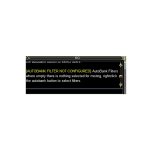
EverQuest's default "auto bank" button puts an item on your cursor into the first empty slot in bank.

View attachment 42740

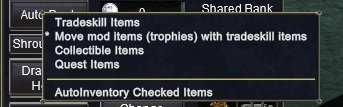
This plugin gives advanced features to EverQuest's button, including putting all of specific item types from your inventory into the bank with a single click.

View attachment 42739

Quick start:

1) /plugin autobank
2) go to a banker and right-click the "auto-bank" button.
3) select the type of...

Read more about this resource...
 
Thanks for this Chat and for the Pics in overview, I had this activated but had no idea what to do.. I just went and right clicked.. super awesome!
 
Hiya Redfrog, Redbot was kind enough to create the resource for it. Everything in this plugin is the same as what was already in MQ, with the exception of filtering out items with tradeskill mods when putting tradeskill items in the bank (I got tired of trying to find all my trophies again lol).
With that said, glad you're enjoying it. Others before me made it, I simply modified it gently and then ripped its guts out and slapped it into a bowl of a different shape.
 
It seems it doesn't work on emu, at least i can get it to work with MQ. But it's working on old MQ2.
 
Not sure if this has been modified, but is there a way to keep it from excluding certain items? Biggest one are backpacks (if empty) being shoved in the bank as 'Tradeskill Items'.
 
I see that Auto bank will drop all of a given type, is there a command line that will trigger the different types? I found the auto-bank button but I'm not sure how to right click it to change types (using a Lua) the window is BigBankWnd and the button is BIGB_AutoButton.
 
/notify BigBankWnd BIGB_AutoButton rightmouseup

assuming the name of the button is correct you can right click it using a notify. However, I'm not personally sure how to use the context menus once you have right clicked.
 
Hi, MQ2Autobank is marked as emulator supported but it doesn't work. I'm using the default UI on the RoF 2 client and there is no popup upon clicking or right clicking the autobank button. I've ensured the plugin is loaded and even restarted the UI.
 
Hi, MQ2Autobank is marked as emulator supported but it doesn't work. I'm using the default UI on the RoF 2 client and there is no popup upon clicking or right clicking the autobank button. I've ensured the plugin is loaded and even restarted the UI.
Its one of the longstanding things that never got fixed up for emu.

 
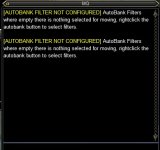
Autobank is no longer working for me. When I right click and select 'Tradeskill Items' or 'Collectible Items' they are never selected, and I get the following message. Any suggestions?autobank.jpg
 
I was unable to confirm this. When I right click autobank and selected tradeskill items then left clicked it, it moved items as expected. I then selected autoinventory selected items and clicked autobank again and it moved the tradeskill items to my inventory as expected.
 
I was unable to confirm this. When I right click autobank and selected tradeskill items then left clicked it, it moved items as expected. I then selected autoinventory selected items and clicked autobank again and it moved the tradeskill items to my inventory as expected.
I forgot about posting this, and should have followed up. I appears the right clicking and selecting tradeskill items is not updating some config. I couldn't find a config file to look at, perhaps since this a dll plugin.

This is a brand new EQ / MQ install on a new Windows 11 installation The first image is after selecting 'tradeskill items' after right clicking. It did not select anything. The second image is the error message. <shrug>
AutobankMenu.jpg
AutobankMessage.jpg
 
I forgot about posting this, and should have followed up. I appears the right clicking and selecting tradeskill items is not updating some config. I couldn't find a config file to look at, perhaps since this a dll plugin.

This is a brand new EQ / MQ install on a new Windows 11 installation The first image is after selecting 'tradeskill items' after right clicking. It did not select anything. The second image is the error message. <shrug>
View attachment 71095
View attachment 71096
Having the same exact problem. Any luck figuring it out?
 
That's unfortunate, this would be a killer plugin to use to help keep my inv clean. :\
 
Last edited:
I see. Well it's listed as a tradeskill item. So it's going to be put in there as a tradeskill item. Since it doesn't have a tradeskill modifier it wouldn't be considered a trophy.
 
I tried setting it, however it doesn't actually take effect like the previous post said, sadly.
Did anybody ever have any luck with getting this to work? I have the same issue where 90% of the time it will not allow me to select any options after right clicking. The strange thing is that it sometimes DOES work for me but will not work later. Where exactly is the configuration file for this stored/written? I can't seem to find it anywhere and it does not seem to persist through relaunching when it magically does work.
 
Did anybody ever have any luck with getting this to work? I have the same issue where 90% of the time it will not allow me to select any options after right clicking. The strange thing is that it sometimes DOES work for me but will not work later. Where exactly is the configuration file for this stored/written? I can't seem to find it anywhere and it does not seem to persist through relaunching when it magically does work.
Working for me straight out of the box, only started using this week. This is awesome but was one of the ones I had missed.

No special plugins, No UI mods.

Not a lot of help.
 
Working for me straight out of the box, only started using this week. This is awesome but was one of the ones I had missed.

No special plugins, No UI mods.

Not a lot of help.
Yeah its peculiar. I've tried reinstalling macroquest and a few other things but cannot get anything to fix it. Never had issues in the past but its been a year or two. Its unfortunate because this is easily one of the best quality of life plugins.
 
Autobank is no longer working for me. When I right click and select 'Tradeskill Items' or 'Collectible Items' they are never selected, and I get the following message. Any suggestions?View attachment 69782

Sorry for the double bump and extremely late necromantic reply but it turns out the issue for me was everquest seeming to randomly toggle the new UI engine back on. I have absolutely no idea why it would randomly work with the new engine enabled sometimes but it seems to be reliably fixed by turning it back off.
Hopefully this can save anybody with this issue the nightmare of manually banking.

Its been working consistently for my last few logins so hopefully this is the solution and not just a freak bout of luck.
 
Sorry for the double bump and extremely late necromantic reply but it turns out the issue for me was everquest seeming to randomly toggle the new UI engine back on. I have absolutely no idea why it would randomly work with the new engine enabled sometimes but it seems to be reliably fixed by turning it back off.
Hopefully this can save anybody with this issue the nightmare of manually banking.

Its been working consistently for my last few logins so hopefully this is the solution and not just a freak bout of luck.
Check my sig for steps you can take to solve this.
 
Sorry for the double bump and extremely late necromantic reply but it turns out the issue for me was everquest seeming to randomly toggle the new UI engine back on. I have absolutely no idea why it would randomly work with the new engine enabled sometimes but it seems to be reliably fixed by turning it back off.
Hopefully this can save anybody with this issue the nightmare of manually banking.

Its been working consistently for my last few logins so hopefully this is the solution and not just a freak bout of luck.
I suddenly noticed it started working for me one day. I couldn't figure out why, but now that you mention it I did have to toggle the new UI off. That must be what fixed it!
 
I suddenly noticed it started working for me one day. I couldn't figure out why, but now that you mention it I did have to toggle the new UI off. That must be what fixed it!
just as an fyi - not only is the new ui a huge pile of resource hogging shit, but there are some things mq just can't do with it turned on. framelimiter, for example, can't frame limit the new ui at all so that by itself should be enough to have everyone turn it off.

it is so detrimental imo, that cwtn and i put a popup warning someone using a cwtn plugin that they're using the new ui engine and that can and will negatively impact their experience
 
just as an fyi - not only is the new ui a huge pile of resource hogging shit, but there are some things mq just can't do with it turned on. framelimiter, for example, can't frame limit the new ui at all so that by itself should be enough to have everyone turn it off.

it is so detrimental imo, that cwtn and i put a popup warning someone using a cwtn plugin that they're using the new ui engine and that can and will negatively impact their experience
Wow, I didn't realize this about the framelimiter. I always ran EQ with the new UI off because of the stupid inventory window sitting in front of everything, but didn't realize there were bigger issues. It 'turned on' again when I had to reinstall windows and everything else.
 
This sounds like a great resource. Can you link something like this to the guild bank?
 
Release AutoBank (core plugin)

Users who are viewing this thread

Back
Top
Cart