• Hail, we're RedGuides. We want you to play six (yes, 6!) EverQuest characters at once. We have scripts and a friendly community to help, please join our playstyle and say hello! 👋
  • We've added LLM sections to our Terms & Rules and Resource Rules, for everyone's sanity & in-game safety.
    Read more
    a. Do not replace your voice with an LLM. This goes for your posts and your scripts. Drafting and editing with a tool is fine, but don't take you out of what you share.
    b. Do not replace your EQ character's voice with an LLM. We don't want scripts that speak over /ooc, /shout or other public channels. This has been an unwritten rule that's kept casino scripts off the site for decades, but we're now compelled to make it clear: keep automated communication private.

    Why Does RG Review Scripts?
    Nearly every LLM-written Lua script we see is making your character do impossible things, and rarely in a way that's beneficial to you. We've seen heavy server hammering, /target over impossible distances when /nav spawn would passively accomplish the same thing, a spawn search that fires 20+ times per second, and other pointless actions that are likely annoying GMs.

    You are welcome to use LLMs as a tool to structure, draft, and edit your work, but please read critically before hitting /lua run

Question - Assistance with making a manual Burn key.

Brutalz

Member
I'm looking for some guidance on how to make a manual Burn key. I'm using Dannet.
I know how to activate burn with it on setting 1 (burn all named) .
How would I go about turning off burn until I want to manually activate it?
Thanks in advance.
 
I'm looking for some guidance on how to make a manual Burn key. I'm using Dannet.
I know how to activate burn with it on setting 1 (burn all named) .
How would I go about turning off burn until I want to manually activate it?
Thanks in advance.

I think that would largely depend on the automation you are using if any. I assume so since you mentioned "setting 1".
 
I'm using Kiss Assist. I want to make a burn key like the one Sic was using in his video of the Cov mission Crusaders. He saved his burns for the last 2 dragons.
 
I was making this way too complex lol.
I think all I'll need to do is toggle burn on/off. I'm only going to use this on certain missions. I'm still a giant noob lol!😆
 
I'm using Kiss Assist. I want to make a burn key like the one Sic was using in his video of the Cov mission Crusaders. He saved his burns for the last 2 dragons.
So... this is how you do it for KA. I use CWTN plugins for everything but BRD.

  • BurnAllNamed on and Burn immediately! :
    Code:
    /noparse /dgge /if (${Me.Class.ShortName.Equal[BRD]}) /multiline ; /burn on doburn
  • BurnAllNamed on but wait on Burn Now until command given or is actual named :
    Code:
    /noparse /dgge /if (${Me.Class.ShortName.Equal[BRD]}) /multiline ; /burn on
  • BurnAllNamed OFF! :
    Code:
    /noparse /dgge /if (${Me.Class.ShortName.Equal[BRD]}) /multiline ; /burn off
For CWTN - I have hotkeys and aliases setup:
Code:
/cwtna burnallnamed on
/cwtna burnallnamed off

That should give you a good start. Modify as needed.
 
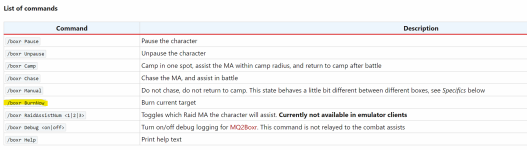
I thoroughly recommend mq2boxr - and issue the command /boxr burnNow - doesnt matter what automation you are using it will trigger the burn routine.


View attachment 48362
I was actually told that it does not for KA, and separate commands were needed, as you need to ensure that the burn is actually toggled off in KA to begin with. I could have been misinformed, but my earlier testing confirmed this, hence the separate hotkeys.
 
Kissassist + EQBCS

Burns Off:
/bcaa //burn off

Burns On:
/bcaa //burn on

Burn Now: (if burn was off and you want to burn current mob)
/bcaa //burn on doburn


Notes to self:

## To turn burn section off /Burn Off
# ! The burn section will never be activated.

## To turn burn section on /Burn On
# !! The burn section will go active on any named mob, if BurnAllNamed=1.

## To activate a burn at any time /Burn
# !!! The burn section must be on via /Burn On prior for this to work.
 
Thank you deathlock, those are the commands I needed!
Thanks to everyone for helping me learn. I'm still a total noob at KA. I'm sure I'll have many more questions in the future lol.
 
Question - Assistance with making a manual Burn key.

Users who are viewing this thread

Back
Top
Cart