
-
 Hail, we're RedGuides. We want you to play six (yes, 6!) EverQuest characters at once. We have scripts and a friendly community to help, please join our playstyle and say hello! 👋
You are using an out of date browser. It may not display this or other websites correctly.
You should upgrade or use an alternative browser.
You should upgrade or use an alternative browser.
Question - Assistance with making a manual Burn key.
- Thread starter Brutalz
- Start date

I'm looking for some guidance on how to make a manual Burn key. I'm using Dannet.
I know how to activate burn with it on setting 1 (burn all named) .
How would I go about turning off burn until I want to manually activate it?
Thanks in advance.
I think that would largely depend on the automation you are using if any. I assume so since you mentioned "setting 1".


Shadow
Ultimate seasoned veteran member
So... this is how you do it for KA. I use CWTN plugins for everything but BRD.I'm using Kiss Assist. I want to make a burn key like the one Sic was using in his video of the Cov mission Crusaders. He saved his burns for the last 2 dragons.
- BurnAllNamed on and Burn immediately! :
Code:
/noparse /dgge /if (${Me.Class.ShortName.Equal[BRD]}) /multiline ; /burn on doburn - BurnAllNamed on but wait on Burn Now until command given or is actual named :
Code:
/noparse /dgge /if (${Me.Class.ShortName.Equal[BRD]}) /multiline ; /burn on - BurnAllNamed OFF! :
Code:
/noparse /dgge /if (${Me.Class.ShortName.Equal[BRD]}) /multiline ; /burn off
Code:
/cwtna burnallnamed on
/cwtna burnallnamed off
That should give you a good start. Modify as needed.
Shadow
Ultimate seasoned veteran member
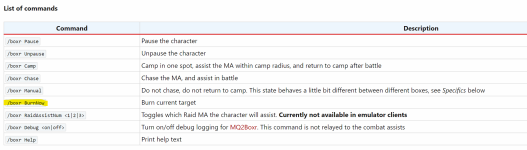
I was actually told that it does not for KA, and separate commands were needed, as you need to ensure that the burn is actually toggled off in KA to begin with. I could have been misinformed, but my earlier testing confirmed this, hence the separate hotkeys.I thoroughly recommend mq2boxr - and issue the command /boxr burnNow - doesnt matter what automation you are using it will trigger the burn routine.
View attachment 48362

Kissassist + EQBCS
Burns Off:
/bcaa //burn off
Burns On:
/bcaa //burn on
Burn Now: (if burn was off and you want to burn current mob)
/bcaa //burn on doburn
Notes to self:
## To turn burn section off /Burn Off
# ! The burn section will never be activated.
## To turn burn section on /Burn On
# !! The burn section will go active on any named mob, if BurnAllNamed=1.
## To activate a burn at any time /Burn
# !!! The burn section must be on via /Burn On prior for this to work.
Burns Off:
/bcaa //burn off
Burns On:
/bcaa //burn on
Burn Now: (if burn was off and you want to burn current mob)
/bcaa //burn on doburn
Notes to self:
## To turn burn section off /Burn Off
# ! The burn section will never be activated.
## To turn burn section on /Burn On
# !! The burn section will go active on any named mob, if BurnAllNamed=1.
## To activate a burn at any time /Burn
# !!! The burn section must be on via /Burn On prior for this to work.

Users who are viewing this thread
Total: 1 (members: 0, guests: 1)
Share: