


Sorry ya'll - taken down.
We can't have nice things.
@nerp and their friend (who im removing name since it is their full toon name) - can give them direct thanks.
By downloading and/or using these pre-prereleases you agree to just enjoy them (or not) and keep it to yourself; please, im begging you.
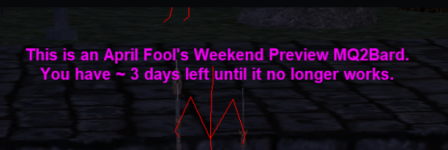
Please don't make me regret this.
Please don't PM me or chat for > any < support on these.
Please don't make me take them down and ruin other folks being able to have a fun "Weekend Preview".
I already get a flood of "im not asking but..." daily. If i get any about this, I'll just take them down.
If you make posts about them, they're going to fippy's and likely getting taken down. super serious
There are no command pages for them, there are no FAQ for them, and there will be 0 support for them this weekend.
If you don't like them; don't use them.
If you don't like how they do xyz, wait for real pre-release and then check again
If you make mine or chat's life harder than it needs to be, they'll just come down. real serious.
Please save input/feedback/suggestions/words/thoughts/ideas/hate for actual pre-release.
This is a pre-pre-release weekend.
If for some reason they just simply don't work, oh well, sorry.
Most of the stuff you should see options in the window for them, but some things are less obvious.
for bard I personally use meleedots and either only aoemez or both depending on what i'm doing - I wait for shm epic with it - my bard invis button is
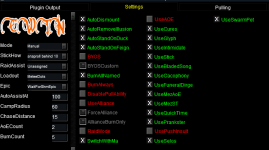
MQ2Ranger is going to shame you if you don't have Prescient Quiver and Ancient Arrows
Because this is > Sic < building these on my local PC - they are unsigned "sketchy" .dll files - use at your own risk. if you have > any < concerns, just don't bother downloading and using them.
they are in .7z (7-zip) format, you will have to use 7zip or similar to unzip them
unce they are unzipped you will need to "unblock" them

you will have to
- Right click on mq2bard
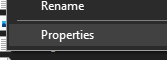
- left click "properties"
- Check "Unblock" and the press apply
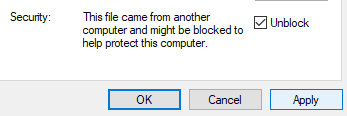
These files go in your plugins folder
Please see >>> Getting Started with CWTN plugins! (Movement, UI Window, Clickies, Pulling, ETC) Check Here First! <<<
I'm locking this thread and shaming the 1st dumb/troll post
We can't have nice things.
@nerp and their friend (who im removing name since it is their full toon name) - can give them direct thanks.
By downloading and/or using these pre-prereleases you agree to just enjoy them (or not) and keep it to yourself; please, im begging you.
Please don't make me regret this.
Please don't PM me or chat for > any < support on these.
Please don't make me take them down and ruin other folks being able to have a fun "Weekend Preview".
I already get a flood of "im not asking but..." daily. If i get any about this, I'll just take them down.
If you make posts about them, they're going to fippy's and likely getting taken down. super serious
There are no command pages for them, there are no FAQ for them, and there will be 0 support for them this weekend.
If you don't like them; don't use them.
If you don't like how they do xyz, wait for real pre-release and then check again
If you make mine or chat's life harder than it needs to be, they'll just come down. real serious.
Please save input/feedback/suggestions/words/thoughts/ideas/hate for actual pre-release.
This is a pre-pre-release weekend.
If for some reason they just simply don't work, oh well, sorry.
Most of the stuff you should see options in the window for them, but some things are less obvious.
for bard I personally use meleedots and either only aoemez or both depending on what i'm doing - I wait for shm epic with it - my bard invis button is
/dgex brd /brd aainvis - you can do this without having to worry about songs or timing starting back up.MQ2Ranger is going to shame you if you don't have Prescient Quiver and Ancient Arrows
Because this is > Sic < building these on my local PC - they are unsigned "sketchy" .dll files - use at your own risk. if you have > any < concerns, just don't bother downloading and using them.
they are in .7z (7-zip) format, you will have to use 7zip or similar to unzip them
unce they are unzipped you will need to "unblock" them
you will have to
- Right click on mq2bard
- left click "properties"
- Check "Unblock" and the press apply
These files go in your plugins folder
Please see >>> Getting Started with CWTN plugins! (Movement, UI Window, Clickies, Pulling, ETC) Check Here First! <<<
I'm locking this thread and shaming the 1st dumb/troll post
Last edited:


